

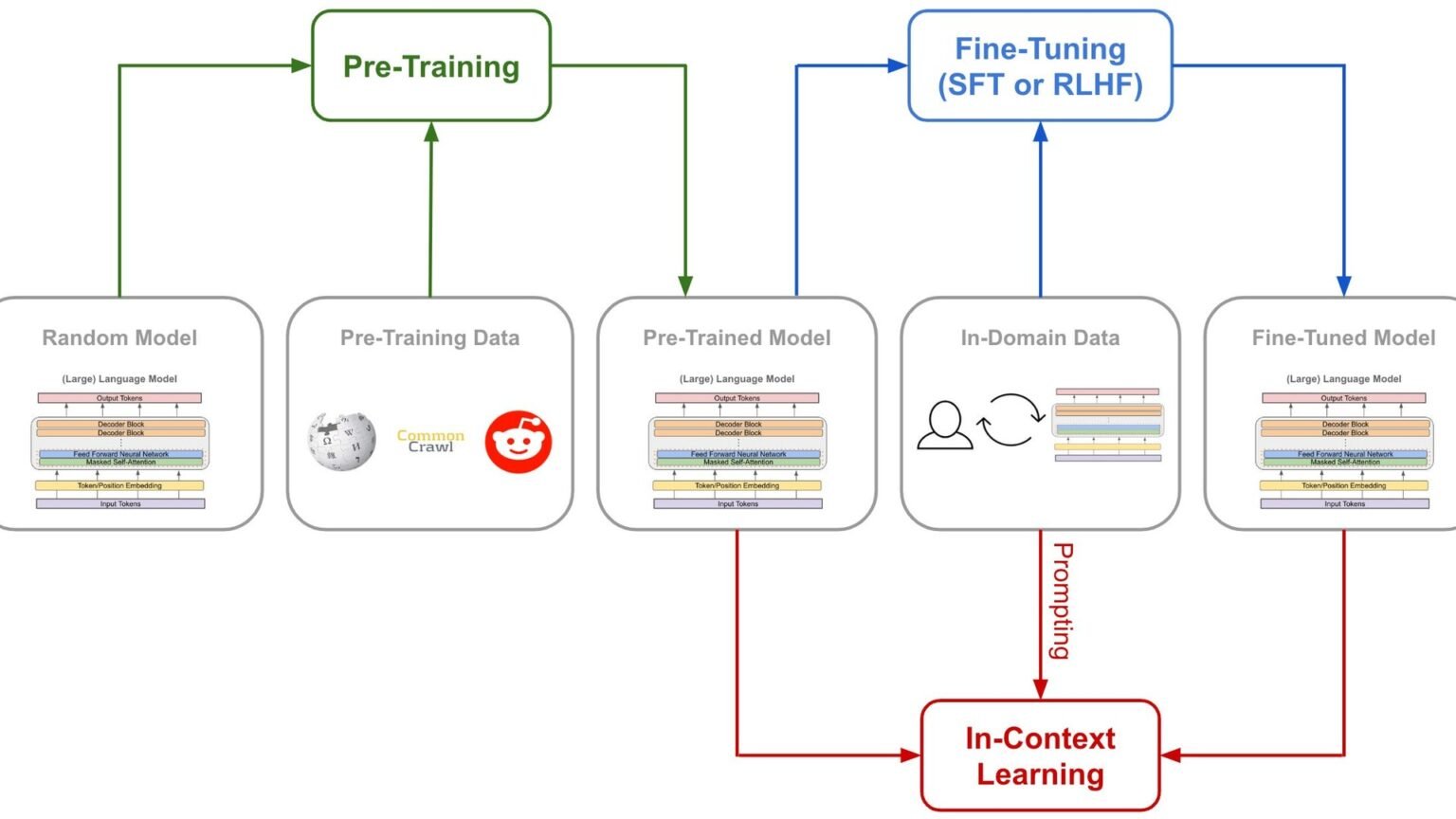

If you want to fine-tune Llama with LoRA in 2026, the practical path is still PEFT adapters plus 4-bit loading rather than full-weight training. In this tutorial, we build a working Python setup around Hugging Face PEFT, TRL, and a Llama 3.2 instruct model, then cover the memory limits, architecture-specific traps, and serving steps that matter in production.
What we’re building, and why LoRA still wins
~0.5%
Trainable parameters in a typical LoRA run
Approximate output from the sample setup
4-bit
Quantization mode used here
Common path for single-GPU fine-tuning
r=8
Canonical LoRA rank default
A common starting point in PEFT setups
T4 16GB
Enough for Llama 3.2 1B + LoRA 4-bit
Per the provided memory cheat-sheet
This tutorial builds a small supervised fine-tuning run on meta-llama/Llama-3.2-1B-Instruct using PEFT LoRA adapters, TRL’s SFTTrainer, and 4-bit quantization. The goal is not a benchmark stunt. It is a reproducible baseline you can run, inspect, and extend.
The reason teams still fine-tune Llama with LoRA is simple: full fine-tuning remains expensive, while LoRA updates only a small adapter matrix layered onto the base model. Meta’s Llama fine-tuning docs describe LoRA as a parameter-efficient method, and Hugging Face’s PEFT docs center the same approach for adapter-based training. In practice, that means you can train a useful adapter on hardware that would never hold a full-weight run.
The editor-provided memory guide is the right mental model here: Llama 3.2 1B with LoRA in 4-bit fits on a T4 16GB, Llama 3 8B with LoRA in 4-bit fits on a 24GB-class GPU, and a full 8B fine-tune without LoRA is in a different league entirely. If your objective is instruction following, style transfer, or domain phrasing, LoRA is usually the first thing to try.

Use Python 3.10+ and current versions of transformers, peft, trl, datasets, accelerate, and bitsandbytes. You also need access to the chosen Llama model on Hugging Face.
python -m venv .venv
source .venv/bin/activate
pip install --upgrade pip
pip install torch transformers peft trl datasets accelerate bitsandbytes
“PEFT methods only fine-tune a small number of (extra) model parameters – significantly decreasing the computational and storage costs.”
Hugging Face PEFT documentation
How does QLoRA differ from plain LoRA in practice?
LoRA is the adapter method: you train low-rank matrices instead of updating the full base model. QLoRA is the common training pattern where the base model is loaded in low precision, often 4-bit, while the LoRA adapters remain trainable. Hugging Face PEFT and bitsandbytes-based examples commonly combine the two because it cuts memory enough to make single-GPU fine-tuning practical.
In this tutorial, the adapter method is LoRA and the memory-saving setup is 4-bit loading. Many practitioners casually call that stack “QLoRA,” but the code you actually touch is still a LoRA config plus quantized model loading.
Stage 1: Set up the model, tokenizer, and LoRA config
Before you fine-tune Llama with LoRA, get three things right: quantized loading, tokenizer padding, and the adapter target modules. The tokenizer point is easy to miss. Llama tokenizers do not ship with a pad token by default, so setting tokenizer.pad_token = tokenizer.eos_token is required for this TRL flow.
The canonical LoRA pattern for Llama targets the attention projections: q_proj, k_proj, v_proj, and o_proj. The parameters that matter are r, lora_alpha, target_modules, and lora_dropout. A good starting range from the editor brief matches common PEFT usage: rank 4-64, alpha equal to r or 2*r, and dropout around 0.05 to 0.1.
from peft import LoraConfig

lora_config = LoraConfig(
    r=8,
    lora_alpha=8,
    lora_dropout=0.1,
    target_modules=["q_proj", "k_proj", "v_proj", "o_proj"],
    task_type="CAUSAL_LM",
)
What target_modules should you use for other model families?
Do not copy Llama target modules blindly. The right values are architecture-specific. For Llama and Mistral, q_proj, k_proj, v_proj, and o_proj are the usual attention projections. Other families can expose different names and layer layouts.
The safe workflow is to inspect the model modules in Python and confirm the linear layer names before training. If you target the wrong modules, the run may complete without learning what you expect.
for name, module in model.named_modules():
    if "proj" in name:
print(name)| Parameter | What it controls | Practical default |
|---|---|---|
| r | Adapter rank; higher adds capacity and memory | 8 or 16 |
| lora_alpha | Scaling factor for LoRA updates | r or 2*r |
| target_modules | Which linear layers get adapters | q_proj, k_proj, v_proj, o_proj |
| lora_dropout | Regularization on adapter path | 0.05 to 0.1 |
Stage 2: Run the 50-line working training script
Here is the compact training script. It loads the base model in 4-bit, prepares it for k-bit training, applies LoRA, pulls a small Alpaca-style dataset, and trains with SFTTrainer. This is the fastest way to fine-tune Llama with LoRA if you want a baseline that matches current Hugging Face patterns rather than a custom trainer.
Two implementation notes matter. First, prepare_model_for_kbit_training is the PEFT step that readies the quantized model for adapter training. Second, gradient_accumulation_steps changes your effective batch size. With batch size 4 and accumulation 4, the optimizer sees an effective batch of 16 examples per update.
Start with a small subset and one epoch. Confirm the pipeline works before increasing sequence length, rank, or dataset size.
import torch
from transformers import AutoModelForCausalLM, AutoTokenizer, BitsAndBytesConfig, TrainingArguments
from peft import LoraConfig, get_peft_model, prepare_model_for_kbit_training
from trl import SFTTrainer
from datasets import load_dataset

MODEL_ID = "meta-llama/Llama-3.2-1B-Instruct"

# 1. 4-bit quantization config (fits 1B on a T4, 8B on a 24GB)
bnb_config = BitsAndBytesConfig(
    load_in_4bit=True,
    bnb_4bit_quant_type="nf4",
    bnb_4bit_compute_dtype=torch.bfloat16,
)

# 2. Load base model + tokenizer
model = AutoModelForCausalLM.from_pretrained(MODEL_ID, quantization_config=bnb_config, device_map="auto")
tokenizer = AutoTokenizer.from_pretrained(MODEL_ID)
tokenizer.pad_token = tokenizer.eos_token

# 3. Prepare for k-bit training + apply LoRA
model = prepare_model_for_kbit_training(model)
lora_config = LoraConfig(
    r=16, lora_alpha=32, lora_dropout=0.05,
    target_modules=["q_proj", "k_proj", "v_proj", "o_proj"],
    task_type="CAUSAL_LM",
)
model = get_peft_model(model, lora_config)
model.print_trainable_parameters()  # prints ~0.5% trainable

# 4. Load dataset (Alpaca-style instruction data)
dataset = load_dataset("yahma/alpaca-cleaned", split="train[:1000]")

# 5. Train with SFTTrainer
training_args = TrainingArguments(
    output_dir="./llama-lora",
    num_train_epochs=1,
    per_device_train_batch_size=4,
    gradient_accumulation_steps=4,
    learning_rate=2e-4,
    fp16=False, bf16=True,
    logging_steps=10,
    save_strategy="epoch",
)
trainer = SFTTrainer(
    model=model,
    args=training_args,
    train_dataset=dataset,
    dataset_text_field="text",
    tokenizer=tokenizer,
    max_seq_length=512,
)
trainer.train()
trainer.save_model("./llama-lora-final")Why use SFTTrainer instead of a custom Trainer loop?
TRL’s SFTTrainer wraps the common supervised fine-tuning path for causal language models. It reduces boilerplate around dataset text fields, tokenization, and training setup. For a first pass, that is usually better than writing a custom loop because you can validate the adapter path first and optimize later.
Stage 3: Match the model size to your GPU budget
Hardware planning is where many first runs fail. If you want to fine-tune Llama with LoRA on a single GPU, choose the model size from the memory budget first, then tune sequence length and batch size around it. The 1B class is the safest starting point for a laptop-connected cloud notebook or Colab-style environment.
The supplied cheat-sheet is conservative and useful. Llama 3.2 1B plus LoRA in 4-bit fits on a T4 16GB. Llama 3 8B plus LoRA in 4-bit fits on an A10 24GB or A100 40GB. Llama 3 70B plus LoRA in 4-bit moves into A100 80GB or H100 80GB territory. Full fine-tuning of an 8B model without LoRA is not a consumer-GPU exercise.
Sequence length, optimizer state, and batch size all change memory use. Treat the table as a starting point, not a guarantee.
What should you change first if you run out of memory?
Reduce max_seq_length first, then lower per_device_train_batch_size, and only after that consider a smaller model. You can recover throughput with gradient_accumulation_steps if the per-device batch has to shrink.
| Model/setup | Typical hardware target |
|---|---|
| Llama 3.2 1B + LoRA 4-bit | T4 16GB |
| Llama 3 8B + LoRA 4-bit | A10 24GB or A100 40GB |
| Llama 3 70B + LoRA 4-bit | A100 80GB or H100 80GB |
| Llama 4 8B + LoRA 4-bit | Similar to Llama 3 8B |
| Full fine-tune 8B | >150GB VRAM |
Stage 4: Avoid the four gotchas that break most first runs
The first gotcha is the tokenizer pad token. For this stack, tokenizer.pad_token = tokenizer.eos_token is not optional. Without it, TRL-based supervised fine-tuning can fail because the tokenizer lacks a padding token.
The second gotcha is target_modules. They are architecture-specific. For Llama, use q_proj, k_proj, v_proj, and o_proj. For other families, inspect the module names before training. Wrong targets can mean a run that technically completes but barely learns.
The third gotcha is effective batch size. gradient_accumulation_steps is not just a stability knob; it is how you simulate a larger batch on limited hardware. If your GPU only fits batch size 1 or 2, accumulation is how you keep the optimizer update cadence sensible.
The fourth gotcha appears after training. If you plan to serve the model as a single artifact, merge the adapter into the base weights with merge_and_unload(). That collapses the LoRA layers into the model for simpler inference deployment.
Pros
Cons
from peft import PeftModel
from transformers import AutoModelForCausalLM

base = AutoModelForCausalLM.from_pretrained(MODEL_ID)
ft = PeftModel.from_pretrained(base, "./llama-lora-final")
merged = ft.merge_and_unload()
merged.save_pretrained("./llama-lora-merged")
How do you calculate effective batch size correctly?
Multiply per_device_train_batch_size by gradient_accumulation_steps, then by the number of devices if you are training multi-GPU. In the sample script, batch size 4 with accumulation 4 gives an effective batch of 16 on one GPU.
When should you keep adapters separate instead of merging?
Keep adapters separate if you want to swap multiple task-specific LoRA heads onto one base model, or if you need the smallest possible artifact for distribution. Merge when you want a single deployable model and do not need runtime adapter switching.
Stage 5: Evaluate the adapter before you scale up
Once training finishes, load the base model and attach the saved adapter with PeftModel.from_pretrained. This is the quickest smoke test to confirm the adapter loads and generates. If you plan to fine-tune Llama with LoRA for a real task, do this before launching a larger run.
A single prompt is not an evaluation suite, but it catches the common failures: missing adapter files, tokenizer mismatch, or a model that never learned because the target modules were wrong. After that, move to a held-out validation set and task-specific scoring.
Use a held-out set from the same task format as training. For instruction tuning, compare base vs adapter outputs side by side before you trust aggregate metrics.
import torch
from transformers import AutoModelForCausalLM, AutoTokenizer, BitsAndBytesConfig
from peft import PeftModel

MODEL_ID = "meta-llama/Llama-3.2-1B-Instruct"

bnb_config = BitsAndBytesConfig(
    load_in_4bit=True,
    bnb_4bit_quant_type="nf4",
    bnb_4bit_compute_dtype=torch.bfloat16,
)

base = AutoModelForCausalLM.from_pretrained(MODEL_ID, quantization_config=bnb_config)
tokenizer = AutoTokenizer.from_pretrained(MODEL_ID)
ft = PeftModel.from_pretrained(base, "./llama-lora-final")

inputs = tokenizer("Translate to French: Good morning", return_tensors="pt").to(ft.device)
out = ft.generate(**inputs, max_new_tokens=30)
print(tokenizer.decode(out[0]))
What should you measure after the first smoke test passes?
Measure on a held-out dataset with the same prompt format as training. For extraction or classification tasks, use exact-match or task metrics. For instruction following, compare base and fine-tuned outputs on representative prompts and add human review where quality matters.
Can you do RLHF or preference tuning after SFT?
Yes. TRL documents post-SFT workflows including preference optimization methods. The common pattern is to start with supervised fine-tuning to establish task behavior, then layer preference optimization if you need stronger response shaping.
That is usually a second project, not step one. Get the SFT adapter working first.
Stage 6: Decide when not to fine-tune
Best starting point: 1B or 8B with 4-bit LoRA
Not every problem should be solved by training. If your issue is missing knowledge, rapidly changing documents, or retrieval over proprietary text, retrieval-augmented generation may be the better first move. Fine-tuning changes behavior and style well; it does not magically keep a model current on changing facts.
This is the practical decision rule: fine-tune Llama with LoRA when you need durable changes to instruction following, output format, tone, or domain-specific phrasing. Reach for RAG when the core need is access to external knowledge at inference time. Many production systems use both.
Use fine-tuning for behavior. Use RAG for knowledge. Combine them when you need both.
When does fine-tuning beat RAG for real workloads?
Fine-tuning wins when the desired change is in the model’s behavior rather than its knowledge source: structured outputs, tool-call style, refusal boundaries, tone, or domain-specific response patterns. RAG can inject facts, but it does not reliably rewrite the model’s default habits.
| Need | Better first tool |
|---|---|
| Consistent output format or style | LoRA fine-tuning |
| Domain-specific instruction following | LoRA fine-tuning |
| Fresh or frequently changing documents | RAG |
| Grounded answers over private corpora | RAG |
Where to go from here
Once the baseline works, scale one variable at a time: a larger dataset, a longer sequence length, a higher-rank adapter, or a bigger model. Keep notes on memory, throughput, and output quality so you can see which change actually helped.
If you want a second implementation path, compare this Hugging Face stack with Meta’s Llama fine-tuning docs, AWS Neuron’s Optimum Neuron tutorial for Trainium, AMD’s ROCm LoRA notebook, and PyTorch’s Torchtune. The APIs differ, but the core ideas do not: quantize when needed, target the right modules, keep the tokenizer setup correct, and validate the adapter before you scale.
Try a held-out eval set, compare r=8 vs r=16, and test merged vs unmerged serving artifacts.
Frequently asked questions
At minimum, install transformers, peft, trl, datasets, accelerate, and bitsandbytes, plus PyTorch.
Llama tokenizers typically do not define a pad token. In TRL-style supervised fine-tuning, setting tokenizer.pad_token = tokenizer.eos_token avoids padding-related failures. See the Hugging Face TRL docs and the Llama fine-tuning examples in the ecosystem.
Yes. PEFT supports merging adapters back into the base model with methods such as merge_and_unload(). The official reference is the PEFT documentation.
Use RAG when your main problem is access to changing or proprietary knowledge at inference time. Use fine-tuning when you need persistent behavior changes such as output format or style. Meta’s Llama fine-tuning guide is a good starting point for the training side.
Primary sources
- Hugging Face PEFT documentation — Hugging Face
- Hugging Face TRL documentation — Hugging Face
- Llama 3.2 fine-tuning guide — Hugging Face
- Optimum Neuron fine-tune Llama tutorial — Hugging Face
- AMD ROCm LoRA Llama 3.2 notebook — AMD
- Meta Llama fine-tuning docs — Meta
- Torchtune repository — PyTorch
Last updated: May 23, 2026. Related: Agent Infrastructure.




