

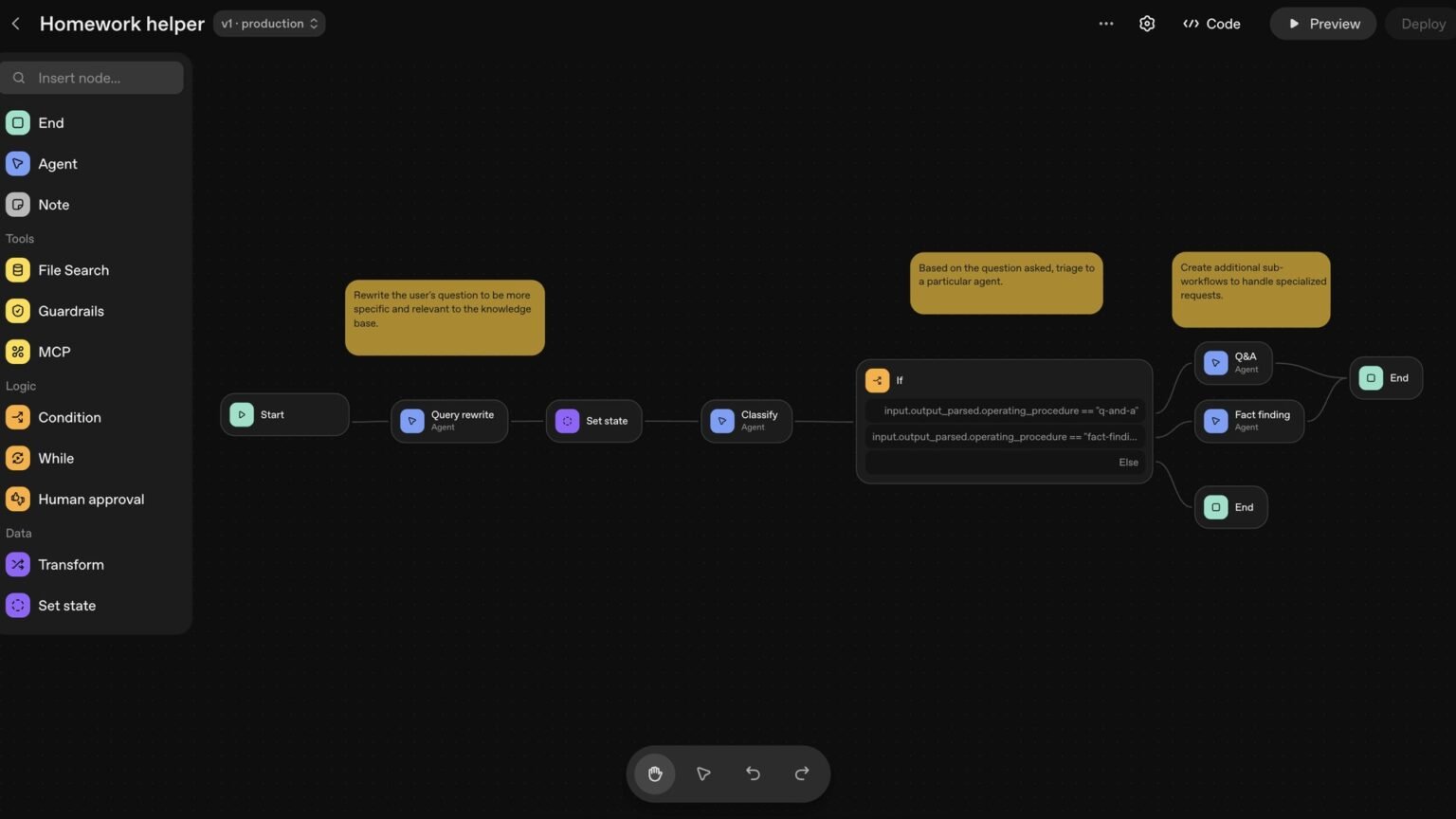

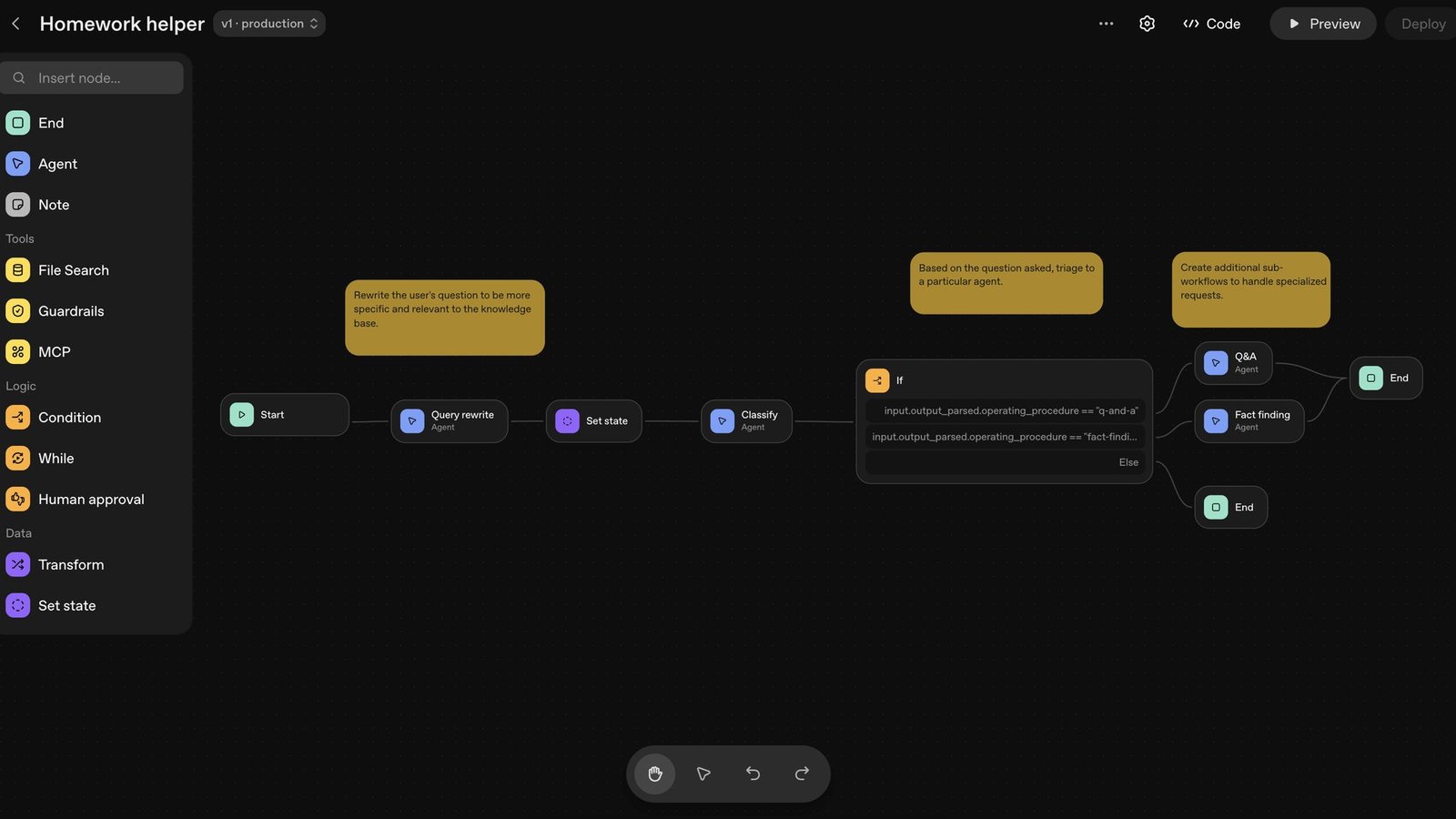
OpenAI is killing Agent Builder on November 30, 2026. Here is the exact export-and-patch path to the Agents SDK, including the failure modes the official doc never shows.
Is OpenAI Agent Builder deprecated, and when does it shut down?
Yes. To migrate OpenAI Agent Builder to the Agents SDK you have a hard deadline: OpenAI announced the deprecation on June 3, 2026, and Agent Builder shuts down on November 30, 2026. After that date the visual canvas is gone, and any production traffic still routing through it stops.
This is not an isolated cut. In the same June 3 announcement OpenAI deprecated three things at once: Agent Builder, the Evals platform, and reusable prompt objects (the v1/prompts API). All three are scheduled to shut down on November 30, 2026. Evals goes read-only earlier, on October 31, 2026, so if your test loop depends on it you have even less runway than the headline date suggests.
The irony is sharp. Agent Builder launched as the visual layer of AgentKit in October 2025, the drag-and-drop canvas that let teams wire up nodes, guardrails, tool calls, and structured-output handoffs without code. Roughly thirteen months later it is being retired. ChatKit and the Connector Registry, the other pieces of the AgentKit bundle, remain available. It is specifically the no-code workflow builder that is going away.
OpenAI’s recommended escape hatches are the Agents SDK (build through code) or ChatGPT Workspace Agents (build through natural language). This tutorial walks the SDK path concretely, because that is where the real migration work lives, and it is the path the official doc warns about but never demonstrates.
Agent Builder and Evals both shut down November 30, 2026, but Evals becomes read-only on October 31, 2026. If your QA pipeline reads from Evals, treat October 31 as your real cutoff and port to Promptfoo before then.
What the Agent Builder export actually gives you (and what it doesn’t)
The export converts your agents and tools into Agents SDK code, but it does not convert your workflow graph or guarantee that every behavior transfers unchanged. That sentence is OpenAI’s own wording in the migration guide, and it is the single most important thing to internalize before you start.
To trigger the export: open your workflow in Agent Builder, select Code in the top navigation, choose Agents SDK in the code dialog, pick TypeScript or Python, and copy the complete export. That part takes ten seconds. What you get back is a set of Agent definitions, their instructions, their tools, and any handoffs the SDK can express directly.
What you do not get back is the canvas. The visual graph encoded control flow (if/else branches, loops, start and end nodes), triggers (what kicked the workflow off), runtime plumbing (the ChatKit surface that hosted the chat), and the permission/auth context that OpenAI managed for you. The official guide tells you to ‘review control flow, triggers, tools, and permissions’ as you test, then leaves you to find the breaks yourself.
The rest of this tutorial does what the doc won’t: it takes a realistic Agent Builder workflow, shows the exported Python, and then walks each gap the warning hints at with the exact patch.
| Agent Builder concept | Transfers cleanly? | What you do in Python |
|---|---|---|
| Agent node (instructions, model) | Yes | Use the generated Agent(…) as-is |
| Tool nodes / function calls | Mostly | Re-implement bodies behind @function_tool |
| Structured output / handoffs | Partial | Add output_type and handoffs= explicitly |
| Guardrail nodes | Partial | Re-wire as input/output guardrails (parallel) |
| If/else, loops, end nodes | No | Write the control flow in your own code |
| Triggers (what starts the run) | No | Build your own webhook / cron / queue caller |
| ChatKit chat runtime | No | Host the runtime yourself or keep ChatKit separately |
| Permissions / auth | No | Configure auth and access in your app |
Step 1: Export the workflow and stand up the Agents SDK
Before you patch anything, get the export running in a clean Python environment so you can see exactly what the SDK reproduces. Install the SDK, set your key, and paste the export into a module. The minimal scaffolding looks like this.
Assume our example is a support-triage workflow: a guardrail screens out off-topic input, a triage agent classifies the ticket, a tool looks up the order, and the workflow hands off to either a refunds agent or a tech-support agent based on a structured classification. In Agent Builder that was five connected nodes. Here is the bare export, before any patching.
Run this and you will confirm the agents and tools exist, but you will immediately notice the graph logic, the branching, the guardrail ordering, is not wired. That is expected. It is the starting point, not the finish line.
# pip install openai-agents pydantic
# export OPENAI_API_KEY=sk-...

from agents import Agent, Runner, function_tool
from pydantic import BaseModel

# --- Tool (export gives you the signature; you write the body) ---
@function_tool
def lookup_order(order_id: str) -> str:
    # Agent Builder ran this against a connector. You now own the call.
    return f"order {order_id}: status=shipped, refundable=true"

# --- Agents (these come through the export cleanly) ---
triage_agent = Agent(
    name="Triage",
    instructions="Classify the support ticket and route it.",
    tools=[lookup_order],
)

refunds_agent = Agent(
    name="Refunds",
    instructions="Handle refund requests. Confirm eligibility before refunding.",
)

tech_agent = Agent(
    name="TechSupport",
    instructions="Resolve technical product issues step by step.",
)

if __name__ == "__main__":
    result = Runner.run_sync(triage_agent, "Where is my order 12345?")
    print(result.final_output)
Step 2: Patch the control flow the graph used to handle
The export drops your if/else and loop nodes entirely; you re-create routing with the SDK’s structured output plus handoffs, and you write any conditional logic in plain Python. This is the gap that breaks the most workflows because it fails silently, the code runs, it just doesn’t branch.
In the canvas, the triage node emitted a category and an edge pointed each category to a different agent. To reproduce that deterministically, give the triage agent an output_type so it returns a typed classification, then route on that value yourself. Add the two destination agents as explicit handoffs so the model can delegate when you prefer model-driven routing.
Below, the TicketClass Pydantic model is the contract your old edges implied, and the route() function is the branch node you lost. If your workflow had a loop (for example, retry classification until confidence clears a threshold), that loop also lives here now, as a while, not as a node.
from agents import Agent, Runner, function_tool, handoff
from pydantic import BaseModel
from typing import Literal

class TicketClass(BaseModel):
    category: Literal["refund", "tech", "other"]
    confidence: float

triage_agent = Agent(
    name="Triage",
    instructions="Classify the ticket. Return category and confidence.",
    tools=[lookup_order],
    output_type=TicketClass,          # the structured-output node, restored
    handoffs=[refunds_agent, tech_agent],  # the edges, made explicit
)

def route(ticket: str) -> str:
    result = Runner.run_sync(triage_agent, ticket)
    cls: TicketClass = result.final_output
    # The if/else node you lost is now ordinary Python control flow:
    if cls.category == "refund" and cls.confidence >= 0.6:
        return Runner.run_sync(refunds_agent, ticket).final_output
    if cls.category == "tech":
        return Runner.run_sync(tech_agent, ticket).final_output
    return "Escalating to a human agent."

print(route("I want a refund for order 12345"))
Step 3: Re-wire guardrails so they run in the right order
Guardrail nodes do not survive as nodes; in the SDK they become input and output guardrails that run in parallel with the agent, and getting their placement wrong is the most common silent regression in this migration.
In Agent Builder a guardrail sat upstream of the agent on the canvas, so it visibly gated execution. The export does not preserve that wiring. If you simply call the agent, your guardrail is gone and unsafe or off-topic input flows straight through. You must attach an input_guardrail (and, for output filtering, an output_guardrail) to the agent so the SDK enforces it.
The pattern below recreates an ‘is this on-topic?’ gate as an input guardrail. The key detail the doc glosses over: the guardrail raises a tripwire that you must catch. If you forget the try/except, a tripped guardrail throws an exception into your request handler instead of returning a clean refusal, which looks like a 500 to your users.
Input guardrails must be attached to the FIRST agent in your chain. Attach them to a downstream handoff target and they only fire after the model has already routed, which defeats the purpose of a pre-screen.
from agents import (
    Agent, Runner, input_guardrail,
    GuardrailFunctionOutput, InputGuardrailTripwireTriggered,
)

@input_guardrail
async def on_topic_only(ctx, agent, user_input: str) -> GuardrailFunctionOutput:
    off_topic = "recipe" in user_input.lower()  # stand-in for a real check
    return GuardrailFunctionOutput(
        output_info={"off_topic": off_topic},
        tripwire_triggered=off_topic,
    )

triage_agent = Agent(
    name="Triage",
    instructions="Classify support tickets.",
    input_guardrails=[on_topic_only],   # the guardrail node, restored upstream
)

async def safe_run(text: str) -> str:
    try:
        result = await Runner.run(triage_agent, text)
        return result.final_output
    except InputGuardrailTripwireTriggered:
        # Without this, a tripped guardrail surfaces as a 500.
        return "That request is outside what this assistant handles."
Step 4: Replace triggers, permissions, and the ChatKit runtime
The SDK is a library, not a hosted service, so the things Agent Builder ran for you, the trigger that started a workflow, the permissions that gated it, and the ChatKit chat surface, are now your responsibility to operate.
Triggers: in the canvas a workflow started from an event (a chat message, a webhook, a schedule). The export contains none of that. You decide what calls Runner.run, a FastAPI endpoint behind a webhook, a cron job, a queue consumer, and you deploy that yourself. This is often the largest hidden cost of the migration: you are now running a service, not configuring a node.
Permissions and auth: Agent Builder inherited your OpenAI workspace context. Your SDK app inherits nothing. You own API-key handling, per-user authorization for tools that touch customer data, and rate limiting. The migration guide’s instruction to ‘review permissions’ means: assume nothing is enforced until you enforce it.
ChatKit runtime: if your workflow was consumed through a ChatKit chat widget, note that ChatKit is not being deprecated, but your exported SDK code does not include a chat host. You either keep ChatKit as your front end and point it at your new SDK service, or you build your own runtime. The simplest production-grade wrapper is a single HTTP handler.
Pros
Cons
# trigger.py  -- the trigger node, now a real endpoint you deploy
from fastapi import FastAPI, Header, HTTPException
from agents import Runner
from my_workflow import route   # from Step 2

app = FastAPI()

@app.post("/agent")
async def handle(payload: dict, authorization: str = Header(None)):
    # Permissions: Agent Builder did this for you. Now you do.
    if authorization != f"Bearer {EXPECTED_TOKEN}":
        raise HTTPException(401, "unauthorized")
    return {"reply": route(payload["message"])}
Agents SDK vs ChatGPT Workspace Agents: which escape hatch?
Choose on who operates the agent, not on which product is newer: pick the Agents SDK when the agent lives inside your product and engineers own it; pick ChatGPT Workspace Agents when a non-engineer owns it and it runs inside ChatGPT for a team.
ChatGPT Workspace Agents is the natural-language path. You paste your exported code into ChatGPT with a prompt like ‘Please help me convert this workflow into an agent,’ and it reconstructs the behavior as a shareable team agent. The catch the migration guide states plainly: it requires a ChatGPT Business, Enterprise, or Edu workspace, and you need permission to create agents. If you are on a Plus or free plan, this path is closed to you.
Workspace Agents also will not embed in your own application surface, expose a programmatic API for arbitrary callers, or give you the deterministic control flow that a code path does. It is excellent for internal, human-facing automations and useless for an agent that needs to sit behind your product’s API.
The decision flowchart below is the one the incumbents skip. Walk it top to bottom and the answer is usually unambiguous.
Decision flowchart: SDK vs Workspace Agents
1) Does the agent run inside YOUR application or API? -> Agents SDK. 2) Do you have a ChatGPT Business/Enterprise/Edu workspace AND agent-create permission? If NO -> Agents SDK (Workspace Agents is unavailable to you). 3) Will a non-engineer need to edit it after launch? If YES and it is internal -> ChatGPT Workspace Agents. 4) Do you need deterministic branching, custom retries, or your own deployment? -> Agents SDK. 5) Is it a single workflow? Do NOT split it across both surfaces; pick one and keep the whole graph there.What about Evals dying at the same time?
Agent Builder workflows often shipped with Evals-based test suites. Evals becomes read-only October 31, 2026 and shuts down November 30, 2026. OpenAI points to Promptfoo as the migration target. Export your eval datasets now, re-express your graders as Promptfoo assertions, and wire them into CI so your migrated SDK agent has a regression net before the canvas disappears. Do not leave this for the final week; read-only at the end of October means you cannot author new evals on the old platform after that.| Dimension | Agents SDK | ChatGPT Workspace Agents |
|---|---|---|
| Built by | Engineers, in code | Anyone, in natural language |
| Runs where | Your app / infra | Inside ChatGPT |
| Requires | Python/TS + API key | Business/Enterprise/Edu + agent-create perm |
| Control flow | Full, deterministic | Model-driven, limited |
| Embeds in your product | Yes | No |
| Best when | Agent is part of your product | Internal team automation, non-engineer owner |
The 7-day migration checklist before November 30, 2026
Treat this as a forced migration with a fixed date, and front-load the work that has no workaround: the export is reversible, the shutdown is not. Here is the sequence I would run, compressed into roughly a week of focused effort per workflow.
Day 1: Export every Agent Builder workflow to Python now, while the canvas still exists, and commit the raw exports to version control as your reference snapshot. Once November 30 passes you cannot regenerate them. Day 2-3: Patch control flow (Step 2) and guardrails (Step 3); these are the silent-failure zones, so add assertions that fail loudly when routing or gating is wrong.
Day 4: Stand up the trigger and auth layer (Step 4) and decide SDK vs Workspace Agents per workflow. Day 5: Port your Evals suites to Promptfoo and wire them into CI before the October 31 read-only cutoff. Day 6: Run the old Agent Builder workflow and the new SDK workflow side by side on the same inputs and diff the outputs, behavior parity is the only acceptance test that matters here. Day 7: Cut traffic over and keep the export snapshot as your rollback reference.
The competitors writing about this deprecation stop at ‘click export.’ The reason this article ranks for teams that actually have to ship is that the export is step one of eight, and the seven steps after it are where production agents live or die.
The export is reversible until November 30, 2026. The shutdown is not. Export and commit your workflows this week, even if you patch them later, so you never lose the source of truth.Builder’s take
I have run a forced-migration drill like this twice now on Cyntr’s orchestration layer, and the export button is never the hard part. The hard part is everything the visual canvas was silently doing for you.
- The export gives you agents and tools, not your graph. Conditional branches, loops, and end nodes are control flow you now own in Python. Budget for re-implementing the wiring, not just pasting code.
- Triggers do not survive. Agent Builder ran on OpenAI’s event surface; the SDK is a library that runs when your code calls Runner. You need your own webhook, cron, or queue, and that is a real service to deploy.
- Guardrails change from a node into parallel code. They still work, but mis-ordering input guardrails after the agent runs is the single most common silent regression I see.
- Decide Agents SDK vs ChatGPT Workspace Agents on who operates it, not on which is newer. If a non-engineer owns the agent, Workspace Agents; if it lives in your product, SDK. Do not split a single workflow across both.
- Evals dies the same day. If your QA loop depended on it, port to Promptfoo now, not in November, because read-only hits October 31.
Frequently asked questions
Yes. OpenAI announced Agent Builder’s deprecation on June 3, 2026, alongside the Evals platform and reusable prompt objects. Agent Builder is scheduled to shut down on November 30, 2026, after which the visual workflow canvas will no longer be available.
Open your workflow in Agent Builder, select Code in the top navigation, choose Agents SDK, pick Python or TypeScript, and copy the export. Then patch the parts the export omits: control flow, triggers, guardrail ordering, permissions, and the runtime. The export converts agents and tools but not your workflow graph.
No. OpenAI states the export ‘does not convert your workflow graph or guarantee that every behavior transfers unchanged.’ You get Agent and tool definitions, but if/else branches, loops, end nodes, triggers, the ChatKit runtime, and permissions do not transfer. You re-implement those in your own code.
OpenAI offers two: the Agents SDK for code-based agents that live in your own application, and ChatGPT Workspace Agents for natural-language agents shared with a team. Choose the SDK when engineers operate the agent inside your product; choose Workspace Agents when a non-engineer owns an internal automation and you have a Business, Enterprise, or Edu workspace.
Yes. Evals was deprecated in the same June 3, 2026 announcement. It becomes read-only on October 31, 2026 and shuts down on November 30, 2026. OpenAI points to Promptfoo as the migration path, so port your eval datasets and graders before the October read-only cutoff.
Yes. ChatGPT Workspace Agents requires a ChatGPT Business, Enterprise, or Edu workspace plus permission to create agents. If you are on Plus or free, that path is unavailable and you should migrate to the Agents SDK instead, which only needs the SDK and an API key.
Primary sources
- Migrate from Agent Builder (official guide) — OpenAI
- Deprecations page (shutdown dates) — OpenAI
- API Changelog (June 3 2026 announcement) — OpenAI
- Deprecation notice: Agent Builder (community) — OpenAI Developer Community
- OpenAI Agents SDK (Python) documentation — OpenAI
- Agent Builder guide — OpenAI
Last updated: June 6, 2026. Related: Agent Infrastructure.




