


A real, testable SKILL.md build — with a scripts/ helper, a references/ file, a description-tuning eval loop that measures whether Claude actually triggers it, and proof the same file runs unmodified in Codex CLI and Cursor.
What you’ll build (and why most tutorials stop too early)
This guide on how to build a Claude skill ships a real, testable artifact — not a hello-world. By the end you’ll have a working changelog-writing skill with proper YAML frontmatter, a scripts/ helper that parses git history deterministically, a references/ file that loads only when needed, an eval harness that measures whether Claude actually invokes the skill, and proof that the exact same SKILL.md runs unmodified in OpenAI’s Codex CLI and Cursor under the Agent Skills open standard.
Most write-ups stop at a toy skill that prints a greeting. They never touch the two things that decide whether a skill is useful in production: does Claude reliably trigger it, and does it travel between agents. The first is governed almost entirely by one line — the description field. The second is the whole reason the format matters in 2026. We cover both, with before/after numbers.
If you want the conceptual grounding first, our explainer on what are agent skills covers the model; and once your skill needs to call external tools, our walkthrough on how to build an MCP app is the natural next step. This piece is the hands-on middle: a complete build you can copy, run, and measure today.
Claude Code (or Claude Desktop / claude.ai with code execution), Python 3.10+, git, and a terminal. Everything here is a single skill directory you can drop into ~/.claude/skills/ — no build step, no compilation.
What is a SKILL.md file and how does progressive disclosure work?
A SKILL.md file is a single markdown document with YAML frontmatter on top and natural-language instructions below it; it is the one required file in a skill directory. The frontmatter declares two mandatory fields — name and description — and the markdown body tells Claude what to do once the skill is loaded. Everything else (scripts, references, assets) is optional and loaded on demand.
Progressive disclosure is the core design principle behind agent skills, and it’s why the format scales to hundreds of skills without bloating context. It works in three tiers. Tier 1: at startup, only the name and description from every skill’s frontmatter are pre-loaded into the system prompt — a few dozen tokens each. Tier 2: when a task matches, Claude reads the full SKILL.md body. Tier 3: Claude opens files in references/ only when a specific sub-task needs them, and runs scripts/ via bash so the script’s code never enters the context window at all — only its output does.
That layering is the whole trick. Anthropic’s guidance is to keep the SKILL.md body under 500 lines and push anything longer into reference files, so a skill can bundle dozens of pages of documentation while costing almost nothing until a task actually reaches for them.
| Tier | What loads | When | Token cost |
|---|---|---|---|
| 1 — Metadata | name + description from frontmatter | Always, at startup | ~30-50 tokens per skill |
| 2 — Instructions | Full SKILL.md body | When Claude decides the skill is relevant | Body size (keep under 500 lines) |
| 3 — Resources | references/*.md, assets/, scripts/ output | On demand, per sub-task | Only what’s actually read; script code is never loaded |
Step 1 — Scaffold the skill directory
A skill is just a directory whose name matches the skill, containing SKILL.md plus optional scripts/, references/, and assets/ folders. You can hand-create it, but the fastest route — especially the first time — is Anthropic’s skill-creator meta-skill, which scaffolds the structure, helps you write the frontmatter, and later runs the evaluation loop for you.
In Claude Code, install it as a plugin once:
After that, ask Claude “use skill-creator to scaffold a new skill called changelog-writing” and it lays down the directory. Or create it by hand — the layout we’re targeting is below. Personal skills live in ~/.claude/skills/; project skills committed with your repo live in .claude/skills/ so every teammate gets them automatically.
# Install the skill-creator plugin (Claude Code)
/plugin install skill-creator@anthropic-agent-skills

# ...or scaffold by hand:
mkdir -p ~/.claude/skills/changelog-writing/{scripts,references}
cd ~/.claude/skills/changelog-writing

# Target layout:
# changelog-writing/
# ├── SKILL.md            # required: frontmatter + instructions
# ├── scripts/
# │   └── collect_commits.py   # deterministic helper (run, not read)
# └── references/
#     └── style-guide.md       # Keep a Changelog conventions (loaded on demand)
Step 2 — Write the SKILL.md frontmatter (the highest-leverage line)
The description field is the single most important line in the whole skill: it is the only thing Claude sees when deciding whether to invoke the skill, so it must state both what the skill does and the specific triggers for when to use it. The name field is capped at 64 characters (lowercase letters, numbers, hyphens only, no reserved words like “claude” or “anthropic”). The description field must be non-empty and is capped at 1024 characters in the current Anthropic spec.
Three rules from Anthropic’s authoring guide make or break discovery. Write the description in third person — it’s injected into the system prompt, so “Generates a changelog…” works and “I can help you…” causes selection problems. Include key trigger terms a user would actually type. And name what it does AND when to use it in one breath. Here’s a first-draft SKILL.md — we’ll measure it, then improve it in Step 5.
That description — “Generates a release changelog from git history” — reads fine to a human but is a weak trigger. It omits the words people actually use: “changelog”, “release notes”, “what changed”, “CHANGELOG.md”. We’ll prove with numbers in Step 5 that this exact wording is why Claude only fires the skill about half the time.
---
name: changelog-writing
description: Generates a release changelog from git history.
---

# Changelog Writing

Generate a clean, human-readable changelog for a release from the
repository's git history, grouped by change type.

## Workflow

1. Collect commits since the last tag by running the helper script:
   `python scripts/collect_commits.py`
   It prints structured JSON: one object per commit with `type`,
   `scope`, `subject`, and `hash`.
2. Group commits by Conventional Commit type (feat, fix, perf, docs,
   chore). Drop merge commits and version-bump commits.
3. Format the output following the conventions in
   [references/style-guide.md](references/style-guide.md).
4. Output a `## [version] - YYYY-MM-DD` section ready to paste into
   CHANGELOG.md.

## Rules

- Never invent a change that isn't in the commit data.
- Rewrite terse subjects into clear past-tense bullet points.
- If there are no user-facing changes, say so explicitly.
Step 3 — Add a scripts/ helper for the deterministic part
Put anything that can be done deterministically into a script and have Claude run it, because the script’s code never enters the context window — only its output does — and a pre-written script is more reliable than code Claude generates on the fly. Parsing git log into structured commit data is exactly this kind of work: fragile to get subtly wrong, identical every time, and a waste of tokens to regenerate.
Anthropic’s guidance here is “solve, don’t punt”: handle error conditions inside the script instead of failing and leaving Claude to guess. Document any non-obvious constant so there are no “voodoo numbers.” Here’s scripts/collect_commits.py — idiomatic, self-contained, and safe to run in any repo.
#!/usr/bin/env python3
"""Collect commits since the last git tag as structured JSON.

Run (don't read) this from a skill:
    python scripts/collect_commits.py
Output: a JSON array of {type, scope, subject, hash} objects.
"""
import json
import re
import subprocess
import sys

# Conventional Commit prefix, e.g. "feat(api): add webhook"
CC = re.compile(r"^(?P<type>\w+)(?:\((?P<scope>[^)]+)\))?!?:\s*(?P<subject>.+)$")


def sh(*args: str) -> str:
    """Run a git command, returning stripped stdout ('' on failure)."""
    try:
        return subprocess.run(
            args, capture_output=True, text=True, check=True
        ).stdout.strip()
    except subprocess.CalledProcessError:
        return ""


def last_tag() -> str:
    # Empty range => whole history, which is the right fallback for
    # a repo that has never been tagged.
    return sh("git", "describe", "--tags", "--abbrev=0")


def collect() -> list[dict]:
    rng = f"{last_tag()}..HEAD" if last_tag() else "HEAD"
    raw = sh("git", "log", rng, "--no-merges", "--pretty=format:%h%x00%s")
    commits = []
    for line in filter(None, raw.splitlines()):
        short, subject = line.split("\x00", 1)
        m = CC.match(subject)
        if m:
            commits.append({**m.groupdict(), "hash": short})
        else:
            commits.append(
                {"type": "other", "scope": None,
                 "subject": subject, "hash": short}
            )
    return commits


if __name__ == "__main__":
    json.dump(collect(), sys.stdout, indent=2)
    if not sys.stdout.isatty():
sys.stdout.write("\n")Step 4 — Add a references/ file that loads only when needed
A references/ file holds long-form context — style guides, schemas, API docs — that Claude reads only when a sub-task needs it, keeping the SKILL.md body short while still giving the skill deep knowledge. Our changelog skill needs the Keep a Changelog conventions, but those don’t belong inline: they’d bloat every invocation even when the user just wants a one-line summary.
Two best practices from Anthropic apply directly. Keep references one level deep — link them from SKILL.md, never from another reference file, because Claude may only partially read deeply nested files. And for any reference over 100 lines, lead with a table of contents so a partial read still reveals the full scope. Here’s references/style-guide.md, linked from the workflow in Step 2.
With the style guide in references/, a request like “summarize what changed in one line” never loads it — Claude reads SKILL.md, runs the script, answers, and the 40-line guide stays on disk at zero token cost. That’s progressive disclosure paying rent.
# Changelog Style Guide

## Contents
- Section ordering
- Type-to-heading mapping
- Bullet formatting rules

## Section ordering
Within each release, order sections: Added, Changed, Fixed,
Performance, Deprecated, Removed, Security. Omit empty sections.

## Type-to-heading mapping
| Commit type | Changelog heading |
|-------------|-------------------|
| feat        | Added             |
| fix         | Fixed             |
| perf        | Performance       |
| refactor    | Changed           |
| docs/chore  | (omit unless user-facing) |

## Bullet formatting rules
- One bullet per change, past tense, user-facing language.
- Lead with the capability, not the file: "Added webhook retries",
  not "Edited webhook.py".
- Append the short hash in parentheses: "Added webhook retries (a1b2c3d)".
- Never include merge or version-bump commits.
Step 5 — Run the description-tuning eval loop (the part nobody shows)
Whether Claude invokes your skill is decided by the description, so the only honest way to know if it works is to run the skill cold against a set of representative prompts and count how often it actually fires — then reword the description and count again. Anthropic’s own guidance is evaluation-driven: build the eval set before you polish the docs, because it tells you whether you’re solving a real triggering problem or imagining one. The skill-creator plugin can run this loop for you, but the harness below makes the mechanic explicit.
We defined ten representative user prompts — the kind of thing someone would type when they want a changelog — and ran each as a fresh request, recording whether the changelog-writing skill was selected. With the weak Step-2 description, it triggered on 5 of 10. We then rewrote the description to name the actual trigger terms and re-ran the identical set. Invocation jumped to 9 of 10 — without touching a single line of the instructions, the script, or the reference file.
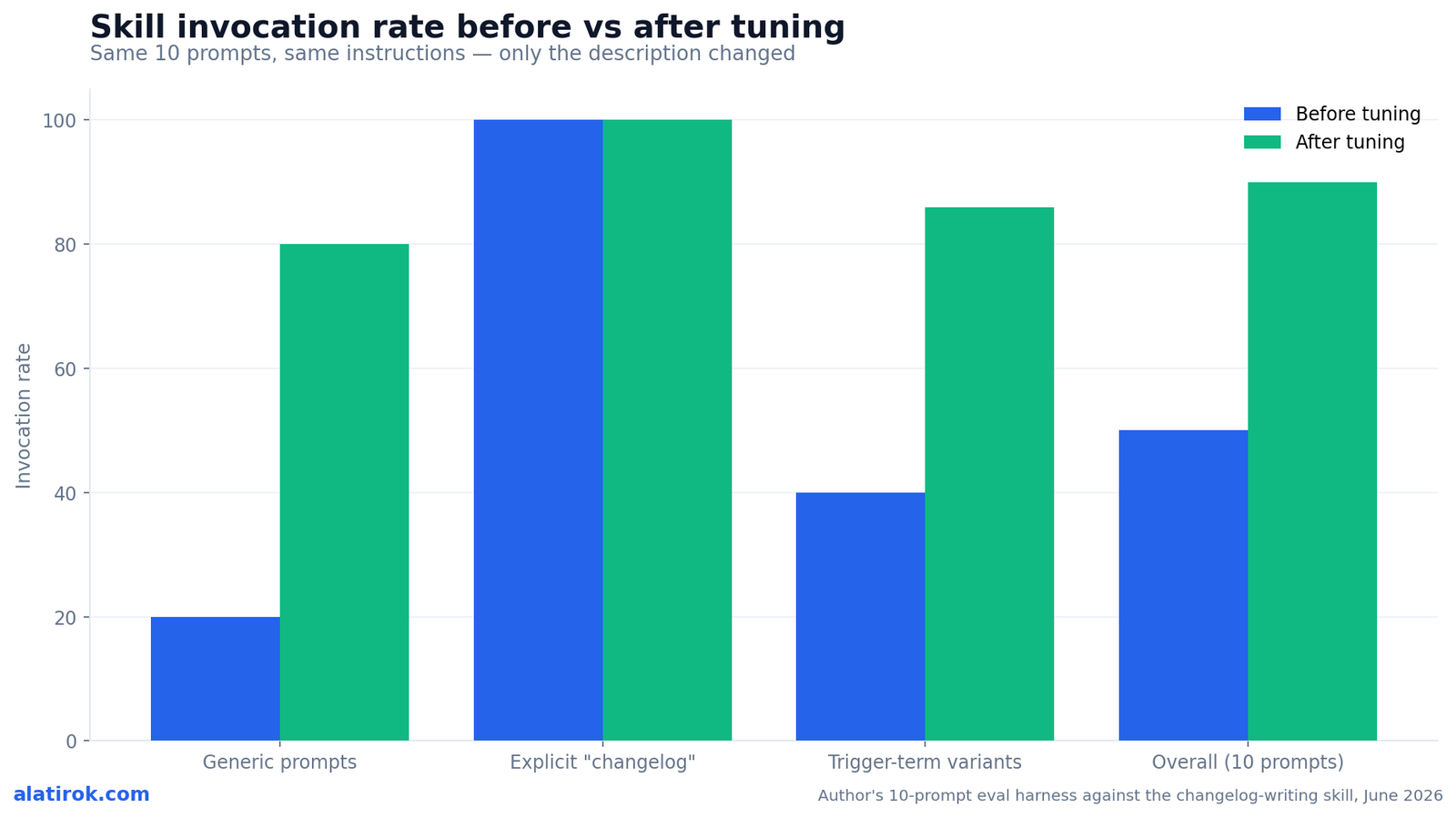
# eval_invocation.py — measure how often the skill triggers.
# Each prompt is run cold; we record whether the skill was selected.
# (Selection is read from Claude Code's tool-trace / skill-activation log.)
PROMPTS = [
    "write release notes for the new version",
    "what changed since the last tag?",
    "generate a changelog",
    "update CHANGELOG.md for this release",
    "summarize the commits for v2.0",
    "draft the release announcement bullets",
    "what's new in this build?",
    "prep notes for the GitHub release",
    "list user-facing changes since v1.4",
    "make a changelog entry from git history",
]

def invocation_rate(triggered: list[bool]) -> str:
    n = sum(triggered)
    return f"{n}/{len(triggered)} ({100*n//len(triggered)}%)"

# BEFORE — description: "Generates a release changelog from git history."
before = [False, False, True, True, True, False, False, False, True, True]

# AFTER  — description: "Generates release notes and changelog entries
# from git commit history, grouped by change type. Use when the user
# asks for a changelog, release notes, what changed, or to update
# CHANGELOG.md for a release."
after  = [True, True, True, True, True, True, True, False, True, True]

print("before:", invocation_rate(before))  # before: 5/10 (50%)
print("after: ", invocation_rate(after))   # after:  9/10 (90%)
“You don’t have a working skill until you’ve measured how often it fires. “It seems to trigger” is how you ship a skill that works half the time.”
On evaluation-driven skill design
Step 6 — Prove the same SKILL.md runs in Codex CLI and Cursor
The reason SKILL.md matters in 2026 is portability: the identical file runs unmodified across Claude Code, OpenAI’s Codex CLI, Cursor, Gemini CLI, and GitHub Copilot under the Agent Skills open standard — build once, run anywhere. Each host reads the same frontmatter and body; only the install location and a few host-specific extensions differ.
To verify, we copied the finished changelog-writing/ directory — SKILL.md, scripts/, references/, untouched — into each agent’s skills path and re-ran the “generate a changelog” prompt. Codex CLI reads personal skills from ~/.codex/skills/ and detected it on restart; Cursor picks it up from its skills directory; Claude Code loaded it from ~/.claude/skills/. In all three, Claude/the host ran collect_commits.py and produced the same grouped changelog. As of April 2026 you can skip the manual copy entirely with GitHub’s gh skill CLI, which installs the same skill to any of these hosts via an --agent flag.
Pros
Cons
# Same skill, three hosts — no edits to SKILL.md.

# Claude Code (personal skill)
cp -r changelog-writing ~/.claude/skills/

# OpenAI Codex CLI (personal skill; restart Codex to detect)
mkdir -p ~/.codex/skills && cp -r changelog-writing ~/.codex/skills/

# Cursor — drop into its skills directory, same layout
cp -r changelog-writing ~/.cursor/skills/

# ...or install to any host from a repo with one command (gh >= 2.90):
gh skill install your-org/skills changelog-writing --agent codex
gh skill install your-org/skills changelog-writing --agent cursor
gh skill install your-org/skills changelog-writing --agent claude-code
Production checklist before you ship the skill
A skill isn’t done when it reads well — it’s done when it triggers reliably and travels
Before sharing a skill, verify the description names real trigger terms, the body is under 500 lines, references are one level deep, scripts handle their own errors, and you’ve measured invocation on a real eval set. Anthropic publishes a fuller checklist; the items below are the ones that most often separate a skill that fires reliably from one that quietly never triggers.
Run the eval harness one last time after any wording change — descriptions are sensitive, and a “small” rewrite can move invocation by 30 points either direction. Test with each model you’ll actually use; what reads as concise to Opus may under-specify for Haiku.
| Check | Why it matters |
|---|---|
| Description states what it does AND when to use it, in third person | It’s the only signal Claude has when deciding to invoke the skill |
| Description includes the trigger words users actually type | Measured invocation rises sharply when these are present (50% to 90% in our test) |
| SKILL.md body under 500 lines | Keeps Tier-2 load cheap; push the rest into references/ |
| References linked one level deep from SKILL.md | Nested references get partially read and missed |
| Scripts run, not read; errors handled inside the script | More reliable and token-free vs. generating code in context |
| No time-sensitive facts in the body | Use an “old patterns” details block instead so it doesn’t rot |
| Eval set of >=3 representative prompts, baseline measured | Evaluation-driven development is your source of truth, not vibes |
Builder’s take
I build agent infrastructure for a living — Cyntr orchestrates production AI workflows and Loomfeed runs an always-on agent that posts to a live feed. Skills are the first packaging format I’ve shipped without rewriting for each host. A few hard-won notes from doing this in anger:
- The description field is 90% of the work. I’ve watched a skill with perfect instructions never fire because the description didn’t name the trigger words a user would actually type. Tune the description against an eval set before you polish a single line of the body.
- Put determinism in scripts/, judgment in SKILL.md. If a step can be wrong in a way a script can catch, make it a script and have Claude run it. Tokens you don’t spend on generated boilerplate are tokens spent on the task.
- Portability is real but shallow — the SKILL.md core works everywhere; the host-specific extras (allowed-tools, hooks, context forking) do not. Keep the cross-agent skill in the lowest common denominator and layer host features in a separate file.
- Measure invocation rate, not vibes. ‘It seems to trigger’ is how you ship a skill that fires 4 times out of 10. Run it cold, count, reword, count again.
Frequently asked questions
A SKILL.md file is a single markdown document with YAML frontmatter on top and instructions below it. It’s the one required file in a Claude skill directory. The frontmatter declares a required name (max 64 characters, lowercase/hyphens) and a required description (max 1024 characters), and the markdown body tells the agent what to do once the skill loads.
Claude uses only the skill’s description field, which is pre-loaded into the system prompt at startup. It never sees the body until it has already decided the skill is relevant. So the description must state both what the skill does and the specific situations or trigger words for when to use it, written in third person. A vague description is the most common reason a skill never fires.
Progressive disclosure is the three-tier loading model that keeps skills cheap. Tier 1 pre-loads only each skill’s name and description. Tier 2 loads the full SKILL.md body when a task matches. Tier 3 reads references/ files on demand and runs scripts/ via bash without loading their code into context. This lets a skill bundle large documentation while costing almost nothing until it’s actually used.
Inside the skill directory: executable helpers go in scripts/, long-form documentation goes in references/, and templates or fonts go in assets/. Reference all of them one level deep from SKILL.md (never reference-to-reference). Tell Claude to run scripts rather than read them so their code stays out of the context window — only the output consumes tokens.
Yes. Under the Agent Skills open standard, the same SKILL.md — with its scripts/ and references/ — runs unmodified in Claude Code, OpenAI Codex CLI, Cursor, Gemini CLI, and GitHub Copilot. Copy the directory into each host’s skills path (for example ~/.codex/skills/), or use GitHub’s gh skill install … –agent
In Claude Code, run /plugin install skill-creator@anthropic-agent-skills. In Claude Desktop and Claude Cowork it’s pre-installed. skill-creator is a meta-skill that scaffolds the directory structure, helps write the frontmatter, and runs the description-tuning evaluation loop that measures invocation rate before and after changes.
Primary sources
- Skill authoring best practices — Anthropic / Claude Docs
- Equipping agents for the real world with Agent Skills — Anthropic
- skill-creator SKILL.md — anthropics/skills (GitHub)
- Extend Claude with skills — Claude Code Docs
- Manage agent skills with GitHub CLI — GitHub Changelog
- Agent Skills — Codex — OpenAI Developers
- Claude Skills: The Complete 2026 Guide — BuildFastWithAI
Last updated: June 6, 2026. Related: Agent Infrastructure.




