


Google just killed Gemini CLI. Here is the current, terminal-only head-to-head of Claude Code, Codex CLI, and Antigravity CLI, with a real 10-developer cost-per-team table.
What is the best AI coding CLI in 2026?
The best AI coding CLI 2026 is Claude Code for hard, multi-file production work, Codex CLI for cheapest entry and sandboxed terminal execution, and Antigravity CLI for fast, multi-agent exploration — and crucially, Gemini CLI is no longer on the list. Google retired Gemini CLI at I/O on May 19, 2026 and it stops serving requests on June 18, 2026, replaced by the Go-based Antigravity CLI. Most page-one comparisons you will find still list Gemini CLI as a live option; they are factually stale, and that is the single biggest reason to read this one instead.
This is a terminal-only shootout. We are deliberately excluding IDE agents like Cursor and Windsurf — those are a different category that we cover in separate IDE shootouts. A CLI coding agent lives in your shell: you pipe it into CI, SSH it onto a remote box, run headless refactors, and let it drive git, tests, and tools without ever opening a graphical editor. If that is your workflow, an IDE comparison is answering the wrong question.
The three live contenders are Anthropic’s Claude Code (Opus 4.8), OpenAI’s Codex CLI (GPT-5.5-Codex), and Google’s brand-new Antigravity CLI (Gemini 3.5 Flash). All three speak MCP, all three run in the terminal, and all three are priced very differently. Below is the head-to-head, a real 10-developer cost table, and the token-economics framing that most reviews skip entirely.
If a ‘best CLI 2026’ article still recommends Gemini CLI, it was not re-tested after May 19, 2026. Gemini CLI and the Gemini Code Assist IDE extensions stop serving Google AI Pro, Ultra, and free users on June 18, 2026. Antigravity CLI is the replacement.
Claude Code vs Codex CLI vs Antigravity CLI: the comparison table
At a glance: Claude Code has the highest reasoning ceiling and best real-issue accuracy, Codex CLI is the cheapest on-ramp with the strongest sandbox story, and Antigravity CLI is the fastest and the only one with native multi-agent orchestration in the terminal. Each runs a different frontier model, so your choice is partly a model choice.
Antigravity CLI is the genuinely new entry. Built in Go for fast startup, it shares the same agent harness as the Antigravity desktop app — sessions and agent state move between the two — and it carries over Gemini CLI’s Agent Skills, Hooks, Subagents, and Extensions (now repackaged as Antigravity plugins). Its headline trick is orchestrating multiple background agents so a large refactor or a parallel research task does not lock up your terminal session.
| Dimension | Claude Code | Codex CLI | Antigravity CLI |
|---|---|---|---|
| Vendor | Anthropic | OpenAI | |
| Default model | Claude Opus 4.8 | GPT-5.5-Codex | Gemini 3.5 Flash |
| Lowest paid entry | Pro $17/mo (annual) / $20 monthly | Go $8/mo, Plus $20/mo | AI Pro $19.99/mo |
| Top consumer tier | Max 20x $200/mo | Pro from $100/mo (5x/20x) | AI Ultra $200/mo (20x) |
| Free tier | No (paid only) | Yes (Codex Mini, capped) | Limited free access |
| Multi-agent orchestration | Subagents | Sandboxed parallel tasks | Native, background, built-in |
| Written in | Node/TS | Rust | Go |
| MCP support | Yes | Yes | Yes |
| Best at | Multi-file refactors, correctness | Sandboxed execution, low cost | Speed, large-codebase exploration |
What does the best terminal AI coding agent cost for a 10-developer team?
$2,280
Copilot Business / 10 devs / yr
Cheapest team seat
$18,000
Claude Code Teams / 10 devs / yr
Premium reasoning tier
5.5x
Claude Code token efficiency vs Cursor
On comparable hard tasks
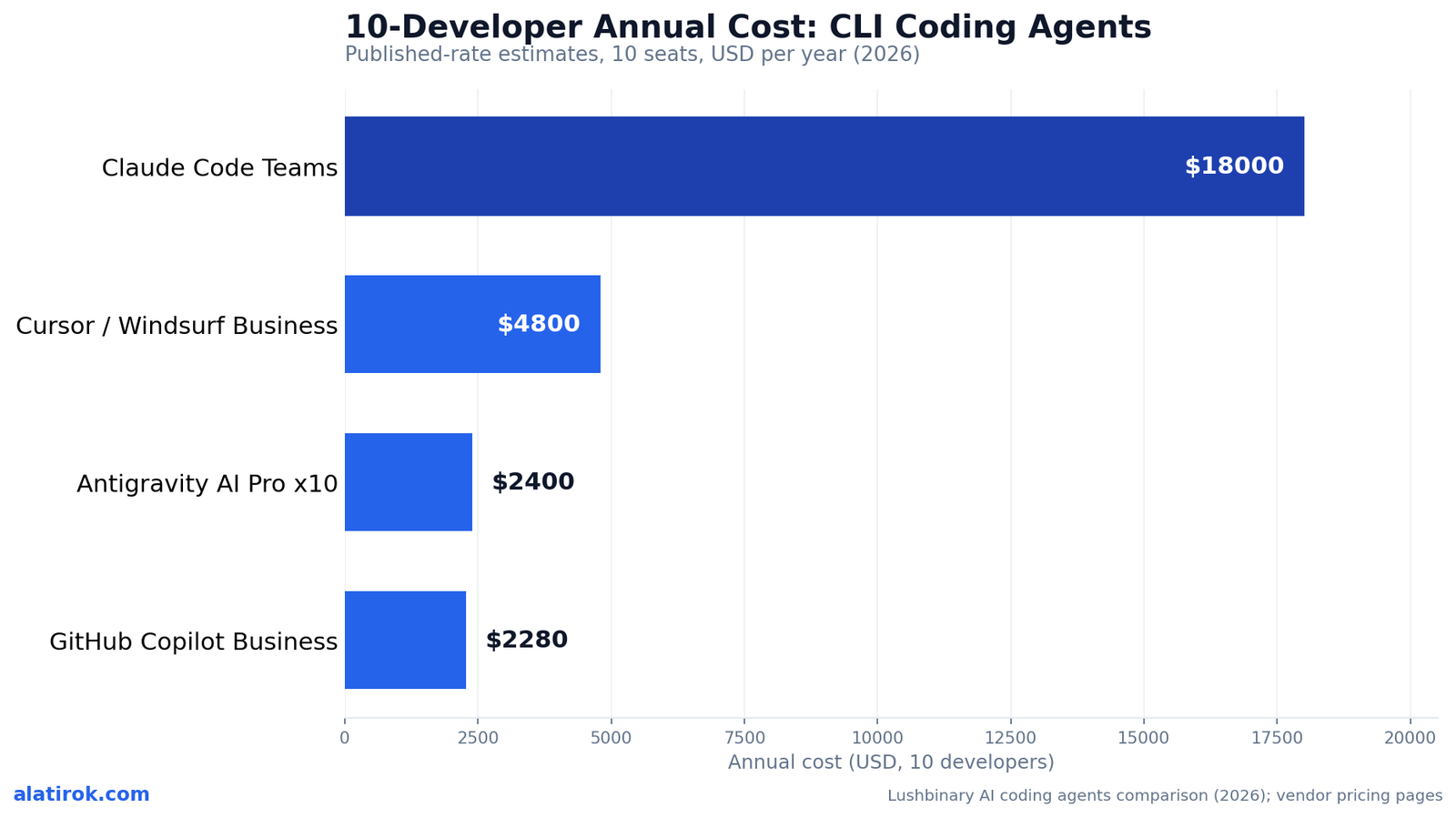
For a 10-developer team, GitHub Copilot Business (~$2,280/yr) and Antigravity AI Pro x10 (~$2,400/yr) are the cheap seats, Cursor or Windsurf Business land around $4,800/yr, and Claude Code Teams sits near $18,000/yr — roughly 7.5x the Antigravity bill. That spread is the number most CLI coding agent comparisons bury, and it is the one a team lead actually has to defend in a budget meeting.
Two caveats keep that $18,000 from being a knockout against Claude Code. First, Claude Code Teams pricing is now negotiated at the seat level, so the figure is a published-rate estimate, not a fixed list price. Second, and more importantly, raw seat price ignores token burn. Independent 2026 testing found Claude Code uses about 5.5x fewer tokens than Cursor-class tools for comparable hard work — in one benchmark, Claude Code finished a task in 33K tokens with no errors while a Cursor agent on the same task burned 188K. If your usage routes through API metering rather than flat seats, that efficiency claws back a large share of the headline gap.
The chart below is the per-team picture every reviewer should lead with. It is the single most decision-relevant number for a team lead choosing a terminal-first coding agent.
Which CLI coding agent wins on benchmarks: SWE-Bench Pro vs Terminal-Bench 2.1?
Claude Code’s Opus 4.8 wins SWE-Bench Pro at 69.2% versus GPT-5.5’s 58.6%, while Codex CLI’s GPT-5.5 wins Terminal-Bench 2.1 at 78.2% versus Opus 4.8’s 74.6% — the two benchmarks measure different jobs, so neither tool is a clean sweep. Match the benchmark to your workload and the answer flips.
SWE-Bench Pro measures whether an agent can solve real GitHub issues end-to-end across a multi-file codebase. That is the closest proxy for production maintenance work, and Opus 4.8’s 10.6-point lead there is why Claude Code is the consensus default for serious refactors. Terminal-Bench 2.1 measures raw shell execution — running commands, chaining tools, recovering from errors in a terminal — and GPT-5.5 retains the edge, consistent with Codex CLI’s sandbox-first design. Antigravity’s Gemini 3.5 Flash lands around 76.2% on Terminal-Bench, slotting between the two on execution while trailing both on real-issue accuracy (~55%).
One number worth holding onto from OpenAI’s GPT-5.5 launch: the model demoed 1,000+ sequential tool calls without human intervention. For a terminal agent that is meant to grind through a long autonomous loop, that endurance matters as much as a single-task score — but note that these vendor figures have not all been independently reproduced, so treat them as directional.
“Opus 4.8 owns real GitHub issues; GPT-5.5 owns the shell. The ‘winner’ depends entirely on which job your CLI does all day.”
Alatirok benchmark read, June 2026
| Benchmark (what it measures) | Claude Code (Opus 4.8) | Codex CLI (GPT-5.5) | Antigravity (Gemini 3.5 Flash) |
|---|---|---|---|
| SWE-Bench Pro (real GitHub issues) | 69.2% | 58.6% | ~55.1% |
| Terminal-Bench 2.1 (shell execution) | 74.6% | 78.2% | ~76.2% |
What are the Codex CLI free tier limits?
Codex CLI is the only one of the three with a real free tier: free ChatGPT users get Codex Mini with capped daily usage, not the full agent, while paid access starts at Go ($8/mo) and Plus ($20/mo). That makes Codex CLI the lowest-friction way to try a terminal coding agent in 2026 — you can run it without a credit card, just with tight quotas.
On the Plus plan ($20/mo), usage is metered in rolling five-hour windows: roughly 15-80 GPT-5.5 local messages per window. Pro starts at $100/mo and lifts that to about 80-400 messages (5x), with a 20x tier reaching 300-1,600. Since April 2, 2026, OpenAI shifted Codex billing to API-token-based rates, so heavy work is metered through Codex credits — GPT-5.5 runs about 125 credits per 1M input tokens for Business, or roughly 14 credits per local task for Plus and Pro. The practical takeaway: the flat monthly price is a floor, and a heavy day can push you into credit top-ups.
By contrast, Claude Code has no free tier — entry is the Pro plan at $17/mo (annual) or $20/mo monthly, scaling to Max 5x ($100/mo) and Max 20x ($200/mo). Antigravity rides Google’s AI subscriptions: AI Pro at $19.99/mo, AI Ultra at $99.99/mo for 5x quota, and a top $200/mo tier for 20x (cut from $249.99). Only Antigravity and Codex offer any free terminal access at all.
Codex’s April 2, 2026 move to API-token credits means a flat $20 Plus subscription does not equal unlimited terminal work. Watch your five-hour windows; a long autonomous loop can exhaust them fast and force a credit purchase.
Why token efficiency matters more than sticker price
Sticker price ranks the cheapest seat, but token efficiency decides the real bill — and on hard work Claude Code’s ~5.5x advantage over Cursor-class tools can flip a 7.5x seat-price disadvantage into a near-tie. This is the framing almost every page-one comparison skips, and it is where a terminal CLI’s design choices show up on your invoice.
The mechanism is simple. Some agents load everything into context — open files, imports, semantic matches, git history — and you pay for all of it on every turn. Claude Code fetches what it needs when it needs it, prunes aggressively, and targets retrieval. In a documented 2026 benchmark, that discipline produced a 33K-token completion against a 188K-token completion for the same task on a less efficient agent. At scale, a team burning $5K/month on a token-hungry tool could run equivalent throughput for roughly $1K/month on a lean one.
For a CLI specifically, this compounds: terminal agents run long, multi-step, mostly headless loops where context bloat accumulates turn over turn. Antigravity’s Go core and Gemini 3.5 Flash optimize for raw speed (a reported 289 tok/s versus ~67-71 for the others), which is great for interactive feel but is a different axis than tokens-per-task. When you model true cost, ask two questions: what is the seat price, and how many tokens does this agent burn to finish my kind of work?
Pros
Cons
Best terminal AI coding agent 2026: the verdict by use case
Claude Code for hard work, Codex CLI for the cheapest start, Antigravity CLI for speed
Pick Claude Code if correctness on real codebases is the priority and budget can flex, Codex CLI if you want the cheapest, most sandboxed on-ramp, and Antigravity CLI if speed and multi-agent exploration matter most — and skip Gemini CLI entirely since it shuts down June 18, 2026. There is no universal winner; there is a best fit per workload.
Teams increasingly run more than one. A common 2026 pattern: Antigravity CLI for rapid iteration and large-codebase exploration, Claude Code for complex refactors and architectural changes, and Codex CLI for sandboxed testing in security-sensitive environments. Because all three speak MCP, your tool integrations port across them, so a multi-CLI setup is cheaper to maintain than it used to be.
The score cards below condense the head-to-head into a single per-tool read for a developer or team lead choosing a terminal-first coding agent in 2026.
Claude Code (Opus 4.8)
Best for: Complex refactors, production maintenance, correctness-critical work
What works
Watch out for
Codex CLI (GPT-5.5-Codex)
Best for: Sandboxed execution, security-sensitive scaffolding, low-cost trials
What works
Watch out for
Antigravity CLI (Gemini 3.5 Flash)
Best for: Speed, large-codebase exploration, parallel background agents
What works
Watch out for
Builder’s take
I run two products where coding agents do real work in the terminal every day, so I picked these three on the basis of cost discipline and token burn, not benchmark vanity. Here is how I actually choose:
- If a vendor’s SERP still lists Gemini CLI as a live option, distrust the whole page — Google retired it on May 19 and it stops serving June 18, 2026. Freshness is the cheapest signal of whether a comparison was actually tested.
- Token efficiency is the line item nobody prices. Claude Code using ~5.5x fewer tokens than Cursor-class tools for hard work is the real reason its scary-looking Teams price can still pencil out at the API layer.
- Benchmarks split by axis: Opus 4.8 wins SWE-Bench Pro (real GitHub issues), GPT-5.5 wins Terminal-Bench 2.1 (shell execution). Match the benchmark to your workload, not the headline.
- For a 10-dev team on a budget, Copilot Business and Antigravity AI Pro x10 are the cheap seats; Claude Code Teams is the premium tool you justify with throughput, not seat price.
- Don’t conflate IDE agents (Cursor, Windsurf) with true terminal CLIs. If your workflow is SSH-into-a-box, CI, and headless refactors, an IDE shootout is answering a different question than this one.
Frequently asked questions
No. Google retired Gemini CLI at I/O on May 19, 2026. Gemini CLI and the Gemini Code Assist IDE extensions stop serving requests for Google AI Pro, Ultra, and free users on June 18, 2026. The official replacement is the Go-based Antigravity CLI, which inherits Agent Skills, Hooks, Subagents, and Extensions (now Antigravity plugins). Only organizations on a Gemini Code Assist Standard or Enterprise license retain Gemini CLI access.
There is no single winner — it depends on workload. Claude Code (Opus 4.8) is best for complex, multi-file production work and correctness, leading SWE-Bench Pro at 69.2%. Codex CLI (GPT-5.5) is the cheapest on-ramp with the best sandboxed shell execution, topping Terminal-Bench 2.1 at 78.2%. Antigravity CLI (Gemini 3.5 Flash) is the fastest and the only one with native multi-agent orchestration in the terminal.
Yes. Free ChatGPT users get Codex Mini with capped daily usage — restricted quotas, not the full agent. Paid access starts at Go ($8/mo) and Plus ($20/mo), where usage is metered in rolling five-hour windows (roughly 15-80 GPT-5.5 messages on Plus). Since April 2, 2026, heavy work is metered through API-token Codex credits, so the flat monthly price is a floor, not a ceiling.
For a 10-developer team, Claude Code Teams runs roughly $18,000/year at published rates, though Teams pricing is now negotiated at the seat level. For individuals, Claude Code starts at Pro ($17/mo annual, $20/mo monthly), then Max 5x ($100/mo) and Max 20x ($200/mo). Its ~5.5x token efficiency on hard tasks narrows the real cost gap against cheaper tools when usage is API-metered.
Antigravity CLI replaced Gemini CLI. Announced at Google I/O on May 19, 2026, it is built in Go for faster startup, shares an agent harness with the Antigravity desktop app (sessions and state move between them), and adds native multi-agent orchestration so background refactors do not lock up your terminal. It rides Google’s AI tiers: AI Pro at $19.99/mo, AI Ultra at $99.99/mo (5x), and a top $200/mo tier (20x).
No. Cursor and Windsurf are IDE-based agents, not true terminal CLIs, so they fall outside a terminal-only comparison. A CLI coding agent runs in your shell — pipeable into CI, SSH-able onto remote boxes, and usable headless without a graphical editor. The true terminal CLIs in 2026 are Claude Code, Codex CLI, and Antigravity CLI; Cursor and Windsurf belong in a separate IDE-agent shootout.
Primary sources
- Transitioning Gemini CLI to Antigravity CLI — Google Developers Blog
- Bye-bye, Gemini CLI; Google nudges devs toward Antigravity — The Register
- Codex Pricing — OpenAI Developers
- Antigravity 2.0 vs Claude Code vs Codex CLI Compared — AImadeTools
- AI Coding Agents 2026: Pricing & Features Compared — Lushbinary
- Claude Opus 4.8 vs GPT-5.5: Benchmarks & Pricing — Lushbinary
- Claude Code vs Cursor 2026: Token Efficiency Verdict — Toolradar
Last updated: June 3, 2026. Related: Products.




