



Agent Skills are folders with a SKILL.md file that teach AI agents how to do a task. By 2026 SKILL.md is a cross-vendor open standard, not a Claude-only feature. Here is the full spec, the token budgets, and a Skills vs MCP decision boundary.
What are agent skills, in one sentence?
Agent skills are self-contained folders, each built around a required SKILL.md file, that teach an AI agent how to perform a specific task and that the agent discovers and loads on demand. The folder holds plain-language instructions plus any scripts, reference docs, and assets the task needs, and the agent only pulls them into its context window when a request actually calls for them.
If you have been hearing “Skills” and “SKILL.md” everywhere and assumed it was a Claude-only gimmick, that is the misconception this guide exists to correct. As of 2026, SKILL.md is a cross-vendor open standard with a published specification at agentskills.io, and the same folder runs unmodified across Claude Code, OpenAI’s Codex CLI, Google’s Gemini CLI, GitHub Copilot, Cursor, Cline, Windsurf, and OpenCode. The format outgrew its origin.
The mental model that matters: a Skill encodes the how. It is the difference between telling an agent “connect to our database” (a connectivity problem) and telling it “here is exactly how our team writes a quarterly revenue report, step by step, with the filters we always apply” (a procedure problem). Skills own the second job, and they do it without you re-typing the procedure every session.
Anthropic shipped Skills on October 16, 2025, and the developer Simon Willison called them “maybe a bigger deal than MCP” the same day. The reason became obvious within months: because the format is just a folder and a Markdown file, anyone could implement it, and everyone did.

What is the SKILL.md format and folder structure?
A skill is a directory containing, at minimum, a file named exactly SKILL.md, which itself is YAML frontmatter followed by a Markdown body; optional scripts/, references/, and assets/ subfolders hold everything the agent loads later. The filename is case-sensitive and literal. Not skill.md, not Skill.md, not SKILL.MD. The directory name must be kebab-case and must match the name field inside the frontmatter.
The frontmatter has exactly two required fields. name (max 64 characters, lowercase letters, numbers, and hyphens only, no leading or trailing or consecutive hyphens) and description (max 1024 characters, non-empty, describing both what the skill does and when to use it). The agentskills.io spec also defines optional fields: license, compatibility (max 500 chars, for environment requirements), a free-form metadata map, and the experimental allowed-tools list of pre-approved tools.
Everything below the frontmatter is unrestricted Markdown: step-by-step instructions, input/output examples, and edge cases. The three optional subfolders divide labor cleanly. scripts/ holds executable Python, Bash, or JavaScript the agent runs (and whose output, not source, consumes tokens). references/ holds detailed docs the agent reads only when needed. assets/ holds templates, schemas, and data files.
The description field is the single most important line in the whole skill, because it is the only part loaded at startup and therefore the only thing the agent uses to decide whether your skill is relevant at all. Anthropic‘s guidance is blunt: write it in the third person (“Extracts text from PDFs…”), include concrete trigger keywords, and never use “I can help you” phrasing, because the description is injected directly into the system prompt.
skill-name/ contains SKILL.md (required: YAML frontmatter + Markdown), plus optional scripts/ (executable code the agent runs), references/ (docs loaded on demand), and assets/ (templates, schemas, data). The directory name must be kebab-case and must equal the frontmatter name field. Keep reference links one level deep from SKILL.md.
# pdf-processing/SKILL.md
---
name: pdf-processing
description: Extracts text and tables from PDF files, fills PDF forms, and merges documents. Use when working with PDF files or when the user mentions PDFs, forms, or document extraction.
license: Apache-2.0
metadata:
  author: example-org
  version: "1.0"
---

# PDF Processing

## Quick start
Extract text with pdfplumber:

```python
import pdfplumber
with pdfplumber.open("file.pdf") as pdf:
    text = pdf.pages[0].extract_text()
```

## Advanced features
**Form filling**: See [FORMS.md](references/FORMS.md) for the complete guide
**API reference**: See [REFERENCE.md](references/REFERENCE.md) for all methods
How does progressive disclosure and the token budget work?
~100
Tokens per skill at discovery
name + description only, pre-loaded into the system prompt
<5,000
Recommended SKILL.md body budget
median observed is 1,414 tokens
<500
Lines recommended for SKILL.md
split into reference files past this
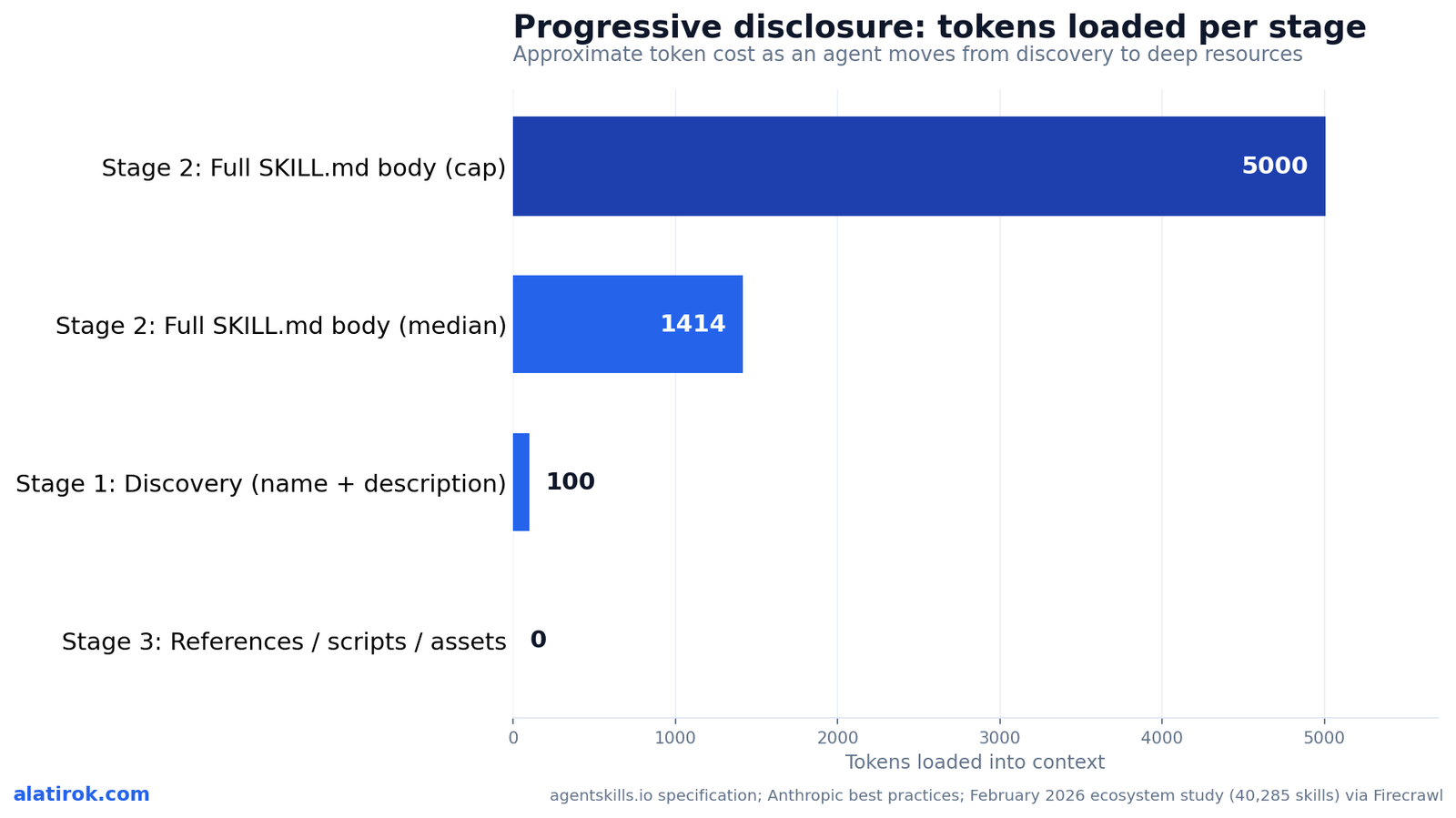
Progressive disclosure loads a skill in three stages, each with a tighter token budget: roughly 100 tokens at discovery (name plus description), under 5,000 tokens recommended when the full SKILL.md body loads on activation, and zero tokens for scripts, references, and assets until the agent actually reads or runs them. This staging is the entire reason Skills scale where giant system prompts do not.
Stage one is discovery. At startup, the agent pre-loads only the name and description from every installed skill’s frontmatter into the system prompt, at a per-skill overhead of roughly 30 to 100 tokens. Firecrawl’s analysis pegs a 50-skill startup at about 1,500 to 2,500 tokens total, and 100 skills at roughly 3,000 to 5,000 tokens. That is the standing tax you pay on every turn just to keep skills discoverable.
Stage two is loading. When the agent decides a skill is relevant, it reads the full SKILL.md body. The spec recommends keeping that body under 5,000 tokens; a February 2026 ecosystem study found the median skill body is just 1,414 tokens, so most authors stay well inside the budget. Stage three is on-demand resources: when SKILL.md points to references/finance.md, the agent uses a bash read to pull in only that file, leaving sales.md and product.md on disk at zero token cost until separately needed.
The practical authoring rule that falls out of this: keep the SKILL.md body under 500 lines, and move anything needed less than roughly a fifth of the time into a reference file. Material that lives in references/ is free until read, so a skill can bundle a 2,000-line API reference and a giant lookup table without inflating the budget for the 80 percent of tasks that never touch them.
Why agent skills are now an open standard, not a Claude feature
SKILL.md is a published, vendor-neutral specification hosted at agentskills.io with a reference validation library, and by 2026 it is implemented by at least eight major agent tools, which is precisely why it counts as an open standard rather than a Claude feature. The same folder is the single source of truth across vendors. No per-tool format files required.
The confirmed implementers as of 2026 are Claude Code (Anthropic), Codex CLI (OpenAI), Gemini CLI (Google), GitHub Copilot via VS Code, Cursor, Cline, Windsurf, and OpenCode. The New Stack framed Skills as Anthropic’s next bid to define an industry standard, and the bet paid off: a skill written for Claude Code drops into Codex’s skills directory and simply works. Each tool may layer extras on top (Claude Code adds a context-fork mode, Codex adds its own metadata file), but they all read the same core SKILL.md.
The adoption curve was steep. A February 2026 study analyzing 40,285 public skills found the ecosystem grew 18.5 times in 20 days, from 2,179 skills on January 16 to over 40,000 by February 5, with a single-day peak of 8,857 new skills published on January 25. That is open-standard network-effect behavior, not single-vendor uptake.
This cross-vendor framing is the part most explainers still miss, and it is the practical reason to care. If you standardize your team’s procedures as SKILL.md folders, you are not locking into one model provider. You are writing portable agent knowledge that survives a switch from Claude to GPT to Gemini, which is a genuinely different risk profile from building everything into one vendor’s proprietary surface.
“A skill written for Claude Code drops into Codex’s skills directory and simply works. That portability, not any single vendor feature, is the real story of SKILL.md in 2026.”
On why Agent Skills crossed from feature to standard
Agent skills vs MCP vs subagents vs system prompts
The decision boundary is clean once you name what each thing actually provides: Skills give an agent a how-to procedure loaded on demand, MCP gives it tool and data connectivity that is always available, subagents give it a delegated, isolated context window, and a system prompt or one-off prompt gives it a single instruction. They are complementary layers, not competitors.
Skills versus MCP is the comparison people get wrong most often, so anchor on it. MCP is the connectivity layer: it is how an agent reaches your database, your GitHub, your Excel files in the first place. A Skill is the procedure layer: it is how the agent should use that access to produce your team’s report the same way every time. Anthropic’s own framing is “MCP for connectivity, Skills for procedural knowledge,” and the two are designed to stack. A Skill can even reference MCP tools by fully qualified name, like GitHub:create_issue.
Skills versus subagents splits on isolation. Use a Skill to teach reusable expertise any agent can apply in its main context. Use a subagent when you want a discrete task run in its own independent context window with its own tool permissions, typically for parallel workstreams or to keep a noisy sub-task from polluting the main thread. Skills versus prompts splits on persistence: a prompt is a one-off you type now and lose; a Skill is the same instruction made permanent, portable, and self-loading. The tell that you need a Skill is when you catch yourself pasting the same long prompt for the third time.
Cannot reach the data? You need MCP. Re-typing the same procedure every session? You need a Skill. Want a noisy sub-task isolated with its own permissions? You need a subagent. Just steering one reply? That is a prompt. Most real agents use several of these together.
| Building block | What it provides | Load timing | Token cost | Cross-vendor open standard? |
|---|---|---|---|---|
| Agent Skill | A how-to procedure / domain expertise | On-demand, when relevant | ~100 discovery, then <5,000 on load | Yes (SKILL.md / agentskills.io) |
| MCP | Tool + data connectivity to external systems | Always-on, continuous | Tool schemas pre-loaded each turn | Yes (Model Context Protocol) |
| Subagent | A delegated, isolated context window | Invoked per task | Separate context window | Partial (vendor-specific configs) |
| System / one-off prompt | A single instruction or persona | Always-on (system) or once (prompt) | Consumes context every turn | No (vendor-specific) |
How to write a SKILL.md file, step by step
To write a SKILL.md file, create a kebab-case folder, add a SKILL.md with valid YAML frontmatter (name plus a trigger-rich description), write a concise Markdown body of under 500 lines, push rarely-needed detail into references/ and deterministic operations into scripts/, then validate the folder before sharing it. The order matters: prove the gap before you write the skill.
Anthropic recommends evaluation-driven development. First run the agent on the real task with no skill and document exactly where it fails or what context you keep supplying. That failure list is your spec. Then write the minimum instructions needed to close those gaps, because the context window is a shared public good and every token you add competes with conversation history and other skills’ metadata. The default assumption is that the model is already smart; only add what it genuinely does not know.
Match your degrees of freedom to the task. For fragile, must-be-exact operations (a database migration), give low freedom: “Run exactly this script, do not modify the command.” For open-ended work (a code review), give high freedom and trust the model to choose its path. Keep file references one level deep from SKILL.md so the agent reads complete files instead of previewing nested ones, and for any reference over 100 lines, put a table of contents at the top.
Avoid the documented anti-patterns: no time-sensitive language like “before August 2025” (use a collapsible “old patterns” section instead), no Windows-style backslash paths (always forward slashes, even on Windows), and no menu of five competing libraries when one sensible default plus an escape hatch will do. Finally, validate. The reference library exposes a CLI check that confirms your frontmatter and naming conventions are legal.
# 1. Create the kebab-case skill folder (name must match frontmatter)
mkdir -p analyzing-spreadsheets/references analyzing-spreadsheets/scripts

# 2. Author SKILL.md with required name + description frontmatter
cat > analyzing-spreadsheets/SKILL.md <<'EOF'
---
name: analyzing-spreadsheets
description: Analyzes Excel spreadsheets, builds pivot tables, and generates charts. Use when analyzing .xlsx files, spreadsheets, or tabular data.
---

# Analyzing Spreadsheets

## Quick start
Run the loader to read a workbook into a dataframe:

    python scripts/load_workbook.py input.xlsx

## Pivot tables
See references/PIVOTS.md for the full pivot recipe.
EOF

# 3. Validate naming + frontmatter with the reference library
skills-ref validate ./analyzing-spreadsheets
Troubleshooting: the agent never triggers my skill
Almost always a weak description. It is the only text loaded at discovery, so it must say both what the skill does and when to use it, in the third person, with concrete trigger keywords (file types, verbs, user phrases). Replace “Helps with spreadsheets” with “Analyzes Excel spreadsheets… Use when analyzing .xlsx files or tabular data.”Troubleshooting: ‘skill not found’ or it loads the wrong one
Check three things. The file must be named exactly SKILL.md (case-sensitive). The folder name must be kebab-case and must equal the frontmatter name field. And if two skills share a name, the agent cannot disambiguate; the February 2026 study found 46% of marketplace listings collided on names, so make yours specific.Troubleshooting: my SKILL.md is huge and slow
If the body exceeds 500 lines or roughly 5,000 tokens, split it. Move material needed less than ~20% of the time into references/ files linked one level deep from SKILL.md. Those files cost zero tokens until read, so the budget for common tasks drops immediately.Troubleshooting: scripts fail with import or path errors
Skills run in a code-execution environment. On the Claude API there is no network access or runtime package install, so list and verify dependencies up front. Always use forward-slash paths (scripts/helper.py), make scripts handle their own errors rather than punting to the model, and avoid unexplained magic-number constants.What pre-built agent skills already exist, and should you adopt them?
Agent Skills are the portable how-to layer of the 2026 agent stack
Anthropic ships a set of ready-made Skills for office-document work out of the box: pptx for PowerPoint, xlsx for Excel, docx for Word, and pdf for generating and editing PDFs, all available across claude.ai, the Claude API, Claude on AWS, and Microsoft Foundry. They are the canonical reference implementations of the format.
These pre-built skills are instructive precisely because they exercise every part of the spec. The pptx and docx skills bundle scripts/ that manipulate the underlying Office XML, references/ for the gnarlier features like tracked-changes redlining, and assets/ for templates. They also illustrate why Skills require a code-execution capability: a Skill is not just instructions, it is a folder the agent can run code from inside a sandboxed container.
Beyond Anthropic’s set, the open-standard ecosystem now hosts tens of thousands of community skills across curated marketplaces and GitHub collections, spanning engineering workflows (the single largest category at roughly 55% of the corpus), information retrieval, compliance, and productivity. The February 2026 study did flag a maturity caveat worth heeding: nearly 40% of public skills access sensitive context or perform writes, and about 9% were classified as critical risk, so treat third-party skills with the same supply-chain scrutiny you would apply to any dependency.
Pros
Cons
Builder’s take
I have shipped both an MCP-heavy orchestration engine and a discussion platform, so I have watched teams reach for the wrong building block more times than I can count. Here is how I actually decide on Cyntr and Loomfeed.
- If I am re-pasting the same multi-paragraph instruction into an agent every session, that is a Skill, full stop. The re-paste is the signal. Stop re-pasting and write a SKILL.md.
- If the agent literally cannot reach the data or system it needs, that is MCP. Skills do not give you connectivity, they give you procedure. I see people try to encode an API key workflow in a Skill and wonder why nothing connects.
- The discovery budget is real money at scale. A hundred Skills cost you a few thousand tokens on every single turn before the agent does any work. I prune our Skill library the way I prune a dependency tree, because the name and description tax never sleeps.
- The cross-vendor part is the underrated win. I write a Skill once and it runs in Claude Code and Codex CLI without a rewrite. That portability is worth more to me than any single vendor’s feature flag, and it is why I treat SKILL.md as infrastructure, not a Claude convenience.
Frequently asked questions
Agent skills are folders, each built around a required SKILL.md file, that teach an AI agent how to do a specific task. The folder holds plain-language instructions plus optional scripts, reference docs, and assets, and the agent loads them only when a request is relevant. In short, a Skill packages the how of a task so you never have to re-explain it.
MCP (Model Context Protocol) provides connectivity: it is how an agent reaches external systems like databases, GitHub, or files. A Skill provides procedure: it teaches the agent how to use that access to do a task consistently. MCP is connectivity, Skills are know-how, and they are designed to be used together. A Skill can even call MCP tools by fully qualified name.
No. SKILL.md began as Anthropic’s format but is now a published cross-vendor open standard with a spec at agentskills.io. As of 2026 it is supported by Claude Code, OpenAI’s Codex CLI, Google’s Gemini CLI, GitHub Copilot, Cursor, Cline, Windsurf, and OpenCode. The same skill folder runs across all of them without a rewrite.
It loads a skill in three stages. At discovery the agent loads only the name and description (~100 tokens per skill). When the skill becomes relevant it loads the full SKILL.md body (recommended under 5,000 tokens; median observed is 1,414). Files in scripts/, references/, and assets/ cost zero tokens until the agent actually reads or runs them.
Create a kebab-case folder, add a file named exactly SKILL.md with YAML frontmatter containing a name and a trigger-rich description, then write a concise Markdown body under 500 lines. Push rarely-needed detail into a references/ folder and deterministic operations into scripts/. Validate the folder with the skills-ref CLI before sharing it.
Anthropic ships pre-built Skills for office documents: pptx (PowerPoint), xlsx (Excel), docx (Word), and pdf. They are available on claude.ai, the Claude API, Claude on AWS, and Microsoft Foundry, and they require a code-execution capability because Skills can run scripts inside a sandboxed container.
Primary sources
- Agent Skills specification — agentskills.io
- Skill authoring best practices — Anthropic / Claude Docs
- Agent Skills Explained: How SKILL.md Files Work — Firecrawl
- Skills explained: how Skills compares to prompts, Projects, MCP, and subagents — Anthropic
- Claude Skills are awesome, maybe a bigger deal than MCP — Simon Willison
- Agent Skills: Anthropic’s Next Bid to Define AI Standards — The New Stack
Last updated: June 2, 2026. Related: Agent Infrastructure.




