


Browserbase is infrastructure, not an agent. Browser Use and Stagehand are the SDKs that drive it. Here is the stack, the language decision, and the 100-browser-hour threshold that tells you when to pay for managed runtime.
Browser automation for AI agents in 2026: the one diagram that ends the confusion
The fastest way to get browser automation for AI agents 2026 wrong is to compare Browserbase against Browser Use as if they were rivals — they aren’t. Browserbase is infrastructure (a managed browser runtime), while Browser Use and Stagehand are the agent SDKs that drive a browser. You can, and usually should, use them together. Vendor-owned ranking pages blur this on purpose because each one funnels you toward its own product. This piece keeps the layers separate so you can make a real decision.
Think of an agentic browser stack as four stacked slots, each independently swappable. At the top is the brain: an LLM (Claude, GPT, Gemini, or a local model) that decides what to do. Below it sits the agent SDK — Browser Use in Python, Stagehand in TypeScript, or Skyvern for vision-first work — which translates the LLM’s intent into concrete clicks and typing. Under that is the driver, either the Chrome DevTools Protocol (CDP) directly or Playwright/Puppeteer. At the bottom is the runtime: a Chromium process running locally, or a fleet of managed browsers in the cloud.
Browserbase lives only in that bottom runtime slot. It does not reason, it does not decide what to click, and it will not scrape anything by itself. As Browserbase’s own materials put it, you still bring Browser Use, Stagehand, or your own agent code to drive the browser. Once you internalize that the SDK question (what drives the browser) and the runtime question (where the browser runs) are two separate decisions, the rest of this guide falls into place.
The two decisions also have very different drivers. The SDK choice is mostly a language-and-style call you make once at the start of a project. The runtime choice is an operational call you revisit as you scale — and as we’ll show, it has a fairly crisp threshold around 100 browser-hours per month.
LLM brain (decides) -> Agent SDK: Browser Use [Python] / Stagehand [TS] / Skyvern [vision] (drives) -> Driver: CDP or Playwright (executes) -> Runtime: local Chromium vs Browserbase managed (runs). Browserbase is ONLY the runtime layer. Python? Start with Browser Use. TypeScript? Start with Stagehand. Past ~100 browser-hrs/month? Add a managed runtime.
Stagehand vs Browser Use: which agent SDK should you adopt?
Choose Browser Use if you build in Python and want a full-autonomy agent; choose Stagehand if you build in TypeScript and want hybrid AI-plus-code control. The deciding factor is rarely raw capability — it’s the language your codebase already speaks and how much determinism you need.
Browser Use is Python-native and built around autonomy. You hand it a goal in plain language via an Agent loop, and it parses the page’s accessibility tree, feeds that to your LLM, and lets the model decide every click, keystroke, and navigation. It is model-agnostic across OpenAI, Anthropic, and Gemini, and uniquely among the three it supports local inference through Ollama — meaning you can run fully private, zero-API-cost automation. It also carries the largest ecosystem of the open frameworks, which matters when you hit an edge case at 2 a.m.
Stagehand, built by Browserbase, takes the opposite philosophy: you write the control flow in code and sprinkle AI in only where you need flexibility. Its primitives — act(), extract(), observe(), and agent() — let you mix deterministic steps with AI-resolved ones. That hybrid model is the reason production teams reach for it: you get repeatability where the page is stable and resilience where it isn’t. Stagehand sits around 22.9k GitHub stars as of mid-2026.
The trade-off in one line: Browser Use optimizes for ‘describe the goal and walk away,’ which is great for one-off and exploratory tasks but means you pay an LLM call for essentially every step. Stagehand optimizes for ‘codify the flow, AI the gaps,’ which is more work upfront but far more controllable for workflows you’ll run thousands of times.
One practical note that vendor pages skip: both run perfectly well on your own machine first. Browser Use spins up local Chromium out of the box, and Stagehand works against any local Chromium (via CDP) before you attach any cloud infrastructure. Neither requires Browserbase to get started — that is purely a later scaling choice.
| Dimension | Browser Use | Stagehand v3 | Skyvern |
|---|---|---|---|
| Layer | Agent SDK | Agent SDK | Agent SDK |
| Primary language | Python | TypeScript (Python SDK separate) | Python |
| Control style | Full autonomy (goal in, agent decides) | Hybrid: code flow + AI primitives | Vision-first autonomy |
| Page perception | DOM / accessibility tree | DOM via CDP + action caching | Screenshots to a vision model |
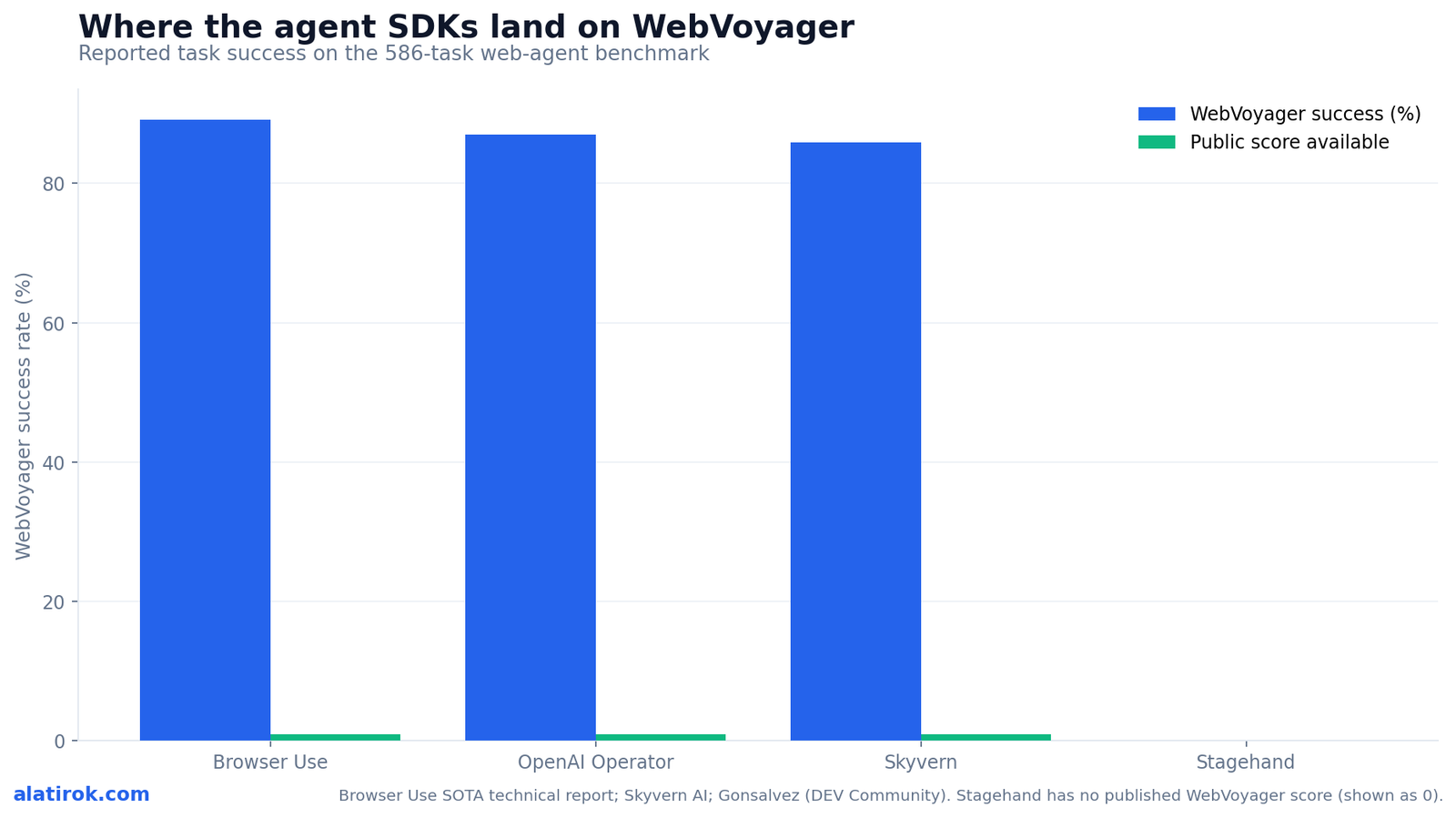
| WebVoyager success | ~89.1% | No public WebVoyager score | ~85.85% |
| Local / private LLM | Yes (Ollama) | Cloud LLMs recommended | Cloud LLMs |
| GitHub stars (approx.) | ~21k+ | ~22.9k | ~21.6k |
| Built by | Browser Use (independent) | Browserbase | Skyvern AI |
| License model | Open source + cloud (~$30/mo) | Open source (MIT) | Open source + Hobby $29 / Pro $149 |
What changed in Stagehand v3 — and why CDP-native matters
Stagehand v3 went CDP-native: it dropped the hard Playwright dependency and now talks to the browser directly over the Chrome DevTools Protocol, which Browserbase measured as roughly 44% faster on iframe and shadow-root interactions. It also caches the LLM’s element mapping so repeat pages replay at zero inference cost. These two changes are the most consequential SDK-layer development of the year for builders worried about latency and token spend.
The CDP move is about cutting round-trip time. By speaking the protocol the browser itself uses — and adopting a modular driver system that works with Puppeteer or any CDP-based driver — v3 removes a translation layer. Browserbase reports the result as 44.11% faster on average across iframes and shadow-root interactions, the exact DOM structures that traditionally break selector-based automation. If you’ve ever fought a nested iframe or a web-component shadow DOM, this is the headline.
The caching change is about money. The first time Stagehand sees a page, it asks the LLM what to click and where to type. It then caches that element-to-action mapping. On the next visit to the same (or sufficiently similar) page, it replays the cached actions without calling the LLM at all — zero inference cost, zero added latency. And it self-heals: if the DOM shifts and a cached action fails, it re-engages the LLM, recomputes the mapping, caches the new one, and continues.
For any high-frequency workload — a daily scrape, a repeated checkout flow, a form filled thousands of times — this caching is the difference between a sustainable LLM bill and a runaway one. It is also why Stagehand’s hybrid philosophy and v3’s architecture reinforce each other: you codify the stable parts and let the cache absorb the AI cost of the variable parts.
“Browser Use asks the model what to do on every step. Stagehand v3 asks once, caches the answer, and replays it for free. That single design choice reframes the cost model of browser automation for AI agents in 2026.”
Alatirok analysis
Playwright vs Stagehand for AI agents: do you still need Playwright?
You do not need to choose between Playwright and Stagehand — Stagehand v3 sits above the driver layer and now drives the browser over CDP directly, so Playwright became optional rather than required. Use raw Playwright when your flow is fully deterministic and known in advance; reach for an AI SDK when the page is unpredictable or you can’t hand-write every selector.
Playwright is a browser driver and test framework, not an agent. It is exceptional at precise, scripted automation: you tell it exactly which selector to click and what to assert. The problem for agentic use is brittleness — the moment a site reshuffles its DOM or A/B-tests a layout, your hand-written selectors break, and you’re back to maintenance. That is the ‘selector hell’ the AI SDK layer exists to solve.
Browser Use and Stagehand both abstract above that. Browser Use uses the accessibility tree plus LLM reasoning so you never write a selector at all. Stagehand lets you express intent (act(‘click the login button’)) and resolves it to a real element at runtime, caching the result. In v3, Stagehand reaching the browser via CDP rather than through Playwright is what unlocked its iframe/shadow-DOM gains — the driver got closer to the metal.
The pragmatic stance most teams land on: keep Playwright for the parts of your pipeline that are stable and well-understood (login with known fields, a fixed export button), and layer an AI SDK over the parts that drift. You can even run both — many production stacks use Playwright for scaffolding and Stagehand primitives for the fragile steps.
// Stagehand v3 over LOCAL Chromium — no managed runtime yet.
// Hybrid control: deterministic code + AI-resolved primitives, with caching.
import { Stagehand } from "@browserbasehq/stagehand";

const stagehand = new Stagehand({
  env: "LOCAL",            // runs on local Chromium via CDP; no Browserbase needed
  modelName: "claude-sonnet-4-5",
});

await stagehand.init();
const page = stagehand.page;

await page.goto("https://example.com/login");

// AI resolves the right elements the first time, then caches the mapping.
// On repeat runs this replays with ZERO LLM inference.
await page.act("type the email into the email field", { email: process.env.LOGIN });
await page.act("click the sign-in button");

// Structured extraction with a schema — deterministic output shape.
const { orders } = await page.extract({
  instruction: "get the most recent order rows",
  schema: { orders: [{ id: "string", total: "string", date: "string" }] },
});

console.log(orders);
await stagehand.close();

// To scale later, flip env to "BROWSERBASE" and add an API key.
// The agent logic above does not change — only the RUNTIME slot does.
Browserbase vs Browser Use: when do you actually need managed browsers?
Add Browserbase when self-hosting browsers becomes operational toil — typically above roughly 100 browser-hours per month — not when you need more agent intelligence. Browserbase doesn’t make your agent smarter; it makes running browsers at scale somebody else’s problem. This is the question vendor pages most want to muddy, because the managed runtime is where the recurring revenue is.
What Browserbase actually adds is infrastructure: serverless headless browsers that launch on demand with no cold starts and scale from one to thousands without you provisioning a cluster. On top of that runtime it bundles the things that quietly eat engineering weeks — Agent Identity for getting through 2FA and OAuth (via partnerships with Cloudflare, Stytch, Fingerprint, and Vercel), automatic CAPTCHA solving (Browserbase reports roughly 92% on reCAPTCHA v2, 88% on hCaptcha, and 95% on Cloudflare Turnstile), residential and stealth proxies, and full session replay (video plus DOM trace) so you can debug a failed run after the fact.
The decision rule is operational, not architectural. For roughly 80% of workloads, a DOM-driven stack on local or cheap self-hosted Chromium is enough. The signals that you’ve crossed into managed-runtime territory: you’re maintaining proxy rotation yourself, you’re getting blocked by bot defenses, you need many concurrent sessions, or your team is spending real hours babysitting browser processes. Browserbase frames the inflection point as the moment self-hosting exceeds about 100 browser-hours per month — at that scale, the managed runtime usually costs less than the toil it removes.
Pricing reflects that staging. Browserbase runs a Free tier (1 concurrent browser, 1 browser hour), a Developer tier around $20/month (25 concurrent browsers, 100 included hours), a Startup tier at $99/month (100 concurrent browsers, 500 included hours), and custom Scale/Enterprise. Proxy traffic is billed separately — about $8/GB residential and $0.30/GB for stealth (datacenter) proxies — which is exactly the kind of cost you want to model before you flip the switch.
Crucially, because Stagehand and Browser Use both run locally first, migrating to Browserbase is usually a runtime swap, not a rewrite. In Stagehand you change env from LOCAL to BROWSERBASE and add a key; your act/extract/observe logic is untouched. That is the whole point of keeping the SDK and runtime layers separate.
Browser-use vs Skyvern: when does vision-first win?
Reach for Skyvern’s vision-first approach when the DOM is unreliable — heavy canvas rendering, legacy enterprise portals, or anti-bot pages that hide their real structure — and stick with Browser Use’s DOM/accessibility-tree approach for the mainstream web, where it scores higher and costs less per step.
Skyvern is the third combatant in what the developer community has dubbed the ‘framework wars.’ Instead of parsing the DOM, it screenshots the page and feeds the image to a vision-capable model, so the agent perceives buttons, forms, and text the way a human eye would. That makes it resilient on sites where the markup is obfuscated or simply doesn’t reflect what’s on screen — the cases that break DOM-driven agents.
The cost of that resilience is tokens and, on the benchmark, a few points: Skyvern reports about 85.85% on WebVoyager versus Browser Use’s ~89.1%. Vision models are heavier and slower than parsing an accessibility tree, so vision-first is a tool you deploy surgically — for the 10-20% of pages where DOM reading genuinely fails — rather than a default for your whole pipeline.
For most builders the sequencing is: start DOM-driven (Browser Use or Stagehand), and only introduce a vision-first path like Skyvern for the specific problem sites that defeat it. Mixing perception strategies per workload beats forcing one approach across everything.
Pros
Cons
The recommended 2026 build sequence (and the best browser agent SDK for you)
The verdict: Browser Use for Python, Stagehand for TypeScript, Browserbase when toil — not capability — demands it
There is no single best browser agent SDK — there is the right one for your language and a clear order of operations. Pick the SDK by runtime, build and validate locally, cache aggressively, and only add managed browsers when operations demand it. Follow this sequence and you avoid both the over-engineering trap and the brittle-script trap.
Step one: choose the SDK by language. Python codebase, full autonomy wanted: Browser Use. TypeScript codebase, hybrid control wanted: Stagehand v3. Unreliable/visual target sites: keep Skyvern in your back pocket for those specific flows.
Step two: build against local Chromium. Both Browser Use and Stagehand run locally with zero cloud dependency. Prove your agent reliably completes the actual task before spending anything. This is where you discover whether your problem is an SDK problem (it can’t drive the page) or a runtime problem (it works but won’t scale).
Step three: instrument cost and reliability. If you’re on Stagehand, lean on action caching for repeat pages. If you’re on Browser Use, measure your per-step LLM spend honestly, because full autonomy means a call per step.
Step four: add the managed runtime only when the operational signals fire — proxy maintenance, CAPTCHA blocks, concurrency needs, or crossing ~100 browser-hours/month. Because the SDK and runtime are decoupled, this is a configuration change, not a re-architecture. That decoupling is the real takeaway of browser automation for AI agents in 2026.
Builder’s take
I have wired browser agents into Cyntr’s research and content pipeline, so I have paid the tuition on this exact stack decision. The single most expensive mistake I see builders make is reaching for managed infrastructure before they have a working agent loop on their own laptop. Here is how I’d sequence it.
- Pick by language, not by hype. If your codebase is Python, Browser Use is the path of least resistance. If it’s TypeScript, Stagehand v3 is the obvious default. Don’t fight your runtime to chase a benchmark delta.
- Build DOM-driven and local first. A Stagehand or Browser Use loop against local Chromium covers roughly 80% of real workloads. Prove the agent actually completes your task before you spend a dollar on managed browsers.
- Treat Browserbase as an operations decision, not an agent decision. The trigger is operational toil — proxies, CAPTCHA, session replay, concurrency — not capability. My rule of thumb is the ~100 browser-hours/month line: below it, self-host; above it, the managed runtime is cheaper than your own time.
- Cache aggressively on repeat pages. Stagehand v3’s action caching turning repeat runs into zero-inference replays is the most underrated cost lever here. For high-frequency scrapes, that is the difference between a viable margin and a burning LLM bill.
- Don’t conflate the layers in your architecture diagram. The brain (LLM), the SDK (Browser Use / Stagehand), the driver (CDP/Playwright), and the runtime (local vs Browserbase) are four separate swappable slots. Keeping them decoupled is what lets you migrate without a rewrite.
Frequently asked questions
Browserbase is infrastructure, not an agent. It provides managed, serverless headless browsers in the cloud, but it does not decide what to click or scrape anything on its own. You still drive it with an agent SDK like Browser Use, Stagehand, or your own code. It sits in the runtime layer of the stack, beneath the SDK and driver layers.
Pick Browser Use if you build in Python and want full agent autonomy where you describe a goal and the agent figures out every step. Pick Stagehand if you build in TypeScript and want hybrid control — you write the flow in code and use AI primitives (act, extract, observe) only where pages are unpredictable. The choice is driven by your language and how much determinism you need, not by raw capability.
Not necessarily. Stagehand v3 went CDP-native and removed the hard Playwright dependency, talking to the browser directly over the Chrome DevTools Protocol. Use raw Playwright for fully deterministic, scripted steps you can hand-write, and use Stagehand’s AI primitives for the unpredictable parts. Many production stacks run both side by side.
Browserbase reports Stagehand v3 is about 44.11% faster on average across iframe and shadow-root interactions, thanks to its CDP-native architecture that cuts round-trip time to the browser. Separately, v3 caches the LLM’s element-to-action mapping, so repeat visits to the same page replay with zero inference cost and zero added latency, self-healing if the DOM shifts.
Add a managed runtime like Browserbase when self-hosting becomes operational toil — Browserbase frames the inflection at roughly 100 browser-hours per month. The triggers are operational: maintaining proxies, getting blocked by CAPTCHA or bot defenses, needing many concurrent sessions, or babysitting browser processes. It does not make your agent smarter; it removes infrastructure work.
On the WebVoyager benchmark of 586 web tasks, Browser Use reports about 89.1% success, ahead of OpenAI Operator’s reported ~87%, while Skyvern’s vision-first approach reports about 85.85%. Stagehand does not publish a WebVoyager score, so it can’t be directly compared on that benchmark — a gap to note rather than a low result.
Primary sources
- Launching Stagehand v3, the best automation framework — Browserbase
- Stagehand vs Browser Use: AI Browser Agent Guide — Scrapfly
- Browser Tools for AI Agents Part 2: The Framework Wars — Steven Gonsalvez, DEV Community
- browserbase/stagehand on GitHub — GitHub
- Agent Auth & Identity — Browserbase Documentation
- Browserbase Pricing — Browserbase
- Browser Use: State of the Art Web Agent (technical report) — Browser Use
- Skyvern-AI/skyvern on GitHub — GitHub
- Caching Actions – Stagehand Docs — Browserbase
Last updated: June 2, 2026. Related: Agent Infrastructure.




