

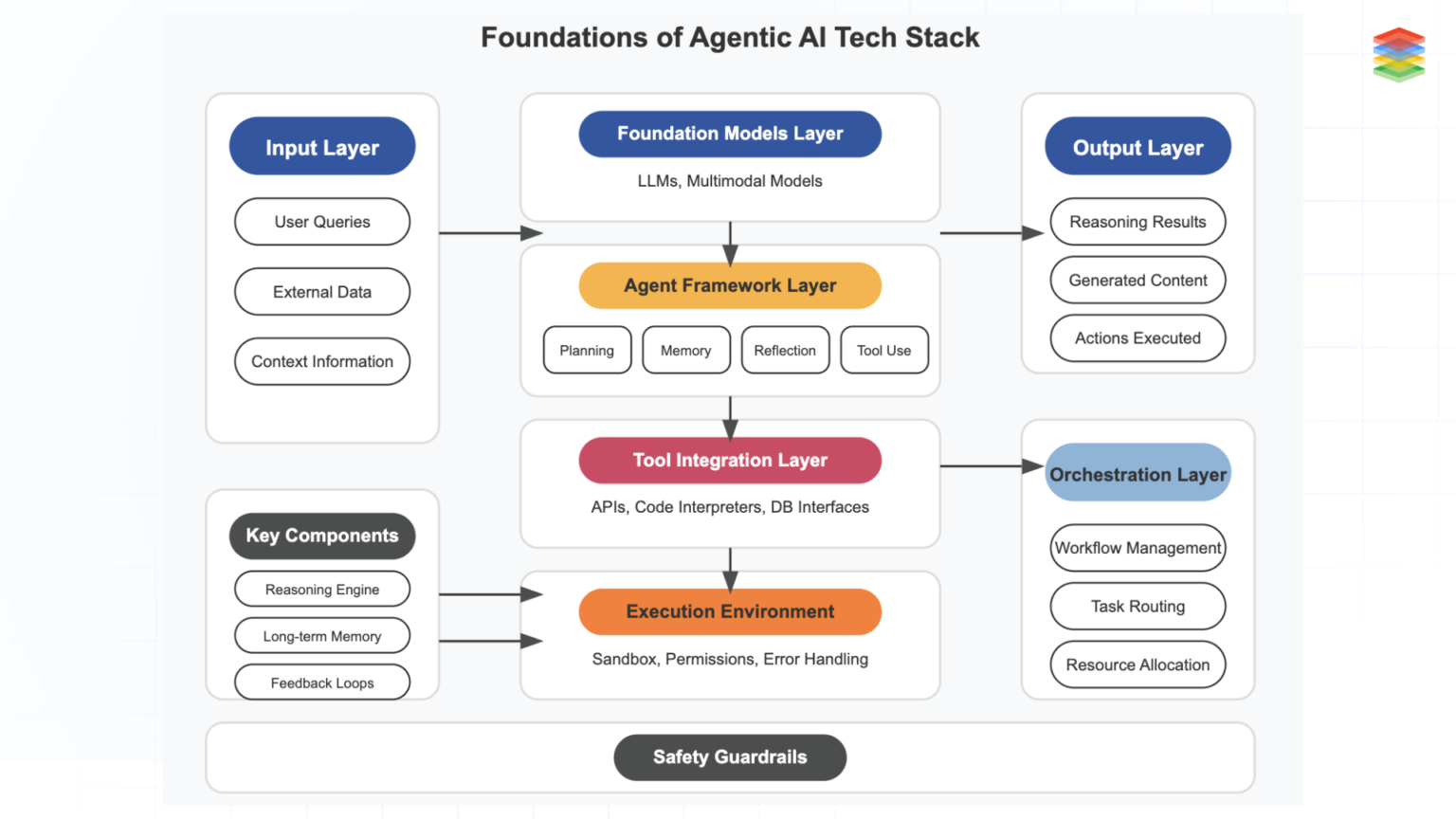

An AI agent stack is now a systems decision, not a model checkbox. Teams have to choose where the agent lives, how much authority it gets, which model providers they can rely on, and what runtime, memory, and tracing layers they can support in production. This guide is structured as a decision tree: start with the interface your users need, then narrow by autonomy, model strategy, orchestration, memory, observability, and deployment. Where useful, we point to official docs from vendors such as LangGraph, CrewAI, Mem0, LangSmith, Langfuse, E2B, and Modal.
If your users want the agent inside the IDE
Recommendation: IDE-native first, backend later
Choose an IDE-native path when the core workflow is code generation, refactoring, debugging, or code review assistance. This keeps context close to the repository and developer ergonomics high, which matters more than broad workflow automation when the agent is acting as a coding partner rather than a back-office worker.
For this branch, start with an editor-integrated product and add external infrastructure only when you need durable workflows, centralized evaluation, or organization-wide policy controls. If your team later needs background execution, handoffs, or long-running jobs, that is the point to connect the IDE experience to a backend orchestration layer such as LangGraph or your own service.
Pros
Cons
📌 Decision rule. If the primary user is a developer and the main loop is edit-run-review, start in the IDE and avoid building a full agent platform on day one.
If your team prefers a CLI-first workflow
Recommendation: CLI over a managed control plane
Pick a CLI-first stack when your users are operators, platform engineers, or power users who already automate through terminals, scripts, and CI. The command line is a strong fit for repeatable tasks such as repo analysis, migration assistance, incident response support, and batch content or data operations.
This branch works best when outputs need to compose with existing shell tools and pipelines. A practical pattern is a thin CLI client over a backend service, so you can preserve local ergonomics while still centralizing logs, prompts, and policy enforcement.
Pros
Cons
agent run \
  --task "summarize open incidents and propose remediation steps" \
  --model anthropic \
  --trace true \
  --output json
If you need a web app for broad internal adoption
Recommendation: Web app plus durable backend workflows
Choose a web app when the audience extends beyond engineering or when you need approvals, shared workspaces, dashboards, and role-based access. Browser delivery also makes it easier to standardize prompts, tools, and audit trails across teams.
This branch is usually the right answer for support, operations, finance, and go-to-market workflows where users need a guided interface rather than a terminal or editor. The tradeoff is that you will need stronger backend orchestration and observability from the start because the app becomes a product, not just a utility.
Pros
Cons
📌 Best fit. Use a web app when consistency, approvals, and shared visibility matter more than raw developer speed.
If the agent is really a backend service
Recommendation: Backend-first with durable orchestration
Treat the stack as backend infrastructure when the agent is invoked by APIs, events, queues, or scheduled jobs rather than by a human sitting in front of a UI. This is the right branch for document pipelines, customer support triage, internal copilots embedded in products, and multi-step business process automation.
Here, reliability beats novelty. Favor explicit state transitions, idempotent tool calls, and durable execution over flashy autonomy, because the system will be judged on uptime, cost control, and auditability.
Pros
Cons
“The more your agent looks like infrastructure, the more it should be engineered like infrastructure.”
Alatirok editorial view
If you only need pair programming, not autonomy
Recommendation: Keep it as an assistant
Keep the system in copilot mode when the human remains the decision-maker and the agent mainly drafts, explains, searches, or proposes edits. This is still the safest default for many engineering teams because it captures most of the productivity upside without introducing unattended execution risk.
In this branch, optimize for latency, context quality, and review UX rather than complex planning loops. You may not need a heavyweight orchestration framework at all if the agent is not managing long-lived state or tool chains.
Pros
Cons
⚠️ Common mistake. Do not add autonomous planning just because the framework supports it. If a human is always in the loop, simpler request-response patterns are often enough.
If you need autonomous or semi-autonomous execution
Recommendation: Autonomous only with guardrails
Move toward autonomous agents only when the task has clear boundaries, measurable success criteria, and tool permissions you can constrain. The best candidates are repetitive workflows with structured inputs and outputs, not open-ended strategic work.
This branch demands stronger orchestration, evaluation, and rollback paths. Frameworks that model state explicitly, such as LangGraph, are often easier to reason about than free-form agent loops when jobs need retries, checkpoints, and human approval steps.
Pros
Cons
If your model strategy centers on Anthropic, OpenAI, or open weights
Recommendation: Build for portability unless you have a hard reason not to
Model choice should follow your constraints, not brand preference. If you need broad ecosystem support and managed APIs, OpenAI and Anthropic both fit many production stacks; if you need deployment control, cost experimentation, or on-prem flexibility, open-weight models become more attractive.
The practical move in 2026 is to design for model portability where possible. Keep prompts, tool schemas, and evaluation harnesses separated from provider-specific code so you can swap models as quality, latency, pricing, or policy requirements change.
Pros
Cons
📌 Architecture tip. Abstract the model layer early. Provider lock-in usually shows up first in prompt formatting, tool calling conventions, and eval drift.
| Model path | Best when | Main tradeoff |
|---|---|---|
| Anthropic API | You want a major hosted model provider with strong developer adoption | Hosted dependency and provider-specific behavior |
| OpenAI API | You want a major hosted model provider with broad tooling support | Hosted dependency and provider-specific behavior |
| Open weights | You need more control over deployment or model customization | Higher infra and optimization burden |
If you need orchestration: LangGraph, CrewAI, or roll your own
Recommendation: LangGraph for production control, CrewAI for faster multi-agent prototyping
Use LangGraph when you want explicit stateful workflows, graph-based control, and durable execution patterns that fit production systems. It is a strong choice for teams that need branching logic, checkpoints, and a clear mental model for how an agent progresses through a task.
Use CrewAI when your team prefers a higher-level multi-agent abstraction and wants to move quickly on role-based agent collaboration. Roll your own when the workflow is narrow, your platform team already has strong internal primitives, or you want to avoid framework coupling and can afford to build state, retries, and tracing yourself.
Pros
Cons
{
  "orchestration_choice": "langgraph",
  "why": [
    "durable state",
    "explicit branching",
    "human approval checkpoints"
  ]
}
If you are deciding between RAG, Mem0, or both for memory
Recommendation: RAG first, add memory deliberately
Use retrieval-augmented generation when the main problem is grounding the model in documents, tickets, code, or knowledge bases. RAG is the right default for enterprise knowledge access because it is easier to inspect and update than latent memory-like behavior.
Use Mem0 or a similar memory layer when the system needs to retain user or workflow-specific preferences across sessions. In many real deployments, the answer is both: RAG for factual grounding and a memory layer for durable user context, with clear retention and deletion policies.
Pros
Cons
⚠️ Governance note. Persistent memory raises data retention and privacy questions quickly. Treat memory stores as governed application data, not as a magical model feature.
If observability is the bottleneck, choose LangSmith or Langfuse
Recommendation: Match observability to your framework gravity
Pick LangSmith when your stack already leans into the LangChain and LangGraph ecosystem and you want tight integration for traces, debugging, and evaluation workflows. Pick Langfuse when you want an observability layer that is broadly positioned around LLM engineering and tracing across different stacks.
The bigger decision is not which dashboard looks nicer. It is whether your team will actually instrument prompts, tool calls, latency, cost, and user feedback consistently enough to improve the system over time.
Pros
Cons
If deployment comes down to E2B, Modal, or self-hosted
Recommendation: Managed first, self-host selectively
Choose E2B when your agent needs secure cloud sandboxes for executing code or running isolated tasks. Choose Modal when you want a managed compute platform for Python-heavy workloads, scheduled jobs, or scalable backend execution without operating the full substrate yourself.
Self-host when compliance, network boundaries, or infrastructure strategy require it and your team can own the operational burden. For many teams, the right answer is hybrid: managed execution for fast iteration, then selective self-hosting for the workflows that truly need tighter control.
Pros
Cons
📌 Practical default. Managed runtimes usually win early because they shorten iteration cycles. Self-hosting makes sense when policy or economics clearly justify the added complexity.
Final decision matrix
Bottom line: choose the minimum viable stack
Most teams do not need the most agentic stack available. They need the lightest stack that fits their interface, autonomy, governance, and deployment constraints. Use the matrix below as a shortcut after walking the branches above.
| Decision branch | Choose this when | Recommended path |
|---|---|---|
| Form factor: IDE | Developers are the main users and the loop is edit-run-review | IDE-native assistant first; add backend orchestration later if needed |
| Form factor: CLI | Power users need scripting and CI integration | CLI client over a centralized backend control plane |
| Form factor: Web app | You need broad internal adoption, approvals, and shared visibility | Web app with durable backend workflows and RBAC |
| Form factor: Backend service | The agent runs from APIs, queues, or schedules | Backend-first architecture with explicit state and retries |
| Autonomy: Pair programming | A human reviews every meaningful action | Assistant-style system with minimal orchestration |
| Autonomy: Autonomous | Tasks are bounded and success criteria are measurable | Stateful orchestration with guardrails and approvals |
| Model strategy | You want flexibility across providers | Abstract model access and keep evals provider-aware |
| Orchestration | You need durable state and branching | LangGraph; use CrewAI for higher-level multi-agent patterns; custom only for narrow cases |
| Memory | You need grounding, personalization, or both | RAG first; add Mem0-style memory only when repeated context matters |
| Observability | You need traces and evals in production | LangSmith for LangChain gravity; Langfuse for a broader stack |
| Deployment | You need code execution or scalable managed compute | E2B for sandboxed execution, Modal for managed backend compute, self-host only when required |
Frequently asked questions
Use LangGraph when you need explicit state, branching, checkpoints, and durable execution without building those primitives from scratch. If your workflow is narrow and your platform team already has strong job control, retries, and tracing, a custom approach can still be reasonable.
Not always. Start with retrieval for grounding against documents and knowledge bases, then add a memory layer such as Mem0 only when cross-session preferences or prior interactions clearly improve outcomes.
Primary sources
- LangGraph documentation — LangChain
- CrewAI documentation — CrewAI
- Mem0 homepage — Mem0
- LangSmith documentation — LangChain
- Langfuse homepage — Langfuse
- E2B homepage — E2B
- Modal homepage — Modal
Last updated: May 20, 2026. Related: Agent Infrastructure.




