

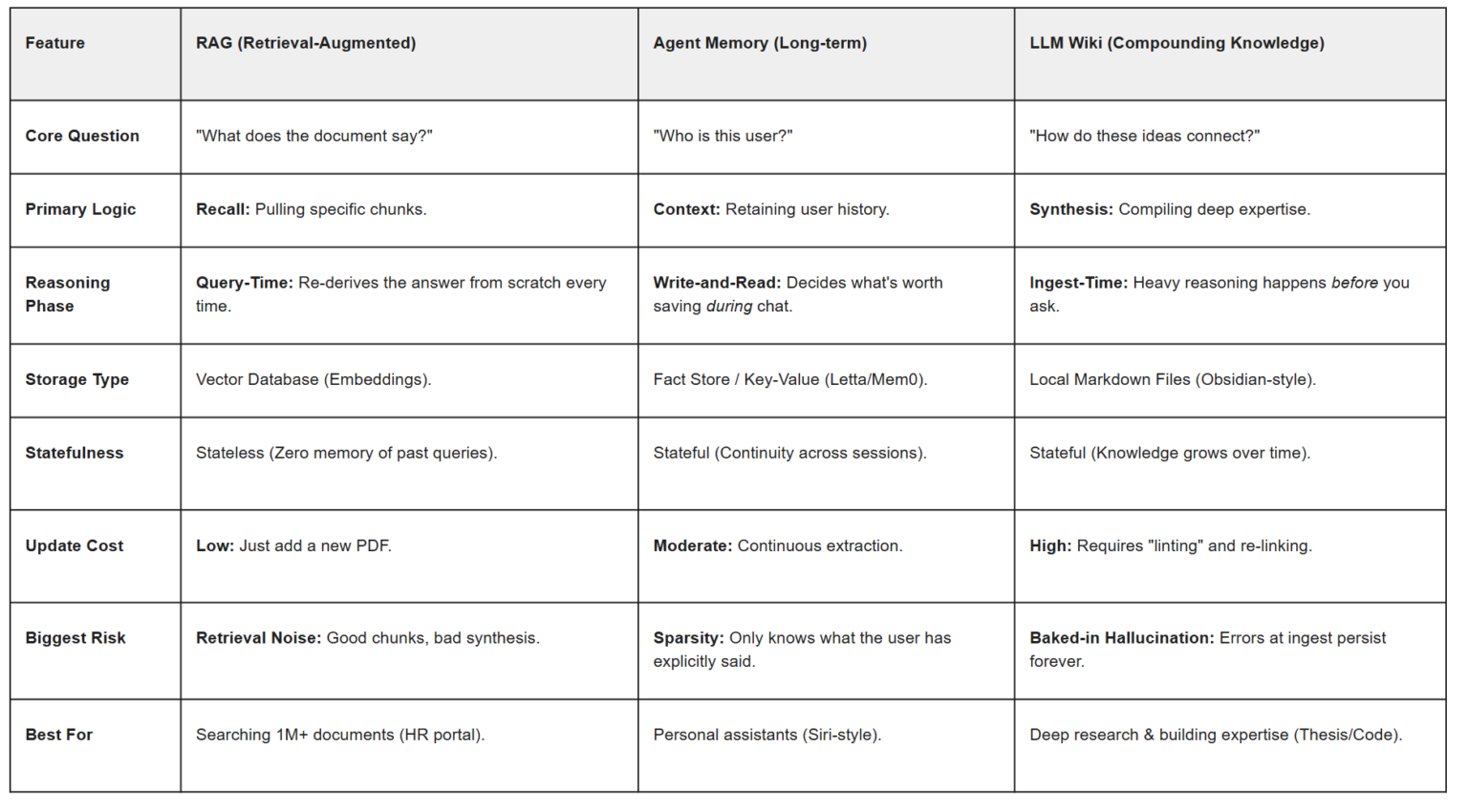

RAG vs agent memory is the most common architecture confusion we hear from builders. What we’re building: two minimal but real Python systems that answer the same architectural question in different ways. First, you’ll build a classic RAG pipeline with LangChain, Chroma, and OpenAI embeddings for grounded document Q&A. Then you’ll build an agent memory workflow with Mem0 for persistent user preferences and conversational context. Prereqs: Python 3.10+, an OpenAI API key, and a Mem0 API key for the memory section. If you want a deeper orchestration layer after this tutorial, see our guides to LangGraph and multi-agent LangGraph builds.
Stage 1 of RAG vs agent memory: decide what problem you are solving
2
working Python pipelines
One RAG build and one memory build
~150
total lines of code
Across both examples, excluding comments
The fastest way to choose between RAG and agent memory is to ask a narrow question: does the model need external knowledge, or does it need to remember a relationship? RAG retrieves passages from a corpus such as product docs, policies, manuals, or internal knowledge bases. Agent memory stores and recalls facts that emerge over time, such as a user preferring dark mode, a support customer running PostgreSQL, or a buyer always asking for invoices in EUR.
That distinction maps cleanly to the underlying tools. LangChain’s retrieval stack is built around loading documents, splitting them, embedding them, and querying a vector store; its retrieval docs cover the core pattern directly. Chroma provides the vector database layer, and OpenAI provides embedding models for semantic search. Mem0, by contrast, is designed around storing and retrieving memories for users, agents, and sessions rather than indexing a static document corpus.
A useful rule of thumb: if the source of truth already exists in files or pages, start with RAG. If the source of truth is created through interaction, start with memory. Many production systems need both, but separating the concerns first keeps the architecture simpler and easier to debug.

📌 Decision rule. Use RAG for static or curated knowledge bases. Use agent memory for persistent user facts, preferences, and conversational state. Combine them when an agent needs both grounded docs and long-lived personalization.
“RAG answers, “What do the documents say?” Memory answers, “What do we know about this user or ongoing task?””
Alatirok tutorial framing
| Question | Choose RAG | Choose agent memory |
|---|---|---|
| Where does the information come from? | Documents, FAQs, policies, manuals | Prior conversations, user profile, workflow history |
| How often does it change? | Batch or periodic updates | Continuously during interactions |
| What is the retrieval unit? | Chunks of text from a corpus | Facts or preferences tied to a user/agent/session |
| Primary failure mode | Bad chunking or poor retrieval relevance | Wrong, stale, or over-personalized memory |
Stage 2: Install dependencies and set environment variables
We will keep the setup intentionally small. The RAG example uses LangChain, Chroma, and OpenAI embeddings. The memory example uses Mem0’s Python SDK. OpenAI publishes current API docs for embeddings and chat models in its platform documentation, while LangChain documents package-specific imports in its Python docs.
Create a virtual environment, install the packages, and export your keys. The code below assumes a Unix-like shell. If you are on Windows PowerShell, set environment variables with $env:OPENAI_API_KEY="..." and $env:MEM0_API_KEY="...".
Pros
Cons
⚠️ Before you run the code. Check the current OpenAI model names in the official API docs before deploying. Model availability can change over time, and this tutorial is written to show the pattern rather than lock you to one SKU.
python -m venv .venv
source .venv/bin/activate

pip install -U langchain langchain-openai langchain-chroma chromadb openai mem0ai python-dotenv

export OPENAI_API_KEY="your_openai_api_key"
export MEM0_API_KEY="your_mem0_api_key"
Stage 3: Build a classic RAG pipeline with LangChain, Chroma, and OpenAI
This first build answers questions from a small local document set. The flow is standard RAG: create documents, split them into chunks, embed them with OpenAI, store them in Chroma, retrieve the most relevant chunks for a query, and pass those chunks to a chat model for answer generation.
LangChain’s retrieval guides and Chroma integration docs cover the same building blocks used here. We will use in-memory sample documents so the tutorial is self-contained, but the same pattern works with loaders for Markdown, HTML, PDFs, or web pages.
import os
from langchain_core.documents import Document
from langchain_text_splitters import RecursiveCharacterTextSplitter
from langchain_openai import OpenAIEmbeddings, ChatOpenAI
from langchain_chroma import Chroma

# 1) Create a tiny knowledge base
raw_docs = [
    Document(
        page_content=(
            "AcmeCloud pricing: The Starter plan includes 3 projects and email support. "
            "The Pro plan includes unlimited projects, SSO, and priority support."
        ),
        metadata={"source": "pricing.md"},
    ),
    Document(
        page_content=(
            "AcmeCloud security: Data is encrypted in transit and at rest. "
            "Enterprise customers can request audit logs and SAML-based single sign-on."
        ),
        metadata={"source": "security.md"},
    ),
    Document(
        page_content=(
            "AcmeCloud regions: The service is available in the US and EU. "
            "EU customers can choose EU data residency on supported plans."
        ),
        metadata={"source": "regions.md"},
    ),
]

# 2) Split documents into chunks
splitter = RecursiveCharacterTextSplitter(chunk_size=300, chunk_overlap=50)
splits = splitter.split_documents(raw_docs)

# 3) Embed and index in Chroma
embeddings = OpenAIEmbeddings(model="text-embedding-3-small")
vectorstore = Chroma.from_documents(
    documents=splits,
    embedding=embeddings,
    collection_name="acmecloud-docs",
)

# 4) Create a retriever
retriever = vectorstore.as_retriever(search_kwargs={"k": 3})

# 5) Retrieve relevant chunks for a user question
question = "Does the Pro plan include SSO, and is EU data residency available?"
retrieved_docs = retriever.invoke(question)

print("Retrieved context:\n")
for i, doc in enumerate(retrieved_docs, start=1):
    print(f"[{i}] source={doc.metadata.get('source')}\n{doc.page_content}\n")

# 6) Generate an answer grounded in the retrieved context
context = "\n\n".join(doc.page_content for doc in retrieved_docs)
llm = ChatOpenAI(model="gpt-4o-mini", temperature=0)

prompt = f"""
Answer the question using only the context below.
If the answer is not in the context, say you don't know.

Context:
{context}

Question: {question}
"""

response = llm.invoke(prompt)
print("Answer:\n")
print(response.content)
Stage 4: RAG vs agent memory — why this side is RAG, not memory
The RAG example works because the answer lives in the documents. The retriever finds chunks about pricing and regions, and the model synthesizes an answer from that evidence. Nothing in the pipeline depends on who the user is, what they asked last week, or what preferences they have accumulated over time.
That makes RAG ideal for docs Q&A, internal knowledge assistants, support deflection on product documentation, and compliance or policy lookup. It also makes debugging easier: you can inspect the retrieved chunks, tune chunk size, adjust k, swap embedding models, or improve the source corpus.
Where teams get into trouble is trying to use RAG as a substitute for user memory. If a customer says, “I’m on the Pro plan and I always want answers in German,” that is not a document retrieval problem. It is a persistent context problem. You can force it into a vector store, but the semantics, lifecycle, and privacy controls are different.
📌 Good fit for RAG. Static docs, product manuals, policy libraries, knowledge bases, and any workflow where the answer should be traceable to a source document.
| RAG tuning lever | What it affects |
|---|---|
| Chunk size and overlap | Whether relevant facts stay together during retrieval |
| Embedding model | Semantic matching quality |
| Retriever k | How much context reaches the model |
| Prompt grounding rule | Whether the model stays faithful to retrieved text |
Stage 5: Build an agent memory pipeline with Mem0
Now switch to a different problem. Suppose you are building a customer-facing agent that should remember a user’s language preference, deployment environment, and product tier across sessions. This is where memory systems fit. Mem0’s product and docs are built around storing and retrieving memories tied to users, agents, and sessions rather than indexing a static corpus.
The example below stores a few user facts, then asks the memory layer to return relevant memories for a new query. The exact response payload can evolve with the SDK, but the pattern is stable: add memories with identifiers, search or retrieve relevant memories for the current turn, and use those memories to shape the model response.
import os
from mem0 import Memory
from openai import OpenAI

# Initialize clients
memory = Memory(api_key=os.environ["MEM0_API_KEY"])
client = OpenAI(api_key=os.environ["OPENAI_API_KEY"])

user_id = "user_123"
agent_id = "support_agent"

# 1) Store a few persistent memories about the user
memory.add(
    [
        {"role": "user", "content": "I manage AcmeCloud in the EU region."},
        {"role": "user", "content": "I prefer answers in concise bullet points."},
        {"role": "user", "content": "Our team is on the Pro plan."},
    ],
    user_id=user_id,
    agent_id=agent_id,
)

# 2) Retrieve relevant memories for a new request
query = "Can you explain whether SSO is included for us?"
memories = memory.search(query=query, user_id=user_id, agent_id=agent_id)

print("Relevant memories:\n")
for item in memories.get("results", []):
    print(item.get("memory"))

# 3) Use those memories to personalize the answer
memory_context = "\n".join(
    item.get("memory", "") for item in memories.get("results", [])
)

system_prompt = (
    "You are a helpful support agent. Use the memory context to personalize the answer. "
    "If memory indicates user preferences, follow them. Do not invent product facts."
)

user_prompt = f"""
Memory context:
{memory_context}

User question:
{query}

Answer in a way that reflects the user's stored preferences.
"""

response = client.responses.create(
    model="gpt-4o-mini",
    input=[
        {"role": "system", "content": system_prompt},
        {"role": "user", "content": user_prompt},
    ],
)

print("\nPersonalized answer:\n")
print(response.output_text)
Stage 6: RAG vs agent memory — why this side is memory, not RAG
The memory example is not answering from a document corpus. It is recalling facts learned from prior interaction: the user is in the EU, prefers concise bullet points, and is on the Pro plan. Those facts may matter for tone, defaults, routing, or workflow decisions even when there is no document to retrieve.
This is the right pattern for assistants that need continuity across sessions, sales or support agents that should remember account context, and task agents that need to preserve state between steps. It is also where governance matters more. Memory can contain personal or sensitive information, so teams need clear rules for what gets stored, how long it persists, and how users can correct or delete it.
One more boundary is worth keeping in mind: memory should not become an unverified source of product truth. If the user asks whether SSO is included, the factual answer should still come from a trusted source such as documentation or account metadata. Memory can tell you who is asking and how to answer; it should not replace the canonical knowledge source.
⚠️ Common mistake. Do not use agent memory as your only factual backend for product, legal, or policy answers. Memory is best for personalization and continuity, not as the sole source of truth.
| Good fit for memory | Poor fit for memory |
|---|---|
| User preferences and communication style | Canonical product documentation |
| Long-lived task state | Regulatory text that must be cited verbatim |
| Account context learned over time | Large static knowledge bases |
Stage 7: RAG vs agent memory — combine them in one application
Most serious agent products end up combining both patterns. The agent first retrieves user-specific memory to understand context and preferences, then runs RAG against a trusted document corpus to answer the factual part of the question. This split keeps personalization and grounding separate, which is healthier for both quality and compliance.
The example below shows a simple composition. It retrieves memories from Mem0, retrieves documents from Chroma, and then asks the model to answer using the documents while adapting style and framing based on memory. This is often the cleanest architecture for support agents, onboarding copilots, and internal assistants.
Pros
Cons
📌 Production pattern. Memory for user context, RAG for factual grounding, orchestration for tool choice and control flow.
import os
from mem0 import Memory
from langchain_openai import OpenAIEmbeddings, ChatOpenAI
from langchain_chroma import Chroma
from langchain_core.documents import Document
from langchain_text_splitters import RecursiveCharacterTextSplitter

# --- Setup memory ---
memory = Memory(api_key=os.environ["MEM0_API_KEY"])
user_id = "user_123"
agent_id = "support_agent"

# --- Setup RAG corpus ---
docs = [
    Document(
        page_content="The Pro plan includes unlimited projects, SSO, and priority support.",
        metadata={"source": "pricing.md"},
    ),
    Document(
        page_content="EU data residency is available on supported plans.",
        metadata={"source": "regions.md"},
    ),
]

splitter = RecursiveCharacterTextSplitter(chunk_size=200, chunk_overlap=20)
splits = splitter.split_documents(docs)
embeddings = OpenAIEmbeddings(model="text-embedding-3-small")
vectorstore = Chroma.from_documents(splits, embeddings, collection_name="hybrid-demo")
retriever = vectorstore.as_retriever(search_kwargs={"k": 2})

# --- Query both systems ---
question = "Do we get SSO, and can you keep the answer brief?"
memories = memory.search(query=question, user_id=user_id, agent_id=agent_id)
retrieved_docs = retriever.invoke(question)

memory_context = "\n".join(
    item.get("memory", "") for item in memories.get("results", [])
)
doc_context = "\n\n".join(doc.page_content for doc in retrieved_docs)

llm = ChatOpenAI(model="gpt-4o-mini", temperature=0)
prompt = f"""
You are a support assistant.
Use memory context only for personalization and user-specific framing.
Use document context for factual claims.
If the answer is not in the document context, say you don't know.

Memory context:
{memory_context}

Document context:
{doc_context}

Question:
{question}
"""

response = llm.invoke(prompt)
print(response.content)
Stage 8: Where to go from here
If you only need document Q&A, stop at the RAG pipeline and focus on corpus quality, chunking, and evaluation. If you are building a stateful assistant, add memory deliberately and define retention, deletion, and review policies before you scale usage. The biggest architectural win is not choosing one camp forever; it is assigning each problem to the right subsystem.
From here, the next step is orchestration. Once an application needs tool calling, branching logic, retries, and multi-step state, a graph-based runtime becomes more useful than a single prompt chain. Our LangGraph guide explains the model, and our multi-agent LangGraph tutorial shows how to structure more complex agent systems.
Keep one final mental model: RAG retrieves evidence, memory retrieves relationship context. If you preserve that boundary, your agents will usually be easier to trust, easier to evaluate, and easier to evolve.
“On RAG vs agent memory, use RAG when the answer should be grounded in documents. Use memory when the system should remember the user.”
Alatirok tutorial summary
Frequently asked questions
Yes. If your application is mainly document question answering, a standard retrieval pipeline is enough. LangChain’s retrieval documentation shows the core pattern of loading, splitting, indexing, and retrieving documents without any persistent user memory: LangChain retrieval docs.
Yes, if the core job is continuity rather than document grounding. Mem0 is designed for storing and retrieving memories tied to users, agents, and sessions, which fits personalized assistants and long-running workflows: Mem0 docs.
For many teams, the safest pattern is hybrid: use memory for user context and preferences, and use RAG or another trusted backend for factual claims. That keeps personalization separate from source-of-truth retrieval. See LangChain retrieval for the grounding side and Mem0 for the memory side.
You can verify the OpenAI embeddings and responses APIs in the official platform docs at OpenAI embeddings and OpenAI Responses API. For the memory layer, start with the official Mem0 documentation.
Primary sources
- LangChain Python docs — LangChain
- LangChain retrieval concepts — LangChain
- LangChain Chroma integration — LangChain
- Chroma homepage — Chroma
- OpenAI embeddings guide — OpenAI
- OpenAI Responses API reference — OpenAI
- Mem0 homepage — Mem0
- Mem0 documentation — Mem0
Last updated: May 20, 2026. Related: Agent Infrastructure.




