

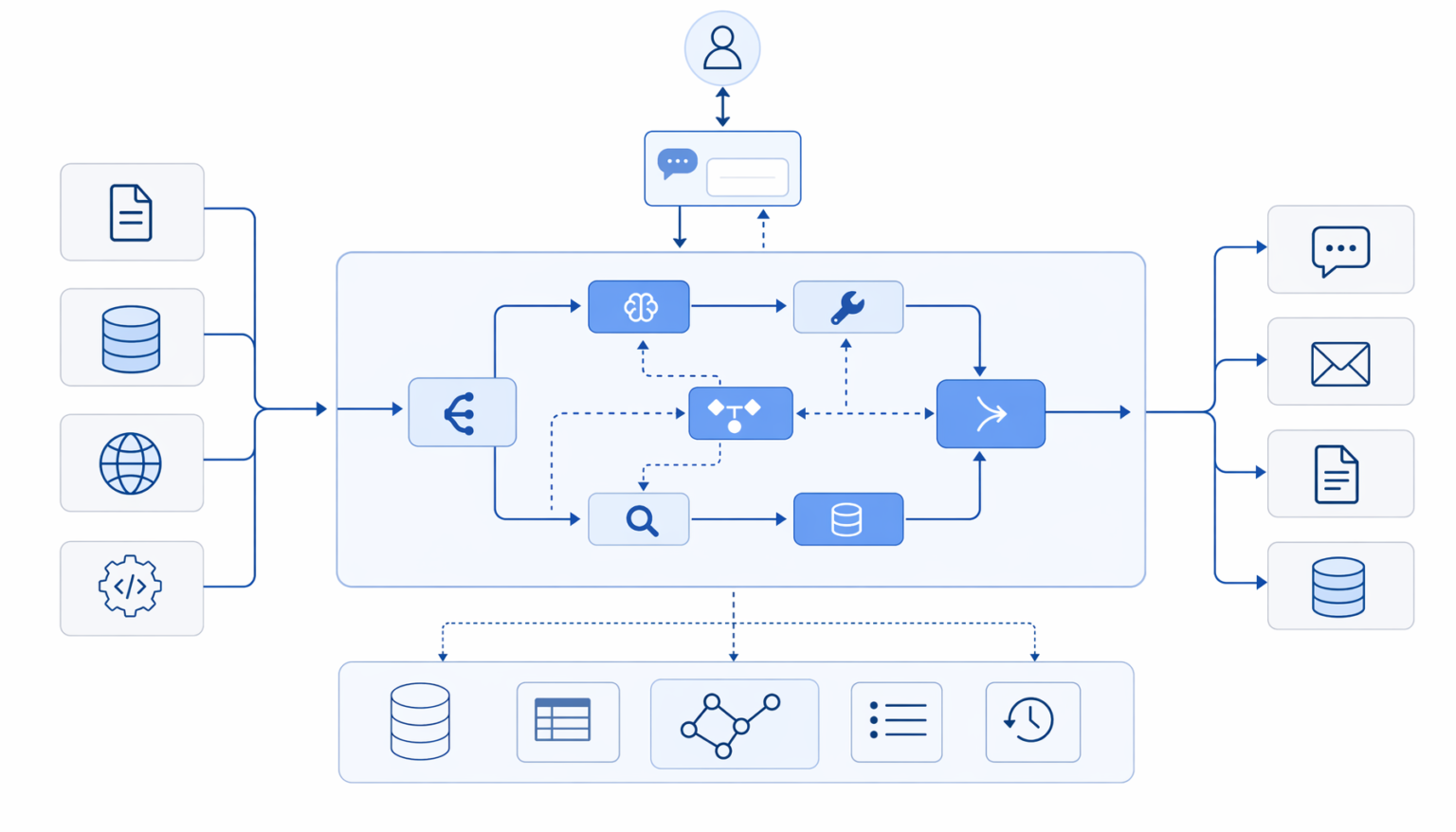

it is the graph-based orchestration framework from LangChain — the team’s strategic bet that durable, branching, multi-agent workflows need a different abstraction than the linear “chain” pattern that defined LangChain through 2023. It models agent workflows as directed graphs of typed state nodes and conditional edges, with a built-in persistence layer for long-running agents that checkpoint state across turns. By 2026, it powers most LangChain-ecosystem agents in production, runs as the orchestration layer inside the LangGraph Platform managed deployment service, and pairs naturally with LangSmith for observability and evaluation.
What is it?
it is an open-source orchestration framework for building stateful, multi-step AI agents. It lets you describe an agent’s workflow as a directed graph: each node is a function (typically an LLM call, tool call, or piece of business logic), each edge defines how state flows between nodes, and conditional edges route execution based on the agent’s current state. It fits agents whose control flow isn’t a straight line — agents that loop, branch, escalate, retry, and call sub-agents.
It is the strategic successor to LangChain’s classic chain abstraction. The chain pattern modeled agent workflows as linear pipelines (prompt → LLM → parser → tool → response). That worked for simple flows but broke down as production agents grew loops, conditional logic, multi-agent coordination, and durable state across days-long execution. The LangChain team built it as a new core primitive — not deprecating LangChain, but positioning it as the right abstraction for production agents.
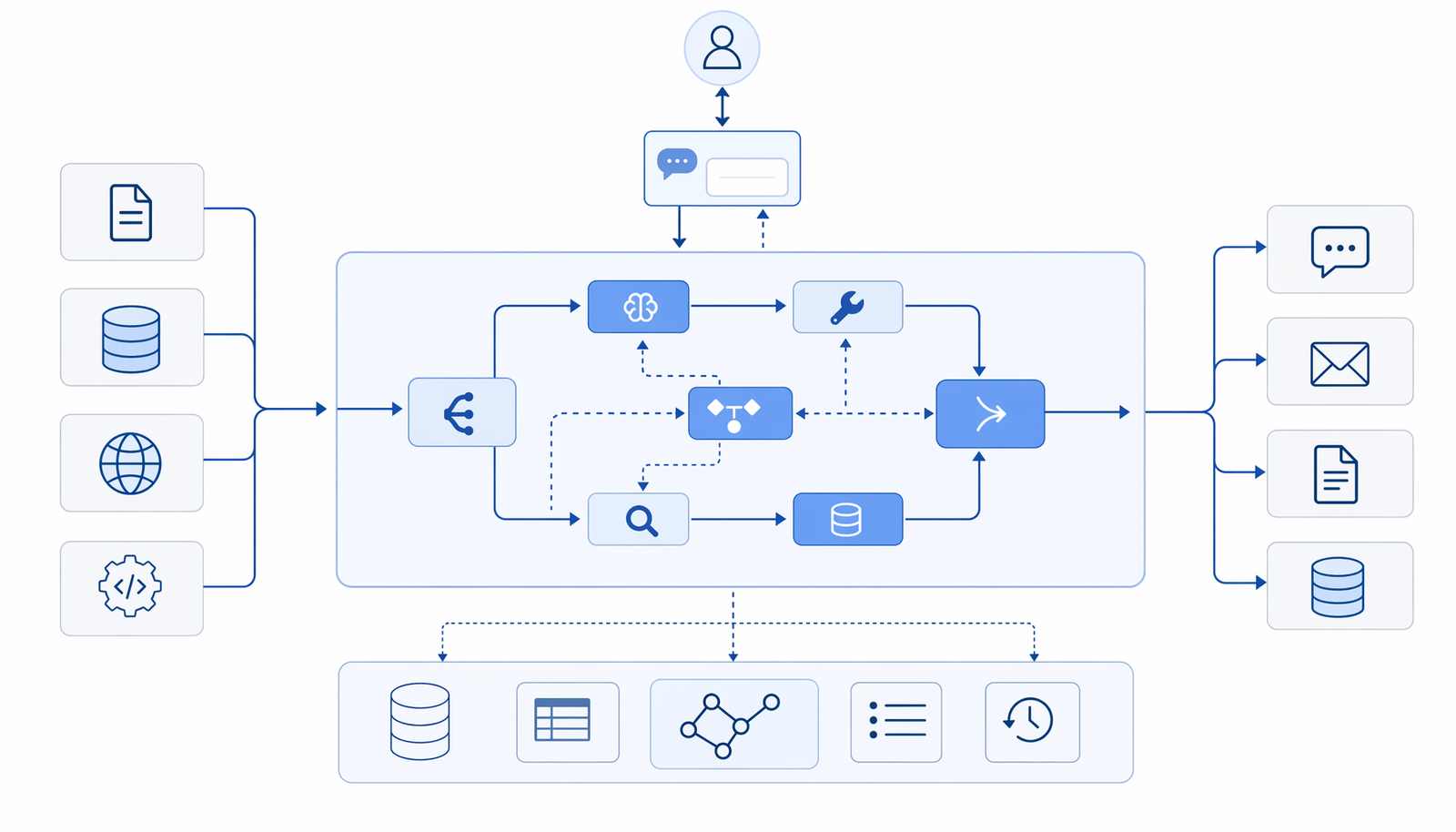
📌 Quick definition. it is the graph-based agent orchestration framework from LangChain. It models agents as directed graphs of state nodes and conditional edges. By 2026, it’s the most-used framework in the LangChain ecosystem for production agents. Repo: github.com/langchain-ai/langgraph. Docs: langchain-ai.github.io/langgraph.
How it works: nodes, edges, and state
A it workflow has three primitives. Specifically, State (typically a TypedDict that holds the agent’s current working memory), Nodes (functions that read state, do work, and return state updates), and Edges (the routing logic that decides which node runs next). Building a it agent is closer to drawing a flowchart than writing a procedural script — you define the shape of the workflow declaratively, then let the framework drive execution.
# Minimal LangGraph agent — single LLM node, single edge
from typing import TypedDict, Annotated
from langgraph.graph import StateGraph, START, END
from langgraph.graph.message import add_messages
from langchain_anthropic import ChatAnthropic

class AgentState(TypedDict):
 messages: Annotated[list, add_messages]

llm = ChatAnthropic(model='claude-sonnet-4-6')

def agent_node(state: AgentState):
 response = llm.invoke(state['messages'])
 return {'messages': [response]}

graph = StateGraph(AgentState)
graph.add_node('agent', agent_node)
graph.add_edge(START, 'agent')
graph.add_edge('agent', END)
app = graph.compile()

result = app.invoke({'messages': [{'role': 'user', 'content': 'Hello'}]})
Conditional edges and loops
The real power of the framework shows up when you add conditional routing. A conditional edge is a function that takes the current state and returns the name of the next node — letting you branch, loop, or terminate based on what’s happened so far. The classic tool-using agent pattern (LLM → tool? → execute tool → loop back to LLM, or finish) maps directly to the framework as a graph with a conditional edge from the LLM node.
📌 Why this matters. The conditional edge + back-edge pattern replaces what used to be a tangle of if/else inside an agent loop. The framework’s declarative shape makes the agent’s control flow visible — you can render the graph as a diagram, reason about possible execution paths, and debug failures by inspecting which node ran when.
# Tool-using agent with conditional loop back to LLM
from langgraph.graph import StateGraph, START, END
from langgraph.prebuilt import ToolNode

def should_continue(state: AgentState) -> str:
 last = state['messages'][-1]
 if last.tool_calls:
 return 'tools'
 return END

graph = StateGraph(AgentState)
graph.add_node('agent', agent_node)
graph.add_node('tools', ToolNode(tools))
graph.add_edge(START, 'agent')
graph.add_conditional_edges('agent', should_continue)
graph.add_edge('tools', 'agent') # loop back
app = graph.compile()
Persistence and checkpointing
the framework’s killer feature for production agents is built-in persistence. The framework can checkpoint state after every node execution to a configurable backend (in-memory, SQLite, Postgres, Redis). Agents can pause for human review, resume hours or days later, retry from any prior checkpoint, and branch off alternate histories — all without the application having to manage that state machinery itself.
The checkpointing isn’t just for resumability. It’s what makes time-travel debugging possible — when an agent does something wrong in production, you can rewind to any prior step, modify the state, and resume execution. Debugging production the framework agents is dramatically easier than debugging traditional agent loops where state lives in process memory.
# Checkpoint to Postgres for production durability
from langgraph.checkpoint.postgres import PostgresSaver

checkpointer = PostgresSaver.from_conn_string(
 'postgresql://user:pass@host:5432/langgraph'
)
checkpointer.setup() # creates tables on first run

app = graph.compile(checkpointer=checkpointer)

config = {'configurable': {'thread_id': 'user-123-session-456'}}
app.invoke({'messages': [..]}, config=config)
# Resume later with the same thread_id — state is loaded automatically
LangGraph Platform: the managed deployment surface
LangGraph Platform is LangChain’s managed hosting layer for the framework agents. You push a the framework application to LangGraph Platform and get production infrastructure: API endpoints, durable execution, automatic scaling, the LangGraph Studio visual debugger, and native integration with LangSmith for observability. Teams that don’t want to operate the checkpointing, queuing, and scaling infrastructure themselves can ship the framework agents to production without writing devops code.
Importantly, LangGraph Platform isn’t required to use the framework. Plenty of teams self-host the framework against their own Postgres and queue infrastructure. The platform is the convenience layer, not the lock-in — the framework itself remains open-source and portable.
| Capability | Self-hosted the framework | LangGraph Platform |
|---|---|---|
| Graph compilation | Yes | Yes |
| Postgres checkpointer | Bring your own | Managed |
| LangGraph Studio (visual debugger) | Local only | Cloud-hosted with team access |
| LangSmith integration | Manual setup | Native |
| Scaling, queuing, retries | DIY | Managed |
| Cron jobs / scheduled agents | DIY | Built-in |
| Cost model | Compute + dev time | Per-execution pricing |
the library vs LangChain: when to use which
This question comes up constantly. The short answer is: LangChain for components, the library for orchestration. You still reach for LangChain to access its component library — model wrappers, retrievers, document loaders, output parsers, the prompt template ecosystem. Most the library agents import heavily from LangChain even though the orchestration layer is the library.
“the library is what LangChain becomes once your agent stops being a script and starts being a state machine.”
Industry framing, 2026
| You’re building.. | Reach for |
|---|---|
| Linear pipeline (prompt → LLM → parse → respond) | LangChain LCEL (chains) |
| Agent with tool calls and a loop | the library |
| Multi-agent system with handoffs | the library |
| Long-running agent that pauses for human review | the library (with checkpointer) |
| RAG pipeline with retrieval + generation | LangChain LCEL (or the library for branching) |
| Quick prototype with no state | LangChain |
LangGraph competitors and alternatives
LangGraph isn’t the only graph-based agent framework in 2026. Three categories of alternatives matter: (1) other open-source agent orchestrators (CrewAI, AutoGen, AgentScript), (2) workflow engines repurposed for AI (Temporal, Inngest), and (3) cloud-native agent platforms (AWS Bedrock Agents, Google Vertex AI Agent Builder).
| Framework | Positioning | Best for |
|---|---|---|
| LangGraph | Graph-based agent orchestration with first-class persistence | Production agents in the LangChain ecosystem |
| CrewAI | Role-based multi-agent framework | Multi-agent teams where each agent has a specific role |
| AutoGen (Microsoft) | Conversation-based multi-agent framework | Research and prototyping multi-agent systems |
| Temporal | General workflow engine, AI is one use case | Companies already running Temporal for non-AI workflows |
| Inngest | Serverless workflow engine with AI primitives | TypeScript-first teams |
What this means for builders
First, if you’re building production AI agents in Python, LangGraph should be your default. The persistence layer, time-travel debugging, and visual debugging via LangGraph Studio are real productivity wins over a hand-rolled agent loop. The learning curve is real — invest a few days in the docs and tutorials before you commit to it.
Next, if you’re already running LangChain in production, the migration to LangGraph is incremental — you can keep LangChain components (LLM wrappers, retrievers) and adopt LangGraph just for the orchestration layer. This is the path most teams take in 2026.
Finally, if you’re building a multi-agent system, LangGraph competes with CrewAI and AutoGen. By contrast, LangGraph is the more flexible primitive — you can model role-based teams (à la CrewAI) or conversation-based teams (à la AutoGen) as LangGraph subgraphs. Betting on LangGraph as the orchestration layer keeps your options open.
Builder’s take
I’ve shipped multiple LangGraph-based agents in production through 2024-2025. The framework is opinionated in ways that pay off over time — declarative graph shape, first-class persistence, time-travel debugging. The cost is a learning curve: LangGraph’s idioms (state TypedDicts, the Annotated reducer pattern, conditional edges) take a few days to internalize before you’re productive.
- Use the checkpointer from day one. Even in development. The cost of adding it later — when you need to debug a production agent that’s been running for 6 hours — is much higher than setting it up upfront.
- Render the graph as a diagram. LangGraph can export the graph as a Mermaid diagram. Specifically, do this and put it in your repo’s README. It becomes the canonical reference for how the agent works, and reviewers can spot control-flow bugs at a glance.
- Pair LangGraph with LangSmith. The two are designed to work together. Your tracing, evaluation, and graph orchestration all live in the same mental model — debugging production issues becomes dramatically easier.
Common LangGraph pitfalls to avoid
Teams adopting LangGraph hit the same three problems in their first weeks. Worth knowing about before you ship.
- Overusing checkpointing. Checkpointing every node sounds safe but slows down everything and bloats your Postgres. The right default is checkpoint at human-in-the-loop boundaries and on long-running tool calls — not on every LLM message.
- Deeply nested subgraphs. LangGraph supports subgraphs but every level of nesting makes debugging exponentially harder. If you have three levels of subgraphs you’ve probably built a state machine inside a state machine — flatten it.
- Thread ID management. The configurable thread_id is what binds a conversation to its checkpointed state. Forgetting to scope thread_ids per user / per session is the cause of approximately every cross-user data leak in LangGraph postmortems. Bake the user ID into the thread ID from day one.
- Treating LangGraph as a chatbot framework. It’s general-purpose graph orchestration. The most interesting LangGraph applications aren’t chatbots — they’re long-running data pipelines, scheduled batch agents, and event-driven workers. Don’t constrain yourself to the chat metaphor.
Frequently asked questions
Yes. LangGraph is open source under the MIT license — available at github.com/langchain-ai/langgraph. Specifically, the framework itself, the checkpointer backends, and the SDK are all open source. By contrast, LangGraph Platform (the managed hosting service) is a commercial product. As a result, you can adopt LangGraph entirely with self-hosted infrastructure and zero LangChain Inc revenue capture if you want to.
No. Specifically, LangChain remains the component library (LLM wrappers, retrievers, document loaders, output parsers, prompt templates). LangGraph is the orchestration layer that sits on top. As a result, most production LangGraph agents import heavily from LangChain — they coexist by design.
No. Specifically, LangGraph runs anywhere you can run Python — your laptop, a Docker container, a Kubernetes cluster, a serverless function. By contrast, LangGraph Platform is the managed hosting layer that provides production infrastructure (Postgres checkpointing, queues, autoscaling, cron) so you don’t have to build it yourself. As a result, smaller teams often start with self-hosted LangGraph and migrate to LangGraph Platform once operational complexity exceeds the cost.
They optimize for different things. Specifically, CrewAI is opinionated about multi-agent systems with named roles (“the researcher”, “the writer”, “the editor”) and pre-defined collaboration patterns. By contrast, LangGraph is the lower-level primitive — you can build a CrewAI-style role-based system as a LangGraph subgraph, but you can also build many other agent shapes that don’t fit CrewAI’s role model. As a result, LangGraph trades opinionation for flexibility.
LangGraph Studio is the visual debugger for LangGraph agents — a desktop application that renders your agent’s graph, lets you step through execution, inspect state at each node, and time-travel to any prior checkpoint. Specifically, Studio is free and works against any LangGraph application (self-hosted or LangGraph Platform). As a result, it’s the closest thing to a debugger that exists for LLM-based agents — once teams adopt Studio, they don’t go back to print-statement debugging.




