

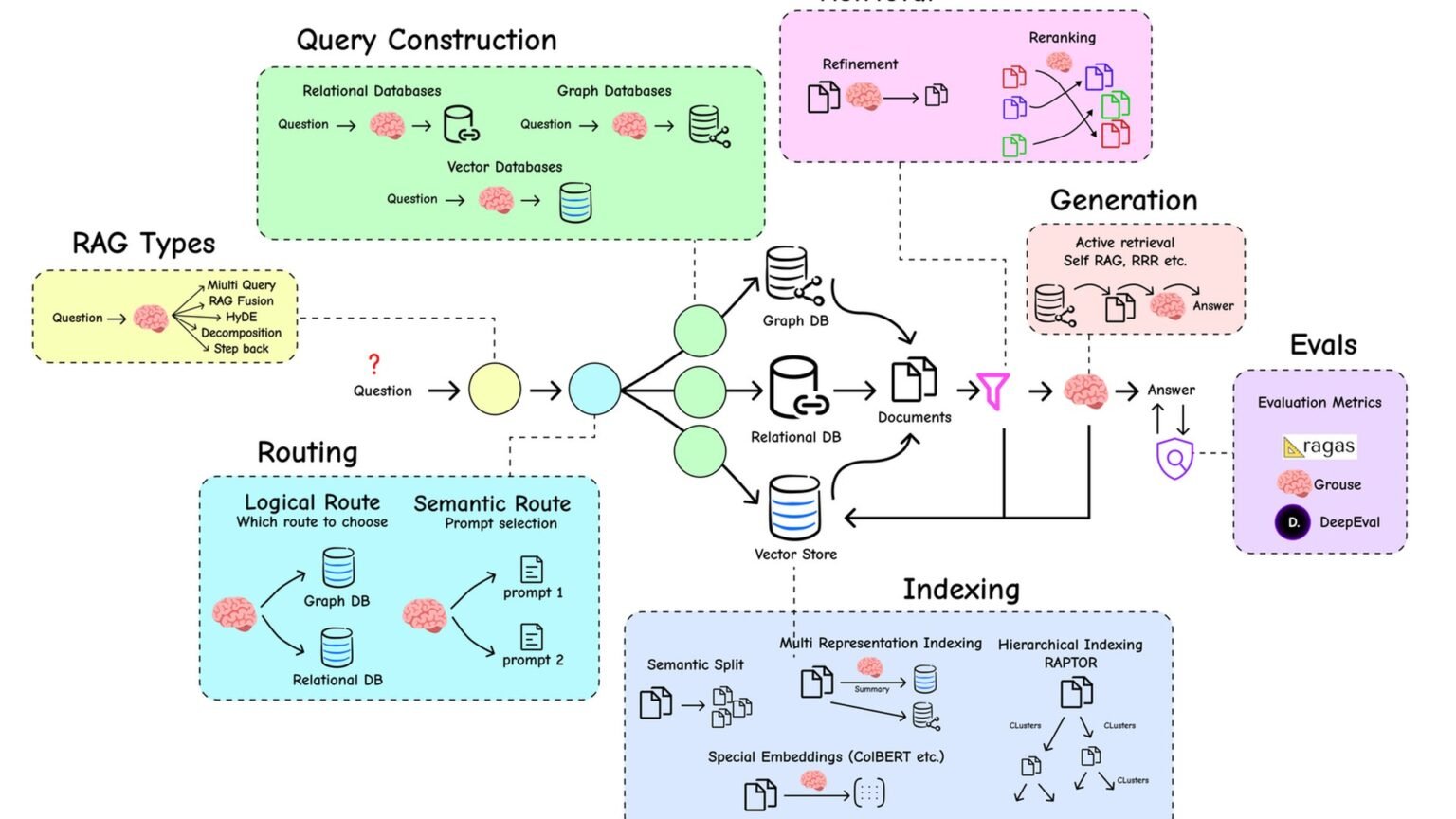

This RAG tutorial Python walkthrough builds a production-style retrieval-augmented generation pipeline the way teams actually ship it in 2026: chunk documents, embed them, store vectors in Qdrant, retrieve the best matches, and force the model to answer from context only. The pattern matches the core ideas documented by LangChain, LlamaIndex, and the Qdrant Python client.
What we’re building, and what you need first
500-1000
Typical chunk size
Usually measured in tokens, not characters
50-100
Typical overlap
Helps preserve context across chunk boundaries
3-5
Typical top-K retrieval
Higher K can help multi-document questions
3072
Embedding dimension
For OpenAI text-embedding-3-large
A modern RAG system has two phases. First comes indexing: parse documents, split them into chunks, create embeddings, and store those vectors in a database. Then comes querying: embed the user’s question, retrieve the nearest chunks, and prompt the model with that context. That is the core of this RAG tutorial Python build, and it remains the most practical architecture for private docs, internal knowledge bases, and product manuals.
The implementation here uses OpenAI embeddings, Qdrant as the vector store, and pypdf for PDF parsing. For a local demo, Qdrant can run in memory; for production, point the client at a managed or self-hosted Qdrant instance. The chunking defaults reflect the broad 2026 consensus: roughly 500-1000 tokens per chunk, 50-100 tokens of overlap, dense embeddings, and a retriever that returns a small top-K set before generation.
Install the basics first:
You need Python 3.10+ and an OpenAI API key in your environment before running the code.
pip install openai qdrant-client pypdf“Answer using ONLY the provided context. If the answer isn’t in the context, say so.”
System prompt used in the tutorial code
What official docs should you keep open while building?
Use the LlamaIndex docs for indexing and retrieval patterns, the LangChain RAG tutorial for framework-level reference, and the Qdrant Python client repo for client usage. If you want Anthropic’s current guidance on embeddings via Voyage, start at Anthropic docs.
Stage 1: Build the full production-style pipeline
Here is the complete working example. It is intentionally compact, but it covers the full lifecycle: collection creation, PDF parsing, chunking, embedding, upsert, retrieval, and answer generation. If you only copy one section from this article, copy this one. The code follows the same broad retrieval flow you will see in framework docs, but keeps the moving parts visible.
This is the heart of the RAG tutorial Python pattern: keep indexing and querying separate, and make the prompt explicitly refuse unsupported answers.
from openai import OpenAI
from qdrant_client import QdrantClient
from qdrant_client.models import VectorParams, Distance, PointStruct
from pypdf import PdfReader
import uuid

client_oai = OpenAI()
client_qdrant = QdrantClient(":memory:")  # use a URL for production

EMBEDDING_MODEL = "text-embedding-3-large"
EMBED_DIM = 3072

# === INDEX PHASE ===
def chunk(text, size=800, overlap=100):
    """Sliding window chunker — words not characters."""
    words = text.split()
    return [" ".join(words[i:i+size]) for i in range(0, len(words), size-overlap)]

def index_pdf(path):
    text = "".join(p.extract_text() for p in PdfReader(path).pages)
    chunks = chunk(text)
    embeds = client_oai.embeddings.create(model=EMBEDDING_MODEL, input=chunks).data
    points = [
        PointStruct(id=str(uuid.uuid4()), vector=e.embedding, payload={"text": c, "source": path})
        for c, e in zip(chunks, embeds)
    ]
    client_qdrant.upsert(collection_name="docs", points=points)

client_qdrant.create_collection(
    collection_name="docs",
    vectors_config=VectorParams(size=EMBED_DIM, distance=Distance.COSINE),
)

index_pdf("docs/handbook.pdf")
index_pdf("docs/spec.pdf")

# === QUERY PHASE ===
def answer(question: str, k=4):
    q_embed = client_oai.embeddings.create(model=EMBEDDING_MODEL, input=question).data[0].embedding
    hits = client_qdrant.search(collection_name="docs", query_vector=q_embed, limit=k)
    context = "\n\n".join(h.payload["text"] for h in hits)
    response = client_oai.chat.completions.create(
        model="gpt-4o",
        messages=[
            {"role": "system", "content": "Answer using ONLY the provided context. If the answer isn't in the context, say so."},
            {"role": "user", "content": f"Context:\n{context}\n\nQuestion: {question}"},
        ],
    )
    return response.choices[0].message.content, hits

answer_text, sources = answer("How do I configure tenant isolation?")
print(answer_text)
print("\nSources:")
for h in sources:
print(f" - {h.payload['source']} (score={h.score:.3f})")Why use Qdrant in memory for the first pass?
QdrantClient(":memory:") is a fast way to validate your indexing and retrieval logic without provisioning infrastructure. For production, switch to a real Qdrant deployment and keep the same collection and search flow. The client repository documents both local and remote usage at Qdrant Python client.
Stage 2: Understand the three lines that make or break retrieval
Most RAG bugs are not in the framework. They come from three places: bad chunking, mismatched embeddings, or weak retrieval settings. In practice, a RAG tutorial Python implementation succeeds or fails on a few lines of code that look almost trivial.
Start with chunking. The tutorial uses a sliding window over words because it is easy to inspect and reason about. In production, sentence-aware chunking is often better, but the main principle is unchanged: do not create chunks so small that they lose meaning, and do not create chunks so large that retrieval returns noisy slabs of text.
def chunk(text, size=800, overlap=100):
    words = text.split()
    return [" ".join(words[i:i+size]) for i in range(0, len(words), size-overlap)]
How does hybrid search compare to dense-only?
Dense retrieval is usually the right default for semantic questions, but it can miss exact keywords, IDs, or rare terms. Hybrid search combines vector search with lexical retrieval such as BM25. If your users ask for error codes, policy names, or exact field names, hybrid often outperforms dense-only. The LangChain RAG tutorial is a good starting point for retrieval composition, while Qdrant and database-backed stacks can be paired with keyword search layers.
What chunking strategy should you use for PDFs?
PDF extraction is messy. Headers, footers, and multi-column layouts can pollute chunks. Before tuning embeddings, inspect raw extracted text from pypdf. If the document is structurally complex, consider a parser with layout awareness, then chunk on paragraph or sentence boundaries. LlamaIndex’s documentation at docs.llamaindex.ai covers a range of ingestion and node parsing patterns.
| Parameter | Recommended starting point | Why it matters |
|---|---|---|
| Chunk size | 500-1000 tokens | Controls how much context each retrieved unit carries |
| Chunk overlap | 50-100 tokens | Prevents sentence and paragraph breaks from losing meaning |
| Embedding model | text-embedding-3-large or BGE-large | Determines semantic retrieval quality |
| Top-K | 3-5 | Balances recall against prompt noise |
| Distance metric | COSINE for normalized embeddings | Must match the embedding behavior |
Stage 3: Embed, search, and prompt with discipline
The embedding call, the vector search, and the final prompt are the operational core of the system. Each one should be explicit and inspectable. That matters because retrieval quality is easier to debug when you can print the top hits, scores, and source metadata before the model ever writes an answer.
For embeddings, use a current model and match your vector dimension to the collection schema. For search, start with k=4 or k=5. For prompting, keep the instruction narrow. The strongest line in this RAG tutorial Python example is not the search call; it is the refusal rule that tells the model to say the answer is absent when the context does not support it.
Always print retrieved sources during development. If retrieval is wrong, generation will be wrong too.
q_embed = client_oai.embeddings.create(
    model="text-embedding-3-large",
    input=question,
).data[0].embedding

hits = client_qdrant.search(
    collection_name="docs",
    query_vector=q_embed,
    limit=4,
)
When does reranking matter?
Reranking matters when your first-stage retriever returns plausible but not ideal chunks. A common pattern is: retrieve top 20 with embeddings, rerank to top 5 with a cross-encoder or dedicated reranker, then prompt the LLM. This is especially useful for long documents, near-duplicate chunks, and questions that require subtle relevance judgments. If your current system retrieves vaguely related passages, reranking is often the next upgrade.
How do I handle multi-tenant RAG safely?
Do not rely on prompting for tenant isolation. Store tenant identifiers in metadata and filter at retrieval time so the search space is restricted before generation. In Qdrant-based systems, that usually means adding payload fields such as tenant ID and applying filters in search requests. The same principle applies whether you use raw clients or higher-level frameworks.
Stage 4: Tune the five parameters that actually matter
There is no shortage of RAG knobs, but only a handful consistently change outcomes. Chunk size is first. If chunks are too small, the retriever finds fragments that lack enough context to answer. If chunks are too large, retrieval returns broad passages that bury the relevant sentence. Start around 800 tokens and adjust based on your document style.
Overlap is second. A modest overlap preserves continuity when a sentence or paragraph spans chunk boundaries. Embedding model choice is third. The editor-provided baseline here uses text-embedding-3-large, while open alternatives such as BGE remain common in self-hosted stacks. Fourth is top-K: too low and you miss evidence, too high and you flood the prompt. Fifth is distance metric. COSINE is the usual default for normalized embeddings; if your embedding stack expects dot product, configure the store accordingly.
If you remember one thing from this RAG tutorial Python guide, remember this: tune retrieval before you touch prompt wording. Most weak answers begin upstream.
response = client_oai.chat.completions.create(
    model="gpt-4o",
    messages=[
        {
            "role": "system",
            "content": "Answer using ONLY the provided context. If the answer isn't in the context, say so.",
        },
        {
            "role": "user",
            "content": f"Context:\n{context}\n\nQuestion: {question}",
        },
    ],
)
How should I choose between OpenAI and open embeddings?
If you want the fastest path to a working system, use a hosted embedding model with clear API ergonomics and stable dimensions. If you need tighter control over cost, deployment, or data locality, open embedding models can make sense. The key is consistency: your collection schema, distance metric, and query-time embeddings all need to match the indexing setup.
Stage 5: Fix the failure modes before users find them
The most useful part of any production tutorial is not the happy path. It is the failure analysis. Four issues show up repeatedly. First, chunk boundaries cut sentences mid-flow, which produces partial evidence and brittle retrieval. The fix is overlap or sentence-aware chunking. Second, hybrid queries fail because dense retrieval misses exact keywords. The fix is to add lexical search alongside vectors for terms, IDs, and literal strings.
Third, the model invents details. That usually means the prompt is too permissive or the retrieved context is weak. Tighten the system instruction and make unsupported answers explicit. Fourth, reranking is missing. If your top-K set contains roughly relevant chunks but not the best ones, add a reranker between retrieval and generation. Those four fixes solve a surprising share of real-world incidents in a RAG tutorial Python deployment.
Pros
Cons
Do not treat hallucinations as only a model problem. In RAG systems, they are often retrieval problems first.
What document parsing issues break retrieval quality fastest?
Repeated headers, footers, page numbers, and broken reading order are common culprits. If every chunk contains the same boilerplate, retrieval scores become less meaningful. Clean the text before embedding, and inspect a sample of chunks manually. This is often more valuable than changing models.
| Failure mode | What it looks like | Practical fix |
|---|---|---|
| Bad chunk boundaries | Relevant sentence split across chunks | Use overlap or sentence-aware chunking |
| Dense-only misses exact terms | Queries for IDs or product names fail | Add hybrid lexical search |
| Model invents details | Answer sounds plausible but unsupported | Use stricter grounding prompt |
| No reranking | Top hits are related but not best | Rerank retrieved chunks before prompting |
Stage 6: Know when not to use RAG
RAG is not the answer to every context problem. If the full source material already fits comfortably in the model’s context window, just put it in the prompt. That removes an entire retrieval layer and all the tuning that comes with it. If you need exact recall over structured data, use SQL, filters, or even plain grep. If you need numerical computation, call a tool rather than hoping retrieval plus generation will do arithmetic reliably.
That counter-recommendation matters because teams often reach for RAG too early. A good RAG tutorial Python guide should also tell you when to avoid the pattern. Retrieval-augmented generation is best when the corpus is too large for direct prompting, changes often, and benefits from semantic search over prose.
What is the simplest decision rule for using RAG?
Use RAG when you need semantic retrieval over a changing body of unstructured text. Do not use it when exact lookup, deterministic computation, or small-context prompting solves the problem more directly.
Where to go from here
Once the baseline works, the next upgrades are straightforward. Replace the in-memory store with a real Qdrant deployment, add metadata filters for tenant or document type, evaluate retrieval quality on a fixed question set, and consider reranking for harder corpora. If your documents contain exact identifiers or product SKUs, add hybrid search. If your ingestion pipeline handles messy PDFs, invest in parsing quality before changing models.
Frameworks can help once you understand the raw mechanics. LlamaIndex provides higher-level ingestion and retrieval abstractions, while LangChain documents end-to-end RAG composition patterns. Anthropic’s documentation is also relevant if you are evaluating embedding options via Voyage. The point of this RAG tutorial Python build is not to avoid frameworks forever. It is to make the underlying retrieval pipeline legible enough that you can debug it when production traffic arrives.
Create a small evaluation set of real user questions and inspect retrieved chunks before you optimize prompts.
Frequently asked questions
A minimal production stack is: parse documents, chunk them, create embeddings, store them in a vector database, retrieve top matches, then prompt the model with those matches. The official LangChain RAG tutorial and LlamaIndex docs both describe this retrieval-first pattern.
Qdrant gives you a dedicated vector database with a Python client, collection configuration, and similarity search primitives that fit RAG well. For implementation details, see the Qdrant Python client repository.
A practical starting point is roughly 500-1000 tokens per chunk with 50-100 tokens of overlap. That guidance aligns with common retrieval practice and is easy to test against your own corpus. If you are using a framework, inspect how it handles chunking in the LlamaIndex docs.
Skip RAG when the source material already fits in the model context window, when you need exact recall from structured data, or when the task is numerical and should call a tool instead. The retrieval pattern is powerful, but it is not a substitute for SQL, filters, or deterministic computation.
Primary sources
- LlamaIndex documentation — LlamaIndex
- LangChain RAG tutorial — LangChain
- LlamaIndex GitHub — GitHub
- Qdrant Python client — GitHub
- Anthropic documentation — Anthropic
Last updated: May 23, 2026. Related: Agent Infrastructure.




