

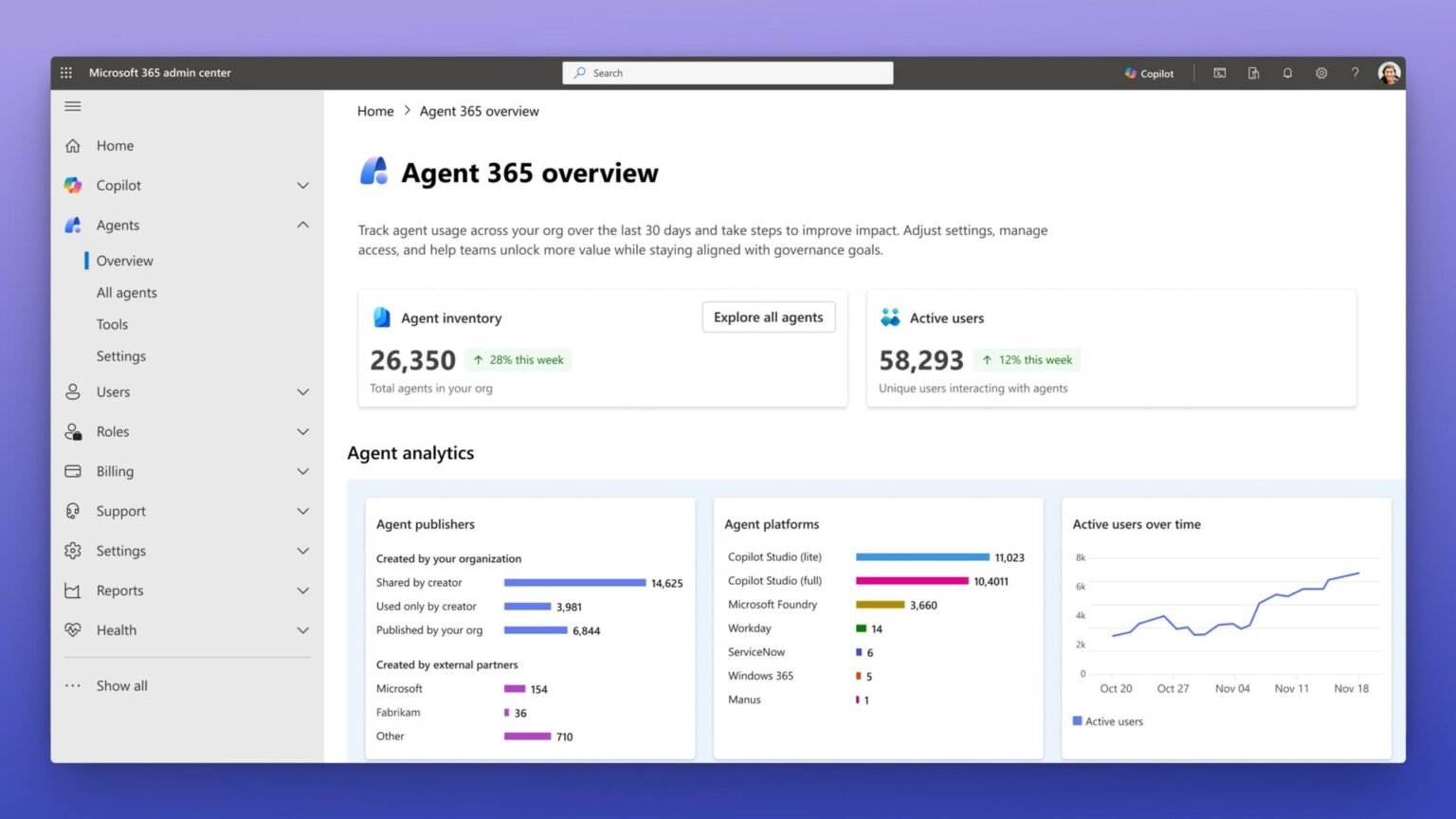

Yes, Agent 365 can govern an existing AWS, OpenAI, or Vertex agent without a Copilot Studio rebuild. But discovery is not governance, and the difference decides what you can actually enforce.
Can Agent 365 govern third-party agents without a rebuild?
Yes, Agent 365 can govern third-party agents without rebuilding them in Copilot Studio, but only after you explicitly onboard each agent with the Agent 365 SDK and an Entra Agent ID. Until then, a non-onboarded AWS Bedrock, OpenAI, or Vertex AI agent appears only as shadow activity through Defender and Entra signals, which is detection, not control. This single distinction, discovery versus governance, is what every marketing page glosses over and what decides whether your security team can actually enforce a policy on a non-Microsoft agent. The direct answer to can Agent 365 govern third-party agents: yes, via registry sync and Entra Agent ID, with limits worth knowing.
Microsoft moved Agent 365 to general availability on May 1, 2026, positioning it as the control plane to observe, govern, and secure agents across Microsoft and partner clouds. The GA release added registry sync for AWS Bedrock and Google Cloud, so admins can pull an existing third-party agent into the Microsoft 365 admin center with, in Microsoft’s own words, no development work required. That phrase is doing a lot of work, and reading it as full governance is the most expensive mistake an architect can make here.
The good news for anyone dreading a migration: there is no Copilot Studio rebuild. You do not recreate your Bedrock agent as a Copilot Studio topic flow. Your agent keeps running on its native runtime. What changes is the identity and instrumentation layer you wrap around it. Getting from ‘visible’ to ‘governed’ is an SDK and configuration task, not a port. The rest of this article maps exactly where that line sits and what crosses it.
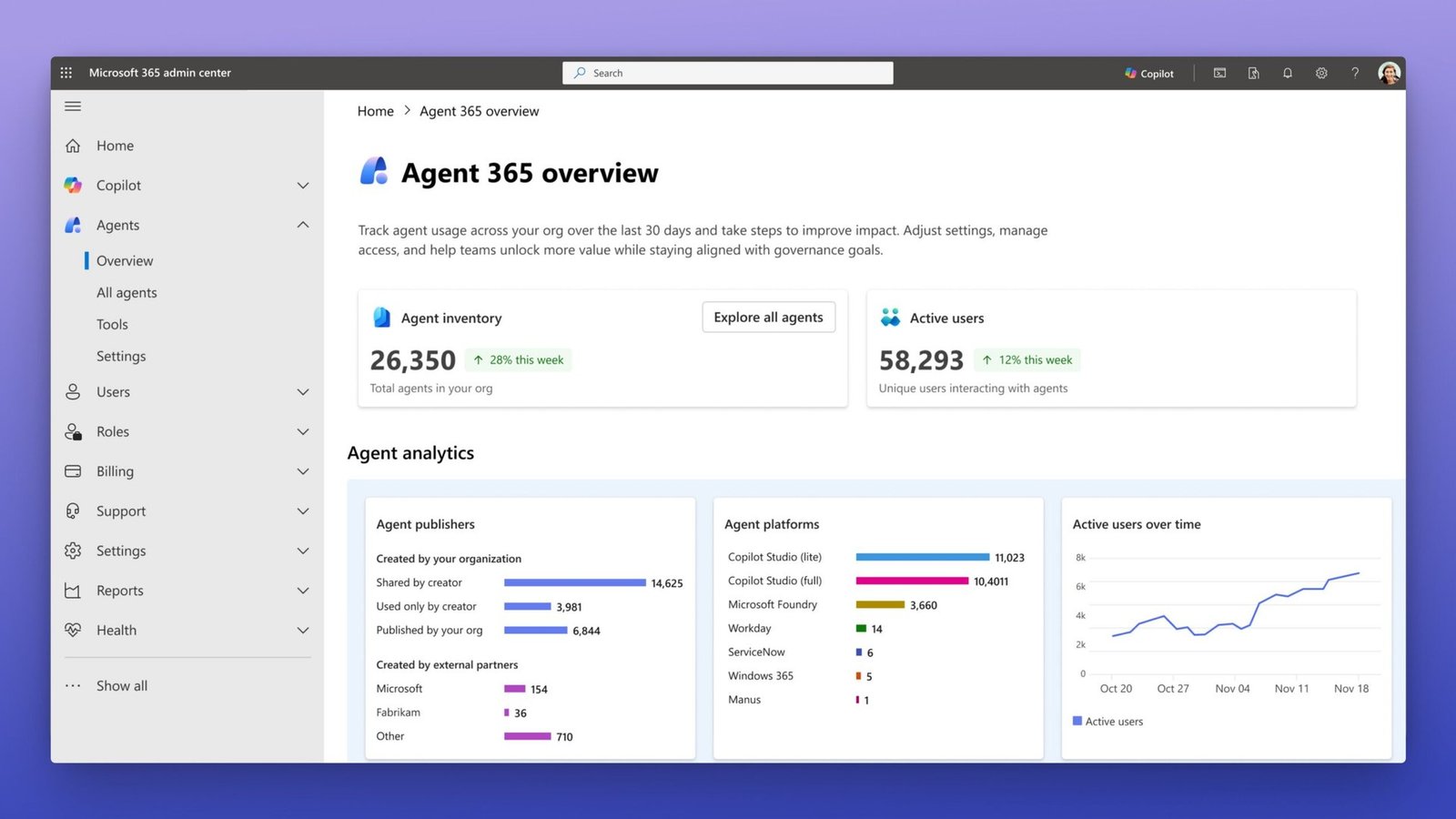
Discovery is automatic and free of code. Governance, meaning Registry inclusion with policy, Conditional Access, and Purview DLP enforcement, requires onboarding the agent onto an Entra Agent ID via the Agent 365 SDK. No Copilot Studio rebuild is involved at any point.
Shadow agent vs governed agent in Agent 365: what is the difference?
A shadow (discovered) agent is one Agent 365 can see through Defender and Entra signals but cannot enforce policy against; a governed (onboarded) agent has its own Entra Agent ID and inherits Conditional Access, Purview, and Defender controls automatically. Microsoft’s own developer guidance is explicit that registration only makes an agent ‘visible and manageable in the Microsoft 365 admin center,’ while the security benefits flow from building the agent on an agent identity blueprint.
Oasis Security put the governance gap plainly in its 2026 analysis: ‘The line stops at identity. Agent 365 governs who the agent is and how it signs in. What the agent carries and uses to actually do its work is still outside scope’ until you onboard it. Discovery alone does not prevent over-access or data exfiltration. For AWS Bedrock AgentCore and Google Gemini Enterprise agents pulled in via registry sync, the same source notes there is ‘no runtime enforcement’ in the preview state, which is the trap admins fall into when they assume a name in the registry equals a policy on the wire.
The table below is the decision-grade view. Read it as the literal difference between a row in a dashboard and an enforceable control. Every ‘No’ in the Discovered column is a capability your security team does not have until onboarding flips it to ‘Yes.’
“Seeing a shadow agent in the admin center is a detection event, not a control. Nothing is enforced until it has an Entra Agent ID.”
Decision rule for Agent 365 governance
| Capability | Discovered / Shadow (registry sync only) | Onboarded / Governed (Agent 365 SDK + blueprint) |
|---|---|---|
| Visible in agent Registry | Yes (inventory entry only) | Yes (full managed entry) |
| Has an Entra Agent ID | No (surfaced as activity signal) | Yes (first-class tenant identity) |
| Conditional Access enforceable | No | Yes (same engine as human users) |
| Purview DLP / sensitivity labels | No | Yes (automatic, no extra code) |
| Defender runtime monitoring & response | Signals / anomaly detection only | Yes (full threat response workflows) |
| Lifecycle (start / stop / delete) | Basic, rolling out for AWS & GCP | Yes (admin-controlled) |
| License required | Agent 365 + native platform | Agent 365 + native platform |
| Autonomous A2A / A2T (own identity, no human) | No | Frontier preview only |
Can Agent 365 manage AWS Bedrock agents and Vertex AI agents?
Yes. Agent 365 can register existing AWS Bedrock and Google Vertex AI agents automatically with no development work, because the Bedrock and Vertex APIs let Agent 365 pull the agents directly into the Microsoft 365 admin center. Microsoft’s developer documentation states this directly: for agents built on Vertex AI or Amazon Bedrock, ‘registration requires no development work. No SDK integration, no blueprint, and no code changes are required.’
But registration is the Register tier, the first of Agent 365’s four incremental capability tiers (Register, Observability, Work IQ, AI teammate). After registration, Microsoft’s docs say you ‘can use the Agent 365 SDK to add observability, Work IQ tool access, and other capabilities incrementally.’ That word incrementally is the whole story: a registered Bedrock agent is an inventory item until you invest in the higher tiers. Registry sync for AWS Bedrock and Google Cloud shipped as a public preview at GA, with basic lifecycle governance (start, stop, delete) rolling out across those clouds.
So ‘can Agent 365 manage AWS Bedrock agents’ has two true answers depending on what you mean by manage. Inventory and basic lifecycle: yes, out of the box. Identity-level governance with Conditional Access and DLP: only after you onboard the agent onto a blueprint via the SDK. Both can be true for the same agent on the same day; one is a checkbox and the other is a project.
Registry sync for AWS Bedrock and Google Cloud is a public preview as of the May 1, 2026 GA. Do not assume preview-grade discovery equals production-grade enforcement on those clouds.Does Agent 365 govern OpenAI Agents SDK agents?
Agent 365 can govern an OpenAI Agents SDK agent, but the path is onboarding via the Agent 365 SDK, not automatic registry sync. Unlike Bedrock and Vertex, an OpenAI-stack agent does not get pulled in code-free; you instrument it and bind it to an Entra Agent ID blueprint. The Agent 365 SDK is explicitly designed to layer governance on top of agents built with other frameworks, including the OpenAI Agents SDK, the Microsoft Agent Framework, the Claude Code SDK, and LangChain.
Practically, this means observability instrumentation through the Agent 365 SDK (OpenTelemetry-based) plus a blueprint that provisions the Entra Agent ID. For OpenAI, LangChain, and Microsoft Agent Framework stacks, Microsoft supports auto-instrumentation; if your runtime cannot use the SDK or runs in an unsupported language such as Java, you can send telemetry directly over OTLP/HTTP without an SDK dependency. Either way, the agent’s code stays on its own framework. You are adding a governance sidecar of identity and telemetry, not rewriting the agent in Copilot Studio.
The same logic applies to Claude Code, Cursor, Ollama, and other local or third-party binaries. Defender and Intune can detect them as shadow activity on managed devices, but governance does not begin until each one is explicitly onboarded. As Oasis Security notes, third-party platforms like OpenAI Assistants and LangChain are ‘entirely outside the program’ until you bring them in. Detection is the on-ramp; it is never the destination.
Decision tree: how to govern an existing third-party agent in Agent 365

START: You have an existing agent on AWS Bedrock / Vertex AI / OpenAI / LangChain / Claude.

Step 1  Do you just need it VISIBLE in the admin center?
        - Bedrock or Vertex AI  -> Enable registry sync. No code. Done (discovery only).
        - OpenAI / LangChain / local binary -> It may surface as SHADOW activity
          via Defender/Intune on managed devices. Still discovery only.

Step 2  Do you need ENFORCEABLE policy (Conditional Access, Purview DLP,
        Defender response, governed Work IQ tool access)?
        - If NO  -> Stop. Registry visibility is enough. No rebuild, no SDK.
        - If YES -> Continue. This is onboarding, NOT a Copilot Studio rebuild.

Step 3  Onboard the agent (Agent 365 SDK + CLI):
        a) Create an agent identity BLUEPRINT  -> provisions an Entra Agent ID.
        b) Add OBSERVABILITY instrumentation (Agent 365 SDK / OpenTelemetry distro,
           or raw OTLP/HTTP if the SDK can't run in your stack).
        c) (Optional) Add WORK IQ tool access for governed M365 data/actions.
        Result: Conditional Access, Purview DLP, and Defender now apply AUTOMATICALLY.

Step 4  Does the agent need its OWN identity with NO tied human user
        (autonomous A2A / A2T 'AI teammate')?
        - That tier (AI teammate) is FRONTIER PREVIEW ONLY. Not GA. Plan accordingly.

Step 5  Licensing check (always):
        Agent 365 license  +  the agent's NATIVE platform license (AWS/OpenAI/Google).
        Agent 365 does NOT replace vendor licensing.
How do you onboard a third-party agent without rebuilding it?
To onboard a third-party agent without rebuilding it, you create an Entra Agent ID via an agent identity blueprint using the Agent 365 CLI, then instrument the existing agent with the Agent 365 SDK for observability. The agent keeps running on its native cloud; you are adding identity and telemetry, not porting logic to Copilot Studio. Microsoft’s docs are unambiguous that building on a blueprint is what unlocks ‘governed Work IQ tool access, Microsoft Purview data protection, Microsoft Defender threat monitoring, and Entra ID governance, making your agent a fully governed enterprise identity.’
The mechanics: the Agent 365 CLI provisions a Microsoft Entra Agent ID as a first-class identity in your tenant, subject to the same Conditional Access, identity protection, and access reviews as human users. Once the blueprint exists, Purview sensitivity labels, DLP, and retention apply to every data interaction automatically, ‘with no extra code,’ and Defender monitors the agent’s behavior for anomalies using the same alert and response workflows as any user. That is the payoff for onboarding: governance you do not have to wire up per-control.
Crucially, the identity model can shift if you move an agent that used delegated user access onto its own identity. Microsoft warns that an agent with its own identity ‘doesn’t inherit a calling user’s access at run time’; you must grant and re-scope permissions to the agent identity directly. This is the part teams underestimate. The code does not move, but the authorization model does, and that re-scoping is where careful governance review pays off.
Pros
Cons
Are Agent 365 autonomous A2A and A2T agents generally available?
No. Fully autonomous agents that operate with their own identity and no tied human user, what Microsoft calls AI teammates and what governance teams describe as A2A or A2T patterns, remain in Frontier preview only and are not generally available. Microsoft’s developer documentation states that the AI teammate type, an agent that operates in Microsoft 365 with its own mailbox, Teams presence, and directory entry, ‘is only available for tenants participating in the Frontier preview program.’
This matters for any roadmap that assumes you can put a fully autonomous third-party agent under GA-grade governance today. You can register and even observe a third-party agent at GA, and you can govern one that acts on behalf of a user. But the moment the agent runs as its own actor with no human in the loop, you are in preview terms, with availability and capabilities Microsoft explicitly says ‘might change over time.’ Treat that tier as experimental, not as a control you can attest to in an audit.
The same GA release did extend public-preview support for agents operating with their own credentials and permissions, including in team workflows, alongside Entra network controls that can inspect traffic and block malicious prompt attacks for Copilot Studio and local agents. So the direction of travel is clear. But for the specific question an architect needs answered, can I govern a fully autonomous, human-less third-party agent under GA terms, the honest answer in mid-2026 is not yet.
If your control narrative depends on governing autonomous, human-less agents, document that this capability (AI teammate / A2A / A2T) is Frontier preview, not GA. Preview features carry no GA service commitments and can change.
Do third-party agents need both an Agent 365 license and their native license?
$15
per user / month
Agent 365 standalone list price; also bundled in Microsoft 365 E7
May 1, 2026
GA date
Agent 365 reached general availability for commercial customers
4
capability tiers
Register, Observability, Work IQ, AI teammate (the last is Frontier-only)
2
licenses required
Agent 365 plus the agent’s native-platform license; the control plane is additive
Yes. A governed third-party agent requires both an Agent 365 license and the agent’s own native-platform license. Agent 365 is a control plane that does not replace AWS Bedrock, OpenAI, or Google Cloud licensing, nor your existing Microsoft 365, Dynamics 365, or Copilot Studio costs. Licensing analysts at SAMexpert and Schneider IT Management both confirm that Agent 365 sits on top of, not in place of, the underlying runtime and vendor commercial terms.
Agent 365’s standalone price is 15 US dollars per user per month, and it is also bundled in the Microsoft 365 E7 SKU. That fee buys the governance layer: Registry, Entra Agent ID, observability, and the Defender, Purview, and Conditional Access integrations. It does not buy the agent’s compute or model usage. A Bedrock agent still incurs AWS charges; an OpenAI Agents SDK agent still incurs OpenAI usage; ISV partner agents carry their own commercial terms, and you connect platform by platform.
The budgeting takeaway is simple but easy to miss in a proof of concept: model your total cost of ownership as Agent 365 plus native platform plus any ISV fees, not as a single line. Teams that scoped only the 15 dollars per user found the governance layer cheaper than the runtime it governs. The control plane is rarely the expensive part; the agents it watches are.
Verdict: Agent 365 governs third-party agents, but only after you onboard them
Yes, without a rebuild, but discovery is not governance
Agent 365 can govern your existing AWS, OpenAI, or Vertex agent without a Copilot Studio rebuild, but only an onboarded agent with an Entra Agent ID is actually governed. A discovered agent is a fire alarm; an onboarded agent is the sprinkler system. If you take one thing from this article, make it the line between the Discovered and Onboarded columns of the table above.
The decision is therefore not ‘rebuild or not.’ You never rebuild. The decision is how far up the capability ladder each agent needs to climb: visible-only via registry sync, observable via the SDK, or fully governed on a blueprint with Work IQ tool access. Match the tier to the risk. A read-only research agent might be fine at the Observability tier; an agent touching regulated customer data belongs on a blueprint with Purview DLP and Conditional Access enforced.
And keep two flags planted: autonomous human-less agents are Frontier-preview-only, and the licensing always stacks. Get those right and Agent 365 is a genuinely strong way to pull multi-cloud agent sprawl under one governance plane, without the migration tax every rival framework quietly assumes.
Builder’s take
I run governance reviews for agents across three clouds, and the Agent 365 question I get most is the wrong one. People ask ‘will Agent 365 see my Bedrock agent?’ The answer is almost always yes. The question that actually matters is ‘can it stop my Bedrock agent from exfiltrating a customer list?’ That answer depends entirely on whether you onboarded it. Here is what I tell teams shipping on Cyntr and Loomfeed:
- Treat the registry like a fire alarm, not a sprinkler. Seeing a shadow agent in the admin center is a detection event, not a control. Nothing is enforced until you give that agent an Entra Agent ID via a blueprint.
- Budget for the SDK work up front. ‘No development work’ gets you visibility. Purview DLP, Conditional Access, and Defender response require instrumenting the agent with the Agent 365 SDK and standing it up on an agent identity blueprint. That is real engineering, just not a rebuild.
- Do not promise your CISO autonomous-agent governance yet. Agents that run with their own identity and no tied human user are still Frontier-preview-only. If your roadmap assumes GA-grade control over fully autonomous A2A agents, push it right.
- Read the licensing twice. Agent 365 is a control plane, not a substitute for your AWS or Google bill. You pay both. The teams that get burned are the ones who assumed the $15/user covered the underlying runtime.
Frequently asked questions
Yes. Agent 365 never requires a Copilot Studio rebuild. Existing AWS Bedrock and Vertex AI agents register code-free via registry sync, and OpenAI Agents SDK or LangChain agents are onboarded by instrumenting them with the Agent 365 SDK and binding them to an Entra Agent ID blueprint. The agent keeps running on its native runtime; you add identity and telemetry, not new logic.
A shadow (discovered) agent is visible through Defender and Entra signals or registry sync but has no Entra Agent ID and no enforceable policy. A governed (onboarded) agent has its own Entra Agent ID via an identity blueprint and automatically inherits Conditional Access, Purview DLP, and Defender threat response. Discovery is detection; governance is enforcement, and only onboarding crosses that line.
Yes. Microsoft’s GA release on May 1, 2026 added registry sync for AWS Bedrock, so admins can discover, inventory, and perform basic lifecycle actions (start, stop, delete) with no development work. But that is the Register tier only. Identity-level governance with Conditional Access and Purview DLP requires onboarding the Bedrock agent onto an Entra Agent ID blueprint using the Agent 365 SDK.
It can, but not via automatic registry sync the way Bedrock and Vertex do. You onboard an OpenAI Agents SDK agent by instrumenting it with the Agent 365 SDK (auto-instrumentation is supported for OpenAI, LangChain, and Microsoft Agent Framework) and provisioning an Entra Agent ID blueprint. Until then it is only detectable as shadow activity, not governed.
No. Agents that run with their own identity and no tied human user, which Microsoft calls AI teammates and which map to autonomous A2A and A2T patterns, remain in Frontier preview only as of mid-2026. They are not generally available and carry preview terms, so treat that tier as experimental rather than an audit-grade control.
Yes. Agent 365 is a control plane priced at $15 per user per month (or bundled in Microsoft 365 E7) and does not replace AWS, OpenAI, or Google Cloud licensing, nor your existing Microsoft 365 or Copilot Studio costs. Budget total cost of ownership as Agent 365 plus the native platform plus any ISV partner-agent fees.
Primary sources
- Microsoft Agent 365, now generally available, expands capabilities and integrations — Microsoft Security Blog
- Get started with Agent 365 development (capability tiers, blueprints, SDK) — Microsoft Learn
- Ecosystem partner agents available in Agent 365 — Microsoft Learn
- Registry sync in the Microsoft 365 agent registry (preview) — Microsoft Learn
- Agent 365 & Entra Agent ID vs. Oasis: discovery vs. governance for hybrid environments — Oasis Security
- Agent 365 Licensing: What It Covers and Costs — SAMexpert
- Microsoft Agent 365: Licensing, Key Features, FAQ — Schneider IT Management
Last updated: June 3, 2026. Related: Governance.




