

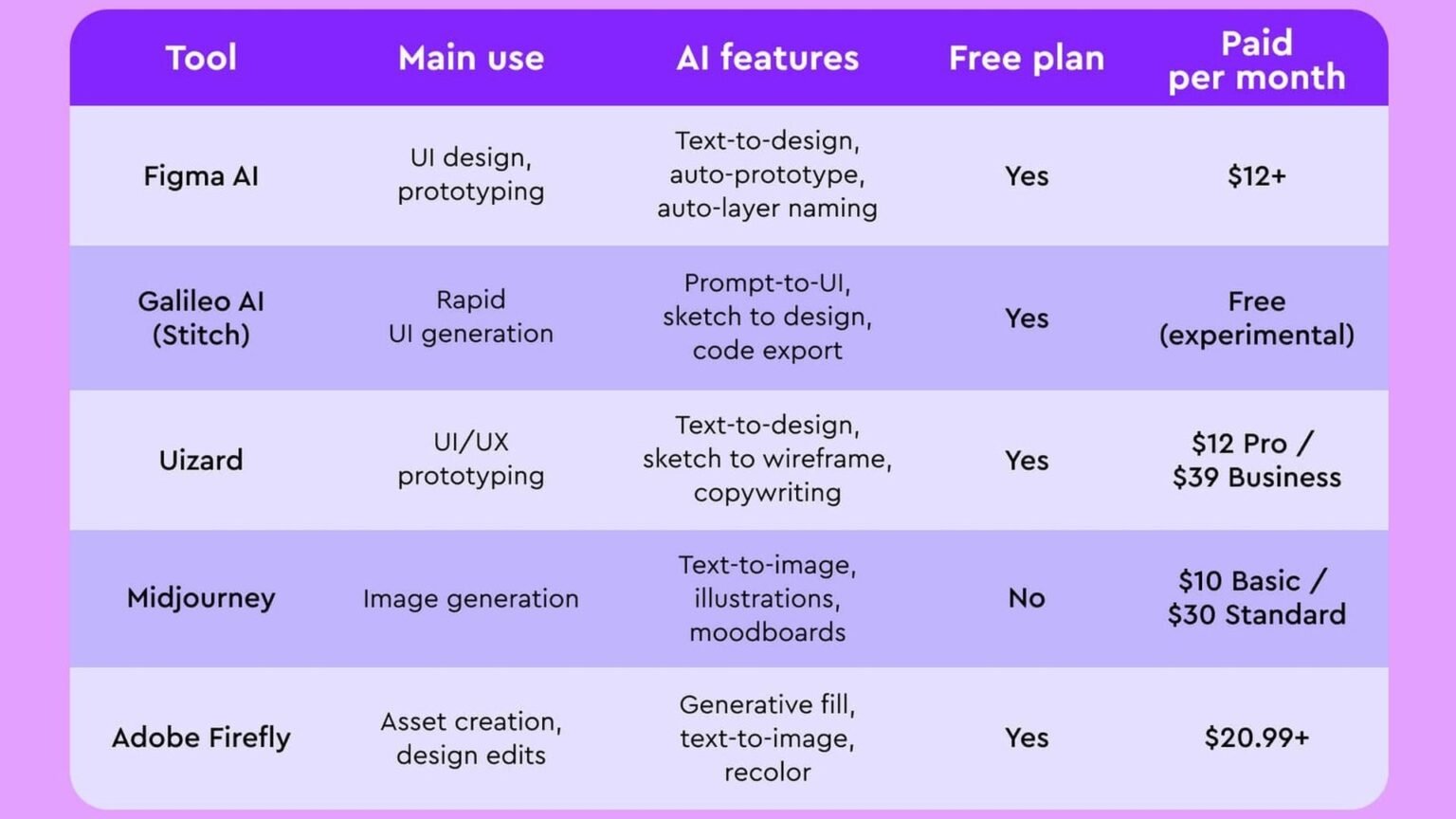

AI for designers 2026 is no longer one category. It splits into four buying decisions: product design workflows in Figma AI, marketing and template-heavy work in Canva Magic Studio, enterprise-safe creative generation in Adobe Firefly, and fast visual exploration in Krea. The right pick depends less on model quality than on where the tool sits in your design system, asset pipeline, and review process.
The market has split into four distinct lanes
$15
Figma Professional per editor/month
Figma AI is listed as included with paid plans on Figma’s AI page
$14.99
Canva Pro per month
Published on Canva pricing and AI pages
$10
Krea Basic per month
Published on Krea pricing
The core story in AI for designers 2026 is specialization. Figma is pushing AI into the place many product teams already work. Canva keeps aiming at speed, templates, and lightweight editing for broad business users. Adobe Firefly is strongest where legal review, brand governance, and Creative Cloud workflows matter. Krea stands out for real-time exploration, where a designer wants to steer visuals interactively instead of waiting on batch generations.
That makes this less a pure feature race than a workflow decision. If your team ships interfaces, component libraries, and handoff artifacts, Figma has structural advantages. If your team needs campaign assets, social graphics, and quick edits, Canva stays compelling. If procurement cares about commercially safer training data, Firefly has the clearest enterprise pitch. If the job is ideation and direction-finding, Krea feels different from the rest because the interaction loop is live.
This review focuses on where each tool fits in a real design workflow, not on who can generate the flashiest one-off image.
“Explore ideas in real time.”
Krea homepage
| Tool | Best fit | Starting price | Standout strength |
|---|---|---|---|
| Figma AI | Product design teams | $15/editor/month on Professional | AI inside the core design system workflow |
| Canva Magic Studio | Marketing, SMB, generalist teams | Free tier; Pro $14.99/month | Fast template and asset production |
| Adobe Firefly | Enterprise creative teams | Included with Creative Cloud plans; generative credits apply | Commercially focused Adobe ecosystem and training-data positioning |
| Krea | Concept and experimentation | $10/month Basic | Real-time visual exploration |
Figma AI verdict: best overall for product design teams
Figma is the strongest default recommendation because it puts AI inside the environment where many product teams already define flows, components, and handoff. On its official AI page, Figma highlights Make, visual search, layer renaming, and content generation. Those are not just novelty prompts. They target the repetitive work that slows interface design: finding the right component, cleaning file structure, and getting a first draft onto the canvas.
For AI for designers 2026, that matters more than image spectacle. Product designers rarely need a hundred surreal variations. They need a rough screen, a reusable pattern, and a file that still makes sense to teammates. Figma’s advantage is that AI output lands in the same system where comments, libraries, and Dev Mode already live.
The caveat is scope. Figma AI is most valuable when the end product is a UI or a design-system artifact. It is less compelling as a broad creative suite for brand campaigns, photo manipulation, or video-heavy work. Teams that expect one tool to cover every visual task will still need adjacent products.
Figma AI ⭐ Editor’s Pick
Best for: Product designers, design systems teams, and cross-functional UI workflows
What works
Watch out for
If your primary job is shipping product UI, Figma is the safest first choice.
“Go from prompt to editable designs.”
Figma AI product page
How does Figma fit into design-to-dev handoff today?
Figma’s advantage is not only generation. It is continuity. A team can ideate in the same file where components, annotations, and Dev Mode inspection already happen. For code-oriented workflows, that makes Figma AI more useful when paired with implementation tools rather than treated as a standalone generator.
For teams that want stronger code output from design intent, Magic Patterns is often the more direct complement because it focuses on generating UI and front-end patterns from prompts and edits.
Canva Magic Studio verdict: best for fast brand and marketing output
Canva’s AI story is about accessibility and speed. On its AI hub, Canva bundles Magic Design, Magic Write, editing tools, and template-driven creation into a package that works for non-specialists as well as designers. That is why Canva remains hard to dismiss in AI for designers 2026: many organizations do not need a pristine design-system workflow. They need assets shipped by lunch.
The product is strongest when the work starts from a campaign need rather than a blank product canvas. Social posts, presentations, one-pagers, resized variants, and quick image edits all benefit from Canva’s broad surface area. The free tier also lowers the barrier for teams that want AI assistance without a full creative-stack commitment.
Its limits are familiar. Canva is less opinionated about product design rigor, component governance, and engineering handoff. A startup’s growth team may love that. A mature product org probably will not want Canva as the center of its interface workflow.
Canva Magic Studio
Best for: Brand, social, content, and SMB teams producing high volumes of assets
What works
Watch out for
Canva wins when speed, templates, and broad team access matter more than design-system depth.
Adobe Firefly verdict: best for enterprise and commercially safer generation
Adobe Firefly’s differentiator is not just generation quality across images, vectors, and video. It is Adobe’s enterprise positioning around commercially focused use. On the Firefly product page, Adobe says Firefly is designed to be safe for commercial use and notes that current Firefly generative AI models are trained on licensed content, such as Adobe Stock, and public domain content where copyright has expired.
That makes Firefly the clearest enterprise answer in AI for designers 2026. Legal, procurement, and brand teams often care less about whether a model can surprise them and more about whether the vendor can explain provenance, indemnification pathways, and how generated assets fit into existing Adobe workflows. Firefly benefits from being attached to Creative Cloud rather than asking large organizations to adopt a separate creative stack.
The tradeoff is complexity and cost structure. Adobe uses generative credits, and the broader value proposition is strongest when a team already depends on Photoshop, Illustrator, Express, or other Creative Cloud apps. Independent creators looking for the cheapest experimentation loop may find Krea or Canva simpler.
Adobe Firefly
Best for: Large organizations, in-house creative teams, and Adobe-centric workflows
What works
Watch out for
Firefly is the strongest option here when IP review and commercial-use positioning are procurement-level concerns.
“Firefly is designed to be safe for commercial use.”
Adobe Firefly product page
Why do enterprises care so much about Firefly’s training data?
Adobe’s public positioning is unusually explicit compared with many image-generation vendors. Adobe says current Firefly generative AI models are trained on licensed content, such as Adobe Stock, and public domain content where copyright has expired. That does not remove every legal or policy question around generated media, but it gives enterprise buyers a clearer story for internal review than tools that provide less detail about training sources.
For teams in regulated or brand-sensitive environments, that clarity can matter more than having the most experimental model behavior.
Krea verdict: best for real-time experimentation and concept work
Krea feels different because the interaction model is different. Its homepage emphasizes real-time generation and live control, which changes how a designer explores directions. Instead of writing a prompt, waiting, and re-rolling, Krea encourages steering. That makes it unusually good for moodboards, visual ideation, and rapid concept discovery.
In AI for designers 2026, Krea is the tool most likely to expand a designer’s range early in the process. It is less about final-system rigor and more about finding an angle quickly. That can be valuable for brand exploration, concept art, references, and early visual language work before a team commits to a polished deliverable.
The downside is that Krea is not trying to be your central collaboration layer. It does not replace a product design file, a design system, or a full enterprise creative suite. It is best treated as a high-speed exploration instrument that feeds other tools.
Krea
Best for: Concept designers, art-direction exploration, and creators iterating on style quickly
What works
Watch out for
Choose Krea when the goal is to discover directions live, not to manage a full design workflow.
Where AI actually helps designers right now
The practical value of AI for designers 2026 shows up in six workflows. First-draft generation is real, especially for UI scaffolds and layout starting points. Asset variation is also real: Firefly and Krea can produce many directions quickly. Background removal and localized edits are already routine in Canva and Adobe tools. Component-library maintenance is a quieter but meaningful gain in Figma through naming and search. Code generation from design intent is improving through tools like Magic Patterns and Figma-adjacent workflows. Real-time exploration remains Krea’s standout category.
What does not work as well is the fantasy that one prompt replaces the design process. The best results still come when AI is inserted into a narrow step with a clear human reviewer. Teams get leverage when they use AI to compress setup, repetition, and variation, then apply judgment on hierarchy, flows, accessibility, and consistency.
Pros
Cons
| Workflow | Best tool here | Why |
|---|---|---|
| First-draft UI generation | Figma AI / Galileo AI | Closest to editable product-design output |
| Asset variations | Adobe Firefly / Krea | Fast generation across many visual directions |
| Background removal and edits | Canva / Adobe | Broad, accessible editing workflows |
| Component library maintenance | Figma AI | Search, naming, and organization fit existing files |
| Code from design intent | Magic Patterns | Direct focus on UI-to-code workflows |
| Realtime exploration | Krea | Live steering is the core product behavior |
Which should you pick
Best overall: Figma AI
If you want one recommendation, Figma is the best overall choice because it sits closest to how product teams already work. That is why it gets the editorial nod here. Still, the right answer depends on designer type. Brand and marketing teams should lean Canva or Firefly depending on how much enterprise governance they need. Concept-heavy creators should look hard at Krea. Product teams that want stronger generation-to-code flow should pair Figma with tools like Magic Patterns rather than expecting one platform to do everything.
The broader lesson from AI for designers 2026 is that AI has become a layer in the stack, not a replacement for the stack. The winning setup is usually a primary workspace plus one specialized generator, not a single magical app.
| Use case | Pick | Why |
|---|---|---|
| Product designer at a software company | Figma AI | Best integration with UI files, systems, and handoff |
| Growth or marketing designer | Canva Magic Studio | Fastest route to campaign assets and resized variants |
| Enterprise creative team with legal review | Adobe Firefly | Strongest commercial-use and Adobe ecosystem story |
| Concept artist or visual explorer | Krea | Real-time iteration loop is ideal for experimentation |
| Product team needing design-to-code acceleration | Figma AI + Magic Patterns | Combines design context with code-oriented generation |
Frequently asked questions
For most product teams, Figma AI is the strongest default because its AI features live inside the same environment used for interface design, collaboration, and handoff.
Adobe Firefly has the clearest public positioning for commercial use. Adobe says current Firefly models are trained on licensed content such as Adobe Stock and public domain content where copyright has expired.
Two notable adjacent tools are Galileo AI for text-to-UI mockups and Magic Patterns for generating interface patterns and front-end output from design intent.
Primary sources
- Figma AI — Figma
- Canva AI — Canva
- Adobe Firefly — Adobe
- Krea — Krea
- Galileo AI — Galileo AI
- Magic Patterns — Magic Patterns
- Penpot — Penpot
Last updated: May 26, 2026. Related: Products.




