


A hands-on guide to replacing long-lived API keys with short-lived cryptographic SVIDs, then proving agent identity with mutual TLS.
What SPIFFE SPIRE for AI agents actually replaces
SPIFFE SPIRE for AI agents replaces the long-lived API key your agent reads from an environment variable with a short-lived, cryptographically verifiable identity document called an SVID, issued only after the agent proves what it is. Instead of a static token that lives for months and grants the same access whether it is held by your code or by an attacker who scraped it out of a log, the agent receives a credential that expires in minutes to hours and rotates itself automatically. That single change is what makes SPIFFE SPIRE for AI agents worth the setup cost.
SPIFFE (Secure Production Identity Framework For Everyone) is the specification; SPIRE is the open-source runtime you actually deploy. The unit of identity is the SPIFFE ID, a URI of the form spiffe://trust-domain/path, for example spiffe://example.org/ns/agents/sa/planner. Every identity is scoped to a trust domain, which is the cryptographic root of trust for a set of workloads. An AI agent gets one SPIFFE ID, and that ID becomes its stable, routable name across your fleet.
The reason this matters now is that agents are non-human actors that spin up and tear down fast, call each other across clusters, and hold credentials to downstream systems. HashiCorp frames SPIFFE as ideal for exactly this case: verifiable identity tied to a workload rather than a person, with ephemeral credentials that match the pace at which agents are created and decommissioned. The IETF WIMSE working group has gone further, with draft-klrc-aiagent-auth formalizing the idea that an AI agent should be treated as a workload and assigned a WIMSE identifier that MAY be a SPIFFE ID.
The rest of this tutorial walks through the full path: stand up a SPIRE server and agent, register an agent workload so it can prove its identity, fetch and decode an X.509-SVID, and then establish mutual TLS between two agents using the go-spiffe v2 library. Every command and code block below is real and runnable.
Pick your trust domain before anything else. It is baked into every SPIFFE ID and every trust bundle, and changing it later means re-issuing every SVID in the system. Most teams use a DNS-style name they control, like example.org or agents.internal.
The two SVID formats and where the SPIFFE ID lives
An SVID comes in exactly two formats, X.509-SVID and JWT-SVID, and each carries one SPIFFE ID, but in a different place: the X.509-SVID puts it in the certificate’s URI SAN, while the JWT-SVID puts it in the sub claim. Knowing where the identity lives in each format is the difference between debugging a handshake in five minutes and five hours.
For the X.509-SVID, the SPIFFE specification is precise: the SPIFFE ID is encoded as a URI-type entry in the Subject Alternative Name extension, the certificate MUST contain exactly one URI SAN, and therefore exactly one SPIFFE ID. The traditional Subject field is not required; if it is omitted, the URI SAN extension MUST be marked critical per RFC 5280. This is why you cannot just eyeball the CN of an SVID, you have to read the SAN.
The JWT-SVID is a standard JWT with a handful of restrictions. The key one: the sub claim MUST be set to the SPIFFE ID of the workload it was issued to. That is the primary claim your verifier checks. Use X.509-SVIDs for transport-layer authentication like mTLS, where both endpoints present certificates during the TLS handshake. Use JWT-SVIDs for application-layer authentication, for example proving identity to an API gateway or to HashiCorp Vault that cannot terminate mTLS for you.
The WIMSE draft adds a third profile on the horizon, the Workload Identity Token (WIT), which SPIFFE expresses as a WIT-SVID. For agents being built today, X.509-SVID and JWT-SVID are the two you will actually issue.
| Property | X.509-SVID | JWT-SVID |
|---|---|---|
| SPIFFE ID location | URI SAN extension (exactly one) | sub claim |
| Primary use | Transport-layer mTLS between agents | Application-layer auth (gateways, Vault) |
| Default TTL in SPIRE | 1h0m0s | Historically 5 minutes |
| Carries a public key | Yes (the cert key pair) | No (bearer token) |
| Replay risk if leaked | Low: private key never leaves workload | Higher: bearer token, keep TTL tiny |
| Fetched via | spire-agent api fetch x509 | spire-agent api fetch jwt |
Step 1: stand up the SPIRE server and agent
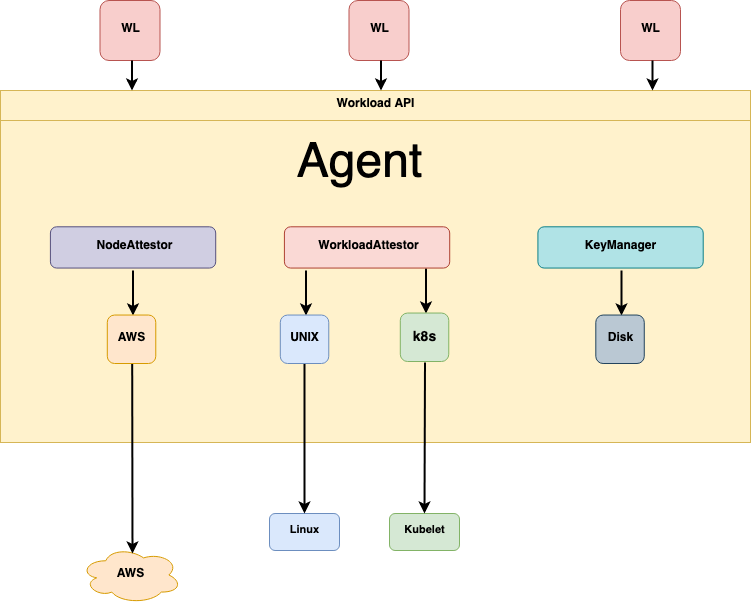
Before any agent can get an SVID, you deploy a SPIRE server as the certificate authority for your trust domain and a SPIRE agent on each node, then the agent proves its own identity to the server through node attestation. The server signs SVIDs; the agent is the local broker that talks to your workloads over a Unix domain socket.
Below is a minimal SPIRE server config for a single trust domain backed by SQLite, plus the agent config that points at it. In production you would use Postgres for the datastore and a real node attestor like k8s_psat or aws_iid; for a first run on a single host, the join_token attestor is the fastest path because it requires no cloud plumbing.
Start the server, generate a one-time join token bound to the SPIFFE ID the agent will receive, then start the agent with that token. Once the server validates the token, the agent is attested and gets its own SPIFFE ID under the spiffe://example.org/spire/agent/... path. That agent identity becomes the parent for every workload the agent later vouches for.
# spire-server.conf
server {
    bind_address = "127.0.0.1"
    bind_port = "8081"
    trust_domain = "example.org"
    data_dir = "/opt/spire/data/server"
    log_level = "INFO"
    ca_ttl = "24h"
    default_x509_svid_ttl = "1h"   # short-lived on purpose
    default_jwt_svid_ttl  = "5m"
}

plugins {
    DataStore "sql" {
        plugin_data {
            database_type = "sqlite3"
            connection_string = "/opt/spire/data/server/datastore.sqlite3"
        }
    }
    NodeAttestor "join_token" {
        plugin_data {}
    }
    KeyManager "disk" {
        plugin_data { keys_path = "/opt/spire/data/server/keys.json" }
    }
}

# spire-agent.conf
agent {
    data_dir = "/opt/spire/data/agent"
    log_level = "INFO"
    server_address = "127.0.0.1"
    server_port = "8081"
    socket_path = "/run/spire/sockets/agent.sock"
    trust_domain = "example.org"
    # trust_bundle_path points at the server's CA bundle, exported once
    trust_bundle_path = "/opt/spire/conf/agent/bootstrap.crt"
}

plugins {
    NodeAttestor "join_token" { plugin_data {} }
    KeyManager "disk" { plugin_data { directory = "/opt/spire/data/agent" } }
    WorkloadAttestor "unix" { plugin_data {} }
}
Step 2: attest the agent and start it
Node attestation is the step most tutorials skip, and it is the one that makes an SVID trustworthy: the agent must cryptographically prove what it is before the server will sign anything for the workloads behind it. Skip attestation and you have just rebuilt API keys with extra YAML.
Run the server, then mint a join token. The token can be bound directly to the SPIFFE ID the agent should adopt, which means the server knows the agent’s identity the moment the token is redeemed. Then launch the agent with that token.
SPIRE supports several node attestor plugins beyond join_token: k8s_psat validates a Kubernetes projected service account token against the API server, aws_iid uses the EC2 instance identity document, and x509pop proves possession of a private key for a CA-signed certificate. For an agent fleet on Kubernetes, k8s_psat is the standard choice because it ties the SPIRE agent’s identity to the node and pod the kubelet already vouches for.
join_token is one-time and manual, which is fine for a demo but does not scale and does not re-attest. For any real agent fleet, use a platform attestor (k8s_psat, aws_iid, gcp_iit, azure_msi) so attestation is automatic and tied to infrastructure the platform already trusts.
# 1. Start the SPIRE server
./spire-server run -config conf/server/spire-server.conf &

# 2. Export the trust bundle so the agent can bootstrap trust
./spire-server bundle show -format pem > conf/agent/bootstrap.crt

# 3. Generate a one-time join token bound to the agent's SPIFFE ID
./spire-server token generate \
    -spiffeID spiffe://example.org/spire/agent/node-1
# -> Token: 8f4e...c2  (valid once, expires shortly)

# 4. Start the agent with the join token
./spire-agent run \
    -config conf/agent/spire-agent.conf \
    -joinToken 8f4e...c2

# 5. Confirm the agent attested successfully
./spire-server agent list
# Found 1 attested agent:
# SPIFFE ID : spiffe://example.org/spire/agent/node-1
# Attestation type : join_token
Step 3: register the agent workload and fetch its SVID
A registration entry is the rule that tells SPIRE which SPIFFE ID to hand a workload and which selectors that workload must match to earn it. This is where workload attestation comes in: when your agent process calls the Workload API, the SPIRE agent inspects the calling process (its UID, path, or Kubernetes namespace and service account) and only returns an SVID if the discovered selectors match a registration entry.
Create an entry for an agent workload running as the Unix user planner. The -parentID is the SPIRE agent’s own SPIFFE ID from the previous step, -spiffeID is the identity the workload will receive, and each -selector is a fact the workload attestor must confirm. On Kubernetes the selectors would be k8s:ns:agents and k8s:sa:planner instead of unix:uid.
Once the entry exists, the agent workload fetches its X.509-SVID over the Workload API socket. The -write flag dumps the certificate, private key, and trust bundle to a directory. The private key is generated locally and never leaves the workload, which is precisely why an X.509-SVID is harder to abuse than a bearer token.
Decode the fetched SVID and you will see the SPIFFE ID exactly where the spec says it should be, in the URI SAN, with a validity window of roughly one hour. SPIRE proactively rotates the SVID at the halfway point of its lifetime, around 30 minutes for a one-hour TTL, so the workload always holds a fresh credential without ever touching a secrets store.
# Register the agent workload (runs as unix user 'planner', uid 1001)
./spire-server entry create \
    -parentID spiffe://example.org/spire/agent/node-1 \
    -spiffeID spiffe://example.org/ns/agents/sa/planner \
    -selector unix:uid:1001
# Entry ID         : 4b9a...
# SPIFFE ID        : spiffe://example.org/ns/agents/sa/planner
# Parent ID        : spiffe://example.org/spire/agent/node-1
# Selector         : unix:uid:1001

# As the planner user, fetch the X.509-SVID over the Workload API
sudo -u planner ./spire-agent api fetch x509 \
    -socketPath /run/spire/sockets/agent.sock \
    -write /tmp/planner/
# Received 1 svid after 5.2ms
# SPIFFE ID:    spiffe://example.org/ns/agents/sa/planner
# SVID Valid After:   2026-06-01 18:00:02 +0000 UTC
# SVID Valid Until:   2026-06-01 19:00:02 +0000 UTC
# Wrote svid.0.pem, svid.0.key, bundle.0.pem to /tmp/planner/

# Decode the SVID and confirm the SPIFFE ID lives in the URI SAN
openssl x509 -in /tmp/planner/svid.0.pem -noout -text | grep -A1 'Subject Alternative Name'
#   X509v3 Subject Alternative Name: critical
#       URI:spiffe://example.org/ns/agents/sa/planner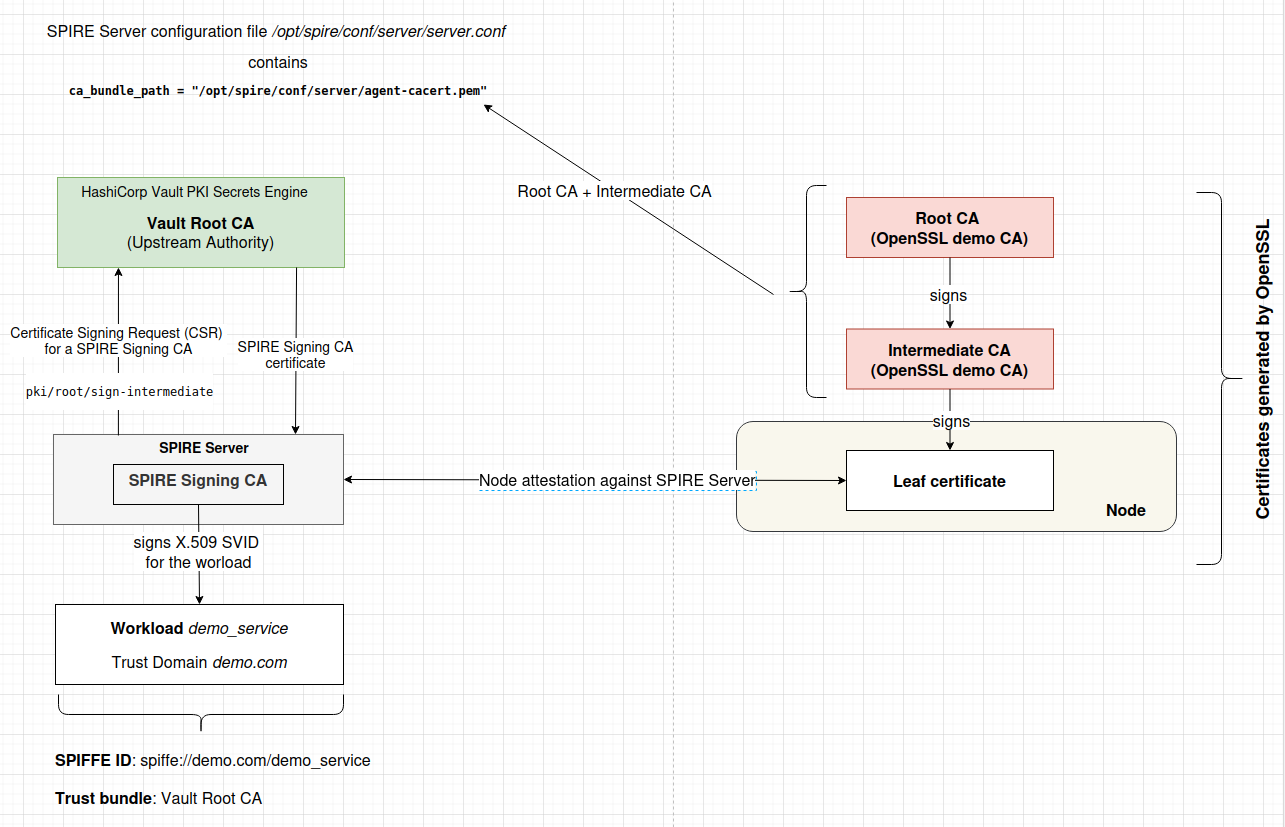
fetch x509 returns no SVIDs
Almost always a selector mismatch. Run the fetch with -socketPath only (no -write) and check the agent logs: SPIRE prints the selectors it discovered for the calling PID. Compare those exactly against your registration entry. A common gotcha is fetching as the wrong Unix user, or, on Kubernetes, forgetting hostPID: true on the agent DaemonSet so the attestor cannot inspect the workload PID.Agent shows as not attested
Check that the trust_bundle_path on the agent matches the server’s current bundle (re-export it with spire-server bundle show), that the join token has not already been redeemed or expired, and that server_address and server_port are reachable. Each join token is single-use; generate a fresh one per agent.SVID expires and is not rotating
Long-running workloads should use the streaming Workload API (workloadapi.NewX509Source in go-spiffe), not a one-shot fetch. The streaming source receives rotated SVIDs automatically at the 50% TTL mark. A one-shot api fetch x509 is a snapshot and will go stale.Step 4: establish mTLS between two agents with go-spiffe
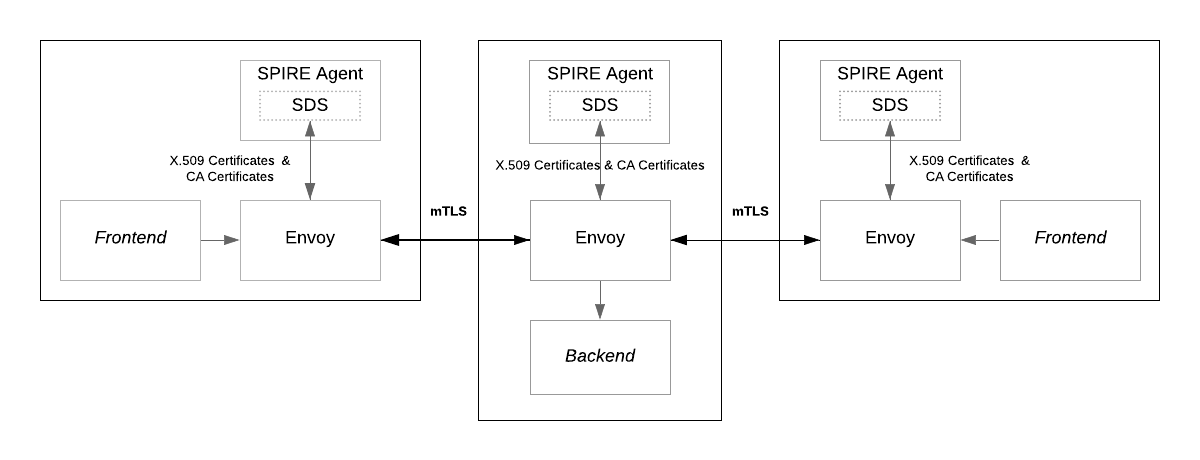
With both agents holding SVIDs, you wire mutual TLS using the go-spiffe v2 library, which presents each agent’s X.509-SVID, verifies the peer’s certificate against the SPIRE trust bundle, and authorizes the peer’s SPIFFE ID, all on the standard library tls.Config. Neither agent ever sees a shared secret; trust comes entirely from the SVIDs.
The pattern is the same on both sides. Each agent opens an X509Source backed by the Workload API, which keeps the SVID and trust bundle fresh through rotation. The server uses tlsconfig.MTLSServerConfig with an authorizer; the client uses tlsconfig.MTLSClientConfig. The authorizer is the security-critical knob: tlsconfig.AuthorizeID pins the exact peer SPIFFE ID you expect, while tlsconfig.AuthorizeMemberOf accepts any identity in your trust domain. For agent-to-agent calls, prefer AuthorizeID so a compromised, unrelated workload in the same trust domain cannot impersonate the peer.
Here is a worker agent acting as the server, accepting connections only from the planner agent, and the planner agent acting as the client, accepting only the worker. The tlsconfig helpers install a custom VerifyPeerCertificate callback that validates the chain against the bundle and then checks the SPIFFE ID, which is why you must never hand-roll this verification yourself.
// worker_agent.go — the server side of the mTLS link
package main

import (
    "context"
    "log"
    "net/http"

    "github.com/spiffe/go-spiffe/v2/spiffeid"
    "github.com/spiffe/go-spiffe/v2/spiffetls/tlsconfig"
    "github.com/spiffe/go-spiffe/v2/workloadapi"
)

const socketPath = "unix:///run/spire/sockets/agent.sock"

func main() {
    ctx := context.Background()

    // Streaming X509Source: auto-rotates the SVID and trust bundle.
    source, err := workloadapi.NewX509Source(ctx,
        workloadapi.WithClientOptions(workloadapi.WithAddr(socketPath)))
    if err != nil {
        log.Fatalf("unable to create X509Source: %v", err)
    }
    defer source.Close()

    // Only accept calls from the planner agent's exact SPIFFE ID.
    clientID := spiffeid.RequireFromString("spiffe://example.org/ns/agents/sa/planner")

    tlsConfig := tlsconfig.MTLSServerConfig(source, source, tlsconfig.AuthorizeID(clientID))
    server := &http.Server{
        Addr:      ":8443",
        TLSConfig: tlsConfig,
        Handler: http.HandlerFunc(func(w http.ResponseWriter, r *http.Request) {
            w.Write([]byte("task accepted by worker agent\n"))
        }),
    }
    log.Println("worker agent listening on :8443 (mTLS, SVID-authenticated)")
    log.Fatal(server.ListenAndServeTLS("", "")) // certs come from the SVID, not files
}
Step 5: the client agent and verifying the handshake
The planner agent dials the worker over the same Workload API source, pinning the worker’s SPIFFE ID so it refuses to talk to any other identity, even one signed by the same trust domain. When both sides pin each other, you have true mutual authentication: each agent has proven, cryptographically, exactly which workload is on the other end.
Run both programs as their respective registered Unix users so the Workload API hands each the correct SVID. A successful request prints the worker’s response. To prove the security boundary is real, point a third process with a different SPIFFE ID at the worker: the handshake fails at VerifyPeerCertificate because the authorizer rejects the unexpected ID, and no application data is ever exchanged.
This is the shape the IETF WIMSE draft endorses for agent-to-agent communication: mutually-authenticated TLS where both endpoints present short-lived X.509 workload credentials and perform a bidirectional certificate exchange, giving strong channel binding and cryptographic proof of control over each agent’s private key. Once that transport layer is solid, you can layer OAuth scopes or OpenID SSF signals on top for authorization, but the identity question is already answered.
// planner_agent.go — the client side of the mTLS link
package main

import (
    "context"
    "io"
    "log"
    "net/http"

    "github.com/spiffe/go-spiffe/v2/spiffeid"
    "github.com/spiffe/go-spiffe/v2/spiffetls/tlsconfig"
    "github.com/spiffe/go-spiffe/v2/workloadapi"
)

const socketPath = "unix:///run/spire/sockets/agent.sock"

func main() {
    ctx := context.Background()

    source, err := workloadapi.NewX509Source(ctx,
        workloadapi.WithClientOptions(workloadapi.WithAddr(socketPath)))
    if err != nil {
        log.Fatalf("unable to create X509Source: %v", err)
    }
    defer source.Close()

    // Refuse to talk to anyone but the worker agent.
    serverID := spiffeid.RequireFromString("spiffe://example.org/ns/agents/sa/worker")

    client := &http.Client{
        Transport: &http.Transport{
            TLSClientConfig: tlsconfig.MTLSClientConfig(source, source, tlsconfig.AuthorizeID(serverID)),
        },
    }

    resp, err := client.Get("https://localhost:8443/")
    if err != nil {
        log.Fatalf("request failed: %v", err) // wrong peer ID lands here
    }
    defer resp.Body.Close()
    body, _ := io.ReadAll(resp.Body)
    log.Printf("worker replied: %s", body)
}
“A leaked SVID expires before your incident channel finishes paging. That turns key exfiltration from a catastrophe into a footnote.”
Surya Koritala, founder of Cyntr and Loomfeed
Going to production: Vault, federation, and what to watch
Default to SVIDs for any multi-agent system in production
For production agent fleets, the two upgrades that matter most are issuing SVIDs through HashiCorp Vault and connecting trust domains with SPIRE Federation, both of which let you adopt SPIFFE without ripping out what you already run.
HashiCorp Vault Enterprise 1.21 added a native SPIFFE auth method: agents authenticate to Vault with a JWT or X.509 SVID whose trust roots in a configured bundle, and Vault can automatically assign and issue X.509-SVID certificates to authenticated workloads with no manual steps. Critically, Vault can also issue X.509-SVIDs to workloads that already authenticate via AppRole or AWS auth, so existing clients join the SPIFFE ecosystem incrementally. Vault Enterprise 2.0 then shipped a dedicated SPIFFE secrets engine that mints SPIFFE JWT-SVIDs directly, reinforcing short-lived, auto-rotated identities to shrink blast radius when a token leaks.
Once agents span multiple clusters or clouds, each cluster runs its own SPIRE server and trust domain. SPIRE Federation lets those trust domains exchange trust bundles so an agent in cluster-a.example.org can verify and authorize an agent in cluster-b.example.org. This is the documented 2026 pattern for multi-cluster and multi-cloud agent fleets, and it keeps each domain’s signing authority independent while still enabling cross-domain mTLS.
Watch three things as you scale. First, attestation quality: an SVID is only as strong as the selectors behind it, so prefer platform attestors over join tokens and make selectors specific. Second, TTL tuning: shorter is safer but increases signing load on the server, and SPIRE’s spiky-renewal behavior near the 50% mark is a known operational concern for large fleets. Third, authorization: SVIDs answer who an agent is, not what it may do. The WIMSE draft is explicit that authentication is the part SPIFFE gets right and authorization is still your problem, so pair SVID-based mTLS with policy, whether that is OAuth scopes, OPA/Rego, or your gateway’s rules.
Pros
Cons
Builder’s take
I have shipped enough agent infrastructure on Cyntr and Loomfeed to develop a strong allergy to the .env file full of provider keys. Here is why I think SPIFFE/SPIRE is the right default for any team running more than one agent in production.
- The single biggest win is not encryption, it is that a leaked credential expires before your incident channel finishes paging. A one-hour SVID that rotates at the 30-minute mark turns a catastrophic key exfiltration into a footnote.
- Most write-ups skip attestation, which is exactly the part that matters. An SVID is only as trustworthy as the node and workload attestors that decided this process deserves an identity. Get the selectors right or you are just shipping prettier API keys.
- Do not roll your own mTLS verification. The go-spiffe v2 tlsconfig helpers wire the trust bundle and the authorizer into the standard library tls.Config correctly. Hand-rolling VerifyPeerCertificate is how SPIFFE IDs get spoofed.
- Treat the SPIFFE ID as a stable, routable name for an agent, not a secret. That is the mental shift the WIMSE draft is pushing, and it is the foundation I want under multi-agent systems before I bolt OAuth scopes on top.
- If you already run Vault, the 1.21 SPIFFE auth method and the 2.0 SPIFFE secrets engine let you adopt this incrementally without a forklift. You do not have to deploy SPIRE everywhere on day one.
Frequently asked questions
SPIFFE is the specification that defines the SPIFFE ID (a spiffe://trust-domain/path URI) and the SVID credential formats. SPIRE is the open-source software that implements SPIFFE: it runs a server that acts as a certificate authority and agents that attest workloads and issue them SVIDs over a local Workload API socket. You design to SPIFFE and you deploy SPIRE.
An API key is a long-lived, copyable string that grants the same access to anyone who holds it, so a single leak can be catastrophic and lasts until someone rotates it manually. An SVID is short-lived (SPIRE defaults to a one-hour X.509-SVID), auto-rotates at the halfway point of its lifetime, and is cryptographically bound to the attested workload. A leaked SVID expires in minutes to hours, dramatically shrinking the blast radius.
It depends on the format. In an X.509-SVID, the SPIFFE ID is a URI entry in the certificate’s Subject Alternative Name extension, and there must be exactly one URI SAN. In a JWT-SVID, the SPIFFE ID is the value of the sub claim. So to verify an X.509-SVID you read the URI SAN, and to verify a JWT-SVID you read sub.
Node attestation is how a SPIRE agent proves what it is to the SPIRE server before it can broker identities for workloads. SPIRE supports attestors like join_token for bootstrapping, k8s_psat for Kubernetes service account tokens, aws_iid for EC2 instance identity, and x509pop for certificate possession. Without proper attestation, an SVID carries no real assurance, it is the step most write-ups skip and the one that makes the whole model trustworthy.
Give each agent a SPIFFE ID via a SPIRE registration entry, then use the go-spiffe v2 library. Each agent opens a workloadapi.NewX509Source for auto-rotating credentials. The server builds its tls.Config with tlsconfig.MTLSServerConfig and the client with tlsconfig.MTLSClientConfig, each using tlsconfig.AuthorizeID to pin the peer’s exact SPIFFE ID. The library verifies the peer certificate against the SPIRE trust bundle automatically.
Yes. Vault Enterprise 1.21 added a SPIFFE auth method that lets agents authenticate with JWT or X.509 SVIDs and can automatically issue X.509-SVID certificates to authenticated workloads, including those already using AppRole or AWS auth. Vault Enterprise 2.0 added a dedicated SPIFFE secrets engine that mints SPIFFE JWT-SVIDs directly, so you can adopt SPIFFE incrementally on top of an existing Vault deployment.
Primary sources
- SPIFFE Concepts: SPIFFE IDs and SVIDs — spiffe.io
- X.509-SVID specification — spiffe.io
- JWT-SVID specification — spiffe.io
- Working with SVIDs — spiffe.io
- SPIRE Concepts: node and workload attestation — spiffe.io
- SPIFFE: Securing the identity of agentic AI and non-human actors — HashiCorp
- Vault Enterprise 1.21 gains SPIFFE auth — HashiCorp
- Vault Enterprise 2.0 modernizes identity security at scale — HashiCorp
- draft-klrc-aiagent-auth: AI Agent Authentication and Authorization — IETF Datatracker
- go-spiffe v2 tlsconfig package reference — Go Packages
- How to Set Up SPIFFE and SPIRE for Workload Identity in Kubernetes — OneUptime
Last updated: June 1, 2026. Related: Identity Provenance.




