

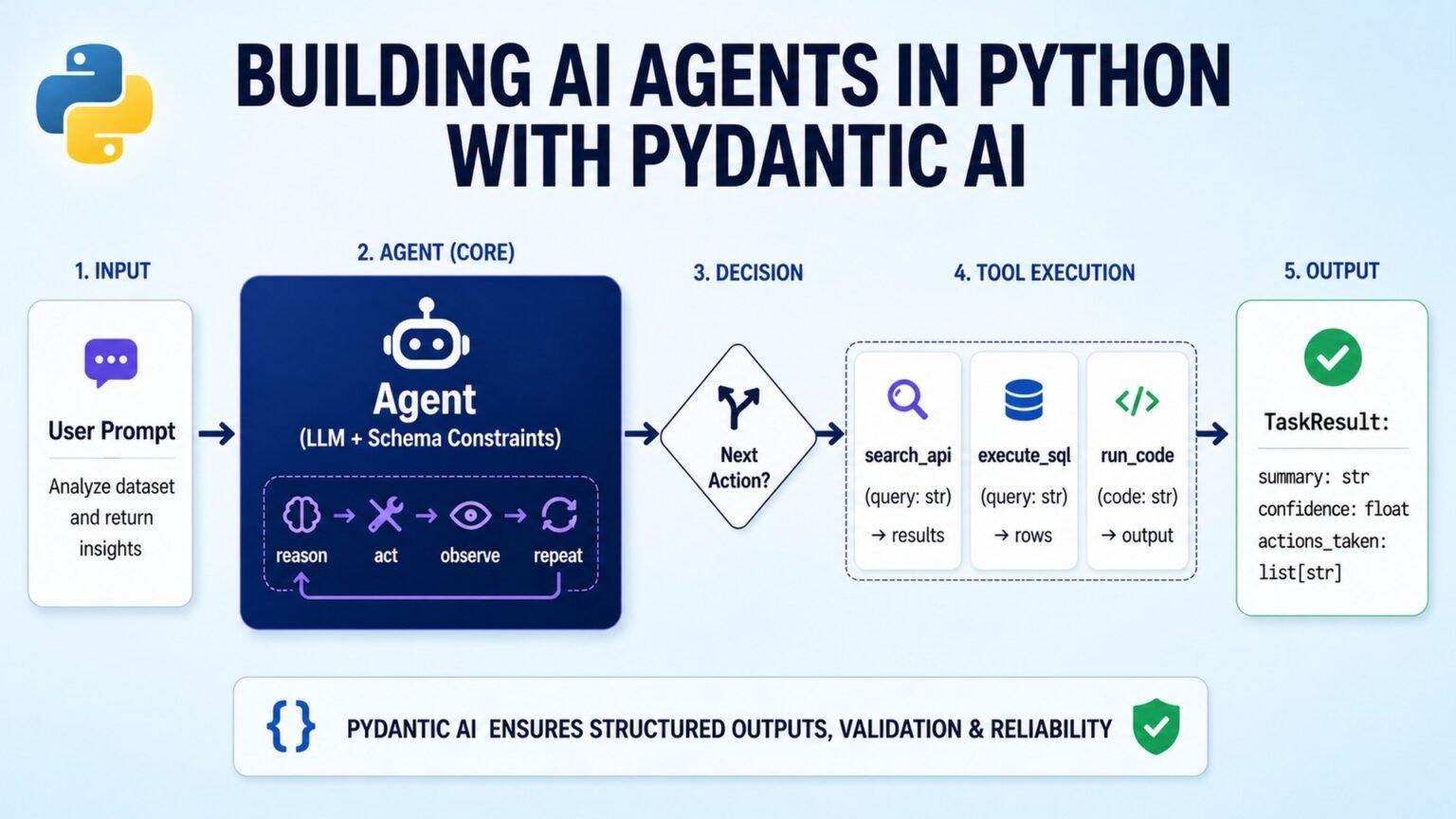

If you want to build AI agent with Python in 2026, start with the thing every framework wraps: a message loop, a tool schema, and a model that decides when to call functions. This tutorial builds that base case first, then shows when to move to Pydantic AI, LangGraph, smolagents, and LlamaIndex depending on the job.
What we’re building, and what you need first
6
serious frameworks
LangGraph, Pydantic AI, smolagents, LlamaIndex, OpenAI Agents SDK, CrewAI
1
core runtime pattern
Message loop plus tool-call loop
2026
consensus pattern
LangChain or LangGraph plus a focused tool is common
Typed
output discipline
Structured outputs reduce downstream parsing failures
This tutorial builds a small weather agent in stages, because that is still the clearest way to understand modern agent architecture. The point is not weather. The point is the control loop: user message in, model decides whether to answer or call a tool, your code executes the tool, and the model gets another turn with the result. Once you see that loop directly, the abstractions in higher-level frameworks stop feeling magical.
The production lesson in 2026 is straightforward: agents are usually not giant autonomous systems. They are bounded workflows with tool access, structured outputs, retries, and state. That is why the serious frameworks have converged around a few durable ideas: typed inputs and outputs, graph-based control flow, retrieval as a first-class primitive, and explicit tool execution.
You can build AI agent with Python using only an SDK and a while-loop, but you should know when to graduate to a framework. The six serious frameworks in active use are LangGraph, Pydantic AI, smolagents, LlamaIndex, OpenAI Agents SDK, and CrewAI. The editorial consensus worth keeping in your head is this: in 2026, it is rarely LangChain or alternative — it is LangChain (or LangGraph) plus a focused tool for the part of the stack where a focused tool earns its abstractions.
You need Python 3.10+, an API key for the model provider you choose, and comfort with virtual environments and pip.
“In 2026, it is rarely LangChain or alternative — it is LangChain (or LangGraph) plus a focused tool for the part of the stack where a focused tool earns its abstractions.”
Alatirok editorial framing based on the current Python agent tooling landscape
| Framework | Best fit | Why teams pick it |
|---|---|---|
| LangGraph | Production agents with state | Durable state, branching, human-in-the-loop |
| Pydantic AI | Typed tool and output contracts | Structured I/O built around Pydantic models |
| smolagents | Code-execution-first agents | Agents write and run Python |
| LlamaIndex | RAG-heavy agents | Query engines and retrieval-centric design |
| OpenAI Agents SDK | OpenAI-native orchestration | Official SDK with handoffs |
| CrewAI | Role-based multi-agent workflows | Task and role abstractions |
Stage 1: Start with the pure-Python agent loop
If you want to build AI agent with Python without cargo-culting a framework, begin here. This is the underlying pattern most libraries wrap: define tools, send messages to the model, inspect whether the model requested a tool call, execute the tool in your code, append the tool result, and continue until the model returns a normal answer.
This pattern matters because it teaches the boundaries clearly. The model does not execute your Python function. It emits a structured request to call a function. Your runtime decides whether to allow it, how to validate arguments, how to log it, and what to do if the tool fails. That separation is the reason agent systems can be made observable and safe.
Pros
Cons
Once you understand this loop, every higher-level framework becomes a convenience layer rather than a black box.
from openai import OpenAI
client = OpenAI()

TOOLS = [{
    "type": "function",
    "function": {
        "name": "get_weather",
        "description": "Get current weather for a city",
        "parameters": {"type": "object", "properties": {"city": {"type": "string"}}, "required": ["city"]},
    },
}]

def run_agent(user_msg):
    messages = [{"role": "user", "content": user_msg}]
    while True:
        r = client.chat.completions.create(
            model="gpt-4o",
            messages=messages,
            tools=TOOLS,
        )
        msg = r.choices[0].message
        messages.append(msg)
        if not msg.tool_calls:
            return msg.content
        for call in msg.tool_calls:
            if call.function.name == "get_weather":
                # call your real weather function here
                result = "18C, foggy"
messages.append({"role": "tool", "tool_call_id": call.id, "content": result})Stage 2: Add type safety with Pydantic AI
The first abstraction most teams should add is not multi-agent orchestration. It is type safety. Pydantic AI, built by the Pydantic team, is compelling because it treats structured output and tool contracts as first-class concerns. That is a practical upgrade when your agent output feeds another service, a UI, or a database write.
This is the minimal canonical pattern from the docs. It is intentionally small, and that is the point. You define a Pydantic model for the output, create an agent with an output type, and let the framework handle the structured result. For teams that need to build AI agent with Python for real applications rather than demos, this removes a surprising amount of brittle parsing code.
Pros
Cons
Pick it when the hardest part of your agent is reliable structured I/O, validation, and typed tool boundaries.
from pydantic_ai import Agent
from pydantic import BaseModel

class WeatherResponse(BaseModel):
    temperature_c: float
    conditions: str

agent = Agent(
    "openai:gpt-4o",
    output_type=WeatherResponse,
    system_prompt="You report weather in clean structured form.",
)

result = agent.run_sync("What's the weather in San Francisco?")
print(result.output.temperature_c, result.output.conditions)
“PydanticAI is a Python agent framework designed to make it less painful to build production grade applications with Generative AI.”
Pydantic AI docs
Stage 3: Move to LangGraph when state and branching matter
Best orchestration default: LangGraph
LangGraph is the strongest general-purpose choice when your agent needs durable state, conditional branching, or human-in-the-loop review. That is why it shows up so often in production discussions. Once your workflow stops being a single loop and starts becoming a state machine, graph semantics become more useful than a thin chat wrapper.
The prebuilt ReAct helper is the fastest way to see the model. It wires a model and tools into a working agent, but the larger reason to learn LangGraph is that you can later replace the prebuilt path with explicit nodes and edges. If your goal is to build AI agent with Python for support operations, internal copilots, or approval-heavy workflows, that control surface matters.
Do not reach for graph orchestration on day one if a single typed tool loop is enough. LangGraph earns its complexity when workflow state is the product.
from langgraph.prebuilt import create_react_agent
from langchain_anthropic import ChatAnthropic

def get_weather(city: str) -> str:
    return f"It's 18C and foggy in {city}."

agent = create_react_agent(
    model=ChatAnthropic(model="claude-sonnet-4-5"),
    tools=[get_weather],
    prompt="You are a helpful weather assistant.",
)

result = agent.invoke({"messages": [{"role": "user", "content": "Weather in SF?"}]})
print(result["messages"][-1].content)Stage 4: Use smolagents when the agent should write and run code
Hugging Face’s smolagents takes a different stance from many chat-first frameworks: code execution is central, not incidental. That makes it attractive for tasks where the model should synthesize Python to transform data, inspect files, or chain operations that are easier to express as code than as a long list of tools.
This is not the right default for every application. It is powerful because code is a universal interface, but that also raises the bar for sandboxing and runtime controls. Use it when code execution is the point of the agent, not when you just need a safer function-calling assistant.
Pros
Cons
Code-execution agents need strict sandboxing, resource limits, and clear permissions before they belong in production.
pip install smolagents“smolagents is a simple library that enables you to run powerful agents in a few lines of code.”
Hugging Face smolagents docs
Stage 5: Use LlamaIndex when retrieval is the center of the design
LlamaIndex remains the clearest choice when your agent is really a retrieval system with agency attached. If the hard part is indexing documents, routing queries, and composing answers from knowledge sources, a retrieval-first framework is often a better fit than a general orchestration layer.
This is where the 2026 mixed-stack reality shows up most clearly. Teams often use LangChain or LangGraph for orchestration and pair it with LlamaIndex for retrieval-heavy components. That is the practical version of the market consensus: use the broad framework where you need workflow plumbing, and use the focused framework where it earns its abstractions.
Choose LlamaIndex when your agent’s quality depends more on retrieval and query engines than on complex branching logic.
pip install llama-indexStage 6: Pick the framework by failure mode, not hype
The wrong way to choose a framework is to ask which one is best. The right way is to ask what breaks first in your application. If parsing breaks first, use Pydantic AI. If workflow state breaks first, use LangGraph. If retrieval quality breaks first, use LlamaIndex. If the task is fundamentally code execution, use smolagents. If you are staying close to OpenAI-native orchestration, look at the OpenAI Agents SDK. If your organization thinks in role-based collaboration, CrewAI may fit better.
This is also where you should resist false binaries. To build AI agent with Python in 2026, many teams combine tools. LangGraph for orchestration plus Pydantic AI-style typed boundaries is a sensible architecture. LangGraph plus LlamaIndex is common for RAG-heavy systems. The stack is becoming modular because the problems are modular.
Choose the framework that solves your dominant failure mode with the least extra machinery.
| If your main problem is… | Start with | Why |
|---|---|---|
| Structured outputs and validation | Pydantic AI | Typed contracts reduce parsing failures |
| State, branching, approvals | LangGraph | Graph orchestration handles complex flows |
| Retrieval quality | LlamaIndex | RAG and query engines are first-class |
| Code execution | smolagents | Python execution is central to the design |
| OpenAI-native handoffs | OpenAI Agents SDK | Official SDK for OpenAI agent workflows |
| Role-based multi-agent tasks | CrewAI | Built around roles and task delegation |
Where to go from here
If you only remember one thing, remember the loop. The fastest way to build AI agent with Python is to understand the no-framework version first, then adopt abstractions only where they remove real pain. That keeps your system legible when you need to debug a bad tool call, add retries, or explain a decision path to another engineer.
A sensible next path is to implement the same tiny agent three ways: pure Python, Pydantic AI, and LangGraph. Then add one real tool, one structured output, and one failure case. You will learn more from that exercise than from reading feature matrices. After that, branch based on your product: retrieval-heavy teams should go deeper on LlamaIndex; workflow-heavy teams should model explicit graphs; code-execution use cases should evaluate smolagents with a proper sandbox.
The broader market pattern is stable now. Pure LangChain solos are diminishing. Mixed stacks are standard. The teams shipping reliable systems are not chasing the most agentic demo; they are assembling boring, inspectable runtimes that make tool use, validation, and state explicit.
Rebuild one small agent in two frameworks and compare the debugging experience, not just the happy path.
python -m venv .venv
source .venv/bin/activate
pip install pydantic-ai langgraph langchain-anthropic llama-index smolagents openai anthropic
Frequently asked questions
Start with the raw tool-call loop so you understand the runtime, then choose a framework based on the problem that fails first. For typed outputs, see Pydantic AI. For stateful workflows, see LangGraph.
No. You can start with a plain SDK and a message loop, as shown in the official OpenAI ecosystem examples and SDKs. Frameworks become useful when you need validation, persistence, branching, or retrieval. See OpenAI Agents SDK and Anthropic’s Python SDK.
Choose LangGraph when your workflow needs durable state, conditional branching, or human review. Choose Pydantic AI when the main challenge is reliable structured I/O and typed tool contracts.
For retrieval-heavy systems, LlamaIndex is often the most natural fit because its agent model is tightly connected to query engines and retrieval workflows.
Primary sources
- Pydantic AI docs — Pydantic
- Pydantic AI GitHub — GitHub
- LangGraph docs — LangChain
- LangChain Python course — LangChain Academy
- LlamaIndex agent guide — LlamaIndex
- smolagents docs — Hugging Face
- OpenAI Agents SDK — GitHub
- Anthropic Python SDK — GitHub
Last updated: May 23, 2026. Related: Agent Infrastructure.




