



Agent Mode edits the doc you have open. Office Agent builds a brand-new one from chat. They are different features, run on different models, and 2026 made one of them the default. Here is the honest breakdown.
What is Copilot Agent Mode in Word, Excel, and PowerPoint?
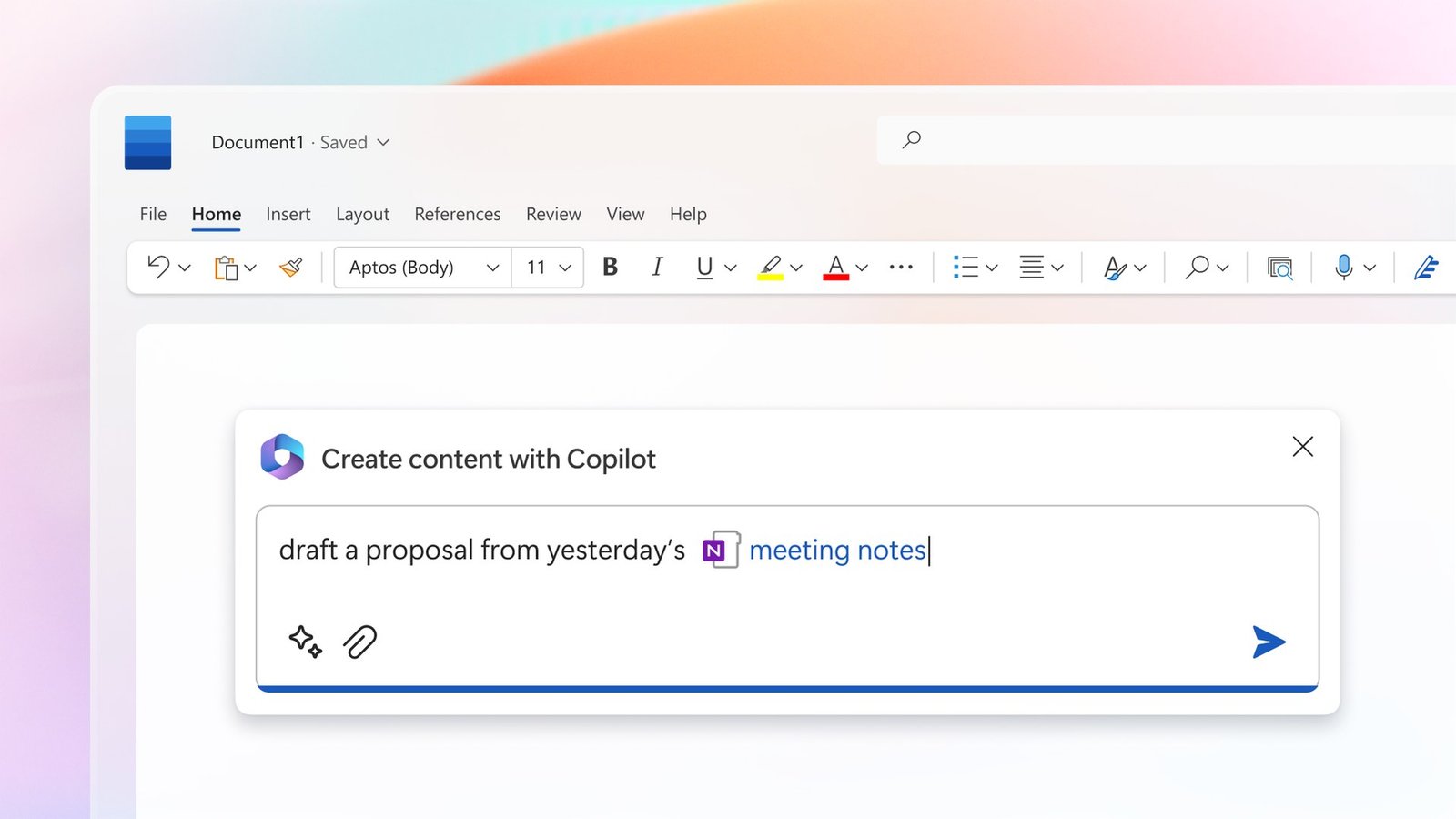
Copilot Agent Mode is the agentic Copilot experience that works inside the document, spreadsheet, or presentation you already have open: it analyzes your request, builds a step-by-step plan, makes the edits itself, then reviews its own work against your intent. Microsoft brought it to general availability on April 22, 2026 in Word, Excel, and PowerPoint, and positioned it at Build 2026 as the default Copilot experience for eligible subscribers rather than an opt-in toggle.
The key word is inside. Where the old Copilot side panel answered questions and suggested text you had to paste in, Agent Mode takes multi-step, app-native actions directly on the file in front of you. In Excel that means writing formulas, restructuring ranges, and building dashboards in the live sheet. In Word it means restructuring a draft, reformatting a report, or rewriting sections in place. In PowerPoint it means restyling and rebuilding slides without you leaving the deck.
Microsoft frames the whole thing as ‘vibe working,’ an explicit analogy to vibe coding: you give a high-level prompt, then steer the agent iteratively as it orchestrates the task, instead of typing every formula or formatting command yourself. You stay the decision-maker; Copilot does the mechanical execution and shows its work as it goes.
That sounds clean until you realize Microsoft shipped a second, separate feature at the same time with a nearly identical name: Office Agent. Conflating the two is the single most common point of confusion in 2026, and it is the first thing this guide untangles.
Office Agent vs Agent Mode: what is the actual difference?
Agent Mode works inside a file you already have open and edits it in place; Office Agent is a chat-first feature that builds an entirely new PowerPoint deck or Word document from scratch and is powered by Anthropic models. Same launch, same ‘vibe working’ banner, two genuinely different products. If you remember one thing from this article, make it this distinction.
Think of it as edit versus create. You reach for Agent Mode when you have a messy quarterly model and want Copilot to fix it, clean it, and chart it in the existing workbook. You reach for Office Agent when you have nothing yet and type ‘build me a 12-slide investor deck on our Q3 results’ into Copilot chat, and it goes off, clarifies your intent, does research, and returns a finished new file.
The triggers differ too. Agent Mode lives in the app surface; in Word, Excel, and PowerPoint it can appear under a control labeled ‘Allow editing,’ because that is literally what you are granting it. Office Agent lives in Copilot chat as a conversational, generate-from-blank experience. Different entry point, different output, different model under the hood.
The two-column card below is the cheat sheet. Screenshot it, because Microsoft’s own support docs describe each feature separately and never put them side by side, which is exactly why people keep mixing them up.
Did you start from a file you already had open? That is Agent Mode. Did you start from a blank chat box asking Copilot to make something new? That is Office Agent. The output destination tells you which feature you used.
| Dimension | Agent Mode | Office Agent |
|---|---|---|
| What it does | Edits the file you have open, in place | Builds a brand-new deck or document from scratch |
| Where you trigger it | Inside Word, Excel, PowerPoint (in-app) | In Copilot chat (chat-first) |
| Mental model | Edit / fix / restructure what exists | Create / generate something new |
| Model under the hood | Microsoft 365 Copilot stack (OpenAI reasoning models) | Anthropic models, multi-agent approach |
| Best for | Cleaning a model, reformatting a report, rebuilding slides | First-draft deck or doc from a single prompt |
| Status in 2026 | GA Apr 22, 2026; default for eligible plans | Available in M365 Copilot chat (Word/PowerPoint; Excel later) |
Why is Office Agent powered by Anthropic inside a Microsoft product?
Office Agent runs on Anthropic’s models, not OpenAI’s, because Microsoft adopted a multi-model strategy and judged Anthropic’s models best for the chat-first, research-and-build workflow that generates new decks and documents. Yes, that means a competitor’s frontier model is doing the heavy lifting inside one of Microsoft’s flagship features, and Microsoft turned Anthropic models on by default for Copilot in Word, Excel, and PowerPoint in early 2026.
This is less awkward than it sounds once you accept the premise the industry has converged on: no single model wins every task. Microsoft’s own framing is that ‘multi-model matters’ and that Copilot should bring the best innovation from across the industry. In practice, OpenAI’s reasoning models sit behind the in-app Agent Mode paths, while Anthropic’s models power Office Agent’s custom multi-agent generation pipeline.
For users, the takeaway is practical, not political. The model you are actually talking to depends on which feature you triggered. If your organization has compliance or data-residency rules about which AI vendors can touch your content, you need to know that Office Agent and Agent Mode can route to different model providers, and admins can govern Anthropic model access in the Microsoft 365 admin center.
It also explains the quality split some users notice. Office Agent’s decks feel ‘tasteful’ and well-structured out of the gate because they are produced by a model and agent design tuned for long-form synthesis. Agent Mode in Excel feels fast and surgical because it is optimized to speak the app natively. Different jobs, different engines.
“The model you are talking to depends on which feature you triggered. Office Agent is Anthropic. In-app Agent Mode is the Microsoft 365 Copilot stack.”
The practical version of ‘multi-model matters’
How does Agent Mode actually work step by step?
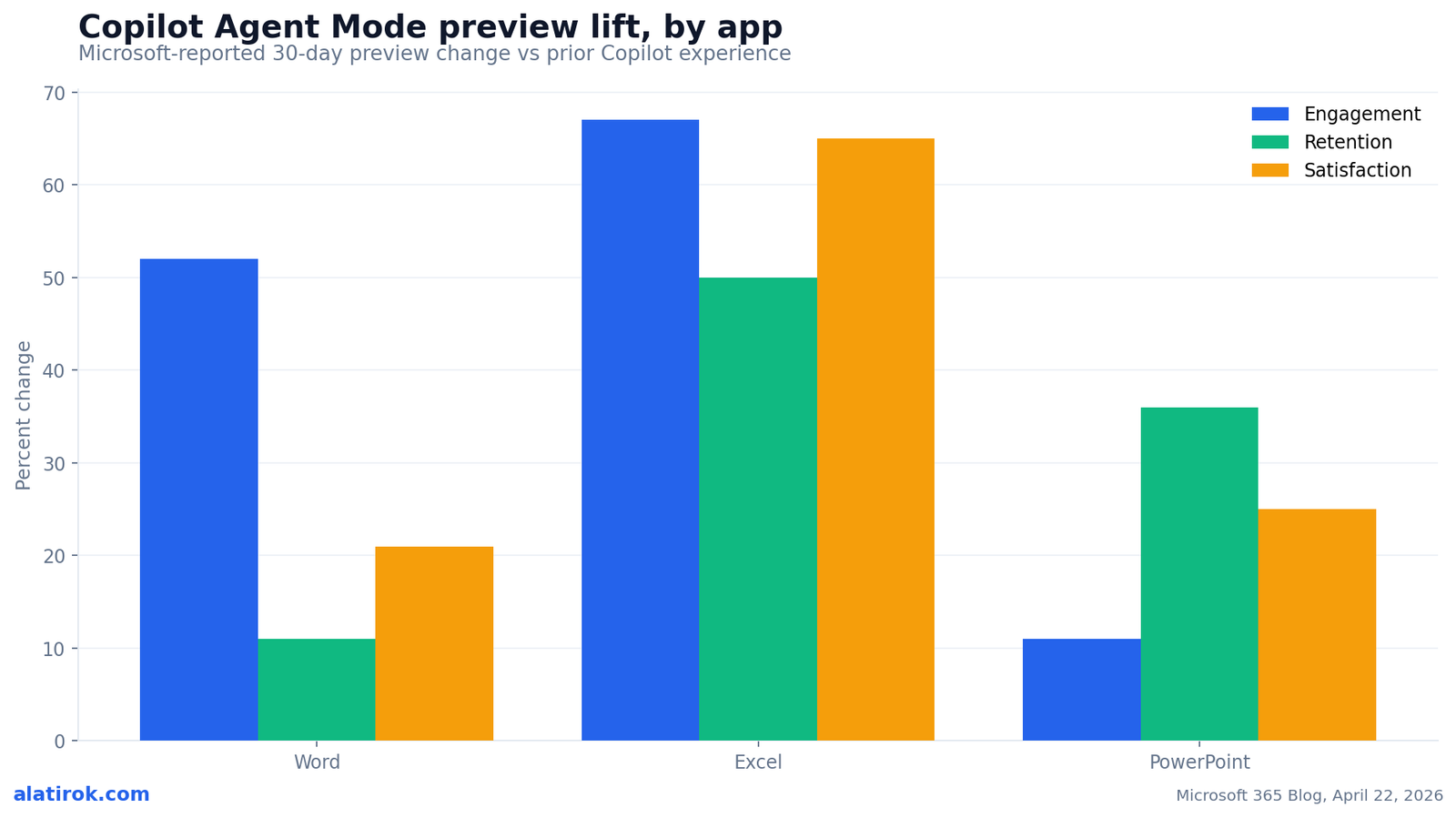
+67%
Excel engagement
Largest lift; 30-day preview window
+50%
Excel retention
Users coming back to Agent Mode
Apr 22, 2026
GA date
Word, Excel, and PowerPoint
Agent Mode runs a visible plan-act-review loop: it interprets your goal, drafts a step-by-step plan, executes the edits directly in your file while showing each action like a to-do list checking itself off, then reviews the result against your original intent before handing control back. That loop is what separates it from a one-shot suggestion.
Step one is intent. You describe what you want in plain language, for example ‘reconcile these two sheets and flag mismatches over 500 dollars.’ Agent Mode parses the request and the file context. Step two is the plan: it lays out the sequence of actions it intends to take, so you can see the approach before it touches anything. Step three is execution, where it performs the edits in the live document and streams its progress in a side panel.
Step four is the part people underuse: review. In Excel especially, Agent Mode can generate a result, evaluate it, fix issues, and iterate until the outcome is verified against the goal. That self-check is a real strength, but it verifies against its own understanding of your intent, not against your business rules. A reformatted Word report is trivial to eyeball; a financial model with new formulas demands real scrutiny before you trust it.
Microsoft’s preview data shows the loop resonates with users. Across a 30-day preview window the company reported notable lifts in engagement, retention, and satisfaction, with Excel posting the largest gains. The chart below shows those figures by app.
Is Copilot Agent Mode the default mode in 2026, and what changed?
Yes. As positioned at Build 2026, Agent Mode is now the default Copilot experience for customers on Microsoft 365 Copilot and Microsoft 365 Premium, and it is available to Microsoft 365 Personal and Family subscribers. The shift from opt-in toggle to default is the most consequential change of the whole 2026 rollout, and it is easy to miss because it changed behavior rather than adding a button.
Before GA, agentic editing was something you went looking for. After GA, for eligible plans, it is the experience you land in. That means Copilot is now primed to take actions on your file rather than just answer questions about it. Microsoft frames this as moving users from first draft to final output faster while keeping them in control, but the default-on framing puts more weight on the ‘in control’ half than many users realize.
Two practical gotchas. First, channels: you need to be on the Current Channel or Monthly Enterprise Channel to get Agent Mode at GA timing; Semi-Annual channels receive it a few weeks later. Second, consumer plans run on AI credits, so Personal and Family users get the capability but within metered limits rather than unlimited use.
The roadmap extends the footprint. Microsoft has signaled Agent Mode and Copilot’s agentic surfaces expanding toward Outlook, Teams, and OneNote later in 2026, with cross-app coordination, sometimes discussed as a ‘super agent,’ on the horizon but without a firm date. For now, the agent works one app at a time.
Because Agent Mode is now the default for eligible plans, it can act on your files without you explicitly opting in to an agent. Treat the review panel as part of the workflow, not an optional last step, especially in Excel.
Can you trust Excel Agent Mode? The honest reliability read
Agent Mode in Excel is fast and genuinely useful, but it can still write a confident, wrong formula, so human verification is non-negotiable for anything requiring accuracy or reproducibility. This is the part Microsoft’s click-the-button support docs will not tell you plainly, and it is the most important thing to internalize before you trust an agent-built model.
The failure modes are specific and worth naming. Copilot can hallucinate a function name or misread a range. It does not know your business rules, so it will not catch that your fiscal year starts in April even though Q1 in your data reads as January through March. It can write a SUMIF that silently excludes rows because the criteria text does not match exactly, the kind of error that produces a plausible total that is simply wrong. Microsoft itself has cautioned that the related Copilot AI function in Excel should not be relied on for tasks requiring accuracy or reproducibility, a striking warning to ship alongside a default-on agent.
None of this makes Agent Mode bad. It makes it an extremely capable junior analyst that needs a reviewer. The honest framing, as Office Watch put it, is that Microsoft’s ‘reliability’ is better described as ‘more reliable,’ not reliable. The self-review loop reduces obvious errors; it does not eliminate silent ones, because the agent verifies against its own reading of your intent, not the ground truth only you hold.
So the right posture is delegate-then-verify. Let Agent Mode do the heavy mechanical work, then spot-check the formulas, sanity-check the totals against a number you already know, and never paste an agent-built model into a board deck without tracing at least the load-bearing cells yourself.
Pros
Cons
How do I turn on and use Copilot Agent Mode?
For most eligible subscribers there is nothing to turn on: Agent Mode is the default in Word, Excel, and PowerPoint as of GA, provided you are on a supported plan and update channel. If you are on Current Channel or Monthly Enterprise Channel with a Microsoft 365 Copilot, Premium, Personal, or Family plan, you already have it.
To use it, open the file you want to work on, invoke Copilot, and grant it editing access (in some surfaces this appears as an ‘Allow editing’ control, which is the in-app face of Agent Mode). Then describe your goal in plain language. Watch the plan it proposes, let it execute, and read the side panel as it streams each action. When it finishes, review the diff before you accept and save.
If you specifically want to create a new deck or document from nothing, do not look in the app, go to Copilot chat and use Office Agent instead. Prompt it with what you want built, answer its clarifying questions about audience, length, and theme, and let it research and assemble the new file. That is the chat-first, Anthropic-powered path, and it produces a fresh artifact rather than editing an existing one.
Admins managing this at scale should note that model routing and Anthropic access are governed in the Microsoft 365 admin center, and that consumer plans meter usage through AI credits. For governance, identity, and licensing questions that this raises, see our companions on Microsoft Agent 365 as a control plane and whether AI agents need their own Microsoft 365 license.
Builder’s take
I build agentic products for a living at Cyntr and Loomfeed, so I read Microsoft’s ‘vibe working’ launch less as a feature and more as a positioning bet. A few things stand out from the trenches:
- The Agent Mode vs Office Agent split is the same edit-in-place vs generate-from-scratch divide every agent team hits. Microsoft just shipped both and gave them confusingly adjacent names. Knowing which one you triggered is half the battle.
- Microsoft running Anthropic models inside Office Agent while OpenAI powers other paths is the most honest admission in the whole launch: no single frontier model wins every task, so route by task. We do the same intent-routing inside Cyntr behind a single brand.
- The plan-act-review loop Microsoft describes is exactly the loop that makes agents feel trustworthy and exactly the loop that hides silent errors when users skip the review step. In Excel, the review step is not optional, it is the product.
- ‘Default as of 2026’ is the real story. The moment an agent is on by default, your verification habits have to be on by default too. Most teams are not ready for that, and the docs will not tell them.
Frequently asked questions
Agent Mode works inside a file you already have open in Word, Excel, or PowerPoint and edits it in place using the Microsoft 365 Copilot stack. Office Agent is a separate, chat-first feature that builds a brand-new PowerPoint deck or Word document from scratch and is powered by Anthropic models. Edit-in-place versus create-from-blank is the core distinction.
In Word, Agent Mode is Copilot taking multi-step actions directly in your open document: restructuring a draft, reformatting a report, or rewriting sections in place. It builds a plan, makes the edits itself, then reviews the result against your intent, instead of just suggesting text for you to paste in.
Yes. As positioned at Build 2026 and following its April 22, 2026 general availability, Agent Mode is the default Copilot experience for Microsoft 365 Copilot and Microsoft 365 Premium customers, and it is available to Microsoft 365 Personal and Family subscribers (metered via AI credits on consumer plans).
Microsoft uses a multi-model strategy and judged Anthropic’s models best suited to Office Agent’s chat-first, research-and-build workflow for generating new decks and documents. In-app Agent Mode paths use OpenAI reasoning models within the Microsoft 365 Copilot stack, so the model you reach depends on which feature you trigger.
Yes. Excel Agent Mode can hallucinate function names, misread ranges, and write confident but incorrect formulas, including silent errors like a SUMIF that excludes rows due to mismatched criteria. Microsoft itself has warned against relying on Copilot in Excel for tasks requiring accuracy or reproducibility, so human verification remains essential.
Not at GA. As of 2026, Agent Mode is generally available in Word, Excel, and PowerPoint only. Microsoft has signaled expansion toward Outlook, Teams, and OneNote later in 2026, along with longer-term cross-app coordination, but those surfaces are not yet covered and the agent currently works one app at a time.
Primary sources
- Copilot’s agentic capabilities in Word, Excel, and PowerPoint are generally available — Microsoft 365 Blog
- Vibe working: Introducing Agent Mode and Office Agent in Microsoft 365 Copilot — Microsoft 365 Blog
- Copilot in Microsoft 365 apps with Anthropic models — Microsoft Learn
- Copilot Agent Mode Word Excel PowerPoint Explained — Office Watch
- Excel’s new Agent Mode can fix your broken formulas — Windows Central
- Microsoft launches Copilot AI function in Excel, but warns not to use it in any task requiring accuracy — PC Gamer
Last updated: June 3, 2026. Related: Products.




