


AG-UI is the open, event-based protocol that connects AI agents to the people using them. Here is how it fits the four-layer agent stack, every event type, and when you don’t need it.
What is the AG-UI protocol?
The AG-UI protocol (Agent-User Interaction) is an open, event-based standard that connects an AI agent’s backend to the user-facing application it talks to, streaming typed events such as messages, tool calls, and state updates over HTTP, Server-Sent Events (SSE), or WebSockets. It was created by CopilotKit and emerged from partnerships with the LangGraph and CrewAI teams, and it is published openly at docs.ag-ui.com and on GitHub under the ag-ui-protocol organization.
The simplest way to understand what AG-UI is: it is the wire format for the boundary where an agent meets a person. Instead of each team inventing a private JSON shape to stream a chatbot’s tokens, tool calls, and progress to a React or mobile front end, AG-UI defines a single, standardized event sequence that any compliant backend can emit and any compliant client can render. The frontend sends one HTTP POST carrying the user’s prompt and current state, then listens to a stream of typed events as the agent runs.
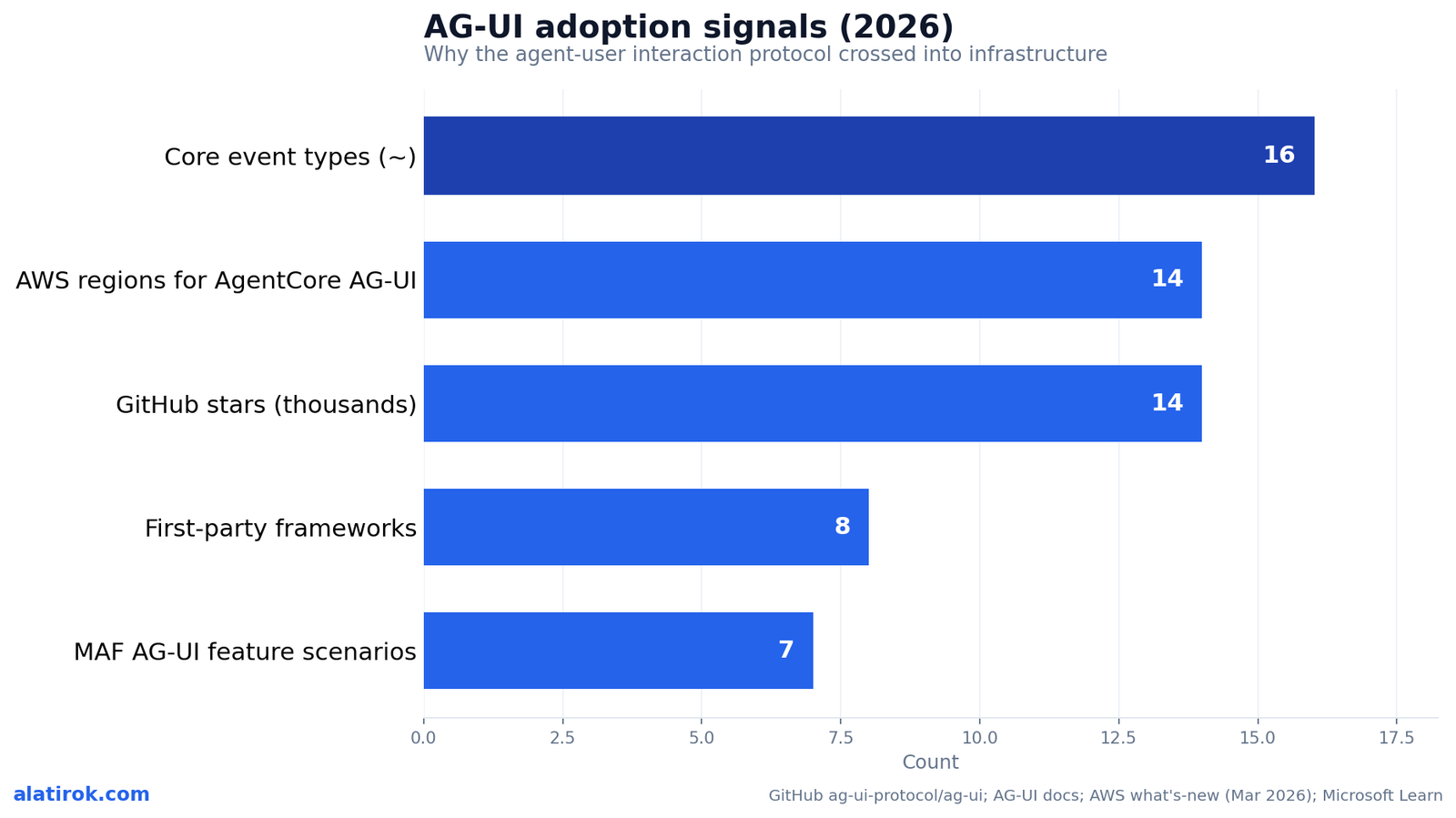
That framing is why people increasingly call AG-UI the agent-user interaction protocol and treat it as the missing third leg of the agent protocol stack. MCP standardized how agents reach tools; A2A standardized how agents reach other agents; AG-UI standardizes how agents reach users. The repository has crossed 14,000 GitHub stars, and as of 2026 it has first-party support across most major agent frameworks, which is what separates it from the dozens of one-off streaming schemes that came before it.
AG-UI is the open event protocol for the agent-to-user boundary: a typed stream of messages, tool calls, and state diffs that keeps any frontend in sync with any agent backend in real time.
AG-UI vs MCP vs A2A: where it sits in the protocol stack
AG-UI, MCP, and A2A are complementary, not competing: MCP connects an agent to tools and data, A2A connects an agent to other agents, AP2 handles agent payments, and AG-UI connects the agent to the human user. Each protocol owns a different edge of the same system. Understanding the AG-UI vs MCP vs A2A distinction is the fastest way to know which one you actually need.
Picture an agent at the center of four boundaries. Looking down, it reaches tools, files, and APIs through the Model Context Protocol (MCP). Looking sideways, it delegates to and negotiates with peer agents through Agent-to-Agent (A2A). When money moves, Google’s Agent Payments Protocol (AP2) authorizes and settles transactions inside the A2A task lifecycle. Looking up and out toward the screen, it reaches the person through AG-UI. They speak to different counterparts, so a serious agent product often runs all four at once.
The practical consequence is that AG-UI is the only one of the four designed around rendering and interactivity. MCP and A2A both use JSON-RPC and are optimized for machine-to-machine calls; AG-UI is optimized for a streaming, human-in-the-loop experience where partial output, tool timelines, approvals, and live state all have to surface on a screen as they happen. If your question is ‘how does my agent get tools,’ that is MCP. If it is ‘how does my agent show its work to a user and take input back,’ that is AG-UI.
“MCP connects agents to tools, A2A to agents, AP2 to payments, and AG-UI to people. They are four edges of one system, not four contenders for the same job.”
The agent protocol stack, 2026
| Protocol | Connects agent to | Primary transport | You need it when |
|---|---|---|---|
| MCP (Model Context Protocol) | Tools, data, APIs | JSON-RPC over stdio / HTTP | The agent must call external tools or read context |
| A2A (Agent-to-Agent) | Other agents | JSON-RPC over HTTP | Agents delegate or coordinate with peer agents |
| AP2 (Agent Payments Protocol) | Payment rails | Extends A2A task lifecycle | Agents must authorize and settle payments |
| AG-UI (Agent-User Interaction) | The human user / frontend | HTTP + SSE / WebSockets | The agent streams output to and takes input from a UI |
How AG-UI works under the hood
AG-UI works by having the frontend send a single HTTP POST to an agent endpoint carrying the user’s message and current state, then subscribing to a stream over SSE or WebSockets on which the agent emits a sequence of typed JSON events until the run finishes. Every event is a JSON object with a type field and a payload, which is what lets the UI react precisely to each stage of the agent’s work instead of parsing an undifferentiated token stream.
A typical run follows a predictable shape. The agent emits a RunStarted event to open the run, then any number of streaming sub-events: TextMessageStart/Content/End triples for assistant text, ToolCallStart/Args/Result groups when it invokes a tool, and StateSnapshot or StateDelta events when shared application state changes. It closes with RunFinished on success or RunError on failure. Because text and tool-call events follow the same Start to Content to End pattern, a client can render streaming chunks the instant they arrive and finalize the block when the End event lands.
State synchronization is the part that distinguishes AG-UI from a plain chat stream. Rather than resending the full application state on every tick, the agent sends one StateSnapshot for the initial picture and then small StateDelta events expressed as JSON Patch (RFC 6902) diffs. The frontend applies each patch to its local copy, so a shared document, form, or dashboard stays in lockstep with the agent at minimal bandwidth. Human-in-the-loop approvals ride the same channel: the agent can pause, the UI can render an approve/reject control, and the user’s decision flows back through the protocol.
Transport is deliberately flexible. The reference implementation runs HTTP with SSE, but the spec works over WebSockets and webhooks too, so the same event vocabulary survives whether you want one-way streaming or a full duplex channel. That transport-agnosticism is precisely why managed runtimes were able to adopt it without forcing a rewrite of the event model.
Because AG-UI events are typed, your frontend can render a live tool-call timeline, an approval prompt, or a syncing form from the same stream — no private per-app JSON dialect required.
What are the AG-UI event types?
AG-UI defines roughly 16 core event types across five categories — Lifecycle, Text Message, Tool Call, State Management, and Special — with additional reasoning and convenience events layered on top. CopilotKit’s own reference counts 17 core types once you include the chunk convenience events. The categories are stable; the exact total shifts slightly as the spec adds reasoning and activity events, so treat ~16 as the working number rather than a frozen constant.
The taxonomy below is the part most SERP results gloss over, so here is the full enumeration grouped by what each category actually does on screen. Lifecycle events bracket the run; Text events stream assistant words; Tool events expose what the agent is calling and what came back; State events keep your UI in sync; and Special events carry custom or third-party payloads.
What are the reasoning and convenience events?
Beyond the core five categories, AG-UI adds reasoning events (ReasoningStart/End and ReasoningMessage Start/Content/End) so a UI can render an agent’s visible chain-of-thought, plus an encrypted-value variant for preserving private reasoning. Convenience events like TextMessageChunk and ToolCallChunk auto-expand into their Start/Content/End equivalents so simple backends can emit one event instead of three. These additions are why public counts range from 16 to 29 depending on whether you include drafts, deprecations, and chunk helpers.| Category | Example events | What it signals |
|---|---|---|
| Lifecycle (5) | RunStarted, RunFinished, RunError, StepStarted, StepFinished | Opens, closes, and segments an agent run into discrete sub-steps; RunError carries failure detail |
| Text Message (3-4) | TextMessageStart, TextMessageContent, TextMessageEnd (+ TextMessageChunk) | Streams assistant text incrementally so the UI can render tokens as they generate |
| Tool Call (4-5) | ToolCallStart, ToolCallArgs, ToolCallEnd, ToolCallResult (+ ToolCallChunk) | Exposes a tool invocation with an id and name, streamed arguments, completion, and the returned result |
| State Management (2-3) | StateSnapshot, StateDelta, MessagesSnapshot | Sends the full state once, then RFC 6902 JSON Patch diffs; MessagesSnapshot syncs conversation history |
| Special (2) | RawEvent, CustomEvent | Wraps external-system events for interoperability or carries application-specific extensions |
AG-UI CopilotKit and first-party framework support
AG-UI began as CopilotKit’s agent-interactivity infrastructure and is now supported first-party by Microsoft Agent Framework, Google ADK, AWS Strands Agents, Mastra, Pydantic AI, Agno, LlamaIndex, and AG2, with the OpenAI Agents SDK and Cloudflare Agents listed as in progress. CopilotKit remains the most common way teams build the AG-UI frontend, providing React components for streaming chat, tool calling, human-in-the-loop, generative UI, and shared state on top of the open protocol.
The AG-UI CopilotKit relationship is worth stating precisely because the SERP blurs it: AG-UI is the open protocol, and CopilotKit is one vendor’s client library and component kit that speaks it. You can implement an AG-UI backend with no CopilotKit at all, and you can point CopilotKit at any AG-UI-compliant endpoint. That separation is what lets the protocol stay vendor-neutral while CopilotKit competes on developer experience.
Microsoft’s integration is the clearest reference build. The Agent Framework exposes all seven AG-UI feature scenarios — agentic chat, backend tool rendering, human-in-the-loop, agentic generative UI, tool-based generative UI, shared state, and predictive state updates. In .NET you register an agent with a MapAGUI extension on ASP.NET Core; in Python you attach a FastAPI endpoint, and the framework’s event bridge converts its native updates into AG-UI events like TEXT_MESSAGE_CONTENT and TOOL_CALL_START automatically. That breadth of first-party support, not any single vendor, is the strongest evidence AG-UI has become a real standard.
Pros
Cons
AG-UI Bedrock AgentCore and the 2026 credibility inflection
Mar 13, 2026
AWS Bedrock AgentCore AG-UI support announced
Joins existing MCP and A2A support
~16
Core AG-UI event types
Across 5 categories; CopilotKit counts 17 with chunk events
14,000+
GitHub stars on ag-ui-protocol/ag-ui
Open spec, not a single vendor’s product
14
AWS regions for AG-UI on AgentCore
Across North America, Europe, Asia Pacific
On March 13, 2026, AWS announced that Amazon Bedrock AgentCore Runtime now supports the AG-UI protocol, letting developers deploy AG-UI servers as a managed service that handles authentication, session isolation, and scaling — the moment AG-UI moved from a community spec to hyperscaler-backed infrastructure. AgentCore now lists AG-UI alongside its existing MCP and A2A support, completing the same tools/agents/users triad inside one managed runtime.
The AG-UI Bedrock AgentCore integration is concrete, not aspirational. The runtime expects containers to serve on port 8080, at the /invocations path for HTTP and SSE and at /ws for WebSocket connections, and it streams text chunks, reasoning steps, and structured tool-call results to frontends in real time. AWS lists availability across 14 regions spanning North America, Europe, and Asia Pacific. Because AgentCore absorbs auth, session isolation, and scaling, teams can ship an interactive agent backend without operating the streaming infrastructure themselves.
Pair that with Microsoft baking AG-UI into its Agent Framework, and 2026 is the year the agent-frontend protocol earned default status. When two of the three largest cloud platforms adopt the same user-boundary protocol within months of each other — and Google ADK, AWS Strands, and the rest already ship it — the cost-benefit math flips. Building a private streaming format now means opting out of a standard your runtime, your framework, and your component libraries already speak.
When you do NOT need AG-UI
AG-UI is the standard for the agent-to-user boundary — adopt it when a human is in the loop
You do not need AG-UI when your agent is a single-shot, request-response completion behind a button, when there is no human watching the run unfold, or when you are doing pure backend agent-to-agent or agent-to-tool work — those are MCP, A2A, or a plain HTTP call, not AG-UI. Adopting a protocol you do not need adds a dependency, an event model to learn, and a version to pin, for no user-visible gain.
Be concrete about the line. If a user clicks a button, the agent runs for two seconds, and you render one final answer, a simple fetch returning JSON is less code and zero new abstraction. If your workload is a nightly batch agent summarizing tickets with no live UI, there is nothing for AG-UI to stream to. If two agents negotiate a task with no human in the loop, that is A2A’s job; if an agent is calling tools, that is MCP’s. AG-UI only pays off when a person is watching a multi-step or long-running agent and the experience benefits from live text, tool-call visibility, approvals, or synchronized state.
The heuristic I use building agent products: reach for AG-UI the moment you find yourself inventing a private JSON schema to stream partial results to a frontend, or the moment you need mid-run human approval. Before that point, you are adding ceremony. AG-UI is a strong default for interactive agent UIs and a poor default for everything else.
AG-UI is for the interactive, human-watching, multi-step case. For single-shot completions, headless batch agents, or pure backend coordination, a plain HTTP call, MCP, or A2A is the simpler and correct choice.
Builder’s take
I build agent products at Cyntr and Loomfeed, so I judge protocols by what they remove from my codebase. AG-UI removes the bespoke streaming glue that every agent team rewrites three times. A few honest observations after wiring agent UIs the hard way:
- The real win is not the chat box, it is the typed event stream. Once your backend emits ToolCallStart and StateDelta instead of opaque tokens, your frontend can render tool timelines, approvals, and live state without you inventing a private JSON dialect per app.
- AG-UI only earns its keep when the agent is long-running, multi-step, or needs human approval mid-flight. For a single-shot completion behind a button, a plain fetch is less code and zero new dependency.
- Treat the user boundary as a security surface, not just a rendering surface. AG-UI standardizes what crosses it, which is exactly where you want to enforce data-leak and prompt-injection checks. That is the part most tutorials skip.
- The March 2026 AWS Bedrock AgentCore adoption is the signal that matters. When a hyperscaler builds AG-UI into its managed runtime alongside MCP and A2A, the protocol stops being a CopilotKit feature and becomes infrastructure you can standardize on.
Frequently asked questions
AG-UI (Agent-User Interaction) is an open, event-based protocol that connects an AI agent’s backend to the app a person uses. The frontend sends one HTTP POST with the user’s message, then listens to a stream of typed JSON events — text, tool calls, and state updates — over SSE or WebSockets, keeping the UI in sync with the agent in real time. It was created by CopilotKit and is published openly on GitHub.
They cover different edges of an agent system. MCP (Model Context Protocol) connects an agent to tools and data. A2A (Agent-to-Agent) connects an agent to other agents. AP2 handles agent payments inside A2A. AG-UI connects the agent to the human user and their frontend. They are complementary, so a full agent product often runs MCP, A2A, and AG-UI together rather than choosing one.
AG-UI defines roughly 16 core event types across five categories: Lifecycle (RunStarted, RunFinished, RunError, StepStarted, StepFinished), Text Message (Start, Content, End), Tool Call (Start, Args, End, Result), State Management (StateSnapshot, StateDelta, MessagesSnapshot), and Special (Raw, Custom). CopilotKit counts 17 once chunk convenience events are included, and the spec adds reasoning and activity events on top.
No. AG-UI is the open, vendor-neutral protocol. CopilotKit is the company that created it and ships a React component library and client that speak it. You can build an AG-UI backend without CopilotKit, and CopilotKit can connect to any AG-UI-compliant endpoint. The protocol also has first-party support in Microsoft Agent Framework, Google ADK, AWS Strands, Mastra, Pydantic AI, Agno, LlamaIndex, and AG2.
Yes. On March 13, 2026, AWS announced that Amazon Bedrock AgentCore Runtime supports AG-UI, letting developers deploy AG-UI servers as a managed service with built-in authentication, session isolation, and scaling. It streams over SSE and WebSockets, expects containers on port 8080 at /invocations (HTTP/SSE) and /ws (WebSocket), and is available across 14 AWS regions, alongside the runtime’s existing MCP and A2A support.
Skip AG-UI when there is no live user experience to stream to: single-shot, request-response completions behind a button, headless batch agents, or pure backend work. Agent-to-tool calls are MCP’s job and agent-to-agent coordination is A2A’s. AG-UI earns its place only when a human is watching a multi-step or long-running agent and benefits from live text, tool-call visibility, approvals, or synchronized state.
Primary sources
- AG-UI documentation — Events concept — AG-UI Protocol
- ag-ui-protocol/ag-ui repository — GitHub
- AG-UI Protocol overview — CopilotKit
- Master the 17 AG-UI event types — CopilotKit
- Amazon Bedrock AgentCore Runtime now supports the AG-UI protocol — Amazon Web Services
- AG-UI Integration with Agent Framework — Microsoft Learn
- Deploy AG-UI servers in AgentCore Runtime — Amazon Web Services
- AG-UI: How the Agent-User Interaction Protocol Works — Codecademy
Last updated: June 2, 2026. Related: Agent Infrastructure.




