


AWS just replaced the boto3 starter toolkit with a four-command AgentCore CLI. Here is the current, cost-aware, framework-neutral walkthrough every other tutorial is missing.
How do you deploy an AI agent to AWS Bedrock AgentCore in 2026?
To deploy an AI agent to AWS Bedrock AgentCore in 2026, you install the AgentCore CLI with npm install -g @aws/agentcore, scaffold a project with agentcore create, deploy it with agentcore deploy, and call it with agentcore invoke. This four-command loop has replaced the older boto3 plus starter-toolkit plus manual ECR-push workflow. If you have followed a tutorial that opens a Python file, imports boto3, and walks you through tagging a Docker image for Elastic Container Registry by hand, you are reading a stale page.
AWS marked the Python bedrock-agentcore-starter-toolkit as legacy and now points new projects to the Node-based AgentCore CLI (@aws/agentcore). The toolkit still works for existing pipelines, but the recommended on-ramp is the CLI, which adds local hot-reload, built-in evaluations, gateway management, and a wider set of supported frameworks. The repository banner on the old toolkit literally reads: for new projects, use the AgentCore CLI.
This walkthrough is the current, CLI-first version. It is framework-neutral, it shows the real cost-per-session math most pages skip, and it explains the short-term-versus-long-term memory primitive that trips people up on their first deploy. We will deploy a working Strands agent, then show the custom container fallback and how to swap in LangGraph or CrewAI on the same runtime.
If you are still mapping the broader landscape before committing, our AI Agent Infrastructure guide and our roundup of the Top 10 Agent SDKs put AgentCore in context against the alternatives. This piece assumes you have decided AgentCore is where your agent is going to live.
If a tutorial tells you to run pip install bedrock-agentcore-starter-toolkit and manually push an ARM64 image to ECR, it predates the CLI. The starter toolkit is now labeled legacy by AWS. Use npm install -g @aws/agentcore instead.
What is the agentcore deploy command and the four-command CLI flow?
The AgentCore CLI condenses agent deployment into four core commands: agentcore create scaffolds the project, agentcore dev runs it locally with hot reload, agentcore deploy packages and ships it to AgentCore Runtime via AWS CDK, and agentcore invoke calls the live endpoint. Teardown is agentcore remove all followed by another agentcore deploy. That is the entire production loop.
Under the hood, agentcore deploy is not a simple upload. It reads your agentcore/agentcore.json and agentcore/aws-targets.json config files, packages your code as a CodeZip archive (or a Docker container if you chose that build type), then uses the AWS CDK to synthesize and deploy a CloudFormation stack that creates the IAM execution role and the AgentCore Runtime itself. You can preview the change set without touching AWS using agentcore deploy --plan, and auto-confirm with -y.
Because deploy is CDK-backed, your project carries an agentcore/ directory you should commit to version control. It contains agentcore.json (agents, memory, credentials, evaluators), aws-targets.json (account and region), and a gitignored .env.local for API keys. Treat that directory like infrastructure code, because that is exactly what it is.
| Phase | Command | What it does |
|---|---|---|
| Scaffold | agentcore create –name MyAgent –defaults | Generates project: app/MyAgent/main.py, agentcore.json, aws-targets.json |
| Test locally | agentcore dev | Spins up a venv, mimics Runtime on localhost:8080, hot reload + agent inspector |
| Deploy | agentcore deploy | Packages code, runs CDK/CloudFormation, creates IAM role + Runtime |
| Invoke | agentcore invoke “Tell me a joke” | Calls the live runtime endpoint; –stream for tokens, –session-id for continuity |
| Tear down | agentcore remove all && agentcore deploy | Resets config, then deploy detects removals and deletes AWS resources |
Step-by-step: deploy a Strands agent to AgentCore Runtime
To deploy a Strands agent to AgentCore Runtime, install Node 20+, Python 3.10+, and the AWS CDK; enable Claude model access in Bedrock; then run the create-dev-deploy-invoke sequence below. The Strands quickstart is the smoothest path because the SDK and the CLI ship from the same AWS team, so the entrypoint contract lines up exactly with the local dev server.
First, confirm your prerequisites. The CLI needs Node.js 20 or later because it is an npm package, Python 3.10+ because the generated agent code is Python, the AWS CDK because deploy uses it, and configured AWS credentials with permission to create AgentCore and CloudFormation resources. If you are on Bedrock as your model provider, enable Anthropic Claude in the Bedrock console first, or your first invoke will fail with a model-access error.
Install the CLI and scaffold a project. The --defaults flag gives you Python, Strands, Bedrock, and no memory, which is the right starting point for a first deploy:
Now change into the project and test locally before spending a cent on AWS. The agentcore dev command creates a virtual environment, installs dependencies, opens the agent inspector in your browser, and serves a Runtime-faithful endpoint on localhost:8080. In a second terminal you can fire a prompt at it. Once the local response looks right, deploy and invoke against the real runtime:
If agentcore invoke returns a joke, your agent is live in AgentCore Runtime. The very first deploy in a fresh account may also need a one-time cdk bootstrap; if deploy complains about a missing bootstrap stack, run it and redeploy. When you are done experimenting, tear everything down so you stop accruing charges.
# 1. Install the AgentCore CLI globally (replaces the legacy starter toolkit)
npm install -g @aws/agentcore
agentcore --help            # sanity check

# 2. Scaffold a Strands + Bedrock project, no memory for the first deploy
agentcore create --name MyAgent --defaults
# equivalent explicit form:
# agentcore create --name MyAgent --framework Strands \
#   --protocol HTTP --model-provider Bedrock --memory none

cd MyAgent

# 3. Run it locally with hot reload (opens the agent inspector)
agentcore dev
# in a second terminal, send a prompt to the local server:
agentcore dev "Hello, tell me a joke"

# 4. Deploy to AgentCore Runtime (CDK + CloudFormation under the hood)
agentcore deploy --plan     # preview the change set first
agentcore deploy -y         # apply it

# 5. Invoke the live endpoint
agentcore invoke "Tell me a joke"
agentcore invoke --session-id chat-1 --stream "What else can you do?"

# 6. Tear it all down when you are finished
agentcore remove all
agentcore deploy            # detects removals, deletes the AWS resources
What does the agent code actually look like? (BedrockAgentCoreApp entrypoint)
The generated app/MyAgent/main.py wraps your agent in a BedrockAgentCoreApp instance and exposes one function decorated with @app.entrypoint; the SDK handles the HTTP server on port 8080, the /ping health check, JSON payload parsing, the session ID, and NDJSON streaming. You write agent logic; the runtime contract is taken care of.
Here is the minimal synchronous version. The payload is a dict, you read the prompt key, call your agent, and return a JSON-serializable result. That is the whole contract:
For token-by-token streaming, switch the entrypoint to an async generator and yield events. AgentCore serializes the stream as newline-delimited JSON, which the CLI renders when you pass --stream to invoke. Calling python main.py directly starts the same server locally, so you can also test with raw curl against localhost:8080 if you prefer not to use agentcore dev.
This is also why the runtime is framework-neutral: the entrypoint signature is the only thing AgentCore cares about. Whatever happens between reading prompt and returning a result, whether it is Strands, LangGraph, CrewAI, or hand-rolled code, is invisible to the platform.
Because app.run() starts a real server on port 8080, you can skip agentcore dev and hit it directly: curl -X POST http://localhost:8080/invocations -H ‘Content-Type: application/json’ -d ‘{“prompt”:”hi”}’. The /ping route answers health checks the same way the live runtime does.
# app/MyAgent/main.py  --  minimal Strands agent on AgentCore Runtime
from bedrock_agentcore import BedrockAgentCoreApp
from strands import Agent

app = BedrockAgentCoreApp()
agent = Agent()  # defaults to a Bedrock Claude model

@app.entrypoint
def invoke(payload):
    """Sync entrypoint: read the prompt, run the agent, return JSON."""
    user_message = payload.get("prompt", "Hello")
    result = agent(user_message)
    return {"result": result.message}

if __name__ == "__main__":
    app.run()  # serves :8080, /ping, payload parsing, session_id, NDJSON

# ---- Streaming variant: async generator, NDJSON over the wire ----
# @app.entrypoint
# async def invoke(payload):
#     prompt = payload.get("prompt", "Hello")
#     async for event in agent.stream_async(prompt):
#         yield event
How much does AWS Bedrock AgentCore cost per session?
$0.0895
per vCPU-hour
Active CPU only; per-second billing
$0.00945
per GB-hour
Peak memory, 128 MB minimum
Up to 3.3x
CPU savings vs pre-provisioned
AWS estimate for an I/O-heavy session
$200
Free Tier credits
For new AWS customers
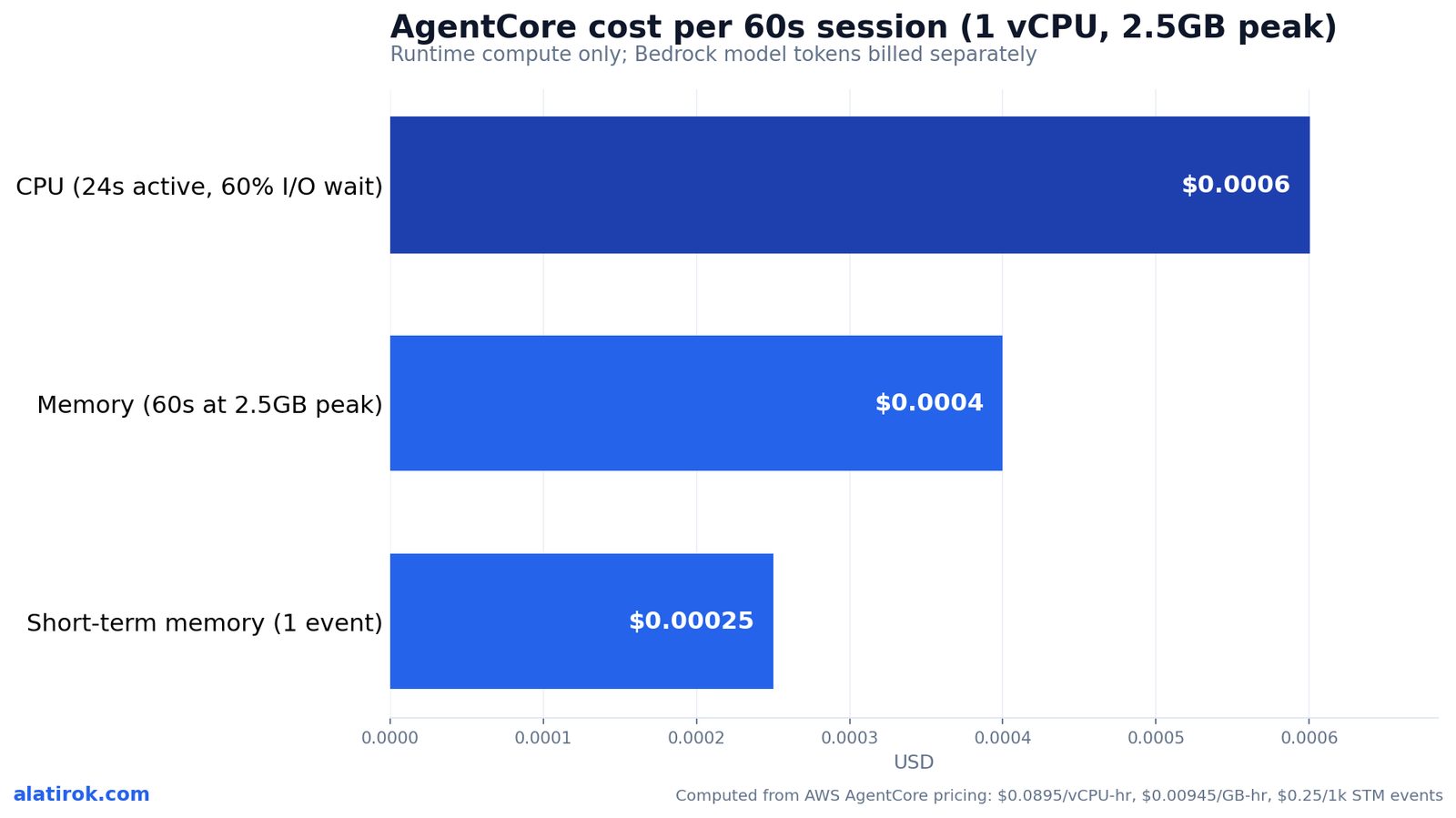
AgentCore Runtime charges $0.0895 per vCPU-hour and $0.00945 per GB-hour, billed per second with a one-second minimum and a 128 MB memory floor. Crucially, you pay only for active CPU consumption; time spent waiting on LLM tokens, tool calls, or database queries (I/O wait) is free if no background process is running. That consumption model is the entire economic argument for AgentCore over a pre-provisioned container.
Work a real number. Suppose a session runs 60 seconds, peaks at 1 vCPU and 2.5 GB of memory, but spends 60% of that time in I/O wait. CPU bills only for the active ~24 seconds: 24s x (1 vCPU) x $0.0895/3600 ≈ $0.0006. Memory bills for the peak across the full 60 seconds: 60s x 2.5 GB x $0.00945/3600 ≈ $0.0004. That is roughly $0.001 per session in raw runtime, before model-inference tokens, which are billed separately by Bedrock. AWS estimates that a pre-allocated service charging for peak provisioning for the full duration would run up to 3.3x higher on CPU and up to 1.4x higher on memory for the same workload.
Memory has its own meter. Short-term memory costs $0.25 per 1,000 new events. Long-term memory storage is $0.75 per 1,000 records per month for built-in strategies (or $0.25 per 1,000 with an override or self-managed strategy), and retrieval is $0.50 per 1,000 record retrievals. New AWS customers also get up to $200 in Free Tier credits to absorb early experimentation.
The practical takeaway: AgentCore is cheapest for bursty, I/O-heavy agent workloads and most expensive, relative to alternatives, for steady CPU-bound jobs. If your agent is mostly waiting on the model, you are in the sweet spot. If it is grinding CPU continuously, price out a container service first.
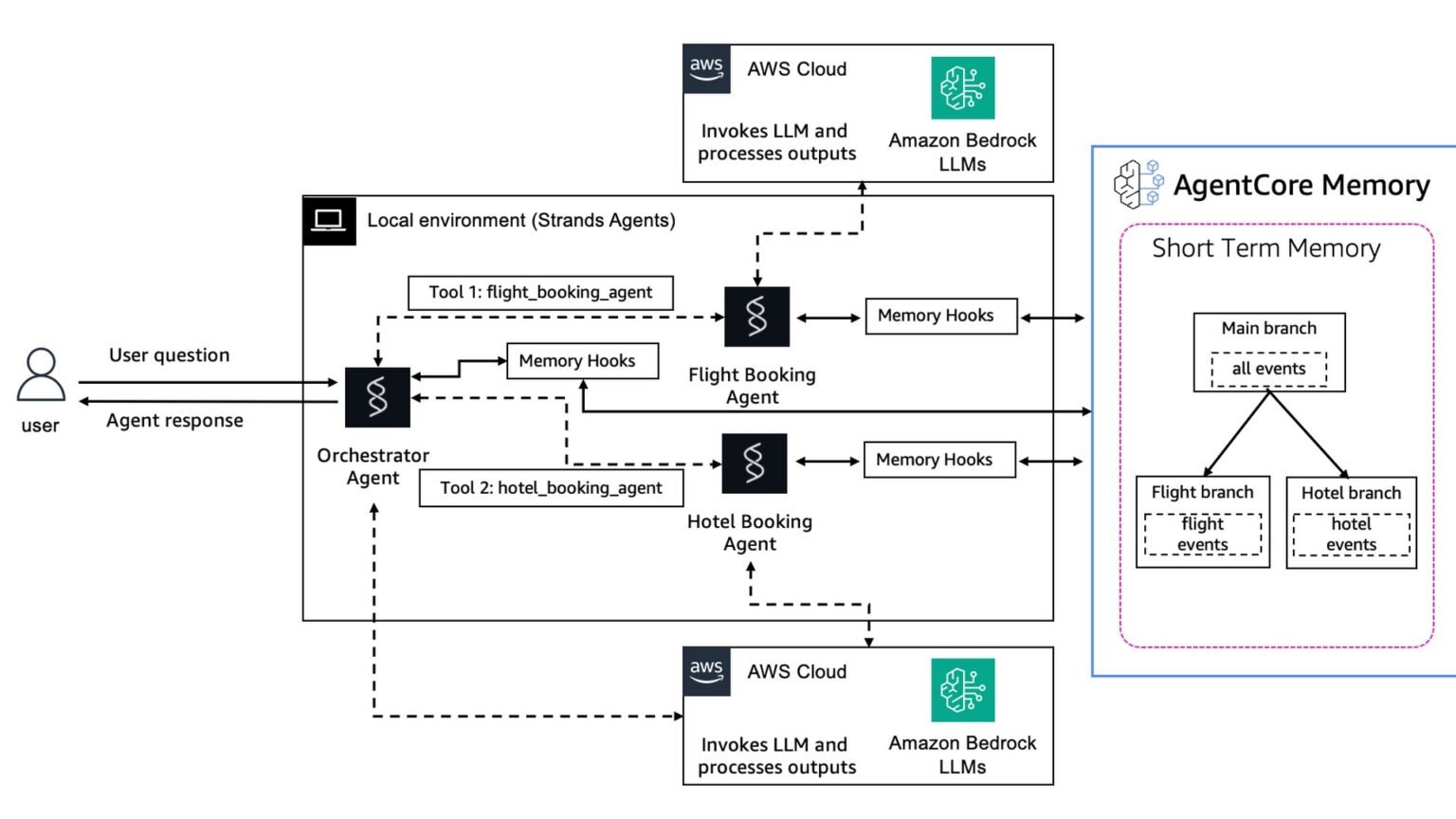
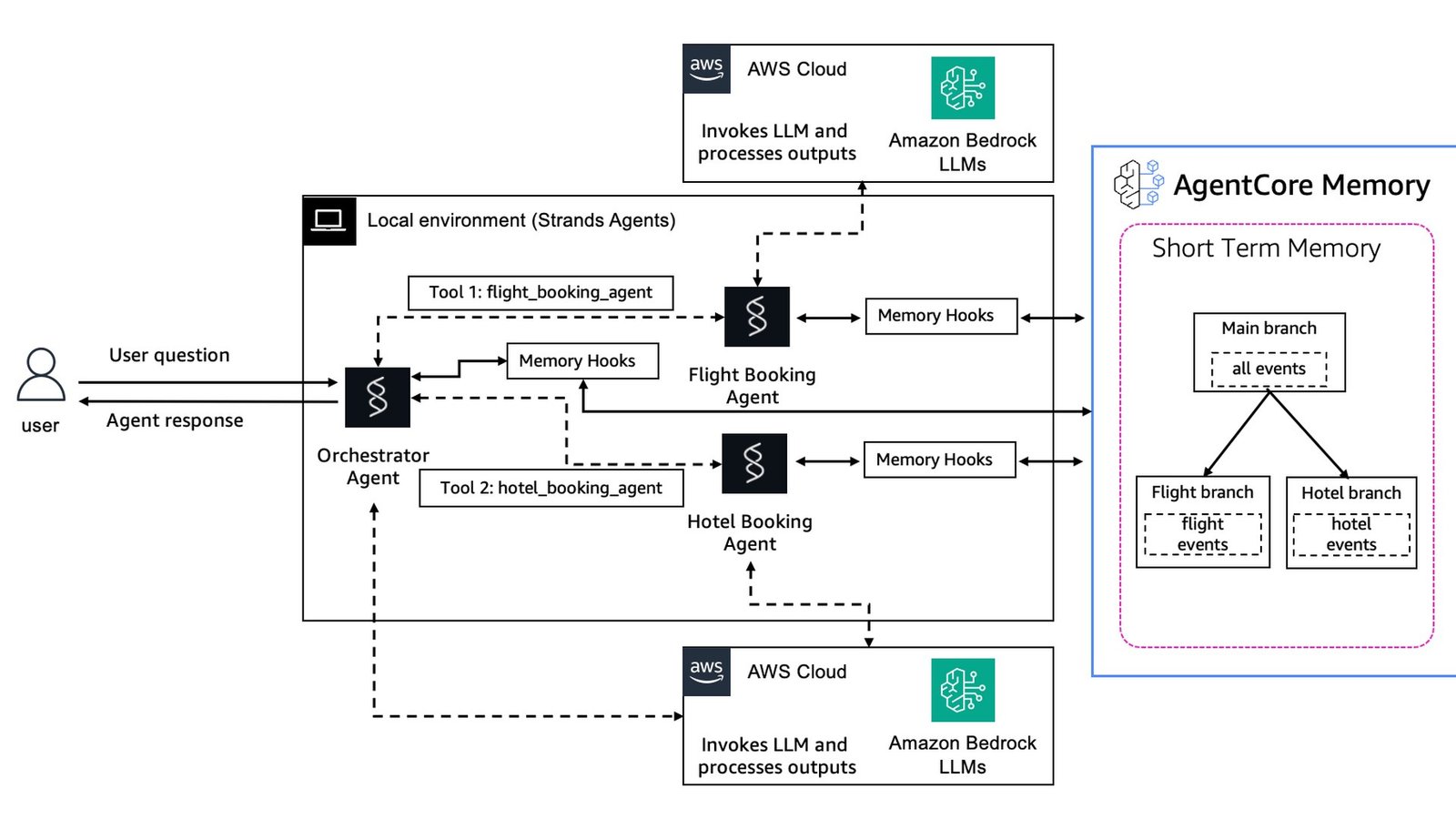
Short-term vs long-term memory: why LTM provisioning takes 2-3 minutes
Short-term memory in AgentCore stores raw conversation events and is available immediately, while long-term memory runs an asynchronous LLM-driven extraction that consolidates those events into reusable records, and provisioning a memory store with a semantic strategy takes about 2-3 minutes. That delay is by design, not a bug, and it changes how you should architect retrieval.
Short-term memory (STM) is the raw event log: every message in the ongoing session, used to maintain context and to restore state if the runtime restarts. It is written and readable right away. Long-term memory (LTM) is built by an extraction process that analyzes those events with an LLM and writes structured records according to your chosen strategy, the most common being SEMANTIC, which pulls out durable facts and knowledge.
Because that extraction is asynchronous, there is a gap between when an event lands in STM and when its distilled form appears in LTM. Design for it: serve immediate needs from short-term memory and treat long-term records as eventually consistent. On a first deploy, this is exactly why --memory none is the right call. You do not want a multi-minute LTM build sitting between you and a green deploy while you are still debugging the entrypoint.
When you are ready, you add memory declaratively. The CLI lets you scaffold it with the create flag or attach it afterward, then a deploy provisions the store.
# Option A: choose memory at create time
# none           -> no memory (fastest first deploy)
# shortTerm      -> raw event log, available immediately
# longAndShortTerm -> STM + async LTM extraction (semantic), ~2-3 min provision
agentcore create --name MyAgent --framework Strands \
  --model-provider Bedrock --memory longAndShortTerm

# Option B: add a long-term, semantic memory store to an existing project
agentcore add memory --name MyMemory --strategies SEMANTIC
agentcore deploy   # provisions the store (LTM build runs asynchronously)
“Serve immediate needs from short-term memory and treat long-term records as eventually consistent. The 2-3 minute LTM build is a feature of the extraction pipeline, not a deploy bug.”
On architecting around AgentCore Memory
AgentCore CLI vs starter toolkit, and Strands vs LangGraph vs CrewAI
The AgentCore CLI (@aws/agentcore) supersedes the Python starter toolkit: it adds hot-reload local dev, built-in evaluations, gateway management, and a four-command flow, while the toolkit remains supported only for existing pipelines. On framework choice, AgentCore Runtime is genuinely neutral, so Strands, LangGraph, CrewAI, and LlamaIndex all run on the identical runtime and pricing. The differentiator is developer ergonomics, not capability.
The CLI-versus-toolkit decision is now simple for new work: use the CLI. The starter toolkit’s own repo points new projects to it. The toolkit’s manual ECR-push, boto3-driven flow still functions, but it is the legacy path and will keep falling behind on features.
Framework choice is more interesting because the runtime does not care. Whatever you put behind the @app.entrypoint contract is opaque to AgentCore, so the question becomes which framework fits your team. Strands is the path of least resistance on AgentCore because the SDK and CLI come from the same team. LangGraph wins when you need explicit, inspectable state-machine control over multi-step flows. CrewAI is fastest to a multi-agent role-based crew. None of them changes your bill.
If you need workflows that survive crashes and resume mid-run, that is a separate concern from the framework; see our Durable Execution explainer. And if your agent runs untrusted code, pair this deploy with a Code-Execution Sandbox rather than executing in the runtime directly.
Pros
Cons
| Framework | create flag | Best for | Runtime cost impact |
|---|---|---|---|
| Strands Agents | –framework Strands | Smoothest fit; same team as the CLI; default | None (same runtime) |
| LangChain / LangGraph | –framework LangChain_LangGraph | Explicit, inspectable multi-step state machines | None (same runtime) |
| CrewAI | (custom build / BYO) | Fast role-based multi-agent crews | None (same runtime) |
| Google ADK | –framework GoogleADK | Teams standardized on Google’s agent stack | None (same runtime) |
| OpenAI Agents | –framework OpenAIAgents | OpenAI-model-centric agents | None (same runtime) |
Custom container fallback, session limits, and going to production
The verdict: use the CLI, start with Strands + CodeZip + no memory
If you need system-level dependencies or a specific base image, create the project with --build Container instead of CodeZip; AgentCore Runtime runs on ARM64 (AWS Graviton), so a custom container image must be built for ARM64 or it will fail to deploy. The CLI handles architecture compatibility automatically for both build types, but for a hand-rolled Dockerfile the ARM64 platform target is on you.
The container path is the modern equivalent of the old FastAPI-plus-Dockerfile workflow, except you no longer push to ECR by hand. You still expose the same HTTP contract, /invocations for the entrypoint and /ping for health, on port 8080, and the CLI’s deploy takes care of the registry. Use this only when CodeZip cannot carry a dependency you need; for pure-Python agents, CodeZip is simpler and Docker-free.
Before you call anything production-ready, internalize the runtime quotas. A session can run up to 8 hours for asynchronous workloads, but the synchronous request timeout is 15 minutes, and a session is terminated after 15 minutes of inactivity, on hitting the 8-hour ceiling, or on a failed health check. Payloads can reach 100 MB for multimodal input, with streaming chunks capped at 10 MB. If your task can exceed 15 minutes of synchronous work, you must move to an asynchronous pattern with background processing and status polling rather than holding one connection open.
Finally, wire up observability before you ship traffic. Enable CloudWatch Transaction Search, then use agentcore logs to stream runtime logs and agentcore traces list to inspect traces. The same CLI that deploys your agent is also your day-two operations console.
# Container build for custom system deps -- MUST target ARM64 (Graviton)
agentcore create --name MyAgent --framework Strands \
  --model-provider Bedrock --memory none --build Container

# Minimal Dockerfile contract for a custom image:
#   FROM --platform=linux/arm64 python:3.12-slim   <- ARM64 is mandatory
#   ...install deps...
#   EXPOSE 8080            # /invocations + /ping on 8080
#   CMD ["python", "app/MyAgent/main.py"]   # app.run() serves the contract

agentcore deploy           # CLI builds, pushes, and wires the registry for you

# Day-two operations from the same CLI:
agentcore status           # live dashboard of deployed resources + ARNs
agentcore logs             # stream runtime logs (CloudWatch)
agentcore traces list      # recent traces for debugging
Builder’s take
I have shipped agent infrastructure for Cyntr and Loomfeed, and the move from the starter toolkit to the AgentCore CLI is the kind of breaking change that quietly invalidates 80% of the deploy tutorials you will find on Google. Here is what actually matters when you put this in production:
- The CLI is not a thin wrapper. It pulls in AWS CDK and CloudFormation under the hood, so a `deploy` is a real infra change set, not a glorified ECR push. Treat the `agentcore/` config dir as part of your repo and review the `–plan` diff like you would a Terraform plan.
- The per-second, I/O-wait-free pricing is the whole reason to be here instead of on a Fargate task. An agent that spends 60% of a session waiting on LLM tokens pays nothing for that wait. If your workload is CPU-bound and steady, AgentCore is the wrong tool and a container service is cheaper.
- Pick `–memory none` for the first deploy. Long-term memory provisions asynchronously and you do not want a 2-3 minute LTM build blocking your first green deploy while you are still debugging the entrypoint contract.
- Framework choice is genuinely free at the runtime layer. I would still start with Strands because the SDK and the CLI ship from the same team, so the entrypoint contract and the local `dev` server line up perfectly. Bring LangGraph or CrewAI once you have a reason.
Frequently asked questions
The Python bedrock-agentcore-starter-toolkit is now labeled legacy by AWS. It still works for existing pipelines, but AWS directs all new projects to the AgentCore CLI, installed with npm install -g @aws/agentcore. The toolkit’s own GitHub repo carries the notice to use the CLI for new work.
agentcore deploy reads your agentcore.json and aws-targets.json, packages your agent as a CodeZip archive or Docker container, and uses the AWS CDK to synthesize and deploy a CloudFormation stack that creates the IAM execution role and the AgentCore Runtime. Run agentcore deploy –plan to preview the change set, and -y to auto-confirm. A fresh account may need a one-time cdk bootstrap first.
AgentCore Runtime bills $0.0895 per vCPU-hour and $0.00945 per GB-hour, per second, with a 128 MB memory floor. You pay only for active CPU; I/O wait is free. A 60-second, I/O-heavy session at 1 vCPU and 2.5 GB peak costs roughly $0.001 in raw runtime, before Bedrock model tokens. Memory is metered separately: $0.25 per 1,000 short-term events and from $0.25 to $0.75 per 1,000 long-term records per month.
Short-term memory stores raw events and is available immediately. Long-term memory runs an asynchronous, LLM-driven extraction that distills those events into reusable records, and provisioning a memory store with a semantic strategy takes about 2-3 minutes. Architect for it by serving immediate reads from short-term memory and treating long-term records as eventually consistent.
Yes. AgentCore Runtime is framework-neutral. Strands, LangChain/LangGraph, CrewAI, LlamaIndex, Google ADK, and OpenAI Agents all run on the identical runtime at the same pricing. The runtime only sees the @app.entrypoint HTTP contract; whatever framework sits behind it is opaque to the platform. Strands is the smoothest because the SDK and CLI ship from the same AWS team.
An AgentCore Runtime session can run up to 8 hours for asynchronous workloads, but the synchronous request timeout is 15 minutes. A session terminates after 15 minutes of inactivity, on reaching the 8-hour ceiling, or on a failed health check. Payloads can be up to 100 MB for multimodal input, with streaming chunks capped at 10 MB. Work that can exceed 15 minutes synchronously must use an asynchronous pattern with background processing and status polling.
Primary sources
- Get started with the AgentCore CLI — AWS Documentation
- aws/agentcore-cli on GitHub — GitHub / AWS
- bedrock-agentcore-starter-toolkit (legacy notice) — GitHub / AWS
- @aws/agentcore on npm — npm
- Amazon Bedrock AgentCore Pricing — Amazon Web Services
- Get started with AgentCore Memory — AWS Documentation
- Quotas for Amazon Bedrock AgentCore — AWS Documentation
- bedrock-agentcore-sdk-python — GitHub / AWS
- How to Deploy an AI Agent with Amazon Bedrock AgentCore — freeCodeCamp
Last updated: June 2, 2026. Related: Agent Infrastructure.




