


A neutral, framework-agnostic walkthrough: wire an execute_python tool into your agent loop, run model-written code in an isolated sandbox, and handle the production realities every vendor post skips.
What this AI agent code execution sandbox Python tutorial builds
This AI agent code execution sandbox Python tutorial builds one thing end to end: an execute_python tool that takes code an LLM wrote at runtime, runs it inside an isolated cloud sandbox, and feeds the captured output back into the agent loop so the model can read its own results and self-correct. No framework lock-in — the loop is plain Python and the Anthropic/OpenAI-style tool-calling pattern, so you can drop it into LangGraph, the OpenAI Agents SDK, smolagents, or your own runner.
Most search results for this topic fall into two buckets, and both leave you stuck. Vendor comparison listicles rank ten sandboxes by cold-start time but never show a working loop. Single-vendor posts do show code, but they are usually TypeScript-first (E2B’s own data-analyst demo uses TS plus GPT-4o) or buried three pages deep in framework docs. This guide is deliberately neutral, Python, and framework-agnostic, and it covers the four production realities those posts skip: execution timeouts, output truncation, network/egress lockdown, and file persistence between turns.
We use E2B’s Code Interpreter SDK as the concrete backend because it gives Firecracker-microVM isolation out of the box, but the tool contract is identical no matter which sandbox sits behind it. At the end you get a ‘pick by workload’ decision table so you know when to swap E2B for Modal or Daytona.
Python 3.10+, an E2B API key (e2b.dev, free Hobby tier), and an LLM API key. Install with pip install e2b-code-interpreter anthropic. The Hobby tier caps a single sandbox at 1 hour (3,600s); Pro raises it to 24 hours (86,400s).
Why you cannot just run LLM-generated code safely in Python with exec()
Never run LLM-generated code in your host process. The only robust way to run model-written code safely is remote execution in an isolated sandbox — a microVM or container — never exec() or a restricted-Python shim, both of which are bypassable. Hugging Face’s smolagents docs say this directly: their built-in LocalPythonExecutor ‘is not a security sandbox’ and ‘can be bypassed,’ and they recommend E2B, Modal, or Docker for any code you did not write yourself.
The threat is not hypothetical. An LLM that has been prompt-injected — through a poisoned web page it scraped, a malicious tool result, or a crafted user message — can emit code that reads your environment variables, exfiltrates secrets over the network, deletes files, or opens a reverse shell. If that code runs in the same process as your agent, the attacker now has everything your process has: cloud credentials, database connections, the lot. A sandbox moves that blast radius to a disposable VM you can kill in one call.
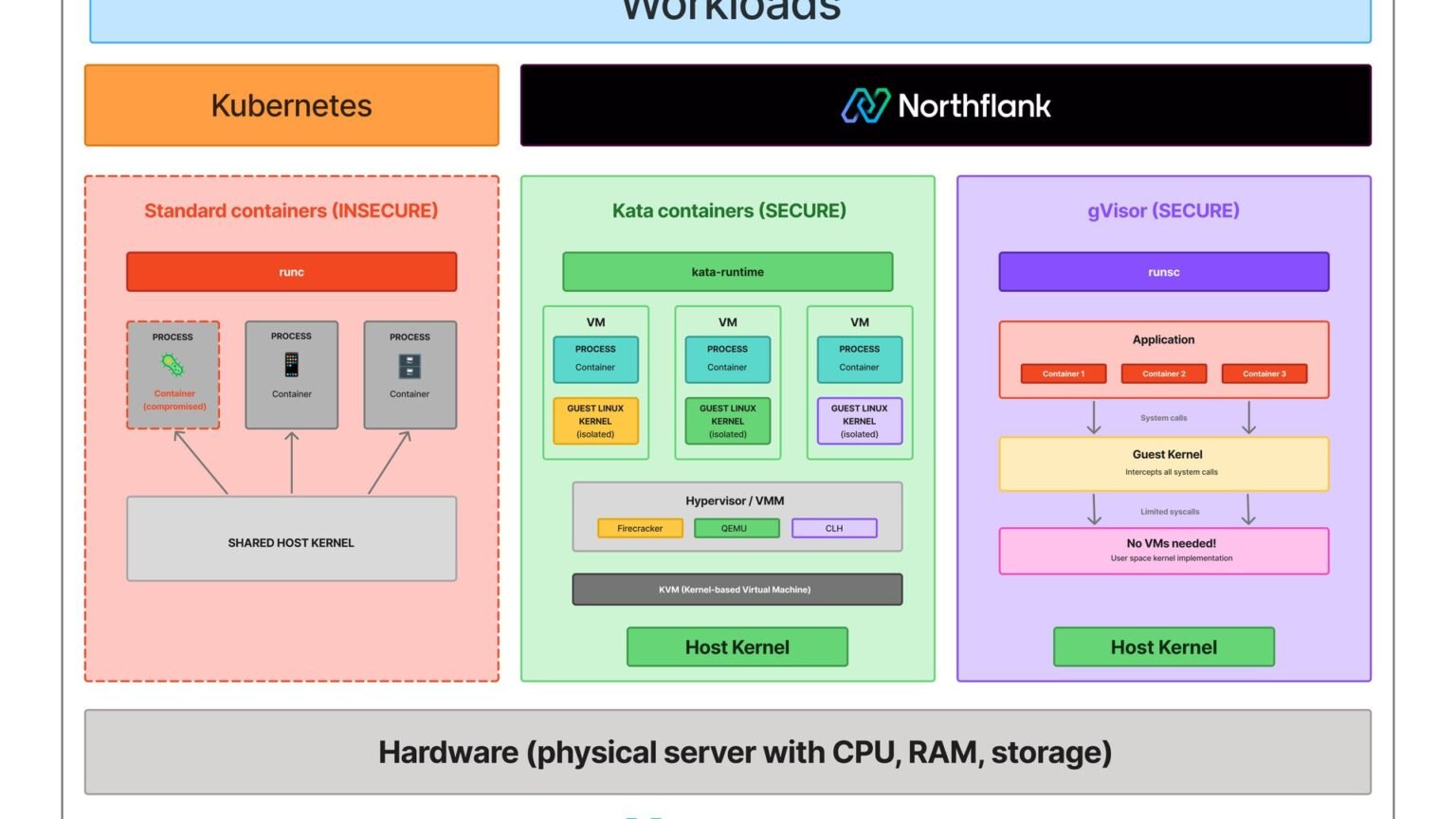
The two common DIY ‘sandboxes’ both fail under adversarial input. AST-walking allowlists (the LocalPythonExecutor approach) miss dunder-attribute tricks and import laundering. Plain Docker containers share the host kernel, so a kernel exploit escapes the container. This is exactly why E2B runs each sandbox in a Firecracker microVM with a dedicated guest kernel — hardware-level isolation, the same primitive AWS Lambda uses.
“The moment you call exec() on model output in your own process, you have handed an attacker with a prompt-injection payload a shell on your infrastructure.”
Surya Koritala, founder of Cyntr
Step 1: Create a sandbox and run code with the E2B Python SDK
Creating an isolated sandbox is two lines: instantiate Sandbox() and call run_code(). The returned Execution object carries the result text, captured stdout/stderr, any rich results (charts, dataframes), and a structured error if the code raised. By default a sandbox lives for 300 seconds; you set that explicitly with the timeout parameter.
Here is the minimal round trip. Set E2B_API_KEY in your environment first. Notice we read both the structured error and the logs — those are the two channels the model needs to debug itself later in the loop.
# pip install e2b-code-interpreter
from e2b_code_interpreter import Sandbox

# timeout is the sandbox lifetime in seconds (default 300).
# Hobby tier max = 3_600s (1h); Pro max = 86_400s (24h).
with Sandbox(timeout=120) as sandbox:
    execution = sandbox.run_code("import math\nprint(math.sqrt(144))")

    print("text   :", execution.text)            # "12.0"
    print("stdout :", execution.logs.stdout)      # ['12.0\n']
    print("stderr :", execution.logs.stderr)      # []
    print("results:", execution.results)          # rich outputs (e.g. images)
    print("error  :", execution.error)            # None unless code raised

# Leaving the 'with' block kills the microVM and reclaims it.
Step 2: Wrap execution as an execute_python tool the model can call
To add a code execution tool to an agent, expose run_code behind a single Python function and describe it to the model with a JSON schema. The function takes a code string, runs it in the sandbox, and returns a compact, structured summary the model can read on its next turn. This is the heart of the execute_python tool — and it is identical whether you wire it into the OpenAI Agents SDK, LangGraph, or a hand-rolled loop.
Two production details live in this function already. First, we keep one long-lived sandbox per session so variables, imports, and files persist across calls — the model can define df in one call and plot it in the next. Second, we never dump raw output into the result; we route it through a truncation helper (Step 4) so a runaway loop or a 50,000-line traceback cannot blow the context window.
import json
from e2b_code_interpreter import Sandbox

# One sandbox per conversation = state persists between tool calls.
sandbox = Sandbox(timeout=600)  # 10 min lifetime

EXECUTE_PYTHON_TOOL = {
    "name": "execute_python",
    "description": (
        "Run Python code in a secure, isolated sandbox and return its output. "
        "State (variables, imports, files) persists across calls in the same session. "
        "Use this for any calculation, data work, or code the user asks you to run."
    ),
    "input_schema": {
        "type": "object",
        "properties": {
            "code": {"type": "string", "description": "Python source to execute."}
        },
        "required": ["code"],
    },
}

def execute_python(code: str) -> str:
    """Run code in the sandbox; return a compact JSON summary for the model."""
    execution = sandbox.run_code(code, timeout=30)  # per-cell wall clock

    summary = {
        "stdout": truncate("".join(execution.logs.stdout)),
        "stderr": truncate("".join(execution.logs.stderr)),
        "error": None,
    }
    if execution.error:
        # Send the traceback back so the model can fix its own bug.
        summary["error"] = truncate(
            f"{execution.error.name}: {execution.error.value}\n"
            + (execution.error.traceback or "")
        )
    return json.dumps(summary)
Step 3: Feed results back into the agent loop so the model self-corrects
The execute_python tool only earns its keep inside a loop: the model proposes code, your runner executes it in the sandbox, you append the captured output as a tool result, and the model reads that output to decide its next step — fixing errors or building on prior results. This loop is the difference between a one-shot code generator and an agent that iterates until the task is done.
Below is a complete, runnable loop using the Anthropic Messages API (the same shape works with OpenAI tool calls — swap the client and field names). Watch how a tool error is not fatal: it goes straight back to the model as text, and the model writes a corrected cell on the next iteration. That feedback channel is why structured stderr and traceback in Step 2 matter.
import anthropic

client = anthropic.Anthropic()
MODEL = "claude-sonnet-4-5"  # any tool-calling model works

def run_agent(user_goal: str, max_turns: int = 8) -> str:
    messages = [{"role": "user", "content": user_goal}]

    for _ in range(max_turns):
        resp = client.messages.create(
            model=MODEL,
            max_tokens=2048,
            tools=[EXECUTE_PYTHON_TOOL],
            messages=messages,
        )
        messages.append({"role": "assistant", "content": resp.content})

        tool_calls = [b for b in resp.content if b.type == "tool_use"]
        if not tool_calls:                     # model gave a final answer
            return "".join(b.text for b in resp.content if b.type == "text")

        tool_results = []
        for call in tool_calls:
            if call.name == "execute_python":
                output = execute_python(call.input["code"])
                tool_results.append({
                    "type": "tool_result",
                    "tool_use_id": call.id,
                    "content": output,        # stdout/stderr/error -> back to model
                })
        messages.append({"role": "user", "content": tool_results})

    return "Stopped: hit max_turns without a final answer."

print(run_agent("Compute the 30th Fibonacci number, then verify it is even or odd."))
Step 4: Handle the production realities — timeouts, truncation, egress, persistence
Four things separate a demo from production: a per-execution timeout, output truncation, network egress lockdown, and file persistence between turns. Vendor listicles skip all four; here is the concrete code for each.
Execution timeouts. The sandbox lifetime (Sandbox(timeout=…)) is not the same as a per-cell wall clock. Pass timeout to run_code so a single infinite loop (while True: pass) gets killed without nuking the whole session. Use set_timeout() to extend the sandbox mid-session if a long job needs it, and always kill() in a finally block so you stop paying for idle microVMs.
Output truncation. An LLM that prints a 100MB dataframe will destroy your context window and your bill. Cap every channel before it reaches the model — keep the head and the tail (errors often surface at both ends) and tell the model bytes were dropped so it does not assume the output was complete.
Network / egress lockdown. Untrusted code with open internet access can exfiltrate anything it can read. E2B sandboxes are network-isolated from your infra by design, but you should still treat outbound access as a policy decision: allowlist the domains a task legitimately needs (e.g. a package index) and deny the rest. The safest default is no egress unless the task requires it.
File persistence between turns. Because we reuse one sandbox per session, files written in one cell survive into the next — the agent can save report.csv in turn 2 and read it in turn 5. To move files across sandbox restarts, use the explicit files API: sandbox.files.write() and sandbox.files.read().
MAX_CHARS = 4000  # per output channel sent to the model

def truncate(text: str, limit: int = MAX_CHARS) -> str:
    """Keep head + tail so both early prints and final tracebacks survive."""
    if len(text) <= limit:
        return text
    head, tail = text[: limit // 2], text[-limit // 2 :]
    dropped = len(text) - limit
    return f"{head}\n... [{dropped} chars truncated] ...\n{tail}"

# Per-cell timeout: this raises instead of hanging the session.
execution = sandbox.run_code("while True: pass", timeout=5)

# Persist a file the model wrote, across a sandbox restart.
data = sandbox.files.read("/home/user/report.csv")   # str or bytes
sandbox.files.write("/home/user/seed.csv", data)      # into a fresh sandbox

# Extend lifetime for a long job, then always clean up.
sandbox.set_timeout(3600)   # Hobby max 3_600s; Pro max 86_400s (24h)
try:
    ...  # run the agent loop
finally:
    sandbox.kill()          # stop paying for the idle microVM
Troubleshooting: “sandbox not found” or commands hang forever
A sandbox that exceeds its lifetime timeout is killed automatically and later calls raise ‘sandbox not found’ — either bump Sandbox(timeout=…) or call set_timeout() before the limit hits. If run_code or files calls hang with no response, set request_timeout (the network-call deadline, distinct from the code-execution timeout) so a dead microVM connection fails fast instead of blocking your loop. There is a known issue where streaming command calls can ignore read timeouts on an unreachable sandbox, so wrap the loop in your own watchdog and kill() on stall.Troubleshooting: model loops forever or ignores tool errors
If the agent never returns a final answer, your loop is missing a max_turns cap (we set 8) or the tool result isn’t being appended to messages — the model can only self-correct if it actually sees the stderr/traceback you return. If it keeps repeating the same broken cell, your truncation is probably cutting the traceback’s last line (the actual exception); use head+tail truncation, not head-only.Troubleshooting: state or files disappear between turns
Persistence only holds within one sandbox instance. If you create a new Sandbox() per tool call, every variable, import, and file is gone — reuse a single long-lived sandbox per conversation (Step 2). For state that must survive a sandbox restart or a different machine, write it out with sandbox.files.write() and re-seed with sandbox.files.read() on the next sandbox.Daytona vs E2B vs Modal sandbox: which to pick by workload
Pick by workload, not brand: E2B (Firecracker microVMs) for untrusted multi-tenant code, Modal for anything touching a GPU, and Daytona for long-lived stateful workspaces where packages and files should persist. They are not drop-in equivalents — isolation model, GPU support, and session length differ sharply.
E2B isolates every sandbox in a Firecracker microVM with its own guest kernel — the strongest isolation here — at roughly a 150ms cold start, with sessions up to 24 hours (Pro) and a paused state retained for 30 days. It has no GPU. Daytona provisions in 27-90ms as long-lived workspaces where pip installs and files persist, but its container/gVisor layer blocks GPU passthrough. Modal is the only one of the three where a sandbox can hold a GPU (T4, A100, H100, H200) with serverless autoscaling — the right call when the agent runs inference or trains a model inside the same isolated process. Note that E2B, Vercel (45-minute cap), Cloudflare, and Blaxel offer no GPU sandboxes at all.
Reassuringly, the contract you built above is portable. The OpenAI Agents SDK added native sandbox support in April 2026 with backends for Blaxel, Cloudflare, Daytona, E2B, Modal, Runloop, and Vercel — so your execute_python tool can swap its backend without rewriting the loop. For first-party depth on two of these, see our E2B and Modal reviews.
Pros
Cons
| Workload | Best pick | Isolation | Cold start / provision | GPU | Session cap |
|---|---|---|---|---|---|
| Untrusted, multi-tenant LLM code | E2B | Firecracker microVM (own kernel) | ~150 ms | No | 24 h (Pro) / 1 h (Hobby) |
| GPU / ML inference or training in-sandbox | Modal | gVisor, serverless | Autoscaled | T4 / A100 / H100 / H200 | Effectively unlimited |
| Long-lived stateful workspace (persist pkgs/files) | Daytona | Docker / Kata / gVisor | 27-90 ms | Via config (gVisor layer blocks passthrough) | Long-lived / configurable |
| Short web-task bursts, JS-heavy stacks | Vercel Sandbox | Container | Fast | No | 45 min |
Putting it together: the full execute_python agent loop
The complete pattern is small: one persistent sandbox, one execute_python tool with truncation, one loop that feeds stdout/stderr/error back to the model, and a finally block that kills the sandbox. That is a secure code interpreter for agents in well under 100 lines.
Everything composes from the snippets above. Define EXECUTE_PYTHON_TOOL and execute_python (Step 2), wrap them in run_agent (Step 3), guard every call with the timeout and truncation helpers (Step 4), and choose your backend from the decision table. To harden further: deny egress by default and allowlist only the domains a task needs; cap max_turns to bound cost; and log every code cell the model runs so you have an audit trail when something behaves unexpectedly.
From here, the natural extensions are streaming output back to a UI with the on_stdout/on_stderr callbacks, returning rich results (matplotlib charts arrive as base64 PNGs in execution.results) to render inline, and swapping the E2B backend for Modal the day your agent needs a GPU — without touching the loop you just wrote.
For most builders shipping an agent that runs LLM-written Python, start with E2B’s Code Interpreter behind the execute_python contract above. It gives you Firecracker isolation, a stateful Python session, and a clean Execution object for free — then graduate to Modal for GPU work or Daytona for long-lived workspaces without rewriting your loop.
Builder’s take
I run Cyntr’s orchestration on code that LLMs partly write at runtime, and the sandbox boundary is the single most load-bearing piece of that system. A few things I wish every tutorial said out loud:
- The sandbox is your trust boundary, not a convenience. The moment you call exec() on model output in your own process, you have handed an attacker with a prompt-injection payload a shell on your infra. Treat the host process as if it will be compromised, because eventually a jailbreak will get through.
- Feeding results back is the actual hard part. Models write code, read the stdout, and self-correct — but only if you return clean, truncated, labeled stdout/stderr/error text. A 40k-character traceback blows your context window and the loop stalls. Truncate aggressively and keep the tail, not the head.
- Pick the sandbox by workload, not by hype. For untrusted, multi-tenant code I want Firecracker isolation (E2B). For anything touching a GPU I reach for Modal. For a long-lived stateful workspace where pip installs should survive, Daytona. They are not interchangeable.
- Persisted files between turns is what turns a toy into a data analyst. If the agent writes a CSV in turn 2 and reads it in turn 5, you need either a context that survives or an explicit files API. Decide this before you ship, not after a user complains the chart vanished.
Frequently asked questions
Never run it in your own process with exec() or a restricted-Python shim — both are bypassable under adversarial input. Run it in an isolated remote sandbox: a Firecracker microVM (E2B) or an isolated container (Modal, Daytona). Hugging Face’s smolagents docs are explicit that their LocalPythonExecutor is not a security sandbox and that E2B, Modal, or Docker are the recommended pattern for code you did not write.
It is a single function you expose to the model via a JSON tool schema. The model emits a code string, your runner executes it in a sandbox, captures stdout, stderr, and any error, and returns a compact summary as the tool result. The model reads that result on its next turn to self-correct or build on prior output. The contract is identical across the OpenAI Agents SDK, LangGraph, and hand-rolled loops.
Use E2B for untrusted multi-tenant code (Firecracker microVMs, ~150ms cold start, 24h Pro sessions, no GPU). Use Modal for any workload that needs a GPU inside the sandbox (T4/A100/H100/H200, serverless autoscaling). Use Daytona for long-lived stateful workspaces where packages and files should persist (27-90ms provisioning), noting its gVisor layer blocks GPU passthrough.
Pass a per-execution timeout to run_code (for example timeout=30) so a single while True loop is killed without ending the session, separate from the sandbox lifetime set in Sandbox(timeout=…). Use set_timeout() to extend the sandbox for a legitimate long job, and always call kill() in a finally block so idle microVMs stop billing you.
Reuse one long-lived sandbox per conversation instead of creating a new one per tool call — variables, imports, and files written in one cell then persist into later cells. To carry state across a sandbox restart or a different machine, write it out with sandbox.files.write() and re-seed it with sandbox.files.read() when the next sandbox starts.
Yes, and both make it easy. The OpenAI Agents SDK added native sandbox support in April 2026 with backends for Blaxel, Cloudflare, Daytona, E2B, Modal, Runloop, and Vercel. smolagents supports E2B, Modal, Docker, and a WebAssembly executor and warns that its built-in LocalPythonExecutor must not be used as a security boundary.
Primary sources
- e2b-dev/code-interpreter SDK (run_code, Execution, Sandbox) — GitHub / E2B
- E2B Code Interpreter Python SDK reference (run_code, Execution, Logs) — E2B
- E2B Python SDK reference (set_timeout, kill, files, timeout default 300s) — E2B
- Daytona vs E2B: AI code execution sandboxes in 2026 — Northflank
- E2B, Daytona, Modal and Sprites.dev — choosing a sandbox platform — SoftwareSeni
- OpenAI Agents SDK: How to Run Agents in Modal Sandboxes — DataCamp
- Secure code execution — Hugging Face (smolagents)
- The next evolution of the Agents SDK (native sandbox backends) — OpenAI
Last updated: June 2, 2026. Related: Agent Infrastructure.




