

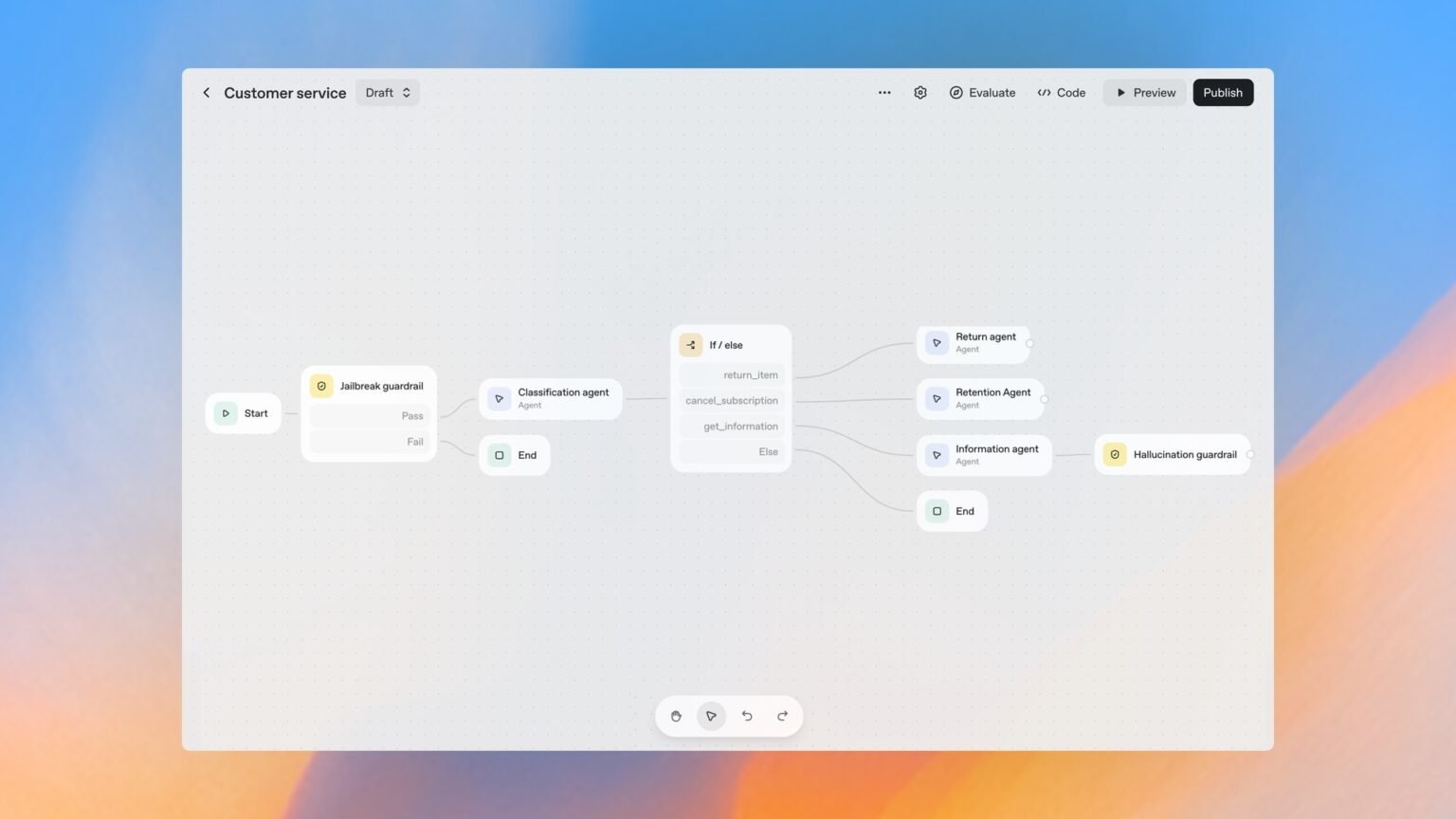

A decision-grade breakdown of AgentKit’s five components, its honest all-in cost, the visual-builder migration cliff, and where the canvas locks you in.
What is OpenAI AgentKit?
OpenAI AgentKit is an end-to-end toolset for building, deploying, and optimizing AI agents, unveiled at OpenAI DevDay on October 6, 2025. Rather than one product, AgentKit is an umbrella over five distinct components: a visual Agent Builder canvas, the embeddable ChatKit chat UI, an admin-facing Connector Registry, an Evals suite for measuring and tuning agents, and an open-source Guardrails safety layer. If you have only seen the ‘drag your first agent onto a canvas’ tutorials, you have seen roughly one-fifth of what AgentKit actually is.
The pitch is speed. OpenAI demoed building two agents and a full workflow live in under eight minutes at DevDay, and cited fintech company Ramp building a buyer agent from a blank canvas in a few hours. That velocity is real and it is the reason AgentKit is worth understanding. But the load-bearing questions for anyone past the demo are different: what does it actually cost, where does the visual canvas hit a ceiling and force you into code, and how much of your stack gets locked to OpenAI along the way.
This guide answers those questions directly. We place AgentKit on the real competitive map next to the code-first OpenAI Agents SDK, Google’s ADK, and the Claude Agent SDK, and against no-code platforms like n8n. We cover the honest all-in cost, the one-way migration cliff from canvas to SDK, Connector Registry lock-in, and the limits of Guardrails. Most existing coverage stops at the happy-path tutorial. This one is built for the buyer deciding whether to commit a roadmap to it.
One critical, current caveat before you commit: as of a June 3, 2026 notice on OpenAI’s deprecations page, Agent Builder, the visual canvas itself, is being deprecated, with shutdown scheduled for November 30, 2026. ChatKit and the underlying Agents SDK remain the recommended forward path. We unpack what that means for your build below, but keep it in mind as you read: the most glamorous piece of AgentKit is also the most fragile.
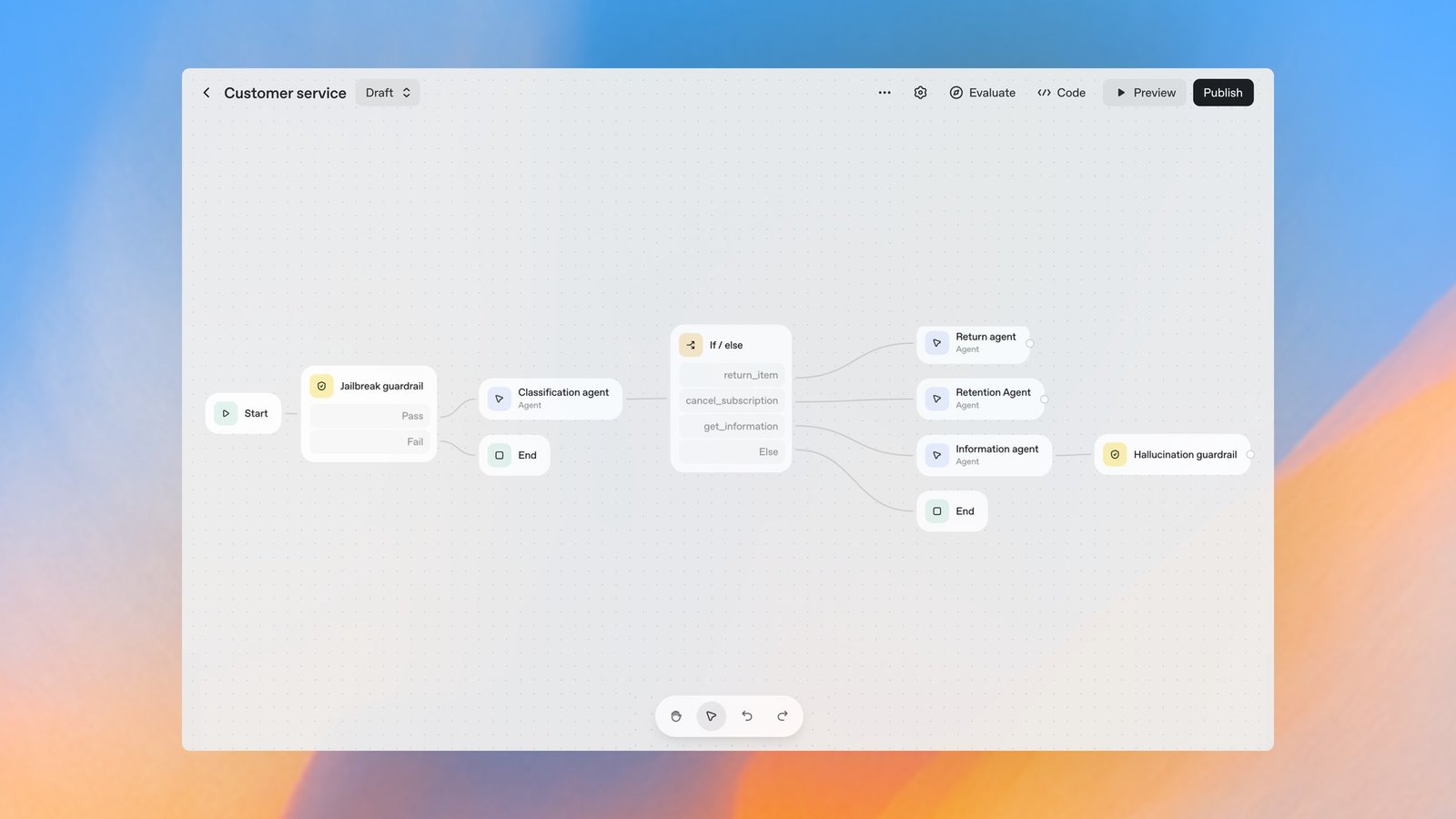
What are the AgentKit components?
AgentKit has five components, and only one of them is the visual canvas everyone talks about. Understanding each one, and which carry the most lock-in risk, is the whole game. Here is the component-by-component map, including the code-first equivalent in the Agents SDK so you can see exactly what the canvas is wrapping.
None of these components carry a separate platform fee. You pay standard OpenAI API token pricing for the models that run underneath, plus tool-call and storage charges we detail later. ‘Free toolkit, metered runtime’ is the accurate mental model. The lock-in column is the one to read twice: it is the difference between a tool you can walk away from and one that quietly becomes load-bearing in your org.
Agent Builder is the visual drag-and-drop canvas with typed nodes, versioning, and inline evals. ChatKit is the embeddable front end. Connector Registry is the admin plane for data and tool permissions. Evals measures quality. Guardrails enforces safety. The trap is assuming they are equally portable, they are not.
In Agent Builder you can open the ‘Agents SDK’ tab to download the code (JavaScript/TypeScript or Python) that reproduces your workflow, then run it in your own environment. Rule of thumb: use the canvas to validate logic fast; export to the SDK the moment you need custom hosting, non-chat triggers, multi-provider models, or fine-grained control. The export is one-way, so plan the exit before you are deep.
| Component | What it does | Open source? | Separate fee? | Agents SDK equivalent | Lock-in risk |
|---|---|---|---|---|---|
| Agent Builder | Visual canvas with typed nodes, versioning, inline evals; exports SDK code | No (hosted) | No | Hand-written agent/handoff graph | High |
| ChatKit | Embeddable chat UI: streaming, threads, chain-of-thought, tool/widget rendering (React/Vue/Angular) | No (hosted) | No | Your own UI on the Responses API | Medium |
| Connector Registry | Central admin panel for data/tool permissions across ChatGPT + API (Drive, SharePoint, Dropbox, MCP) | No (hosted) | No | Your own MCP/connector wiring | High |
| Evals | Datasets, trace grading, automated prompt optimization | No (hosted) | No | Custom eval harness / third-party evals | Low |
| Guardrails | Open-source modular safety layer: input/output/tool channels with Pass/Fail branches | Yes | No | openai-guardrails / custom validators | Low |
How does Agent Builder work, and when does the visual canvas hit a ceiling?
Agent Builder is a node-based canvas where every connection between nodes is a typed edge, workflows are versioned snapshots with IDs, and you can run trace graders inline, but it can only build chat-triggered agents that run on OpenAI models. Those two constraints are where the ceiling lives, and most tutorials never mention them.
Here is the mechanism. You drag typed nodes, agents, tools, guardrails, if/else logic, onto the canvas and wire them together. Because edges are typed, downstream nodes receive the properties they expect, which catches a class of plumbing bugs at design time. When you publish, the workflow becomes a snapshot with a version ID you can reference from the API or pin to an older version. You then either pass that workflow ID into ChatKit to embed it, or download the Agents SDK code to self-deploy.
The ceiling is concrete. First, the only supported trigger type is chat, so webhooks, schedules, and API events are not yet first-class, anything event-driven needs the SDK. Second, Agent Builder is OpenAI-models-only; you cannot drop in Claude, Gemini, or Mistral for comparison or hybrid routing on the canvas. Third, multi-agent coordination leans on manual if/else nodes, which undercuts the no-code promise the moment your routing gets non-trivial. A deep dive by Inkeep found AgentKit needing four separate agents for a support flow that a more flexible runtime handled with one.
So when do you hit the wall? You hit it when you need a non-chat trigger, when you want to A/B a non-OpenAI model, when your orchestration outgrows hand-drawn branches, or when you need to host the runtime yourself for latency, compliance, or cost reasons. At that point the canvas stops being an accelerator and becomes a thing you are migrating off of, which brings us to the cliff.
The AgentKit migration cliff: when the visual builder forces you into Agents SDK code
The migration from Agent Builder to the OpenAI Agents SDK is a one-way street: you can export a visual workflow to code, but you cannot import code back into the canvas. This is the single most important architectural fact about AgentKit, and it is why ‘AgentKit vs Agents SDK’ is the wrong framing, the SDK is the floor underneath the canvas, not a competitor to it.
Practically, this means the canvas is a generative tool, not a round-trip editor. The day you export and start hand-editing the generated TypeScript or Python, the visual version becomes a frozen artifact. Any further canvas changes would have to be re-exported and re-merged by hand, which nobody does at scale. Teams that try to keep both in sync end up maintaining two divergent sources of truth.
The June 2026 deprecation of Agent Builder makes this non-theoretical. With the canvas itself scheduled to shut down on November 30, 2026, per OpenAI’s deprecations page, every serious workflow built on it is on a clock to either move to ChatKit-plus-SDK or be rebuilt. The fortunate detail is that the SDK export and ChatKit are the surfaces OpenAI is keeping, so the migration target is clear, but it is still a migration you should price into the project.
My recommendation for builders: treat Agent Builder as a whiteboard. Sketch the agent graph visually, export to the Agents SDK early, and make the exported code your version-controlled source of truth from that point forward. Do not accumulate business logic that only exists on the canvas. If you internalize one thing from this guide, make it this: design every AgentKit project as if the visual layer will disappear, because for Agent Builder specifically, it is scheduled to.
“The export from canvas to SDK is one-way. Design every AgentKit project as if the visual layer will disappear.”
Alatirok analysis
Is AgentKit free, and what is the honest all-in cost?
$0
Platform fee for AgentKit tools
You pay standard token pricing instead
~$10/1M
Output tokens, flagship GPT-5 tier
Per million output tokens, standard API rate
$0.10/GB-day
ChatKit storage
Charges began November 2025
<8 min
DevDay live build
Two agents + full workflow, demoed Oct 6, 2025
AgentKit’s tools carry no separate platform fee, but AgentKit is not free, you pay standard OpenAI API token pricing plus tool-call and storage charges, and a chatty multi-agent graph compounds all three. ‘Is AgentKit free?’ has a marketing answer (the toolkit is included) and an accounting answer (your monthly bill is entirely usage-based and hard to predict).
Three cost layers stack up. The first and largest is model usage, billed per token at standard API rates, a flagship-tier model in the GPT-5 family runs roughly $1.25 per million input tokens and $10 per million output tokens, so a multi-agent workflow that passes context between several nodes multiplies token spend fast. The second is tool usage: built-in tools meter separately, with Code Interpreter at about $0.03 per session, File Search storage around $0.10 per GB per day, and web search on the order of $10 per 1,000 calls. The third is ChatKit storage, OpenAI began charging for ChatKit uploads at roughly $0.10 per GB-day from November 2025.
There is no flat-rate subscription, which is the honest headline. As eesel AI’s pricing breakdown puts it, predicting exact AgentKit cost is difficult precisely because a ‘simple’ request can trigger a multi-step, multi-agent cascade that consumes far more tokens than a single completion would. Budgeting by request volume alone will mislead you; budget by tokens-per-completed-task and load-test before you commit.
One more hidden line item: hosting. ChatKit embeds a UI, but it has to connect to a backend agent workflow that you build and host. If you export to the SDK and self-deploy, your compute, networking, and observability costs are entirely yours and sit outside OpenAI’s pricing. The ‘free toolkit’ never included the servers.
What is Connector Registry, and how much lock-in does it create?
Connector Registry is a central admin panel that governs how data and tools connect across OpenAI’s products, consolidating sources like Google Drive, SharePoint, Dropbox, Teams, and third-party MCP servers into one permissions plane, and it is the stickiest lock-in surface in AgentKit. The convenience is genuine; so is the gravity it creates.
The value proposition is real governance. An admin can authenticate once via an admin-managed sync connector and deploy a data source across the whole organization, so end users do not wire up their own connections. Supported connectors span Drive, SharePoint, Dropbox, Box, Outlook, Gmail, Google Calendar, Linear, GitHub, HubSpot, and Teams, with custom MCP connectors available to Team, Enterprise, and Edu tiers. For a security team, a single place to grant and revoke agent access to corporate data is a meaningful upgrade over per-app sprawl.
The lock-in is the flip side of that convenience. Once your SharePoint scopes, Drive permissions, and MCP wiring live in OpenAI’s registry, OpenAI sits in the trust path between your agents and your data. Migrating to another agent platform later means re-establishing every one of those connections, re-running admin approvals (including Microsoft Entra scope reviews for SharePoint), and re-validating access in a different control plane. The data does not move, but the integration labor is non-trivial and easy to underestimate at adoption time.
Note one commercial detail: connector access has been offered to Business customers as a free preview through June 2, 2026, after which usage follows plan credits and terms. Treat preview windows as exactly that, a window, and confirm the current commercial terms before you make the registry load-bearing in your architecture.
Before standardizing on Connector Registry, answer three questions: (1) If we switch agent platforms in 18 months, who re-approves these connectors and how long does it take? (2) Are these data scopes documented outside OpenAI’s console so we can reproduce them? (3) Are we relying on a preview-priced feature that could change terms? If any answer is ‘we don’t know,’ you have undocumented lock-in.
What are AgentKit Guardrails, and what are their limits?
Guardrails is AgentKit’s open-source, modular safety layer that plugs into Agent Builder, where each guardrail has an input channel, a logic unit, and Pass/Fail branches, with built-in checks for PII, hallucination, moderation, and jailbreaks. It is the most portable component, and the one most likely to be over-trusted.
Mechanically, guardrails run as independent validation steps around agent execution. Input guardrails fire before the first agent processes a request, output guardrails fire on the agent producing the final response, and tool guardrails run on every custom function-tool invocation. In Agent Builder you wire a Guardrail node’s Pass output straight into the next Agent node and route Fail outputs to an End node or an error-handling branch, so blocked inputs never reach the model. The checks can mask or flag PII, detect jailbreak attempts, and apply moderation policy alongside the run.
The limits matter as much as the features. First, the model-based checks are themselves model-based, and security researchers at HiddenLayer demonstrated that OpenAI’s Guardrails could be bypassed, underscoring that an LLM judging another LLM is not a hard boundary. As SD Times summarized, guardrails are not a get-out-of-risk-free card. Second, the built-in catalog is narrow, PII, hallucination, moderation, jailbreak, anything domain-specific you implement yourself. Third, guardrails govern content, not authorization, they do not replace least-privilege tool permissions, network egress controls, or human approval gates for high-impact actions.
The practical posture: use Guardrails as one layer in defense-in-depth, never the only layer. Because it is open source, you can run it outside Agent Builder too, which is a genuine plus if you migrate off the canvas. But pair it with deterministic policy on tool calls and real authorization, the things an LLM-based filter structurally cannot guarantee.
Pros
Cons
AgentKit vs Agents SDK vs Google ADK vs Claude Agent SDK vs n8n
AgentKit is the best on-ramp and the wrong destination
AgentKit is the fastest way to v1 but the most locked-in; the OpenAI Agents SDK is its code-first foundation and is model-agnostic; Google ADK is the enterprise-grade choice for Google Cloud; the Claude Agent SDK leads on native OS control; and n8n wins on open triggers and self-hosting. Choosing well means matching the tool to where your workflow actually lives.
The key insight that most ‘AgentKit vs Agents SDK’ content misses: they are not rivals. Agent Builder generates Agents SDK code, the SDK is the layer beneath the canvas. The real fork is visual-first (Agent Builder, deprecating) versus code-first (Agents SDK, which OpenAI is keeping and which supports 100+ models, declarative handoffs, voice, and OpenTelemetry observability). For anything past a prototype, the SDK is where durability lives.
Against the field: Google ADK targets production scale, with Python/TypeScript/Java/Go support, state ‘rewinding’ after failures, and tight Vertex AI and Gemini integration, at the cost of stricter project structure and some documented tool-call cost overruns. The Claude Agent SDK is the only one of these where agents directly control a computer, executing shell commands and managing files natively, which makes it ideal for developer-assistant and automation use cases, though it is Claude-centric. n8n sits in a different quadrant entirely: open-source, self-hostable, with HTTP, webhook, cron, form, and MCP triggers, and multi-provider models, the antithesis of AgentKit’s chat-only, OpenAI-only canvas.
Bottom line by job: pick AgentKit to demo and validate fast inside the OpenAI ecosystem; graduate to the Agents SDK for production OpenAI agents; pick Google ADK if you live on Google Cloud and need enterprise governance; pick the Claude Agent SDK for OS-level automation; pick n8n when you need open triggers, self-hosting, or multi-model freedom that AgentKit structurally cannot offer.
| Tool | Style | Model lock-in | Triggers | Best for |
|---|---|---|---|---|
| AgentKit / Agent Builder | Visual, hosted | OpenAI only | Chat only | Fast v1, OpenAI-native demos (Builder deprecating Nov 2026) |
| OpenAI Agents SDK | Code-first | 100+ models | Code-defined | Production OpenAI agents, voice, handoffs |
| Google ADK | Code-first | Gemini-centric, flexible | Code-defined | Enterprise scale on Google Cloud |
| Claude Agent SDK | Code-first | Claude only | Code-defined | Native OS / computer-control automation |
| n8n | No-code, open-source | Any provider | HTTP, webhook, cron, form, MCP | Open triggers, self-hosting, multi-model |
Builder’s take
I build agents for a living across Cyntr and Loomfeed, and AgentKit is the most seductive on-ramp OpenAI has shipped. But seductive is not the same as durable. Here is how I read it after the research:
- The visual canvas is a phenomenal prototyping surface and a mediocre production runtime. Use it to win the demo, not to run the business.
- Treat the Agents SDK export as the real product and Agent Builder as a sketchpad. The export is one-way, so design as if you will leave the canvas on day one.
- The ‘free toolkit’ framing is marketing. Your bill is tokens plus tool calls plus ChatKit storage, and a chatty multi-agent graph compounds all three.
- Connector Registry is the stickiest piece. Wiring your SharePoint and Drive permissions through OpenAI’s admin plane is convenient now and a migration tax later.
- The June 2026 Agent Builder deprecation notice is the tell: OpenAI ships fast and sunsets faster. Build on the SDK and ChatKit, the surfaces they are keeping.
Frequently asked questions
OpenAI AgentKit is a toolset for building, deploying, and optimizing AI agents, launched at DevDay on October 6, 2025. It bundles five components: the visual Agent Builder canvas, the embeddable ChatKit UI, the Connector Registry admin plane, an Evals suite, and an open-source Guardrails safety layer. It is not one app, it is an umbrella over those five pieces, all billed at standard OpenAI token pricing.
The AgentKit tools carry no separate platform fee, but AgentKit is not free overall. You pay standard OpenAI API token pricing for the models that run underneath, plus metered tool calls (for example Code Interpreter sessions, File Search storage, web search) and ChatKit storage charges that began in November 2025. A multi-agent workflow can rack up tokens quickly, so costs are usage-based and hard to predict.
They are layers, not rivals. AgentKit’s Agent Builder is a visual canvas that generates OpenAI Agents SDK code underneath. The SDK is the code-first foundation, it supports 100+ models, declarative handoffs, voice, and full observability. You export from Agent Builder to the SDK when you need custom hosting, non-chat triggers, or multi-provider models, but that export is one-way.
Yes. Agent Builder has an Agents SDK tab where you download the JavaScript/TypeScript or Python code that reproduces your visual workflow, then run it in your own environment. The important limit is that it is one-way: you can export the canvas to code, but you cannot import code back into the canvas. Treat the exported code as your version-controlled source of truth.
Yes. Per a notice on OpenAI’s deprecations page dated June 3, 2026, Agent Builder, the visual canvas, is being deprecated, with shutdown scheduled for November 30, 2026. ChatKit and the underlying Agents SDK remain the recommended forward path. Workflows built on the canvas should be exported to the Agents SDK and re-anchored on ChatKit before the shutdown.
Connector Registry centralizes data and tool permissions (Drive, SharePoint, Dropbox, Teams, MCP servers) in OpenAI’s admin plane. That convenience puts OpenAI in the trust path between your agents and your corporate data. Migrating off later means re-authenticating and re-approving every connector in another control plane, often including Microsoft Entra scope reviews, which is meaningful, hard-to-reverse integration lock-in.
Primary sources
- Introducing AgentKit — OpenAI
- Agent Builder guide — OpenAI
- Deprecations — OpenAI
- OpenAI AgentKit pricing 2026 — eesel AI
- n8n vs OpenAI AgentKit deep dive — Inkeep
- Claude vs OpenAI vs Google ADK — Composio
- Google ADK vs OpenAI AgentKit — xpay
- OpenAI Guardrails — OpenAI
- Security lessons from AgentKit Guardrails — SD Times
- MCP and Connectors — OpenAI
Last updated: June 3, 2026. Related: Agent Infrastructure.




