

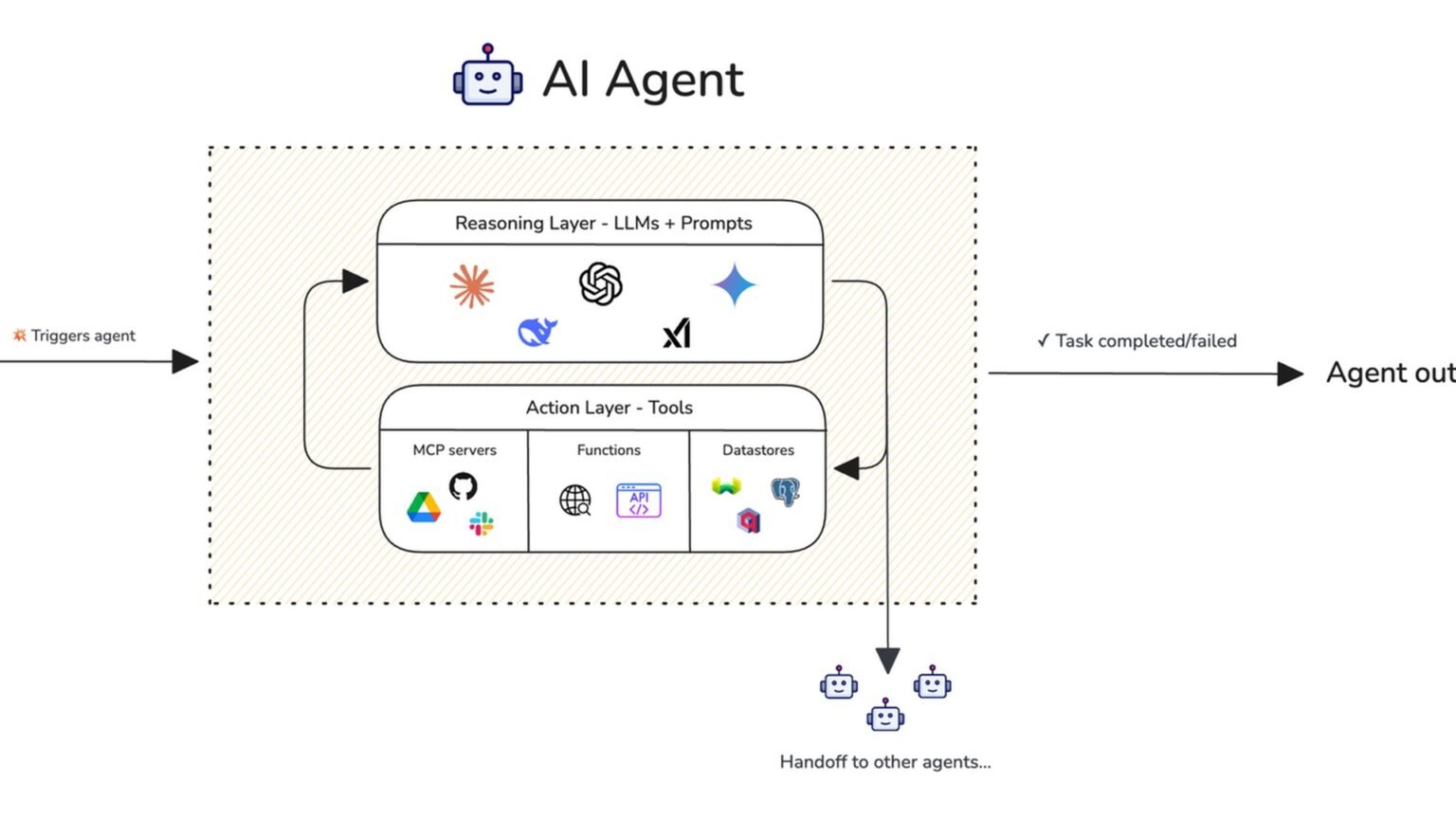

1 test runner, 5 Python dependencies, and a few dozen lines of fixtures are enough to turn ad hoc prompting into a repeatable AI agent eval pipeline. In this tutorial, we will build a Pytest-based harness for agent evaluation: scenario tests, LLM-as-judge scoring with structured output, golden-set comparisons, and CI-friendly replay with pytest-recording. If you are also thinking about production traces and benchmark tooling, pair this guide with alatirok’s coverage of LangSmith production setup for multi-agent observability, top AI agent evaluation tools, what agent observability means in practice, and AI agent control planes.
What we’re building and what you need
~180
Lines of Python in the core example
Across fixtures, models, and tests
5
Primary dependencies
pytest, pytest-asyncio, pytest-recording, pydantic, one model SDK
We are building a small but production-usable AI agent eval pipeline around Pytest. The design goal is simple: every meaningful agent behavior should be testable the same way application behavior is testable. That means scenarios live in version control, assertions are explicit, failures are diffable, and CI can block regressions before they ship.
The stack here is intentionally narrow. We will use pytest as the runner, pytest-asyncio for async tests, pytest-recording to replay HTTP traffic through VCR.py cassettes, Pydantic for structured outputs and validation, and either the OpenAI API or the Anthropic API for model-based judging.
The tutorial assumes Python 3.11 or newer, basic familiarity with Pytest fixtures, and an agent function you can call from tests. The agent can be a simple wrapper around a model, or a more complex system that emits final text plus tool traces. We will keep the agent implementation minimal so the eval patterns stay portable.
If you already have tracing in place, use this tutorial as the regression layer and keep observability for live traffic. Those two systems solve different problems. Observability tells you what happened in production; evals tell you whether a code or prompt change should be allowed to merge. That distinction matters in every serious agent stack, and it is one reason teams increasingly combine test harnesses with trace systems and benchmark dashboards.
You need Python 3.11+, an OpenAI or Anthropic API key for judge-based tests, and a local project where your agent can be imported by Pytest.
“Treat agent evals like software tests: versioned inputs, explicit assertions, reproducible runs, and CI gates.”
Tutorial principle
Stage 1: Install the dependencies and create the project layout
Start with a clean virtual environment and install the packages. The examples below use OpenAI for the judge, but the same pattern works with Anthropic if you swap the client code in the judge helper. Pytest itself does not care which model provider you use.
A simple project layout keeps the suite understandable as it grows. Put your agent code under src/, test fixtures and eval cases under tests/, and cassettes under a dedicated directory so replayed HTTP traffic is easy to inspect. That structure also works well with CI artifact uploads when a cassette or failure log needs review.
python -m venv .venv
source .venv/bin/activate
pip install pytest pytest-asyncio pytest-recording pydantic openai
| Path | Purpose |
|---|---|
| src/agent.py | Agent entry point used by tests |
| tests/conftest.py | Shared fixtures and markers |
| tests/test_eval_rules.py | Deterministic assertions |
| tests/test_eval_judge.py | LLM-as-judge scenarios |
| tests/golden_cases.json | Golden-set inputs and expected outputs |
| tests/cassettes/ | Recorded HTTP interactions |
Stage 2: Define a tiny agent interface that tests can call
Your eval harness should not know much about your internal orchestration framework. It should call a stable interface and inspect a stable result object. That keeps tests resilient even if you later move from a hand-rolled loop to a framework such as LangGraph or another runtime.
Below is a deliberately small async agent that returns final text, a list of tool calls, and optional structured data. In a real system, this wrapper would call your actual planner, tools, and model chain. The important part is that tests get one object with predictable fields.
from __future__ import annotations

from dataclasses import dataclass, field
from typing import Any


@dataclass
class ToolCall:
    name: str
    arguments: dict[str, Any]


@dataclass
class AgentResult:
    final_text: str
    tool_calls: list[ToolCall] = field(default_factory=list)
    output_json: dict[str, Any] | None = None


async def run_agent(user_input: str) -> AgentResult:
    text = user_input.lower()

    if "refund" in text:
        return AgentResult(
            final_text=(
                "I can help with a refund request. "
                "Please share your order ID and purchase date."
            ),
            tool_calls=[ToolCall(name="lookup_policy", arguments={"topic": "refunds"})],
            output_json={"intent": "refund_request", "needs_order_id": True},
        )

    return AgentResult(
        final_text="I can help. Please describe the issue in more detail.",
        tool_calls=[],
        output_json={"intent": "general_support"},
    )
Stage 3: Configure Pytest markers, asyncio, and cassette recording
Now wire the runner. We want three classes of tests: fast deterministic checks, slower judge-based evals, and optional live API runs. Markers make that separation explicit. In CI, you can run deterministic tests on every push and reserve live judge tests for nightly or protected-branch workflows.
The cassette layer matters because model-backed tests are otherwise noisy and expensive. pytest-recording integrates VCR.py with Pytest so HTTP interactions can be recorded once and replayed later. That gives you stable regression checks while still letting you refresh cassettes when prompts or models change.
Recorded cassettes make CI cheaper and more stable, but they do not replace periodic live runs. Refresh them when you intentionally change prompts, models, or judge rubrics.
import os
import pytest

from src.agent import AgentResult, run_agent


def pytest_configure(config: pytest.Config) -> None:
    config.addinivalue_line("markers", "eval: marks agent evaluation tests")
    config.addinivalue_line("markers", "live: marks tests that call live model APIs")


@pytest.fixture
def has_openai_key() -> bool:
    return bool(os.getenv("OPENAI_API_KEY"))


@pytest.fixture
async def agent_runner():
    async def _run(user_input: str) -> AgentResult:
        return await run_agent(user_input)

    return _run
Stage 4: Define eval scenarios as Pytest test cases
This is the core habit change. Instead of keeping eval prompts in a spreadsheet or a notebook, define them as test cases. Pytest parameterization is a natural fit because each scenario gets a readable ID, isolated assertions, and a separate pass or fail result.
Start with deterministic cases first. They are cheap, fast, and usually catch more regressions than teams expect. If your agent must ask for an order ID on refund requests, that is a test. If it must call a policy lookup tool before answering, that is a test. If it must emit valid JSON for downstream automation, that is a test.
Pros
Cons
import pytest


@pytest.mark.asyncio
@pytest.mark.eval
@pytest.mark.parametrize(
    "user_input, required_substrings, expected_tool",
    [
        (
            "I need a refund for my last order",
            ["refund", "order ID"],
            "lookup_policy",
        ),
        (
            "Can you help me?",
            ["help", "describe the issue"],
            None,
        ),
    ],
    ids=["refund-flow", "generic-support"],
)
async def test_eval_scenarios(agent_runner, user_input, required_substrings, expected_tool):
    result = await agent_runner(user_input)

    for needle in required_substrings:
        assert needle.lower() in result.final_text.lower()

    if expected_tool is None:
        assert result.tool_calls == []
    else:
        assert any(call.name == expected_tool for call in result.tool_calls)
Stage 5: Add assertion patterns for real agent outputs
Most agent regressions fall into a few recurring buckets, so it helps to standardize assertion patterns. Three are especially useful in practice: substring or semantic content checks, JSON validation for structured outputs, and tool-call verification. You can add more later, but these three cover a large share of support, workflow, and internal automation agents.
For JSON validation, Pydantic gives you a clean contract. If your agent claims to return structured data, parse it into a model in the test. If parsing fails, the test fails. That is much better than checking for a couple of keys and hoping the shape is usable downstream.
Tool-call assertions are equally important for agent systems that mix language output with actions. If a refund flow must consult policy before answering, assert on the tool name and, when useful, on key arguments. This keeps your eval suite aligned with actual system behavior rather than surface text alone.
from pydantic import BaseModel, ValidationError
import pytest


class RefundOutput(BaseModel):
    intent: str
    needs_order_id: bool


@pytest.mark.asyncio
@pytest.mark.eval
async def test_output_json_validates(agent_runner):
    result = await agent_runner("I want a refund")
    parsed = RefundOutput.model_validate(result.output_json)
    assert parsed.intent == "refund_request"
    assert parsed.needs_order_id is True


@pytest.mark.asyncio
@pytest.mark.eval
async def test_tool_call_matches(agent_runner):
    result = await agent_runner("Refund my purchase")
    assert len(result.tool_calls) >= 1
    first = result.tool_calls[0]
    assert first.name == "lookup_policy"
    assert first.arguments["topic"] == "refunds"


@pytest.mark.asyncio
@pytest.mark.eval
async def test_contains_required_language(agent_runner):
    result = await agent_runner("Need a refund")
    assert "order ID" in result.final_text
Stage 6: Build an LLM-as-judge with structured output
Deterministic assertions are necessary, but they are not always sufficient. Some behaviors are qualitative: was the answer helpful, policy-compliant, concise, and grounded in the provided context? That is where an LLM-as-judge can help, provided you keep the rubric explicit and the output structured.
The key is to avoid free-form judge responses. Ask the model to return a typed object with a score, pass or fail, and short rationale. Pydantic gives you the schema; the model API gives you the completion. The result is still probabilistic, but it becomes much easier to inspect, threshold, and compare over time.
OpenAI and Anthropic both document structured output patterns in their developer docs. The example below uses the OpenAI Python SDK and then validates the returned JSON with Pydantic. If you prefer Anthropic, keep the same Pydantic model and swap the request code to the Messages API documented at docs.anthropic.com.
Keep the rubric narrow. Ask the judge to score only the dimensions you can explain and defend in code review, such as factuality against provided context, policy adherence, or whether required next steps were requested.
from __future__ import annotations

import json
from pydantic import BaseModel, Field
from openai import OpenAI


class JudgeVerdict(BaseModel):
    passed: bool
    score: int = Field(ge=1, le=5)
    rationale: str


class LLMJudge:
    def __init__(self, model: str = "gpt-4.1-mini") -> None:
        self.client = OpenAI()
        self.model = model

    def evaluate(self, *, user_input: str, agent_output: str, rubric: str) -> JudgeVerdict:
        prompt = (
            "You are grading an AI agent response. "
            "Return JSON with keys: passed, score, rationale. "
            "Score must be an integer from 1 to 5.\n\n"
            f"Rubric:\n{rubric}\n\n"
            f"User input:\n{user_input}\n\n"
            f"Agent output:\n{agent_output}\n"
        )

        response = self.client.responses.create(
            model=self.model,
            input=prompt,
        )

        text = response.output_text
        data = json.loads(text)
        return JudgeVerdict.model_validate(data)
Stage 7: Turn the judge into Pytest assertions
Once the judge helper exists, use it like any other test dependency. The pattern below skips live runs when no API key is present, marks the test as both eval and live, and asserts on a minimum score plus a pass flag. That gives you a simple policy for CI: replayed tests on every push, live judge tests on a schedule or before release.
Notice that the rubric is concrete. It does not ask whether the answer is ‘good’. It asks whether the answer identifies the refund intent and requests the order ID needed to proceed. Narrow rubrics produce more stable judge behavior and more actionable failures.
import os
import pytest

from src.judge import LLMJudge


@pytest.mark.asyncio
@pytest.mark.eval
@pytest.mark.live
async def test_llm_judge_refund_flow(agent_runner, has_openai_key):
    if not has_openai_key:
        pytest.skip("OPENAI_API_KEY not set")

    result = await agent_runner("I need a refund for my order")
    judge = LLMJudge()
    verdict = judge.evaluate(
        user_input="I need a refund for my order",
        agent_output=result.final_text,
        rubric=(
            "Pass if the response clearly identifies this as a refund-related request "
            "and asks for the order ID or equivalent information needed to proceed."
        ),
    )

    assert verdict.passed is True, verdict.rationale
    assert verdict.score >= 4, verdict.rationale
Stage 8: Add a golden set for regression comparisons
A golden set is a versioned collection of representative inputs and expected outputs or expected properties. It is one of the most useful artifacts in agent evaluation because it gives your team a stable benchmark across prompt edits, model swaps, and tool changes. Keep it small at first. Ten to thirty high-value cases are often enough to catch obvious regressions.
Golden sets do not need to store exact full responses. In many agent systems, exact text matching is too brittle. A better pattern is to store required phrases, forbidden phrases, expected tool calls, and optional structured output expectations. That keeps the benchmark stable while still enforcing important behavior.
[
  {
    "id": "refund-basic",
    "input": "I need a refund for my last order",
    "must_contain": ["refund", "order ID"],
    "expected_tool": "lookup_policy",
    "expected_json": {
      "intent": "refund_request",
      "needs_order_id": true
    }
  },
  {
    "id": "generic-help",
    "input": "Can you help me?",
    "must_contain": ["help", "describe the issue"],
    "expected_tool": null,
    "expected_json": {
      "intent": "general_support"
    }
  }
]
“A golden set should preserve intent and constraints, not freeze every token of wording.”
Practical eval design
Stage 9: Load the golden set and compare outputs in bulk
With the golden file in place, parameterize over it. This gives you a compact regression suite that can grow one case at a time. The test below loads the JSON file, checks required substrings, validates expected tool behavior, and compares selected JSON fields rather than the entire output object.
That last point is important. Golden tests should fail for meaningful reasons. If you compare every field and every token, you will spend more time updating fixtures than learning from failures. Compare only the parts that matter to downstream correctness or user experience.
import json
from pathlib import Path
import pytest


GOLDEN_CASES = json.loads(Path("tests/golden_cases.json").read_text())


@pytest.mark.asyncio
@pytest.mark.eval
@pytest.mark.parametrize("case", GOLDEN_CASES, ids=[case["id"] for case in GOLDEN_CASES])
async def test_golden_set(agent_runner, case):
    result = await agent_runner(case["input"])

    for needle in case["must_contain"]:
        assert needle.lower() in result.final_text.lower()

    expected_tool = case["expected_tool"]
    if expected_tool is None:
        assert result.tool_calls == []
    else:
        assert any(call.name == expected_tool for call in result.tool_calls)

    for key, value in case["expected_json"].items():
        assert result.output_json is not None
        assert result.output_json[key] == value
Stage 10: Record and replay model calls with pytest-recording
Judge-based tests are useful, but they can make CI slow and expensive if every run hits a live API. This is where pytest-recording earns its place. It records HTTP interactions to cassette files and replays them later, which is especially helpful for stable regression checks around a fixed prompt and model version.
In practice, teams often maintain two modes. The first is replay mode for pull requests, where cassettes are treated as fixtures. The second is refresh mode for maintainers or nightly jobs, where cassettes are re-recorded after intentional changes. That split gives you both stability and a path to update the benchmark.
Never commit raw API keys or sensitive user data into cassettes. Use test prompts, scrub headers, and review cassette contents before merging.
pytest -m "eval and not live" --record-mode=none
pytest -m "eval and live" --record-mode=once
pytest -m eval --record-mode=rewrite
Stage 11: Wire the suite into CI
Once the tests run locally, CI integration is straightforward. The main decision is which subsets run on which events. A common pattern is: deterministic evals on every push, replayed judge tests on pull requests, and live judge refreshes on a nightly schedule or manual workflow. That keeps feedback fast without giving up coverage.
If you use GitHub Actions, the job only needs Python setup, dependency installation, and the Pytest command. If you also use tracing or experiment dashboards, publish those artifacts separately. Tests should remain the merge gate; dashboards should remain the analysis layer. That separation keeps the pipeline understandable.
This is also the point where cross-team standards matter. If your org has multiple agents, define a shared marker taxonomy, a shared result object shape, and a shared cassette policy. Those conventions make it much easier to compare eval quality across projects and to plug into broader infrastructure discussed in alatirok’s coverage of open-source AI agent frameworks and AI agent developer tools.
python -m pip install --upgrade pip
pip install pytest pytest-asyncio pytest-recording pydantic openai
pytest -m "eval and not live" --record-mode=none -q
Where to go from here
A practical baseline for agent quality control
At this point you have a working Pytest-based AI agent eval pipeline: scenario tests, reusable assertion patterns, a structured LLM judge, a golden set, and CI-friendly replay. That is enough to move many teams from anecdotal prompt testing to disciplined regression control.
The next step is breadth. Add more scenarios that reflect real failure modes from production, especially edge cases around missing context, tool failures, and policy-sensitive requests. Keep deterministic assertions for hard requirements, and reserve judge-based scoring for softer quality dimensions where a rubric makes sense.
The step after that is integration. Connect this test harness to observability and experiment tooling so you can trace failures back to prompts, tools, and model versions. For that broader stack, read alatirok’s guides to LangSmith production setup for multi-agent observability, top AI agent evaluation tools, and the AI agent stack in 2026. The pattern to keep in mind is simple: traces explain behavior, evals enforce standards, and CI turns both into shipping discipline.
Frequently asked questions
Pytest gives you versioned test cases, fixtures, markers, parameterization, and CI integration out of the box. That makes regressions visible and enforceable in a way ad hoc notebooks usually are not. The official Pytest documentation covers markers, fixtures, and parametrized tests that map well to agent eval scenarios.
Use a narrow rubric, require structured JSON output, validate it with Pydantic, and replay HTTP interactions with pytest-recording when you want deterministic CI runs. Keep periodic live runs so you can detect drift after model or prompt changes.
Yes. The tutorial’s pattern is provider-agnostic: define a Pydantic verdict schema, call a model API, parse the returned JSON, and assert on the validated object. Anthropic documents its Messages API and related developer guidance at docs.anthropic.com.
Start with high-value, representative user inputs and store expected properties rather than exact wording: required phrases, forbidden phrases, expected tool calls, and selected structured-output fields. This keeps the suite stable while still catching meaningful regressions. For broader eval tooling context, see alatirok’s top AI agent evaluation tools guide.
Primary sources
- Pytest documentation — pytest
- pytest-asyncio documentation — pytest-asyncio
- pytest-recording GitHub repository — GitHub
- Pydantic documentation — Pydantic
- OpenAI API overview — OpenAI
- Anthropic developer documentation — Anthropic
Last updated: May 21, 2026. Related: Observability.




