


Your agent isn’t ‘just hallucinating.’ It is failing in one of two precise, fixable ways. Here is the diagnostic decision tree and the exact framework-layer fixes for each.
Why does my AI agent call tools with wrong arguments?
If you want to stop your AI agent calling tools with wrong arguments, the first move is to stop calling it ‘hallucination‘ and split it into two distinct, fixable failures: selection hallucination (the agent picks the wrong, inappropriate, or nonexistent tool) and usage hallucination (the agent picks the right tool but feeds it fabricated or invalid parameters). These are not the same bug, and they do not share a fix. Most ranking pages blur them together with answer-fabrication and hand you a generic ‘add guardrails’ answer that fixes neither.
The split comes straight from the research. The paper Reducing Tool Hallucination via Reliability Alignment (arXiv 2412.04141) formally divides tool hallucinations into selection and usage categories, and a 2026 follow-up, Internal Representations as Indicators of Hallucinations in Agent Tool Selection (arXiv 2601.05214), adds a third, sneaky variant: tool bypass, where the model simulates the answer itself instead of calling the specialized tool at all.
Here is the punchline that the rest of this article unpacks: selection errors are an information-architecture problem (too many similar tools in context), and usage errors are an enforcement problem (your rules live in the prompt instead of in code). Diagnose which one you have, then apply the matching fix. Both are solvable today without retraining a model.
Selection hallucination = wrong/nonexistent tool. Usage hallucination = right tool, wrong arguments. If you cannot say which bucket a given failure falls into from the trace, your logging is the first thing to fix — you cannot debug what you cannot categorize.
Selection vs usage hallucination: what’s the difference?
Selection hallucination is choosing the wrong tool; usage hallucination is misusing the right one. The research breaks each into named subtypes so you can pin a trace to an exact failure instead of guessing. Mapping your logs onto this taxonomy is the single most useful debugging step, because each leaf maps to a different fix.
From arXiv 2412.04141, the taxonomy splits cleanly. Tool selection hallucination has two subtypes: tool type hallucination — invoking a tool unrelated to the task or fabricating a tool name that does not exist — and tool timing hallucination — calling the same tool repeatedly with identical inputs and outputs when it should not have been called again (this is also why your agent loops; see our companion piece below).
Tool usage hallucination also has two subtypes: tool format hallucination — invalid JSON, wrong parameter names, or omitting required parameters — and tool content hallucination — the parameter values are fabricated, invented by the model rather than grounded in the user’s actual request. The classic example: the user never said 15 guests, but the agent passed guests=15 anyway.
“Selection errors are an information-architecture problem. Usage errors are an enforcement problem. Treating them as one ‘hallucination’ bug is why your fixes never stick.”
Alatirok, on debugging agent tool calls
| Failure mode | Subtype | What you see in the trace | The fix |
|---|---|---|---|
| Selection | Tool type | Calls an unrelated tool, or a tool name that doesn’t exist | Cut tool count + semantic/vector tool filtering |
| Selection | Tool timing | Re-calls the same tool with identical args/results | Loop detection + step budget; deduplicate calls |
| Selection | Tool bypass | Simulates the answer instead of calling the tool | Make the tool mandatory for the intent; validator-agent check |
| Usage | Tool format | Invalid JSON, wrong param names, missing required fields | Strict JSON Schema + provider strict mode |
| Usage | Tool content | Plausible but fabricated parameter values (guests=15) | Pydantic field constraints + fail-closed validator |
How do I tell which one my agent has? (the decision tree)
Run your failing trace through five yes/no questions in order; the first ‘yes’ tells you the bucket and the fix. Do not skip ahead — the order matters, because a fabricated-argument fix will never repair a wrong-tool problem, and vice versa.
1. Did the agent call a tool that does not exist, or one obviously unrelated to the task? → Selection / tool type. Go to the tool-count + semantic-filtering section. 2. Did it call the correct tool but with the same inputs it already tried? → Selection / tool timing (looping). 3. Did it answer without calling the tool it should have? → Selection / tool bypass; make the tool mandatory for that intent. 4. Did the call fail to parse — bad JSON, wrong field names, missing required fields? → Usage / format; enforce a strict schema. 5. Did the call parse fine but with values the user never supplied or values that violate a business rule? → Usage / content; this needs a fail-closed validator, not a better prompt.
If you cannot answer these from your traces, instrument first. Log, per step: the full tool name offered set, the chosen tool, the raw arguments object, the schema-validation result, and the tool’s actual return. That five-field log is what turns ‘it hallucinated’ into a ticket you can close.
Why the order matters (and a common misdiagnosis)
Teams routinely see guests=15 sail through a tool and conclude the model ‘can’t follow instructions,’ then bloat the system prompt with more rules. But if the constraint was only ever in the prompt, the model was never obligated to honor it — that is a usage/content failure whose fix is a validator, not prose. Conversely, adding strict JSON Schema does nothing for an agent that confidently calls the wrong tool with perfectly valid arguments. Diagnose the bucket before you reach for a tool.Why does adding more tools make tool selection worse?
Selection accuracy collapses as tool count rises because many similar tools create choice overload — the model literally has too many near-identical options to disambiguate. This is the most under-reported cause of ‘my agent picks the wrong tool,’ and it is measurable, not anecdotal.
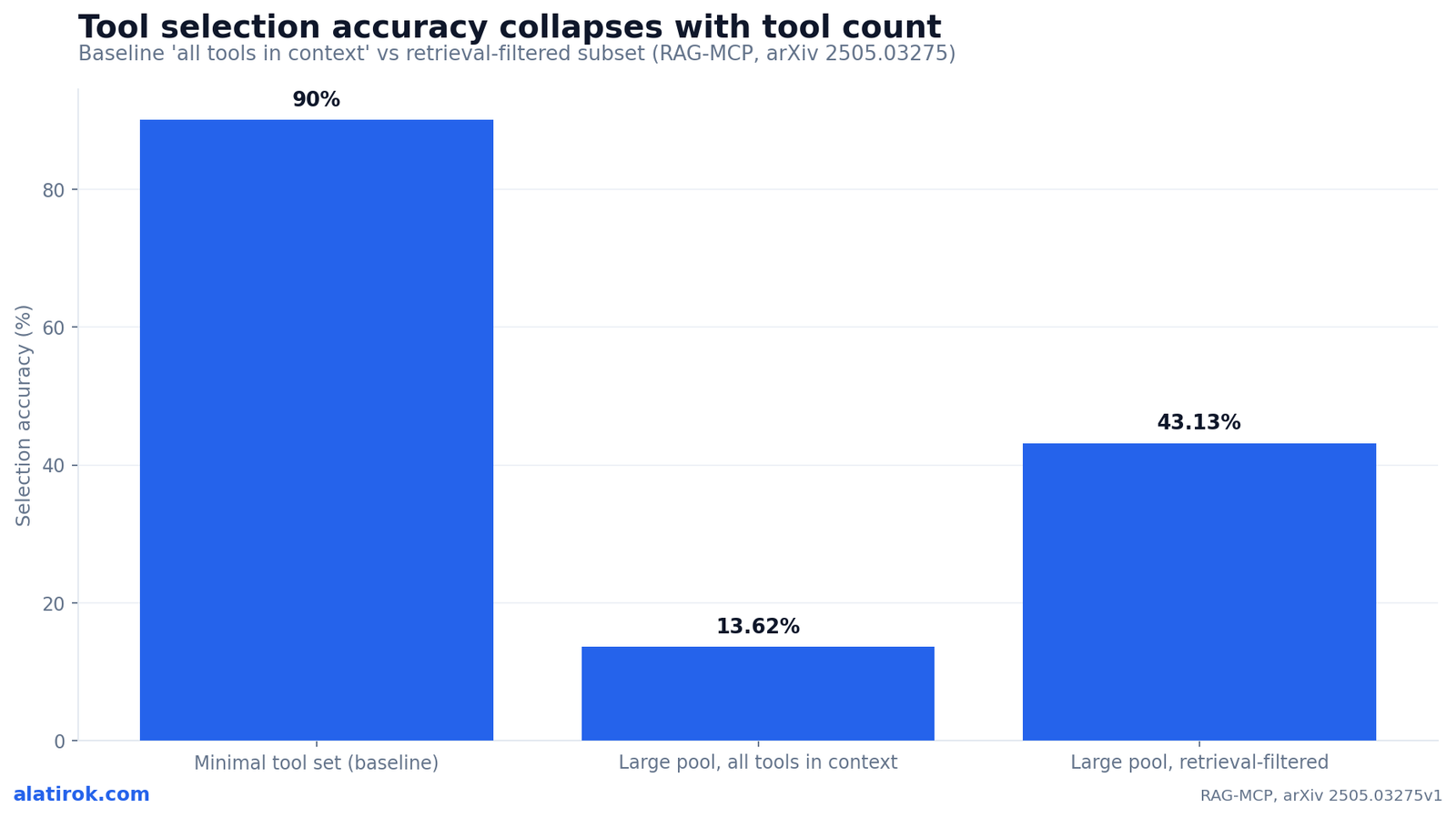
The RAG-MCP study (arXiv 2505.03275) is blunt about the magnitude: a baseline that dumps every tool into context hits success rates above 90% with a minimal tool set, but drops to just 13.62% accuracy when facing a large pool of distractor tools. The Berkeley Function Calling Leaderboard’s hallucination/irrelevance-detection category captures the same restraint failure — knowing when not to call a function gets harder as the menu grows.
The fix is to never show the model the whole toolbox. Retrieve a small, semantically relevant subset per query and inject only those. RAG-MCP reports that retrieval-based filtering more than triples selection accuracy — 43.13% versus the 13.62% baseline — while cutting prompt tokens roughly in half (about 2,134 down to ~1,084). The same idea works without MCP: embed each tool description, embed the user query, and pass only the top-k matches into the function-calling call.
If you are deciding how aggressively to prune, our companion piece on how many tools an agent can have before it breaks walks the thresholds; in practice, keeping the live toolset in the single digits per turn is where reliability lives.
Before any code change, just measure: temporarily cut your toolset to the 3-5 tools relevant to the current task and rerun the failing case. If selection snaps to correct, you have confirmed choice overload — and semantic filtering is your fix.
How do I stop the agent passing wrong parameters to a tool?
To stop your AI agent calling tools with wrong arguments at the parameter level, enforce the contract in code with a strict schema and a fail-closed validator — never in the prompt. A rule stated only in a docstring or system prompt is a suggestion the model is free to ignore; a rule encoded as a Pydantic constraint that rejects the call is a guarantee.
This is the heart of the book_hotel(guests=15) failure. If ‘max 10 guests’ lives only in the function’s docstring, nothing stops the model from passing 15 — and nothing stops the tool from executing on it. Move that ceiling into a typed field constraint, and the invalid call is rejected before execution and bounced back to the model as a structured retry. Two layers do the work: JSON Schema / Pydantic for shape and bounds, plus a custom validator for cross-field business logic.
Turn on provider strict mode too. OpenAI and Anthropic both support enforcing strict JSON Schema for tool calls, which guarantees the API response conforms to your schema and kills most format hallucinations (bad JSON, wrong field names, missing required fields) at the source. Strict mode supports only a subset of JSON Schema, so keep tool argument models flat and explicit rather than deeply nested.
Pros
Cons
from pydantic import BaseModel, Field, field_validator
from datetime import date

# 1) The tool-argument CONTRACT. Constraints live here, not in the prompt.
class BookHotelArgs(BaseModel):
    hotel_id: str = Field(..., min_length=3, description="Known hotel identifier")
    check_in: date
    nights: int = Field(..., ge=1, le=30)
    # The 'max 10 guests' rule is now ENFORCED, not suggested:
    guests: int = Field(..., ge=1, le=10, description="1-10 guests per booking")

    @field_validator("check_in")
    @classmethod
    def not_in_past(cls, v: date) -> date:
        if v < date.today():
            raise ValueError("check_in cannot be in the past")
        return v


class ToolArgumentError(Exception):
    """Raised when a tool call is rejected before execution."""


# 2) FAIL-CLOSED gate. Validate first; only run the tool if it passes.
KNOWN_HOTELS = {"htl_paris_07", "htl_tokyo_22", "htl_nyc_15"}

def book_hotel_guarded(raw_args: dict) -> dict:
    try:
        args = BookHotelArgs.model_validate(raw_args)  # shape + bounds
    except Exception as e:
        # Do NOT execute. Return a structured error the model can act on.
        raise ToolArgumentError(f"Invalid arguments, fix and retry: {e}")

    # Cross-field / business validation the schema can't express:
    if args.hotel_id not in KNOWN_HOTELS:
        raise ToolArgumentError(
            f"hotel_id '{args.hotel_id}' does not exist. Call search_hotels first."
        )

    return _do_booking(args)  # the real side effect, reached only on valid input
How do I wire fail-closed validation into my agent framework?
Register the validator at the framework layer so an invalid tool call is rejected and re-prompted automatically — the agent gets a retry, not a crash, and the tool never runs on bad input. In Pydantic AI this is a first-class feature: tool arguments are validated against the schema, and on failure the framework sends a RetryPromptPart back to the model.
Pydantic AI’s args_validator runs after schema validation passes but before the tool executes — exactly where business logic belongs. Raise ModelRetry from it to reject the call; the framework turns that into a retry prompt containing your message, so the model corrects itself instead of you swallowing a garbage call. Return None to let the call through.
The principle generalizes to any framework: the moment a tool call is malformed or violates a rule, raise a typed retry signal rather than logging a warning and proceeding. Failing closed is the difference between an agent that self-corrects and one that quietly books 15 guests into a 10-guest room.
The book_hotel(guests=15) failure from the research is fixable in exactly one way: enforce ‘max 10’ at the framework layer. A docstring or system-prompt sentence is a hint the model can override; a Field(le=10) plus a fail-closed validator cannot be overridden.
from pydantic_ai import Agent, RunContext, ModelRetry
from pydantic import BaseModel, Field

agent = Agent("openai:gpt-5", instructions="Book hotels for the user.")

class BookArgs(BaseModel):
    hotel_id: str
    guests: int = Field(..., ge=1, le=10)  # schema-level ceiling

# args_validator runs AFTER schema validation, BEFORE the tool body.
# Raise ModelRetry to reject the call and re-prompt the model.
def validate_booking(ctx: RunContext[None], args: BookArgs) -> None:
    if args.hotel_id not in {"htl_paris_07", "htl_tokyo_22"}:
        raise ModelRetry(
            f"hotel_id '{args.hotel_id}' is not a real hotel. "
            "Use search_hotels to get a valid id, then retry."
        )
    return None  # passes -> tool executes

@agent.tool(args_validator=validate_booking)
def book_hotel(ctx: RunContext[None], args: BookArgs) -> str:
    # Reached only with validated, in-bounds, real arguments.
    return f"Booked {args.hotel_id} for {args.guests} guests."

# A bad call (guests=15 or a fake hotel_id) never executes the body;
# the model receives a RetryPromptPart and tries again.
result = agent.run_sync("Book the Paris hotel for 15 people")
print(result.output)
When is a validator agent worth adding?
Add a lightweight validator agent when schema validation can’t catch the failure — specifically when the agent calls a perfectly valid tool with perfectly valid arguments that simply don’t answer the request. Schemas verify shape and bounds; they cannot verify intent. A second, cheap model call that compares ‘what was asked’ against ‘what came back’ closes that gap.
This catches the residual selection failures: tool bypass (the model simulated an answer), wrong-but-valid tool choice, and content hallucination that happened to satisfy the schema. Keep it small and cheap — a Haiku-class model is plenty — and run it only on high-stakes or low-confidence calls so you do not double your token bill on every step. The 2026 internal-representations work (arXiv 2601.05214) shows you can even detect these from the model’s own activations at up to 86.4% accuracy in the same forward pass, but for most teams an explicit validator agent is the pragmatic, framework-agnostic version.
Treat the validator’s verdict like any other tool result: if it flags a mismatch, feed that back as a retry signal rather than returning the suspect result to the user.
from pydantic import BaseModel
from pydantic_ai import Agent

class Verdict(BaseModel):
    answers_request: bool
    reason: str

# Cheap, single-purpose cross-checker. Right tool? Right answer?
validator = Agent(
    "openai:gpt-5-mini",
    output_type=Verdict,
    instructions=(
        "Given a user request, the tool that was called, and its result, "
        "decide if the result actually satisfies the request. "
        "Set answers_request=false if the wrong tool was used, the result is "
        "fabricated, or it does not address the request."
    ),
)

def cross_check(request: str, tool_name: str, tool_result: str) -> Verdict:
    return validator.run_sync(
        f"REQUEST: {request}\nTOOL CALLED: {tool_name}\nRESULT: {tool_result}"
    ).output

v = cross_check(
    request="What's the weather in Paris tomorrow?",
    tool_name="get_stock_price",          # valid tool, wrong choice
    tool_result="AAPL: $214.30",
)
if not v.answers_request:
    # Re-prompt the main agent instead of returning a bad answer.
    print("Rejected:", v.reason)
What’s the fastest fix checklist to ship today?
13.62%
Baseline selection accuracy with a large tool pool
RAG-MCP, arXiv 2505.03275 — down from >90% with few tools
43.13%
Selection accuracy after retrieval filtering
More than 3x the all-tools baseline
~50%
Prompt-token reduction from filtering the toolset
~2,134 to ~1,084 tokens
86.4%
Accuracy detecting tool-call hallucinations from internal states
arXiv 2601.05214, same forward pass
Diagnose the bucket, then fix at the framework layer
Work the fixes in dependency order: instrument, diagnose the bucket, then apply the one matching fix — selection errors get tool-count cuts and semantic filtering, usage errors get strict schemas and fail-closed validation. Doing them out of order wastes time on fixes that target the wrong failure.
This is also where to layer in your broader reliability stack. Strict structured output (JSON + Pydantic) handles the format layer; an LLM-guardrails layer can backstop content and policy; and loop detection handles the timing subtype. None of these replace the others — they each own a leaf of the taxonomy.
The mistake to avoid is the all-in-the-prompt instinct: stuffing more rules into the system prompt feels productive and fixes almost nothing structural. Rules belong in code, the toolbox belongs filtered, and bad calls belong rejected before they execute.
Builder’s take
I’ve shipped enough agent loops at Cyntr and Loomfeed to know that ‘the agent hallucinated’ is a non-diagnosis. Once you split the failure into selection vs usage, the fixes stop being vibes and start being engineering.
- The single highest-leverage rule we follow: a constraint that lives only in a prompt or docstring is a suggestion, not a guardrail. If book_hotel must cap at 10 guests, that ceiling belongs in a validator that rejects the call, not in a sentence the model is free to ignore.
- We treat tool count like a dependency budget. Past roughly 15-20 tools, selection accuracy falls off a cliff in our own runs, mirroring the research. We retrieve a small relevant subset per query instead of dumping the whole toolbox into context.
- Fail closed, always. A tool call that fails schema or business validation should never execute — it should bounce back to the model as a structured retry prompt. Half our ‘mystery’ agent bugs were tools quietly running on garbage arguments.
- A cheap validator-agent cross-check (does the result actually answer the request?) catches the failure mode no schema can: a perfectly valid call to the wrong tool.
Frequently asked questions
Selection hallucination is when the agent chooses the wrong, inappropriate, or nonexistent tool (or calls a tool when it shouldn’t). Usage hallucination is when the agent picks the right tool but supplies invalid or fabricated parameters — bad JSON, wrong field names, missing required fields, or values the user never provided. The split comes from arXiv 2412.04141, and each type has a different fix: selection errors need fewer/filtered tools, usage errors need strict schema validation.
Because many similar tools create choice overload. The RAG-MCP study (arXiv 2505.03275) found selection accuracy drops from over 90% with a minimal tool set to just 13.62% when a large pool of distractor tools is in context. Retrieving only the relevant subset per query more than triples accuracy to 43.13%. Keep the live toolset small — single digits per turn — and use semantic/vector filtering to choose which tools the model even sees.
Enforce the argument contract in code, not in the prompt. Define a strict JSON Schema or Pydantic model with field constraints (types, bounds, required fields), turn on provider strict mode where available (OpenAI and Anthropic support it), and add a fail-closed validator that rejects any call violating a business rule before the tool executes. A constraint stated only in a docstring or system prompt is a suggestion the model can ignore; a Field constraint plus a validator cannot be ignored.
Because the ‘max 10 guests’ rule lives only in the prompt or docstring, which the model is free to override. The fix is to enforce the ceiling at the framework layer — e.g. a Pydantic Field(ge=1, le=10) plus a validator that raises a retry signal (ModelRetry in Pydantic AI) so the invalid call is rejected before execution and the model is asked to correct it. Natural-language rules are hints; code-level constraints are guarantees.
A validator agent is a small, cheap second model that compares the user’s request against the tool that was called and its result, then judges whether the result actually answers the request. Use it for the failures a schema can’t catch: a valid tool called wrongly, fabricated-but-well-formed values, or the model simulating an answer instead of calling the tool (tool bypass). Run it only on high-stakes or low-confidence calls to control cost, and feed a failed verdict back as a retry.
No — not reliably. Prompts can nudge selection and reduce some errors, but any rule that lives only in natural language can be ignored by the model, and adding more rules often makes prompts worse. Structural fixes are what hold: strict JSON Schema/Pydantic validation for shape and bounds, semantic tool filtering to cut selection errors, fail-closed validators for business logic, and an optional validator agent for intent. Use prompting to assist these layers, not to replace them.
Primary sources
- Reducing Tool Hallucination via Reliability Alignment (Relign, RelyToolBench) — arXiv
- Internal Representations as Indicators of Hallucinations in Agent Tool Selection — arXiv
- RAG-MCP: Mitigating Prompt Bloat in LLM Tool Selection via Retrieval-Augmented Generation — arXiv
- Berkeley Function Calling Leaderboard (BFCL) V4 — hallucination / irrelevance detection — UC Berkeley Gorilla
- Pydantic AI — Tools API (args_validator, ModelRetry) — Pydantic
Last updated: June 2, 2026. Related: Observability.




