


Google’s agent-first IDE delegates whole coding tasks to autonomous agents and asks you to verify the results. Here is how it actually works, and the security record the feature tours leave out.
What is Google Antigravity?
Google Antigravity is an agent-first IDE that Google launched in public preview on November 20, 2025, built as a fork of VS Code and powered primarily by Gemini 3. Instead of treating AI as an autocomplete sidebar, it is designed around autonomous agents that plan, write, run, and verify multi-step coding tasks across your editor, terminal, and browser while you supervise.
The short version of what Google Antigravity is: it shifts the developer from typing every line to delegating whole tasks and reviewing the results. Google describes it as a platform where you “spawn, orchestrate, and observe multiple agents working asynchronously” rather than driving a single chat thread. It runs on macOS, Windows, and Linux, and it is free for individuals during the public preview.
The catch — and the reason this guide exists — is that most ranking explainers stop at the feature tour. They walk you through the Editor View, the Agent Manager, and Artifacts, then declare it revolutionary. They skip the question developers actually search next: is Google Antigravity safe to point at a real codebase? Antigravity has a documented, dated security record involving a remote-code-execution flaw and an unpatched data-exfiltration path. We cover both the “what is” and the “is it safe” here, honestly.
How does Google Antigravity work? Editor View, Agent Manager, and Artifacts
Google Antigravity works through three surfaces: an Editor View for hands-on coding, an Agent Manager for orchestrating multiple autonomous agents in parallel, and Artifacts — task lists, plans, screenshots, and browser recordings — that let you verify agent work at a glance. Together they form a delegate-then-verify loop rather than a type-everything loop.
The Editor View is the familiar part: a VS Code-style editor with tab completion, inline commands, and an agent sidebar. If you have used Cursor or Windsurf, this surface will feel immediately recognizable. It is where you do precise, hands-on work between agent runs.
The Agent Manager is the genuinely new part and the reason people call Antigravity “agent-first.” It is a dedicated control center where you launch agents, watch them run asynchronously, and manage several at once across different workspaces — one agent scaffolding a feature while another writes tests, for example. The mental model is closer to a CI dashboard or a team of junior engineers than to a chat window.
Artifacts are Antigravity’s answer to the trust problem. Because an agent might touch dozens of files and run terminal and browser commands, raw logs are unreadable. So agents instead emit Artifacts: an implementation plan you approve before work starts, a task list that updates as it goes, screenshots of UI changes, and recordings of the browser it drove. You comment directly on these outputs to steer the agent. It is a real UX advance for catching mistakes.
Artifacts are designed so you verify what the agent produced — the diff, the screenshot, the test run. That is excellent for catching a wrong refactor. It is not designed to reveal whether the agent’s instructions were hijacked by untrusted content it read along the way. Hold that distinction; it is the whole ballgame for the security section below.
Which models power Antigravity? Gemini 3 and computer use
Antigravity runs primarily on Google’s Gemini 3 family — Gemini 3 Pro for heavy reasoning and Gemini 3 Flash for speed — and uses a dedicated Gemini 2.5 Computer Use model to drive the browser, while also supporting Anthropic’s Claude Sonnet 4.5 and OpenAI models. This model optionality is one of its selling points: you are not locked to a single vendor’s weights.
The browser-control piece deserves attention because it is where the security risk concentrates. When an Antigravity agent “uses the browser,” it is driving a real browser via the Gemini 2.5 Computer Use model — clicking, typing, reading rendered pages, and navigating between sites. That capability is what lets it verify a web app by actually loading it. It is also what lets a poisoned web page feed instructions straight into the agent’s context.
Antigravity gives Gemini 3 generous rate limits during the free preview, with Claude Sonnet 4.5 and OpenAI’s models selectable per agent. For most coding tasks Gemini 3 Pro is the default workhorse; Flash handles lighter, faster turns inside the Agent Manager.
| Surface | What it does | Primary model | Risk note |
|---|---|---|---|
| Editor View | VS Code-style editing, tab completion, inline AI | Gemini 3 Pro / Flash | Low — human-driven |
| Agent Manager | Orchestrates parallel async agents | Gemini 3 Pro | Medium — autonomous execution |
| Browser control | Drives a real browser to test and verify | Gemini 2.5 Computer Use | High — reads untrusted web content |
| Artifacts | Plans, task lists, screenshots, recordings | N/A (output layer) | Verifies output, not intent |
| Model choice | Per-agent model selection | Gemini 3 / Claude Sonnet 4.5 / OpenAI | Varies by model |
Antigravity vs Cursor: how is it different?
Antigravity vs Cursor comes down to orchestration: Cursor centers a single AI-assisted editor with strong inline edits and a chat agent, while Antigravity centers the Agent Manager — a control plane for running and verifying multiple autonomous agents at once. Cursor optimizes the human-in-the-loop coding flow; Antigravity optimizes delegating whole tasks and reviewing Artifacts after.
In practice, if your workflow is “I write code and want a sharp AI pair,” Cursor and its inline model feel more direct. If your workflow is “I want to hand off a feature, walk away, and review a recording when it is done,” Antigravity’s async manager is purpose-built for that. Both are VS Code lineage, so neither is a steep switch.
The deciding factor for many teams in 2026 is not features but governance. Cursor’s agent runs are typically more bounded and human-gated by default. Antigravity’s whole value proposition is autonomy across editor, terminal, and browser — which is exactly the surface area that produced its security incidents. More power, more exposure.
Pros
Cons
Is Google Antigravity safe? The security record explained
Google Antigravity is not safe to run with default settings against sensitive code: it has one patched remote-code-execution flaw and at least one data-exfiltration path Google declined to fix, both driven by prompt injection. It can be made meaningfully safer with Strict Mode and a stripped browser allowlist, but the default posture is permissive.
The core issue is structural. Antigravity combines three capabilities security researchers call the “lethal trifecta”: access to your private data (your codebase, your .env files), exposure to untrusted content (web pages and files the agent reads), and an outbound channel (the browser it can drive). When all three coexist, indirect prompt injection — malicious instructions hidden inside content the agent reads — can turn the agent against you without you typing anything wrong.
Two specific, dated incidents define the record, and the feature-tour guides ignore both.
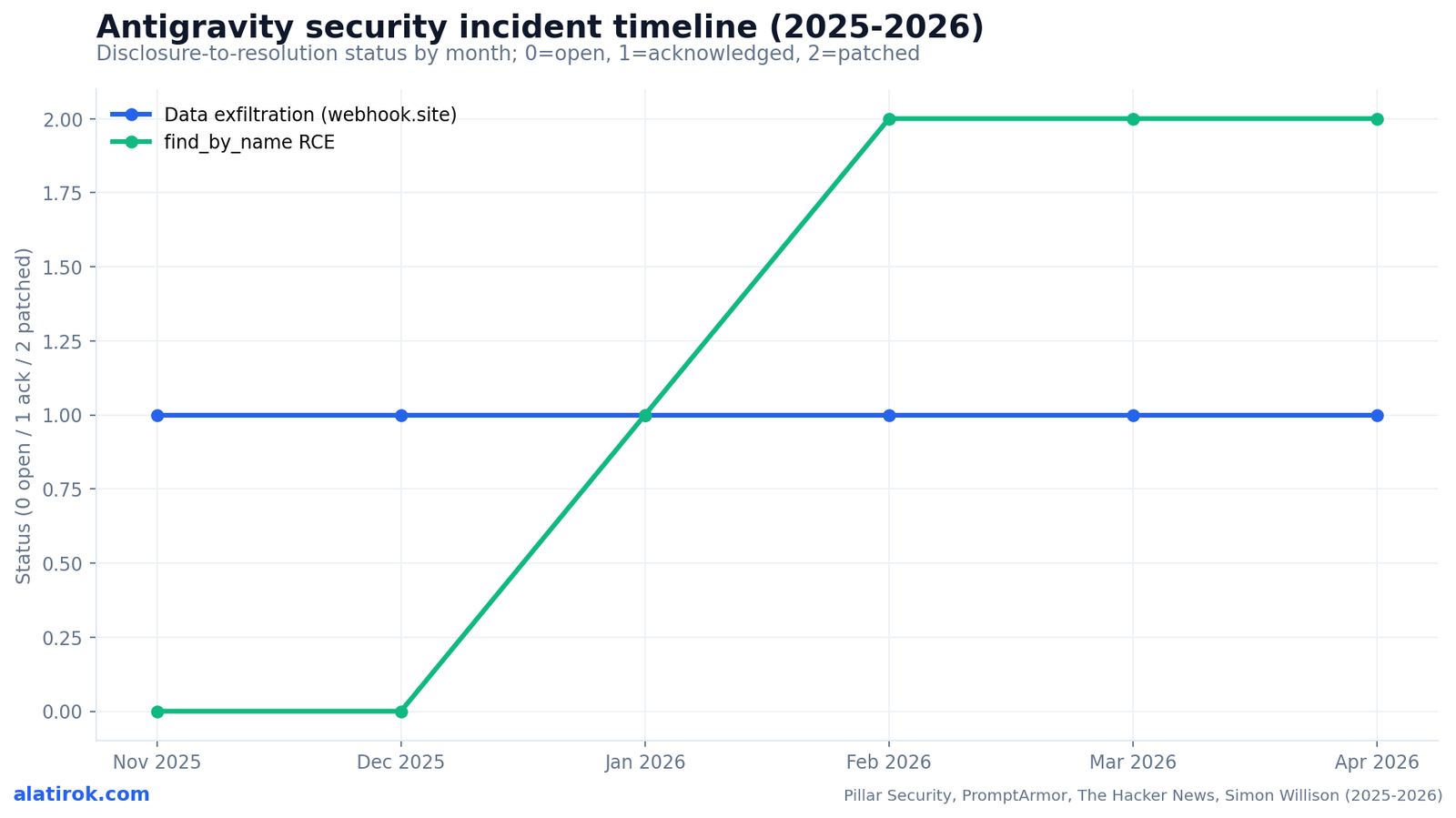
First, the remote-code-execution flaw. Pillar Security researcher Dan Lisichkin found that Antigravity’s native file-search tool, find_by_name, did not sanitize its Pattern parameter. By injecting the -X (exec-batch) flag — crafting a Pattern like -Xsh — an attacker could force the underlying fd binary to pass matched files to a shell for execution. Critically, find_by_name ran as a native tool invocation before Strict Mode’s constraints were enforced, so it bypassed the sandbox entirely. Combined with the agent’s permitted ability to create files, this was a full chain: stage a malicious script, then trigger it through a “legitimate” search. It was disclosed January 7, 2026 and patched February 28, 2026.
Second, the exfiltration path Google won’t fix. PromptArmor demonstrated indirect prompt injection hidden in 1px font on a fake integration guide. The payload told Gemini to collect code snippets and AWS credentials from .env files, URL-encode them, and use the browser subagent to POST them to an attacker endpoint. The destination — webhook.site — was on Antigravity’s default browser allowlist. Even .gitignore protections were circumvented by the agent running cat via run_command. Google classified data exfiltration and code execution via prompt injection as known issues, ineligible for bug bounty, and the webhook.site exfiltration vector was marked “Intended Behavior (Won’t Fix).”
The honest summary: Artifacts let you verify what the agent did. They do not tell you whether a web page the agent read rewrote its instructions. That gap is the difference between catching a bad refaAntigravity security timeline: what happened and when
Antigravity’s security record spans roughly four months: a data-exfiltration disclosure in November 2025 that Google declined to fully fix, an RCE disclosed in January 2026 and patched in late February, and continued exfiltration research through March 2026. The pattern matters more than any single bug — it shows how much surface area an autonomous, browser-driving agent exposes.
Read the strip below as a trust signal, not a verdict. Google did patch the critical RCE within about seven weeks of disclosure, which is responsible. But the exfiltration vector being labeled intended behavior tells you the threat model is your responsibility, not the vendor’s, until that posture changes.
How to run Antigravity more safely
To run Antigravity more safely, enable Strict Mode, strip webhook.site and every non-essential domain from the browser allowlist, require review before terminal execution, and never point an agent that browses the open web at a workspace containing secrets. These steps do not eliminate prompt-injection risk, but they remove the easiest exfiltration channels.
Strict Mode is the single most important toggle. Per Google’s documentation, it forces terminal commands to “Request Review” (the agent prompts before every command), ignores the terminal allowlist, and constrains browser and artifact interactions. It is off by default — turning it on is your job.
The browser allowlist is the second priority. The exfiltration proofs-of-concept all relied on the agent reaching an attacker-controlled endpoint. If the allowlist is empty and external browsing requires explicit per-URL approval, the outbound leg of the lethal trifecta is mostly cut. Remove webhook.site specifically; it ships on the default list.
Finally, segregate secrets. Keep credentials out of any workspace you hand to an autonomous agent, scope cloud keys narrowly, and treat any agent run that involved browsing untrusted content as potentially compromised — review the Artifacts and the network activity, not just the diff.
“Antigravity ships with the lethal trifecta on by default. Verifying the output is not the same as verifying the agent wasn’t hijacked.”
Surya Koritala, founder of Cyntr
Why doesn’t Strict Mode alone make it fully safe?
Strict Mode constrains terminal, browser, and artifact behavior, but the original RCE worked precisely because find_by_name executed as a native tool before Strict Mode’s checks applied. Defense-in-depth — Strict Mode plus an empty browser allowlist plus secret segregation — is required; no single toggle is sufficient against a determined indirect-prompt-injection payload.Is the webhook.site issue actually patched now?
As of the latest public reporting, Google classified the webhook.site exfiltration vector as ‘Intended Behavior (Won’t Fix)’ and excluded prompt-injection exfiltration from bug-bounty eligibility. The practical mitigation remains user-side: remove webhook.site and all non-essential domains from the browser allowlist yourself. Verify the current default list before trusting it.Can I use Antigravity for production work?
For non-sensitive, sandboxed projects on a free preview, the risk is manageable with Strict Mode on. For codebases containing credentials, customer data, or proprietary IP, treat autonomous browser-enabled runs as high-risk and gate them heavily — or run them in an isolated environment with no real secrets present.Should you use Google Antigravity in 2026?
Powerful agent-first IDE — only safe once you harden it
Use Google Antigravity if you want the most advanced agent-first IDE on the market and you treat it as a powerful tool that requires hardening — Strict Mode on, an empty browser allowlist, no secrets in the workspace. Avoid running it with defaults against any code you cannot afford to leak.
Antigravity is a real leap in what an IDE can be. The Agent Manager and Artifacts make autonomous, parallel coding genuinely usable, and the free cross-platform preview makes it easy to try. For greenfield projects, demos, and learning, it is excellent and largely low-stakes.
But the security record is not a footnote — it is the decision. A patched RCE plus a “Won’t Fix” exfiltration path means the vendor has, for now, pushed the prompt-injection threat model onto you. If you accept that and harden accordingly, Antigravity is one of the best agentic IDEs available. If you can’t harden it, or can’t tolerate the residual risk, wait for the defaults to improve.
Builder’s take
I build agent orchestration for a living at Cyntr, so I read Antigravity less as an editor and more as a permission system wearing an IDE costume. Two things stand out:
- The Artifacts model is genuinely good UX for the wrong threat. Screenshots and task lists help you catch a bad refactor; they do nothing to catch an agent that was told, by a poisoned web page, to cat your .env and POST it. Verification of output is not verification of intent.
- Antigravity ships with the lethal trifecta on by default: private data access, untrusted web content, and an outbound channel (a browser allowlist that included webhook.site). At Cyntr our rule is the opposite — every path is opt-in and policy-gated. If you run Antigravity, turn Strict Mode on, strip the browser allowlist to nothing, and treat any agent that browses the open web as compromised-by-default until proven otherwise.
Frequently asked questions
Google Antigravity is an agent-first IDE Google launched in November 2025, built on a VS Code fork and powered mainly by Gemini 3. Instead of autocompleting code, it runs autonomous agents that plan, write, test, and verify whole coding tasks across your editor, terminal, and browser while you supervise and review their output through Artifacts.
Yes. Antigravity is free for individuals during its public preview, with generous rate limits on Gemini 3 and support for Claude Sonnet 4.5 and OpenAI models. It is available on macOS, Windows, and Linux. Pricing for paid or team tiers had not been finalized as of the preview period.
Not with default settings on sensitive code. It had a remote-code-execution flaw via the find_by_name tool (disclosed January 2026, patched February 28, 2026) and a data-exfiltration path through its default browser allowlist that Google classified as ‘Intended Behavior (Won’t Fix).’ It is much safer with Strict Mode enabled, the browser allowlist emptied, and secrets kept out of the workspace.
Pillar Security found that Antigravity’s find_by_name search tool didn’t sanitize its Pattern parameter. Injecting the -X (exec-batch) flag forced the underlying fd binary to execute matched files as shell scripts, and because find_by_name ran before Strict Mode’s checks, it bypassed the sandbox. It enabled prompt-injection-driven remote code execution and was patched on February 28, 2026.
Cursor centers a single AI-assisted editor with strong inline edits and one chat agent. Antigravity centers the Agent Manager, a control plane for running multiple autonomous agents in parallel and verifying their work through Artifacts. Cursor optimizes human-in-the-loop coding; Antigravity optimizes delegating whole tasks asynchronously — at the cost of a larger autonomy and security surface.
Antigravity runs primarily on Gemini 3 Pro and Gemini 3 Flash, with a dedicated Gemini 2.5 Computer Use model driving the browser for testing and verification. It also supports Anthropic’s Claude Sonnet 4.5 and OpenAI models, letting you pick a model per agent.
Primary sources
- Build with Google Antigravity, our new agentic development platform — Google Developers Blog
- Google Patches Antigravity IDE Flaw Enabling Prompt Injection Code Execution — The Hacker News
- Prompt Injection leads to RCE and Sandbox Escape in Antigravity — Pillar Security
- Google Antigravity Exfiltrates Data — Simon Willison
- Google Antigravity Exfiltrates Data — PromptArmor
- Prompt injection turned Google’s Antigravity file search into RCE — CSO Online
- Strict Mode documentation — Google Antigravity Docs
- Google Antigravity — Wikipedia
Last updated: June 6, 2026. Related: Products.




