



A durable, reference-grade explainer of MXC: the three isolation tiers, the threats each one blocks, and how it slots into the Windows agent stack with Agent 365, Entra, and Intune.
What is MXC (Microsoft Execution Containers)?
Microsoft Execution Containers (MXC) is a cross-platform, policy-driven execution layer that wraps an AI agent in OS-enforced isolation across Windows and WSL, letting you declare exactly what the agent can touch (files, network, the desktop) and having the operating system enforce those limits at runtime. Microsoft unveiled it at Build 2026 on June 2, 2026, positioning Windows as the place agents run rather than just a surface they automate.
The core idea is an abstraction layer over isolation primitives. Instead of asking developers to wire up a hypervisor here, a job object there, and a clipboard guard somewhere else, MXC exposes one SDK and one JSON policy model that maps to the right containment construct for the workload. A lightweight coding agent that only needs to read a project folder gets fast, in-user-context containment. An agent that drives the desktop or runs untrusted code from the internet gets something far stronger. Same policy language, different enforcement underneath.
That single-model design is what makes Microsoft Execution Containers MXC different from the bolt-on sandboxes most teams hand-roll today. It is the agent-era successor to a decade of Windows isolation work (AppContainer, Windows Sandbox, WSL), re-aimed at a new threat model where the thing executing code is a non-deterministic model, not a person clicking buttons.
One caution up front, straight from Microsoft: this is early-preview software. The project’s own GitHub repository states that no MXC profiles should be treated as security boundaries currently, and that some default policies are deliberately permissive while the model matures. Read this as a definition of where Windows agent security is going, with the policy and identity pieces shipping first and full containment arriving in tiers.

What are the three MXC isolation tiers?
MXC defines three isolation tiers behind one policy model: process isolation (lightweight, in-user-context), session isolation (separates the agent from your desktop, clipboard, and input), and micro-VM isolation (hypervisor-backed, hardware-enforced for untrusted code). They form a ladder from cheap-and-fast to heavy-and-hard, and you choose a rung per workload rather than per machine.
Process isolation is the lightest tier. It runs the agent inside the user’s environment but constrains which files and network domains the agent’s model-generated commands can reach. It is built for responsiveness, so coding agents stay snappy while still being fenced. GitHub Copilot CLI is the first named adopter of MXC process isolation. Think of it as policy-scoped guardrails, not a jail.
Session isolation is the tier built for agents that act like a user, opening apps, clicking, typing, and running long workflows. It separates the agent’s execution from the human’s desktop, clipboard, UI, and input devices, and binds the agent to a distinct identity. Crucially, the initial release supports non-interactive sessions only. This is the tier that neutralizes UI spoofing, input injection, and cross-session data leakage, because the agent literally cannot see or touch your live session.
Micro-VM isolation is the heaviest tier and is on the roadmap rather than in the first preview. It gives the agent a hardware-virtualized boundary, a separate guest backed by a hypervisor, so a sandbox escape has to defeat the CPU’s virtualization layer rather than a software policy. It is the right home for agents that execute arbitrary untrusted code or handle sensitive data. In MXC’s repository this maps to experimental backends such as Hyperlight, alongside WSL-based Linux containers.
MXC threat-to-isolation-tier decision table
The fastest way to pick a tier is to start from the threat you’re defending against, then read off the lightest tier that blocks it. Process isolation stops unauthorized file and network reach; session isolation adds protection against UI spoofing, input injection, and cross-session leakage; micro-VM adds hardware-backed defense against sandbox escape. The table below maps each tier to its overhead, the threats it blocks, and its best-fit workload, using the real tier semantics from Microsoft’s launch materials.
Read it top to bottom as a ladder of cost and strength. The honest engineering move is to pick the lowest row that covers your actual threat model, because each step down trades density and speed for a harder boundary. An agent that never leaves your repo doesn’t need a micro-VM; an agent running code a stranger wrote on the internet absolutely does.
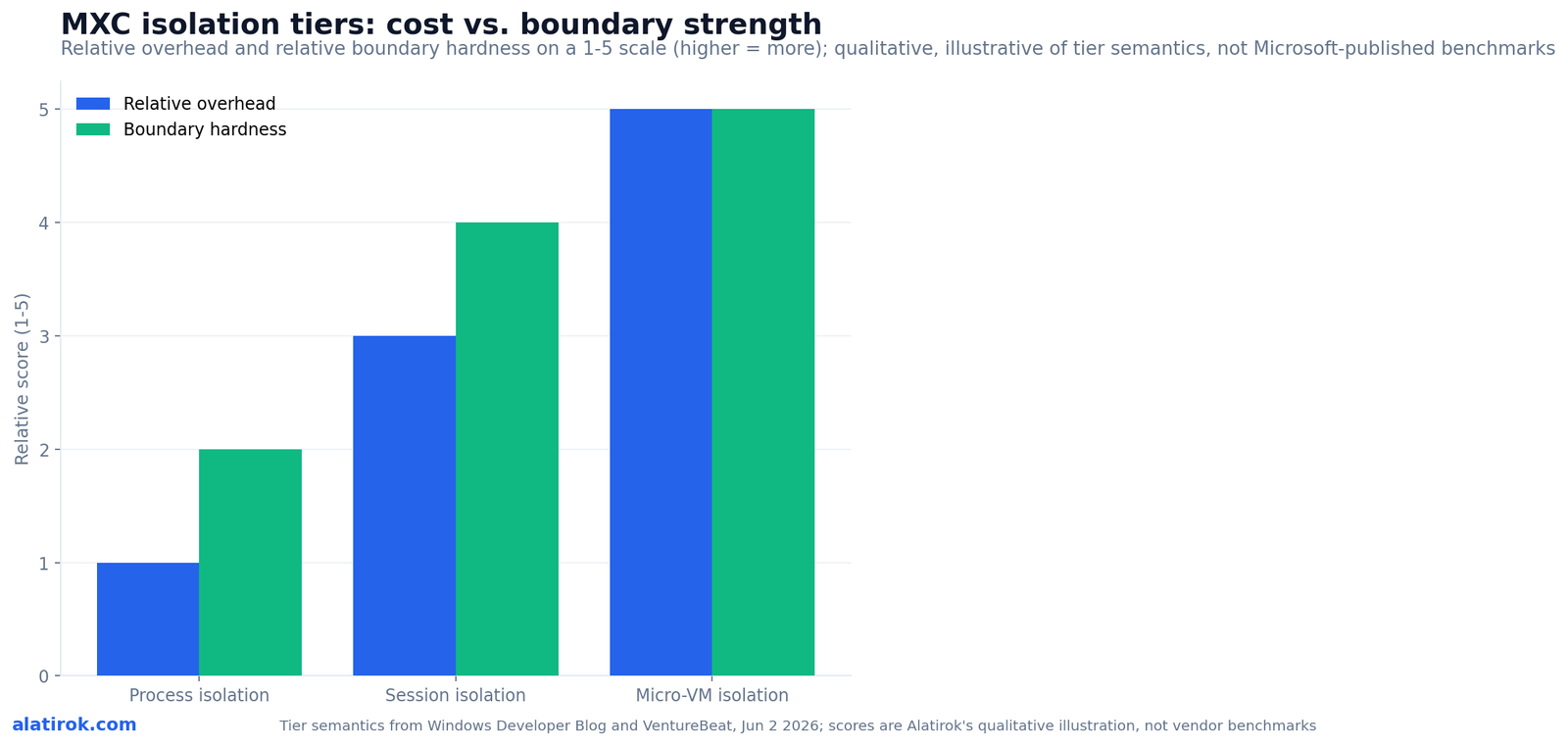
Pick the lightest tier that blocks your worst realistic threat. Repo-only coding agent: process. Agent that drives the desktop or handles other users’ data: session. Agent that runs code a stranger wrote: micro-VM. The same MXC policy file moves with you up the ladder.
| Isolation tier | Overhead / density | Threats it blocks | Best-fit workload | Status |
|---|---|---|---|---|
| Process isolation | Lowest overhead, highest density | Unauthorized file access, out-of-policy network domains | Coding agents that stay in a project dir (e.g. GitHub Copilot CLI) | Coming to Windows Insiders shortly after Build |
| Session isolation | Moderate overhead | UI spoofing, input injection, cross-session data leakage (separates desktop/clipboard/input) | Desktop-driving and long-running agents (non-interactive sessions first) | Coming to Windows Insiders shortly after Build |
| Micro-VM isolation | Highest overhead, lower density than process/session but denser than full VMs | Sandbox escape (hardware-virtualized boundary) | Agents running untrusted code or handling sensitive data | Roadmap (experimental Hyperlight backend in repo) |
How does MXC fit the Windows agent stack with Agent 365, Entra, and Intune?
MXC is the runtime containment layer at the bottom of the stack; Agent 365 sits on top and uses Microsoft Entra for agent identity and Intune for device-level policy to govern those MXC constraints centrally. In Microsoft’s framing, MXC lets an agent start secure and stay secure, while Agent 365 decides which constraints apply to which agent and proves who did what.
Identity is the connective tissue. Under session isolation, Windows assigns each agent either a local ID or a cloud-provisioned identity backed by Entra, and attributes every action from the container to that identity. That is the part the keynote recaps underplayed: it is what finally lets an audit log distinguish a human from an agent, and one agent from another. Intune then enforces device-level policies that gate the agent runtime, Microsoft Defender adds runtime threat protection against prompt injection and emerging agent attacks, and Microsoft Purview extends data-governance and compliance coverage to agent activity.
The combined MXC-plus-Agent-365 integration is slated to arrive in preview in July 2026, with process and session isolation reaching Windows Insider builds shortly after Build. Agent 365 itself reached general availability earlier (its GA expansion was announced May 1, 2026), so the new piece is the native wiring down into the OS runtime.
Sideways in the stack, MXC pairs with the Windows Local AI runtime for fully on-device agents. That runtime ships on-device models and runs agents in a Windows Local Sandbox with no network access by default and capability-gated file and microphone access, requiring a 40-TOPS-class NPU. MXC governs how those local agents are contained; Agent 365 governs who they are and what policy they inherit.
What threats does MXC actually block (UI spoofing, input injection, cross-session leakage, sandbox escape)?
MXC targets four agent-specific threats: UI spoofing and input injection (an agent and the human fighting over the same desktop and input queue), cross-session data leakage (an agent reading another session’s clipboard or windows), and sandbox escape (untrusted code breaking out of its container). Each maps to a tier, which is why the threat model and the isolation ladder are really the same diagram.
UI spoofing is when a malicious page or app paints fake UI to trick an automating agent, or the agent’s own actions get hijacked mid-flow. Input injection is the keyboard/mouse equivalent: forged input events steering the agent or the user. Session isolation defeats both by giving the agent its own desktop and input devices, so there is no shared surface to spoof or inject into.
Cross-session data leakage is the quiet one. A desktop-driving agent that can see the human’s clipboard, open windows, or other users’ sessions is a data-exfiltration path waiting to happen. Session isolation severs that view. Sandbox escape is the worst case, untrusted model output or a plugin breaking containment to reach the host, and it is precisely why the micro-VM tier exists: a hardware-virtualized boundary is far harder to defeat than a software policy.
Notice what MXC does not claim to solve on its own: prompt injection at the model layer. MXC reduces the blast radius if an injected prompt convinces an agent to misbehave, but stopping the bad instruction in the first place is Defender’s job in this stack, not the container’s. Containment limits damage; it does not read the agent’s mind.
MXC vs Windows Sandbox, gVisor, and Firecracker: what is the difference?
Windows Sandbox is a disposable full-desktop VM you launch by hand; gVisor and Firecracker are Linux-only isolation backends for code execution; MXC is a policy layer that orchestrates several such backends per workload through one SDK, including Windows Sandbox itself as one of its containment options. They are not competitors so much as layers and ingredients.
Windows Sandbox has shipped for years as a throwaway clean Windows instance, great for opening a sketchy file, but it is all-or-nothing, manual, and not designed to be driven programmatically per agent task. MXC’s repository actually lists windows_sandbox as one of its (experimental) backends, which tells you the relationship: MXC can use Windows Sandbox as the muscle for a given policy, but adds the declarative policy, the identity binding, and the lighter process and session tiers that a full VM can’t offer.
gVisor (a user-space syscall-intercepting kernel) and Firecracker (a Rust micro-VM monitor that boots in roughly 125 ms with about 5 MB of overhead) are the Linux-world building blocks that platforms like E2B, Daytona, and Modal lean on, and that we’ve covered for code-execution sandboxes. MXC’s micro-VM tier is the Windows-and-WSL analog of the Firecracker approach, and its roadmap Linux containers reach into WSL toolchains. The honest framing: if your agents run Linux code in the cloud, the Firecracker/gVisor stack stays your baseline; MXC’s wedge is the Windows desktop, on-device, and WSL surface those tools were never built to govern.
Under the hood, MXC’s own backend names make the layering concrete. Its stable, non-experimental backends are processcontainer (Windows), bubblewrap (Linux), and lxc; its experimental ones include windows_sandbox, wslc, microvm, seatbelt (macOS), isolation_session, and hyperlight. One JSON schema and the @microsoft/mxc-sdk TypeScript package sit in front of all of them.
Pros
Cons
As of the June 2026 preview, treat MXC process isolation as policy-scoped guardrails, not a hard security boundary. The microsoft/mxc repo states no MXC profiles should be treated as security boundaries currently. Reserve true containment claims for the micro-VM tier once Hyperlight-backed isolation ships.
How do you isolate an AI agent on Windows with MXC (and on WSL)?
You isolate an agent by writing an MXC policy that declares its allowed files, network domains, and isolation tier, then launching the agent through the MXC SDK or CLI so Windows (or WSL) enforces those limits at runtime. The mental model is declarative: you describe the box, Windows builds it.
The workflow is the same regardless of tier, which is the whole point. You author a versioned JSON policy, choose a backend appropriate to the tier (processcontainer for the process tier, an isolation-session backend for session isolation, a micro-VM backend for the heavy tier), and spawn the agent via the @microsoft/mxc-sdk TypeScript package or the MXC CLI. Stable backends run without flags; experimental ones (including the micro-VM and session backends in preview) require an explicit experimental opt-in, which is Microsoft’s way of reminding you they aren’t hardened.
For MXC and WSL agents, the same policy model reaches Linux toolchains: the roadmap Linux-container and WSL-container backends let a Windows-hosted developer contain a Linux-first agent without leaving the WSL workflow. That matters because so many coding agents already live in WSL, and until now they ran with whatever access the user had.
The strategic takeaway for builders: standardize on the policy file, not the backend. If you describe each agent’s blast radius in MXC policy today (even while treating it as guardrails), you inherit stronger enforcement for free as session and micro-VM tiers harden, without rewriting your agents.
// mxc-policy.json — declare an agent's blast radius once;
// the same policy maps to a stronger tier as MXC matures.
{
  "schemaVersion": "1.0",
  "agent": {
    "name": "repo-coding-agent",
    // identity is the point: bind actions to an auditable agent ID
    "identity": { "provider": "entra", "mode": "cloud-provisioned" }
  },
  // pick the lightest tier that blocks your worst realistic threat
  "isolation": {
    "tier": "process",            // process | session | micro-vm
    "backend": "processcontainer" // stable; bubblewrap/lxc on Linux
  },
  "filesystem": {
    "allowRead":  ["${WORKSPACE}/**"],
    "allowWrite": ["${WORKSPACE}/build/**"],
    "denyRead":   ["${HOME}/.ssh/**", "${HOME}/.aws/**"]
  },
  "network": {
    "default": "deny",           // no network by default
    "allowDomains": ["api.github.com", "registry.npmjs.org"]
  },
  "desktop": {
    // only meaningful at the session tier; ignored under process
    "shareClipboard": false,
    "shareInput": false
  }
}
// Illustrative shape based on MXC's documented JSON-schema +
// @microsoft/mxc-sdk model; confirm exact field names against
// the microsoft/mxc repo, which is early preview.
Who is using MXC, and why does it matter now?
MXC is the Windows agent runtime’s trust boundary, shipping in tiers
OpenAI and Nvidia are named launch partners, GitHub Copilot CLI ships on MXC process isolation today, and Nvidia is bringing its OpenShell agent runtime to Windows on MXC, which is why a same-day-keynote announcement is worth understanding as architecture rather than news. The partner list signals that MXC is meant to be the shared substrate other vendors’ agents run inside, not a Microsoft-only feature.
Per Microsoft’s launch materials, GitHub Copilot CLI has adopted MXC process isolation, Nvidia is bringing OpenShell to Windows built on MXC, and OpenAI is exploring patterns for safe code generation and execution on top of it. That is the pattern that makes a platform: when the agents you’d otherwise compete with choose to run inside your box, the box becomes infrastructure.
Why now? 2026 is the year agents stopped being chat windows and started driving real machines, and the industry consensus that shared-kernel containers aren’t a sandbox finally hit the desktop. Microsoft Execution Containers MXC is Microsoft’s bid to make Windows the governed runtime for that shift, with identity, policy, and tiered containment in one stack rather than a pile of point tools.
The realistic read for teams: this is a direction to design toward, not a finished product to deploy as a hard boundary. Write your agents to a policy now, watch the July 2026 Agent 365 preview and the Windows Insider rollout, and reserve your strongest containment claims for the micro-VM tier when it lands.
“When the agents you’d otherwise compete with choose to run inside your box, the box becomes infrastructure.”
Alatirok analysis of the MXC launch, June 2026
Builder’s take
I build agent infrastructure for a living at Cyntr and Loomfeed, so I read the MXC launch through one lens: where does the trust boundary actually live, and who is accountable when an agent does something it shouldn’t. Three things stood out.
- The real shift isn’t the sandbox, it’s the identity binding. Session isolation pinning every action to a distinct Entra-backed agent ID is what finally lets you answer ‘which agent did this’ in an audit log. That’s the part most coverage buried.
- Microsoft’s own GitHub repo says today’s profiles ‘should not be treated as security boundaries.’ Believe them. This is a policy-and-identity story shipping now and a containment story arriving in stages, micro-VM last. Treat process isolation as guardrails, not a jail, until Hyperlight lands.
- If you’ve already standardized on E2B, Daytona, Modal, or Firecracker for code execution, MXC doesn’t replace them, it competes for the desktop-driving and on-device slice Linux micro-VMs were never built for. Run both; let policy, not vendor loyalty, pick the tier.
Frequently asked questions
MXC stands for Microsoft Execution Containers. It is a cross-platform, policy-driven execution layer announced at Build 2026 (June 2, 2026) that isolates AI agents on Windows and WSL, with the operating system enforcing the declared limits at runtime.
Process isolation (lightweight, in-user-context, for coding agents), session isolation (separates the agent from your desktop, clipboard, and input to stop UI spoofing and cross-session leakage), and micro-VM isolation (hypervisor-backed hardware boundary for untrusted code). One MXC policy model maps to all three.
No. Windows Sandbox is a manual, disposable full-desktop VM. MXC is a policy layer that can orchestrate several backends per workload, including Windows Sandbox itself as one option, plus lighter process and session tiers and a hardware-backed micro-VM tier, all behind one SDK and identity model.
Process and session isolation are coming to Windows Insider builds shortly after Build 2026, and the combined MXC-plus-Agent-365 integration is slated for preview in July 2026. Micro-VM and Linux-container tiers are on the roadmap. An early-preview SDK is already on GitHub at microsoft/mxc.
MXC is the runtime containment layer; Agent 365 governs it. Entra provides agent identity so actions are attributable, Intune enforces device-level policy that gates the agent runtime, Defender adds runtime threat protection, and Purview extends data governance to agent activity. Together they let IT apply MXC constraints centrally.
Yes, that’s a core design goal. MXC spans Windows and WSL through one policy model, and its roadmap Linux-container and WSL-container backends let you contain Linux-first agents without leaving the WSL workflow. Stable Linux backends today include bubblewrap and lxc; Windows uses processcontainer.
Primary sources
- Windows platform security for AI agents (MXC announcement) — Windows Developer Blog
- Build 2026: Furthering Windows as the trusted platform for development — Windows Developer Blog
- Microsoft launches MXC, an OS-level sandbox for AI agents, with OpenAI and Nvidia already on board — VentureBeat
- microsoft/mxc: Policy-driven, layered isolation and containment — GitHub
- Windows Gets MXC: Policy-Based Microsoft Execution Containers for AI Agents — Windows Forum
- At Build 2026, Microsoft Sets Up Windows as an OS for AI Agents — Visual Studio Magazine
- Build 2026: How Microsoft Plans to Turn Windows 11 Into a Local AI Powerhouse for Developers — Windows News
- Microsoft Agent 365, now generally available, expands capabilities and integrations — Microsoft Security Blog
Last updated: June 3, 2026. Related: Identity Provenance.




