

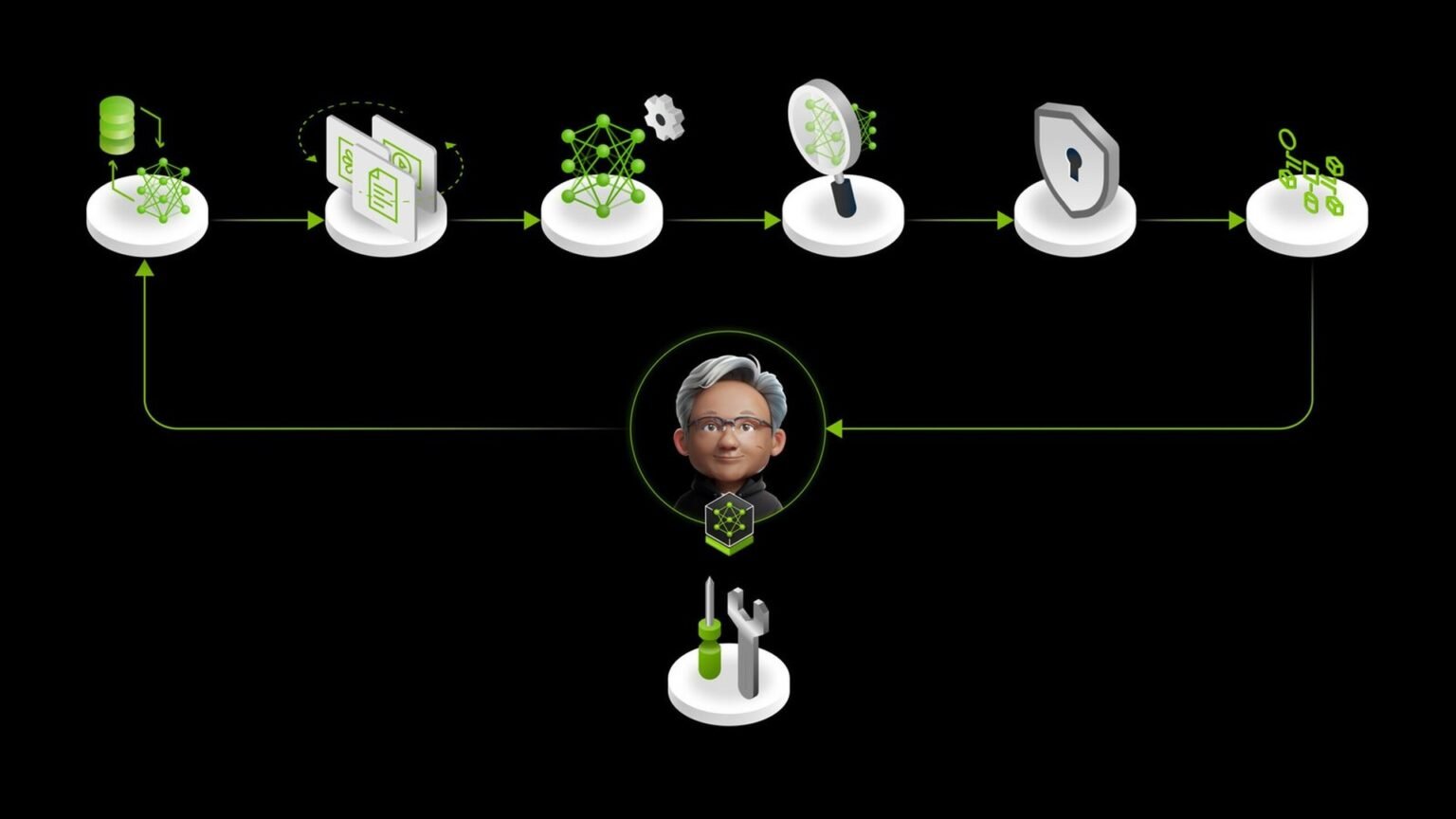

What we’re building here is a practical map of NVIDIA NeMo agent customization: a five-stage workflow that starts with prompts, tools, and RAG, then moves through synthetic data, fine-tuning, RL refinement, and evaluation. The prerequisite is familiarity with Python, model training concepts, and NVIDIA’s NeMo components, including NeMo, NeMo Data Designer, NeMo RL, NeMo Gym, and the NeMo Agent Toolkit.
What NVIDIA is shipping: a full agent customization loop
5
stages in the pipeline
Prompting to evaluation
May 20
coordinated NeMo push
Customization and evaluation articles published the same day
4
core repos cited here
Data Designer, RL, Gym, Agent Toolkit
3
post-training methods named
RLVR/GRPO and DPO
NVIDIA’s May 20 developer post lays out a full five-stage pipeline for agent customization: prompt engineering with tools and RAG, synthetic data generation, supervised fine-tuning, RL refinement, and evaluation with iteration. The framing matters because NVIDIA is not pitching a single model tweak. It is pitching an end-to-end workflow for builders who want to adapt models and agents on NVIDIA infrastructure.
The most useful concept in that post is the idea of a skill as the unit of customization. NVIDIA describes skills as reusable packages that combine instructions, scripts, and templates. That makes NVIDIA NeMo agent customization feel closer to a software packaging problem than a prompt-only exercise, and it echoes the broader industry move toward skill-based agent design.
For builders, the practical takeaway is that NVIDIA NeMo agent customization is now organized enough to map into a repeatable build process. You can start with a working agent, generate data from its traces, improve the base model, then add reward-driven refinement and evaluation in a loop rather than as disconnected experiments.
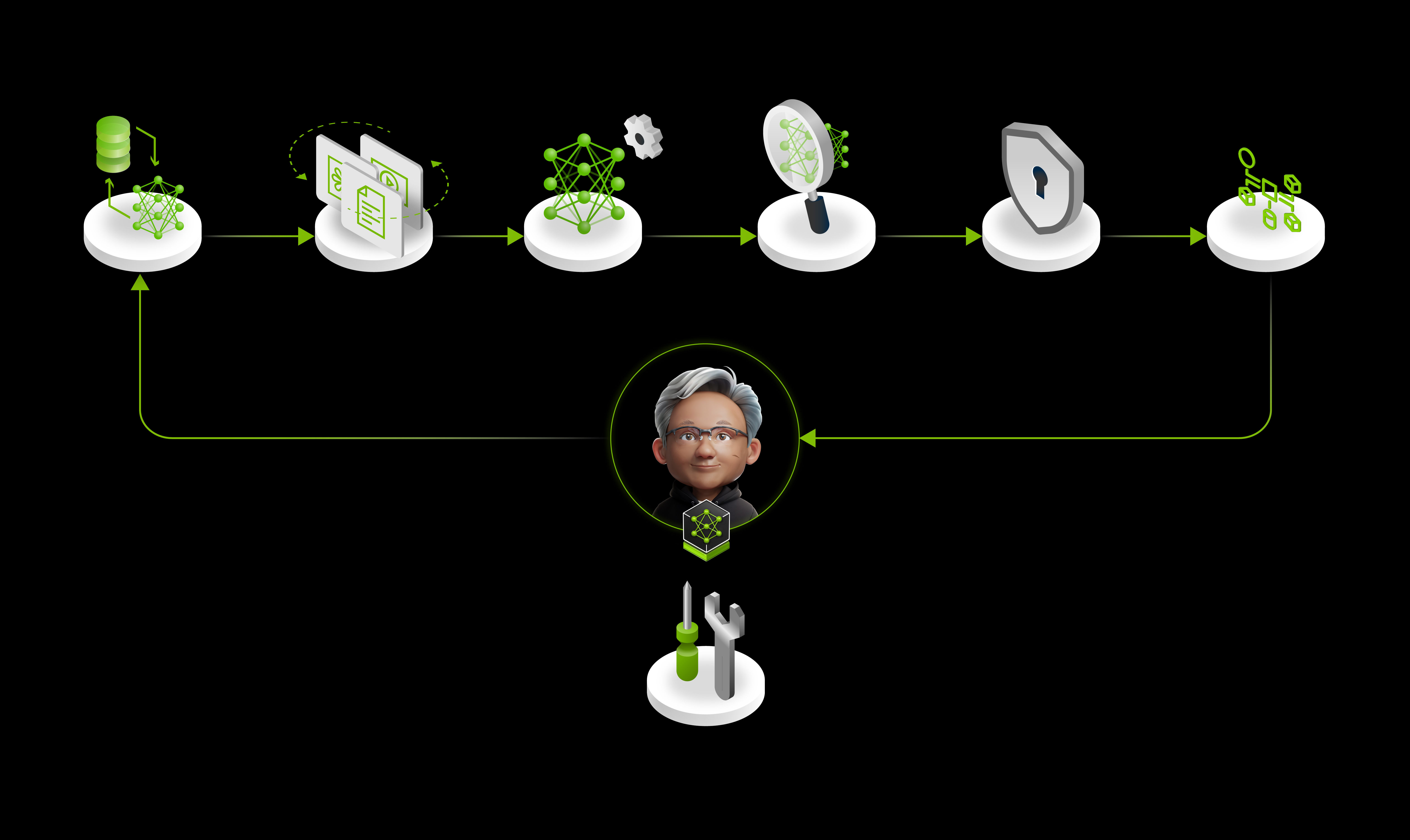
You’ll want Python, a shell, and working familiarity with prompts, tool calling, supervised fine-tuning, and RL-style post-training before implementing the full NeMo pipeline.
“You are an expert CLI assistant. Translate user requests into structured JSON tool calls. Respond with ONLY a JSON object. Set unused flags to null.”
NVIDIA Developer Blog, “Mastering agentic techniques: AI agent customization”
| Stage | Primary NeMo component | What it does |
|---|---|---|
| 1 | Prompts + tools/skills + RAG | Defines the initial agent behavior and external actions |
| 2 | NeMo Data Designer | Generates synthetic data for customization |
| 3 | NeMo Automodel + Megatron-Bridge | Runs supervised fine-tuning |
| 4 | NeMo RL | Applies RLVR/GRPO or DPO refinement |
| 5 | NeMo Agent Toolkit + NeMo Gym | Evaluates agents and supports iteration |
Stage 1: Start with prompts, tools, skills, and RAG
The first stage is the one most teams already recognize: define the system prompt, expose tools, package repeatable behaviors as skills, and add retrieval when the task depends on external knowledge. NVIDIA’s point is not that this stage is enough. It is that this is where you create the traces and task structure that later stages can learn from.
In practice, this means your first implementation of NVIDIA NeMo agent customization should look like a disciplined agent scaffold, not a giant prompt. Keep tool schemas explicit, keep outputs structured, and keep skill boundaries narrow enough that you can later generate synthetic examples or verify outcomes against ground truth.
If a behavior cannot be expressed as a clear tool call, skill, or retrieval step, it will be harder to synthesize data for it and harder to verify during RL.
{
  "system_prompt": "You are an expert CLI assistant. Translate user requests into structured JSON tool calls. Respond with ONLY a JSON object. Set unused flags to null.",
  "tools": [
    {
      "name": "run_command",
      "description": "Execute a shell command in a controlled environment",
      "input_schema": {
        "type": "object",
        "properties": {
          "command": {"type": "string"},
          "timeout_seconds": {"type": ["integer", "null"]}
        },
        "required": ["command", "timeout_seconds"]
      }
    }
  ]
}
Stage 2: Generate synthetic data with NeMo Data Designer
Once the initial agent works, NVIDIA’s next step is synthetic data generation through NeMo Data Designer. This is the bridge between a handcrafted agent and a trainable dataset. You use prompts, traces, schemas, and task definitions to create examples that cover the behavior you want the model to internalize.
This stage is where NVIDIA NeMo agent customization starts to move beyond prompt engineering. Instead of relying only on runtime orchestration, you create data that can teach the model the shape of successful tool use, the structure of outputs, and the edge cases your production workflow actually sees.
from pathlib import Path
import json

skills_dir = Path("skills/incident-triage")
examples = [
    {
        "input": "Check disk pressure on node-17 and summarize the issue.",
        "expected_tool_call": {
            "tool": "run_command",
            "args": {
                "command": "df -h / && journalctl -n 200",
                "timeout_seconds": 30
            }
        },
        "expected_summary": "Disk usage and recent logs collected for triage."
    }
]

output_path = skills_dir / "synthetic_examples.jsonl"
with output_path.open("w", encoding="utf-8") as f:
    for row in examples:
        f.write(json.dumps(row) + "\n")

print(f"Wrote {output_path}")Stage 3: Fine-tune the model with supervised learning
NVIDIA’s third stage uses NeMo Automodel and Megatron-Bridge for supervised fine-tuning. The logic is straightforward: once you have a dataset of desired behaviors, you can shift some of that behavior from brittle orchestration into the model itself. That can reduce prompt complexity and improve consistency on repeated tasks.
For teams evaluating NVIDIA NeMo agent customization, this is also the point where stack choice becomes strategic. NVIDIA is presenting NeMo as a full-stack alternative for organizations that already run NVIDIA hardware and want the training-to-deployment loop in one ecosystem, rather than stitching together hosted APIs and separate post-training tools.
Fine-tuning is not a substitute for tool design or evaluation. It is a way to make repeated behaviors more native to the model after you have defined them clearly.
python prepare_sft_dataset.py \
  --input skills/incident-triage/synthetic_examples.jsonl \
  --output data/incident_triage_sft.jsonl

python train_sft.py \
  --train-data data/incident_triage_sft.jsonl \
  --output-dir checkpoints/incident-triage-sft
Stage 4: Refine with RLVR, GRPO, or DPO using NeMo RL
The fourth stage is the editorially novel one. NVIDIA points to RLVR/GRPO or DPO refinement through NeMo RL. In plain terms, this is where you optimize the model not just to imitate examples, but to improve against a reward or preference signal.
The key addition is NeMo Gym, which NVIDIA describes as providing verification endpoints that score model outputs against ground truth during training. That matters because verifiable rewards are central to the broader industry push behind reasoning-style post-training. Productizing that idea lowers the barrier for teams that want to train agents against checkable outcomes rather than vague human judgments alone.
Pros
Cons
Verification endpoints make it easier to reward correct outputs on tasks where there is a ground truth answer, executable result, or schema-valid target.
def verify_tool_call(output: dict, expected: dict) -> float:
    if output.get("tool") != expected.get("tool"):
        return 0.0

    out_args = output.get("args", {})
    exp_args = expected.get("args", {})

    score = 1.0
    for key, value in exp_args.items():
        if out_args.get(key) != value:
            score -= 0.5
    return max(score, 0.0)

candidate = {
    "tool": "run_command",
    "args": {
        "command": "df -h / && journalctl -n 200",
        "timeout_seconds": 30
    }
}

expected = {
    "tool": "run_command",
    "args": {
        "command": "df -h / && journalctl -n 200",
        "timeout_seconds": 30
    }
}

print({"reward": verify_tool_call(candidate, expected)})Stage 5: Evaluate and iterate with NeMo Agent Toolkit and NeMo Gym
Best way to read the stack: one loop, not five silos
The fifth stage closes the loop. NVIDIA pairs the NeMo Agent Toolkit with NeMo Gym for orchestration and evaluation, and it published a companion piece on AI agent evaluation the same day as the customization article. That coordinated release is a signal that NVIDIA wants to own both sides of the workflow: how agents are customized and how they are measured.
For builders, this is the difference between a demo and a system. NVIDIA NeMo agent customization only becomes durable when every stage feeds the next one: prompts generate traces, traces become synthetic data, data supports fine-tuning, fine-tuned models get reward-based refinement, and evaluation exposes the next failure modes to fix.
test_cases = [
    {
        "input": "Check disk pressure on node-17 and summarize the issue.",
        "expected": {
            "tool": "run_command",
            "args": {
                "command": "df -h / && journalctl -n 200",
                "timeout_seconds": 30
            }
        }
    }
]

def evaluate(agent_fn, cases):
    results = []
    for case in cases:
        output = agent_fn(case["input"])
        reward = verify_tool_call(output, case["expected"])
        results.append({
            "input": case["input"],
            "output": output,
            "reward": reward
        })
    return results
Package skills the way NVIDIA suggests
NVIDIA’s proposed skill directory is more than a documentation detail. It is a packaging convention: instructions in SKILL.md, implementation scripts in a dedicated folder, and reusable output formats in templates. If this pattern spreads, it gives teams a portable way to share agent capabilities across projects.
That is one reason NVIDIA NeMo agent customization is strategically interesting. Standardized skill packaging can become a distribution layer. The company is not only offering training components; it is also nudging developers toward a filesystem convention that could make NeMo-native skills easier to reuse and evaluate.
skills/
  incident-triage/
    SKILL.md
    README.md
    scripts/
      collect_logs.sh
      parse_logs.py
      summarize_findings.py
    templates/
      triage_report.md
A minimal skill you can actually build from
To make the pattern concrete, start with a skill that turns an ops request into a structured tool call and a templated report. Keep the scope narrow. A good first skill is incident triage because the inputs, scripts, and outputs are easy to verify.
The example below follows the exact prompt style NVIDIA published. It is intentionally strict: JSON-only output, explicit nulls, and no extra prose. That discipline is what makes later synthetic data generation and verification much easier.
SYSTEM_PROMPT = (
    "You are an expert CLI assistant. Translate user requests into structured JSON tool calls. "
    "Respond with ONLY a JSON object. Set unused flags to null."
)

user_request = "Collect recent logs for node-17 and prepare a triage summary."

expected_output = {
    "tool": "run_command",
    "args": {
        "command": "journalctl -n 200",
        "timeout_seconds": 30,
        "working_directory": None
    }
}

print(SYSTEM_PROMPT)
print(expected_output)
Where NVIDIA fits against OpenAI and Anthropic
NVIDIA is not claiming that NeMo replaces every hosted model API or every agent SDK. The stronger claim is narrower and more credible: if you want an open, NVIDIA-centered customization stack that spans prompts, synthetic data, fine-tuning, RL, and evaluation, NeMo now looks much more complete than it did before.
That is why NVIDIA NeMo agent customization matters beyond one blog post. NVIDIA is telling customers that if they already bought the GPUs, they can also use a coherent training-and-deployment loop on top of them. OpenAI and Anthropic still define much of the frontier model conversation, but NVIDIA is pushing hard on the infrastructure layer where enterprises actually operationalize agent behavior.
NeMo’s pitch is full-stack customization on NVIDIA hardware, not a one-for-one replacement for every model provider or agent framework.
| Question | NVIDIA’s answer in this release |
|---|---|
| What is the unit of customization? | Skills |
| How do you create more training data? | Synthetic data with NeMo Data Designer |
| How do you refine beyond SFT? | RLVR/GRPO or DPO with NeMo RL |
| How do you score outputs during training? | Verification endpoints in NeMo Gym |
| How do you orchestrate and evaluate agents? | NeMo Agent Toolkit plus evaluation workflows |
Where to go from here
If you are choosing a stack today, the practical lesson is to evaluate NeMo as a pipeline, not as a single repo. Start with one skill, make the outputs structured, generate a small synthetic dataset, and define a verifier before you think about larger-scale post-training. That sequence matches how NVIDIA has organized the platform.
The next useful step is to read NVIDIA’s customization post alongside its companion evaluation material, then inspect the four public repos tied to this workflow. For teams building on NVIDIA hardware, NVIDIA NeMo agent customization is now concrete enough to prototype as an end-to-end loop rather than a loose collection of components.
Prototype one verifiable skill first. If you can score it, you can improve it.
git clone https://github.com/NVIDIA-NeMo/DataDesigner.git
git clone https://github.com/NVIDIA-NeMo/RL.git
git clone https://github.com/NVIDIA-NeMo/Gym.git
git clone https://github.com/NVIDIA/NeMo-Agent-Toolkit.git
Frequently asked questions
NVIDIA’s developer post describes five stages: prompt engineering with tools, skills, and RAG; synthetic data generation; supervised fine-tuning; RL refinement with RLVR/GRPO or DPO; and evaluation with iteration. NVIDIA lays this out in its agent customization post and ties the stack back to the broader NeMo platform.
NVIDIA describes NeMo Gym as providing verification endpoints that score model outputs against ground truth during training. In the customization workflow, that makes it useful for verifiable-reward setups where an agent’s output can be checked programmatically.
The NeMo Agent Toolkit is NVIDIA’s agent orchestration and evaluation component in this workflow. It sits in the evaluation-and-iteration stage alongside NeMo Gym and helps turn customization work into a repeatable agent system.
Synthetic data is stage two of the pipeline, handled by NeMo Data Designer. NVIDIA positions it as the step that converts prompts, traces, and task definitions into training data for later supervised fine-tuning and refinement.
Primary sources
- Mastering agentic techniques: AI agent customization — NVIDIA Developer
- NVIDIA NeMo homepage — NVIDIA
- NeMo Data Designer — GitHub
- NeMo RL — GitHub
- NeMo Gym — GitHub
- NeMo Agent Toolkit — GitHub
Last updated: May 23, 2026. Related: Agent Infrastructure.




